Rook: The Security Super Agent
Rook looks after Security: 6 playbooks, 1 that can change the site. What each one does, and how to ask Rook for a job.
On this page
Rook is Protuno’s Security Super Agent for WordPress: it runs a security audit, a plugin vulnerability check, a malware scan, a spam exposure audit and a new-admin watch, and applies low-risk hardening, through 6 playbooks, 1 of which can change a site. Ask it in Claude, Claude Code, Codex or Cursor, for example “How safe is this site?”. A playbook that changes the site takes a backup first, and in Approval mode it waits for your Approve in Protuno.
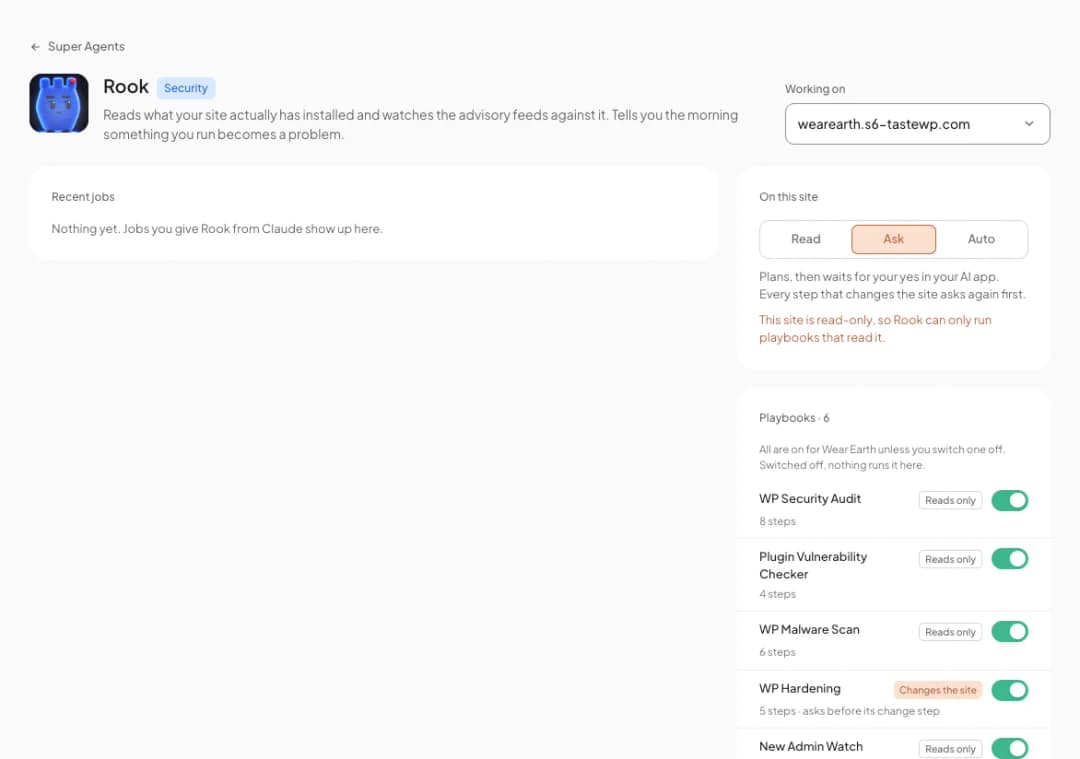
Rook looks after Security. Reads what your site actually has installed and watches the advisory feeds against it. Tells you the morning something you run becomes a problem.
Ask Rook in your AI app, for example “Rook, check my site for vulnerable plugins”. Rook plans the job and runs the playbooks one step at a time. In Approval mode a run starts only when you press Approve in Protuno; in Auto mode it starts on its own, with no approval.
Rook’s playbooks
Rook has 6 playbooks. 1 can change the site, and it asks before its change step. The other 5 only read.
| Playbook | Reads or changes | Steps | What it does |
|---|---|---|---|
| WP Security Audit | Reads only | 8 steps | A security audit graded A to F, covering setup and exposure, vulnerable plugins and themes, and access control. Every finding is checked against real code first. |
| Plugin Vulnerability Checker | Reads only | 4 steps | Checks every installed plugin and its exact version against known vulnerability data, and tells you which need updating first. |
| WP Malware Scan | Reads only | 6 steps | Scans files and the database for malware and checks each finding before it reports it. It finds only; it does not remove. |
| WP Hardening | Changes the site | 5 steps · asks before its change step | Applies safe WordPress hardening one change at a time, after a backup, and lists the risky changes it leaves for you. |
| New Admin Watch | Reads only | 2 steps | Reports every administrator and their application passwords: new admins, the default “admin” username and new or unused application passwords. |
| Comment & Signup Spam Exposure Audit | Reads only | 2 steps | Shows where comments are open, the size of the spam and pending queues, and signups that look like bots. |
On Rook’s page
Pick a site under Working on. Recent jobs shows what you gave Rook from your AI app. On this site sets its mode there: Read only, Approval mode or Auto mode. Every playbook is on for that site unless you switch it off.
Comments