Iris: The SEO Super Agent
Iris looks after SEO: 5 playbooks, 3 that can change the site. What each one does, and how to ask Iris for a job.
On this page
Iris is Protuno’s SEO Super Agent for WordPress: it runs a technical SEO audit, finds and fixes broken links, finds broken images and missing alt text, improves a post’s title and meta, and adds missing featured images, through 5 playbooks, 3 of which can change a site. Ask it in Claude, Claude Code, Codex or Cursor, for example “Fix the broken links”. A playbook that changes the site takes a backup first, and in Approval mode it waits for your Approve in Protuno.
Iris looks after SEO. Crawls your site the way a search engine does, and reports the pages that quietly stopped being linked or indexed.
Ask Iris in your AI app, for example “Iris, find the broken links on my blog”. Iris plans the job and runs the playbooks one step at a time. In Approval mode a run starts only when you press Approve in Protuno; in Auto mode it starts on its own, with no approval.
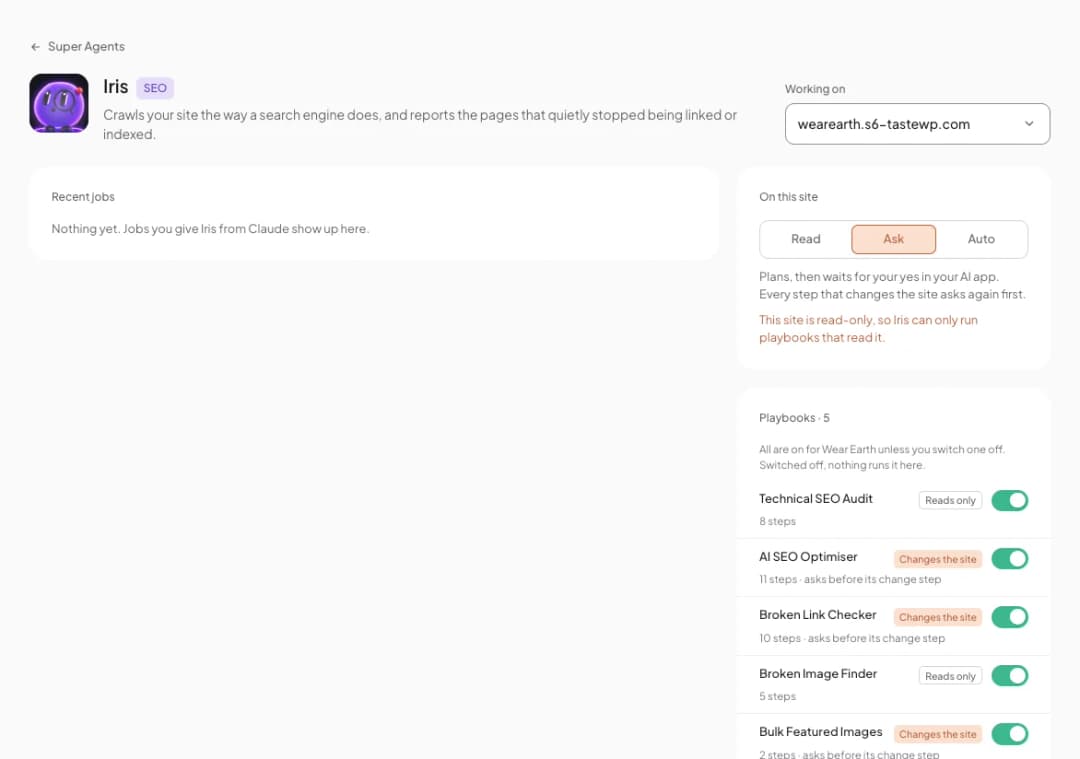
Iris’s playbooks
Iris has 5 playbooks. 3 can change the site, and each asks before its change step. The other 2 only read.
| Playbook | Reads or changes | Steps | What it does |
|---|---|---|---|
| Technical SEO Audit | Reads only | 8 steps | A full SEO audit: crawling, indexing, sitemaps and robots, canonicals and redirects, schema and Core Web Vitals, across up to 50 pages, ranked by impact. |
| AI SEO Optimiser | Changes the site | 11 steps · asks before its change step | Improves the SEO of one post at a time: title, meta description, image alt text and structured data, applied behind a backup and a WordPress revision so it can be undone. |
| Broken Link Checker | Changes the site | 10 steps · asks before its change step | Finds broken links across up to 50 pages and fixes only the safe ones, where there is one clear replacement. Every fix can be rolled back. |
| Broken Image Finder | Reads only | 5 steps | Finds broken images and missing alt text across up to 50 pages. Changes nothing. |
| Bulk Featured Images | Changes the site | 2 steps · asks before its change step | Sets a featured image on published posts that have none, from images in your library whose names match the post title. At most 25 per run, never replaces an existing image, and can be rolled back. |
On Iris’s page
Pick a site under Working on. Recent jobs shows what you gave Iris from your AI app. On this site sets its mode there: Read only, Approval mode or Auto mode. Every playbook is on for that site unless you switch it off.
Comments