Routines: Put A Playbook On A Schedule
A playbook with a schedule is a routine. Routines run as scheduled tasks in your AI app, on Pro and Agency.
On this page
A playbook with a schedule is a routine: Daily, Weekly or Monthly, at a time and in a time zone you pick, on one site.
Routines run in your AI app
A routine runs as a scheduled task in your AI app, on your plan there, not on Protuno’s clock. When you save one, a pop-up gives you the task text with a Copy task button and three steps for adding it in Claude. Until you add that task in your AI app, the routine does not run, and Protuno does not warn you. Claude needs a paid plan for scheduled tasks.
The routines calendar
Routines shows every scheduled playbook across every site, and when each one runs next.
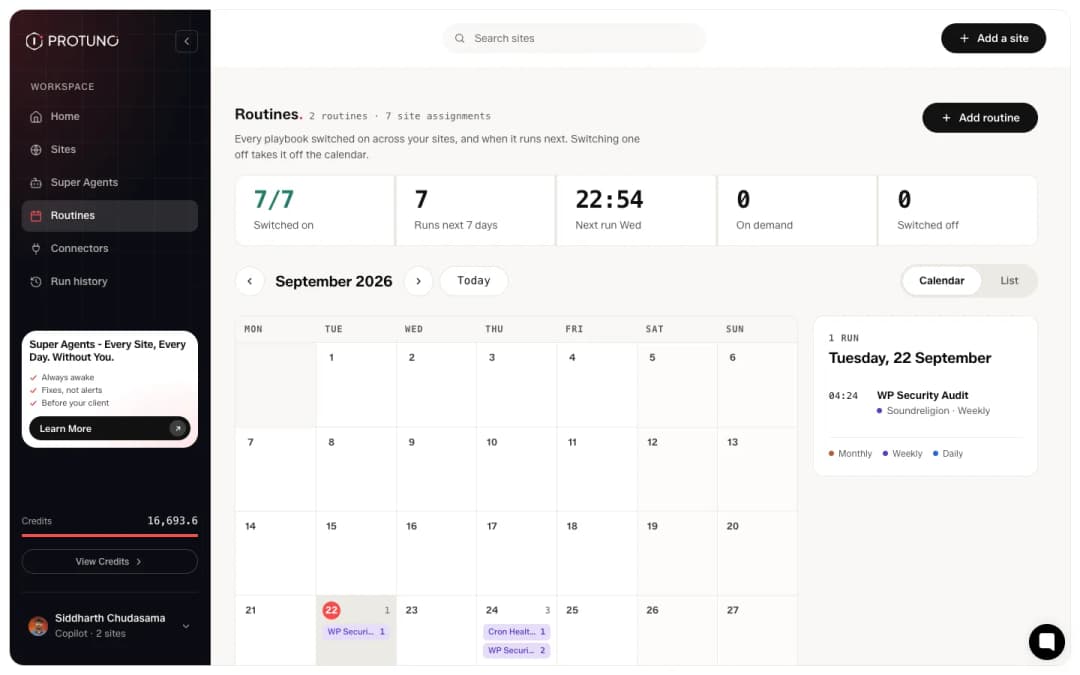
There is a list view as well, grouped by playbook, showing each site’s own day and time. Switching a routine off takes it off the calendar without detaching the playbook from the site. Put routines for playbooks that change things on your staging site. On a live site left in Read only, a routine for a playbook that can write will not fire, and the row says so.
Which sites can schedule
Routines are on Pro and Agency. On Free, you run any of the 27 playbooks by asking your AI app.
Where to go next
- What Protuno costs, to see which plans include routines.
- What Protuno can and cannot change, before leaving anything on unattended.
Comments