Dash: The Performance Super Agent
Dash looks after Performance: 2 playbooks, 1 that can change the site. What each one does, and how to ask Dash for a job.
On this page
Dash looks after Performance. Clears the database bloat that slows every page, and finds the images nobody uses or that are stored twice, with the space each one takes.
Ask Dash in your AI app, for example “Dash, clean up the database on my shop”. Dash shows you a plan, you approve it in Protuno, and it runs the playbooks one step at a time.
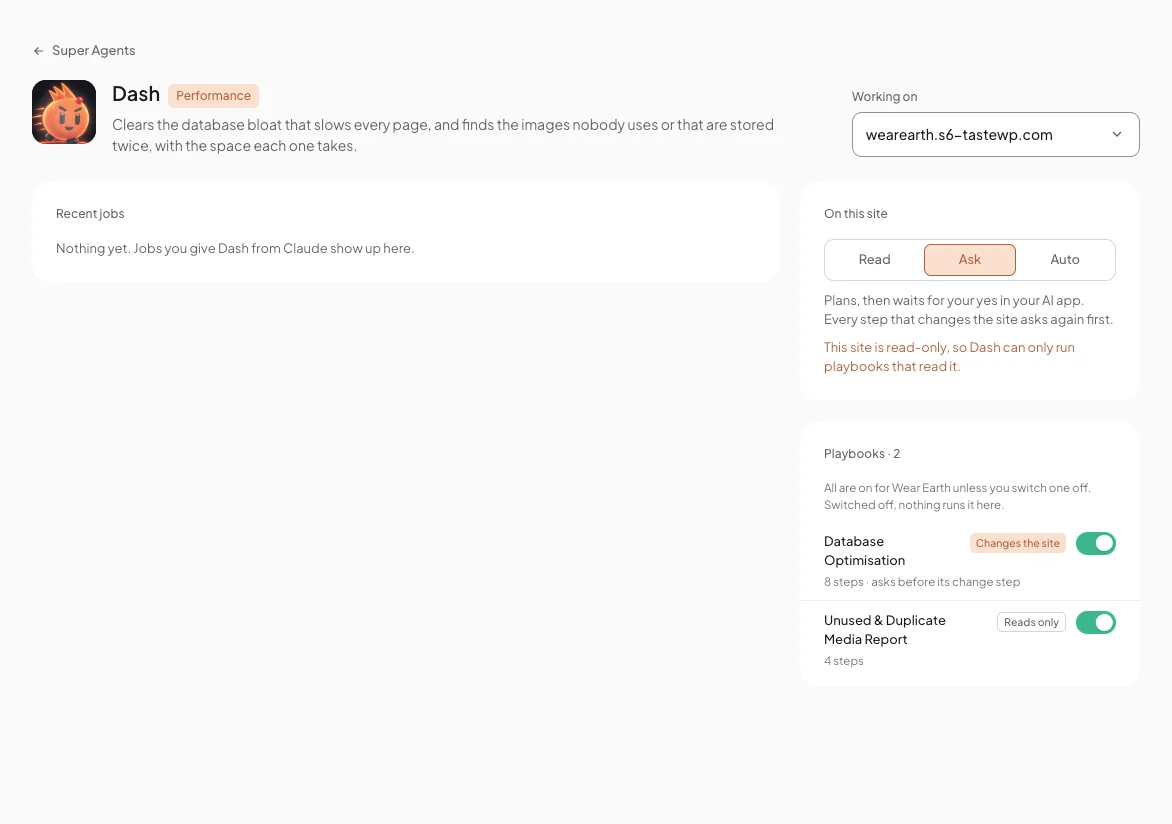
Dash’s playbooks
Dash has 2 playbooks. 1 can change the site, and it asks before its change step. The other 1 only read.
| Playbook | Reads or changes | Steps | What it does |
|---|---|---|---|
| Database Optimisation | Changes the site | 8 steps · asks before its change step | Cleans database bloat (revisions, spam and trashed comments, expired transients and similar) through WordPress’s own delete functions, after taking and checking a database backup. Deletes are permanent; the backup is the way back. |
| Unused & Duplicate Media Report | Reads only | 4 steps | Finds images uploaded more than once and images nothing uses, with the space they take. Deletes nothing. |
On Dash’s page
Pick a site under Working on. Recent jobs shows what you gave Dash from your AI app. On this site sets its level there: Read, Ask or Auto. Every playbook is on for that site unless you switch it off.
Comments