Echo: The Marketing Super Agent
Echo looks after Marketing: 5 playbooks, 3 that can change the site. What each one does, and how to ask Echo for a job.
On this page
Echo looks after Marketing. Checks your contact forms and that the site can actually send email, and keeps comment spam and stray text under control.
Ask Echo in your AI app, for example “Echo, check my contact forms still send”. Echo shows you a plan, you approve it in Protuno, and it runs the playbooks one step at a time.
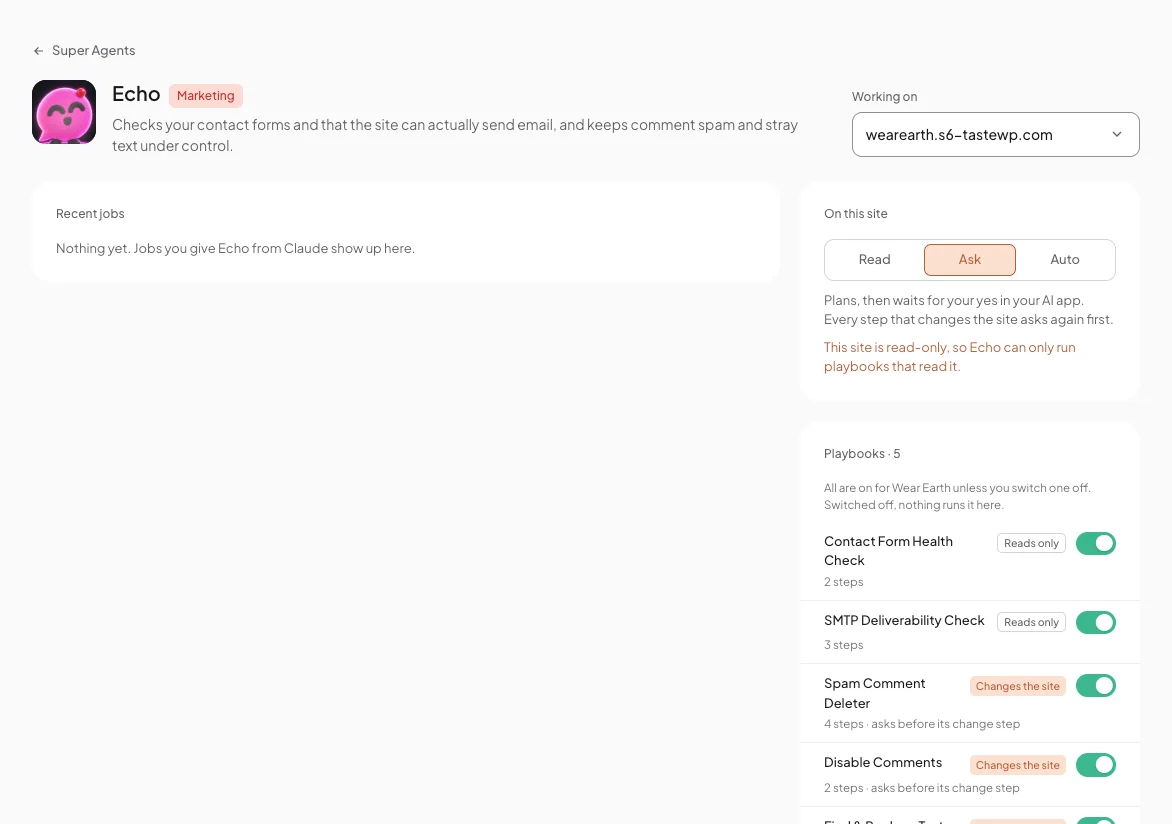
Echo’s playbooks
Echo has 5 playbooks. 3 can change the site, and each asks before its change step. The other 2 only read.
| Playbook | Reads or changes | Steps | What it does |
|---|---|---|---|
| Contact Form Health Check | Reads only | 2 steps | Checks your form setup: form plugins, where forms sit, missing SMTP, a From address on another domain, forms with no recipient and missing spam protection. Never sends a test email. |
| SMTP Deliverability Check | Reads only | 3 steps | Checks the site can really send email with a real test send, and reports SPF, DKIM and DMARC. |
| Spam Comment Deleter | Changes the site | 4 steps · asks before its change step | Moves confirmed spam comments to the trash, after a plan you can read, then reports what was removed. |
| Disable Comments | Changes the site | 2 steps · asks before its change step | Stops new comments and pings: closes the Discussion defaults and up to 25 open items per run. Existing comments are never deleted. Can be rolled back. |
| Find & Replace Text | Changes the site | 2 steps · asks before its change step | Replaces a phrase you choose in post and page titles, excerpts and content, at most 10 items per run, showing each change before and after. Can be rolled back. |
On Echo’s page
Pick a site under Working on. Recent jobs shows what you gave Echo from your AI app. On this site sets its level there: Read, Ask or Auto. Every playbook is on for that site unless you switch it off.
Comments