WordPress Spam Comments: The Playbook, Step By Step.
Clearing WordPress spam comments safely means two signals, a stop rule and a way back. Here is the four-step Protuno playbook, and what it will not touch.

Most spam cleanup is a button labelled Empty Spam. The button never asks which of those comments were real.
A spam folder is a pile of guesses. Most are right. A few are a customer asking a question, and once the folder is emptied nobody can tell which few.
Short answer: safe WordPress spam comment cleanup needs a second signal beyond the spam label, a rule that stops the whole job when the numbers look wrong, and a way back. The Protuno Spam Comment Deleter playbook does this in four steps. It moves only the comments that carry two signals to the trash, it never permanently removes anything, and it checks afterwards that the comments you wanted to keep did not move.
What this post is, and is not: it is a practical walk through one playbook and the reasoning behind its order. It describes how the check works from the playbook’s own step files. It does not quote a run, a count or a result, because this post is written without running the playbook.
An empty folder is a fact about a button. A clean comment section is a fact about every comment you kept.
Why Emptying The Spam Folder Falls Short
WordPress gives every comment one status: approved, held for moderation, spam or trash. That status is a single label, set by whatever last touched the comment. A spam filter set it. A person set it. A plugin that misfired set it.
Emptying the folder trusts that label completely. If the label is wrong on one comment, the comment is gone. There is no second look, because the button was built for speed.
The opposite habit is just as common. The folder is never emptied, so spam that was caught and never cleared sits in the database indefinitely, and the comment tables grow for years. Nobody wants to be the person who clicks the button, so nobody does.
Both habits come from the same gap. There is no step between “flagged” and “gone” that checks the flag.
That gap is the interesting part of this playbook. It is also why the job is a poor fit for a blind schedule and a good fit for a written sequence.
Three Signals On One Comment
The playbook decides what is safe to move by looking at each spam comment in three ways. Any one of them alone is weak.
| Signal | What it tells you | What it cannot prove alone |
|---|---|---|
| Comment status is spam | Something classed it as spam | That the classifier was right |
| Akismet result on the comment | A detector independently said true (or 1) | That the comment has been there long enough to be settled |
| Age of the comment | It is older than a minimum (10 minutes by default) | That it is spam at all |
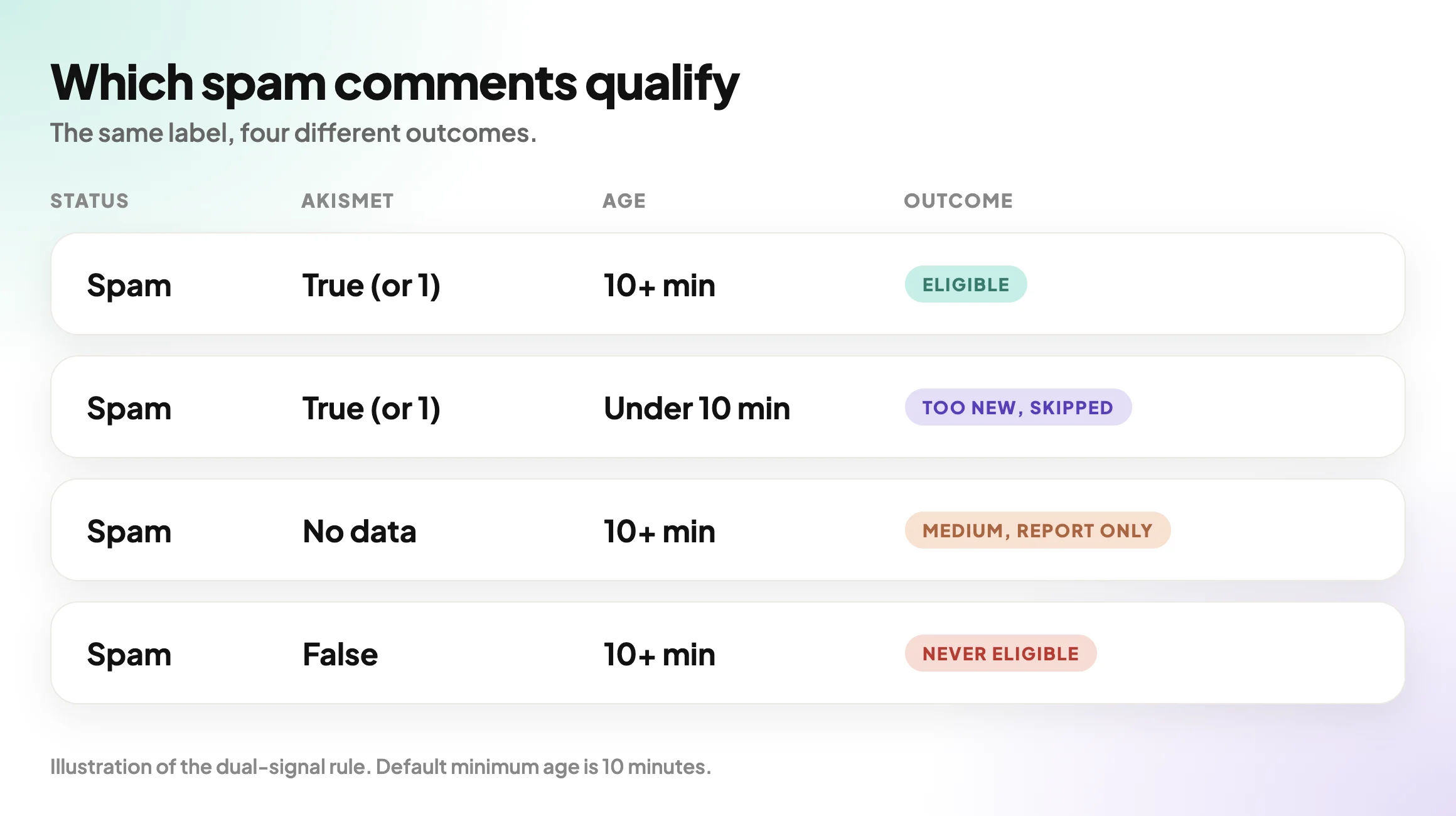
The rule that follows from the table is short. A comment is eligible only when it is already spam, a detector has confirmed it, and it is not brand new. The playbook calls that the dual-signal rule.
Two cases matter more than the rest. An Akismet result that is explicitly false means the detector said this is not spam, so the comment is never eligible. A comment with no Akismet data at all has no second signal, so it is not eligible either, and the playbook will not call it confirmed spam.
A Small Test You Can Run Today
You can see the shape of your own problem in about ten minutes, with nothing installed.
Write down five things for one site:
- How many comments are approved, held for moderation, in spam and in trash.
- Whether Akismet is installed and active.
- Whether the trash is switched on, meaning a retention period is set rather than zero.
- The oldest comment in the spam folder.
- Any spam comment you recognise as a real person.
Here are the places to look:
/wp-admin/edit-comments.php?comment_status=spam
/wp-admin/edit-comments.php?comment_status=trash
/wp-admin/plugins.php          (is Akismet listed and active?)
wp-config.php                  (search for EMPTY_TRASH_DAYS)
If you find even one real comment in the spam folder, you have your reason to read on. A cleanup that cannot tell that comment apart is a cleanup you should not schedule.
The Playbook, Step By Step
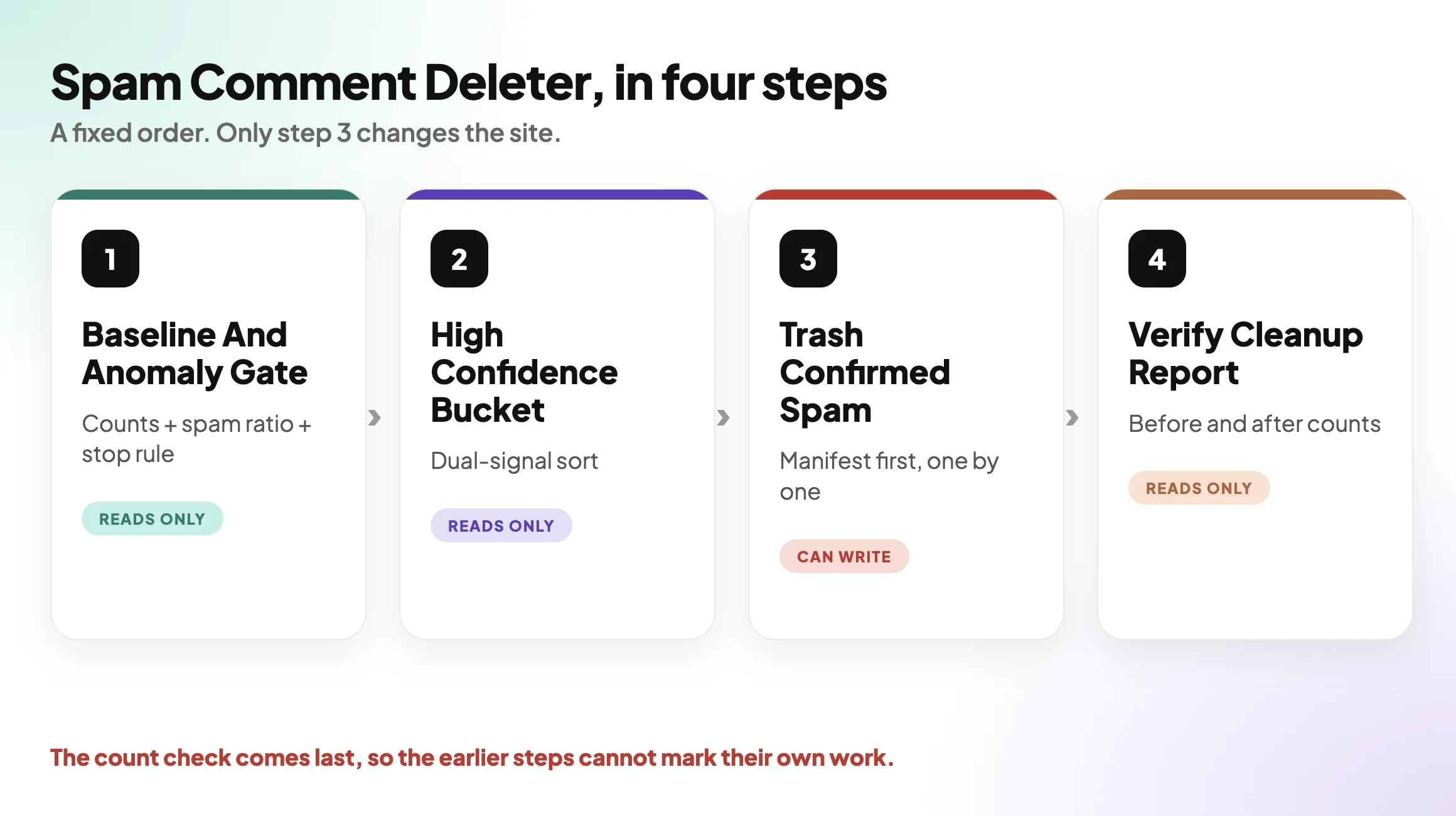
Spam Comment Deleter is a Protuno Care playbook. It runs a fixed sequence of four steps, and only one of them changes the site. In the dashboard it carries the CAN WRITE label. The public playbooks page lists the same four-step playbook as Comment Cleanup, described as clearing the spam that WordPress has already flagged, and nothing else. The dashboard card calls it Spam Comment Deleter, so you may see either name.
| # | Step | What it does |
|---|---|---|
| 1 | Comment Baseline And Anomaly Gate | Reads the comment counts (approved, moderated, spam, trash), works out the spam ratio, applies the stop rule, and records the trash retention period and whether Akismet is installed. Changes nothing. |
| 2 | Build High Confidence Spam Bucket | Sorts spam comments into buckets under the dual-signal rule: eligible, medium (spam only, never actioned) and too new (skipped). Changes nothing. |
| 3 | Trash Confirmed Spam | The only step that writes. Moves eligible comments to the trash one at a time, after a retention check and a written audit manifest. |
| 4 | Verify Spam Cleanup Report | Re-reads the counts, asserts that spam dropped by exactly the number trashed and that approved and moderated did not change, then writes the report. Changes nothing. |
The order is the safety. The counts and the stop rule come before any bucket exists. The bucket exists before anything is trashed. The check comes after, and it is the only one that can say the earlier steps did what they claimed.
Step 1 and step 2 both use one read capability, called comments-spam-audit, to compute the counts and the buckets on the site itself. The step file explains why: an earlier version paged the comments over the REST API, which cannot see comment meta. That version got seven of nine counts wrong and planned to trash six spam comments, including one whose Akismet result was explicitly false. The fix was to stop rebuilding the numbers from REST pages.
That is a good rule for any cleanup tool you are considering. The classification has to be read from where the signal lives.
What The Stop Rule Is Protecting You From
Step 1 computes one ratio: spam divided by approved plus moderated plus spam. Trash is left out on purpose, because trashed comments are spam that has already been dealt with. The default threshold is 0.6.
Here is how that works, with made-up numbers to show the arithmetic and not a result from any site.
| Illustration | Approved | Moderated | Spam | Ratio | Gate |
|---|---|---|---|---|---|
| A normal blog | 300 | 20 | 80 | 0.20 | Proceed |
| A broken classifier | 100 | 0 | 900 | 0.90 | Stop |
When the gate says stop, the playbook stops the whole job. It reports that the spam volume is anomalous, likely a misconfigured classifier, and that manual review is needed before any cleanup.
The reasoning is sound. A huge spam share is more likely to be a classifier gone wrong than a site that is 90 percent spam. Mass-trashing it could bury the real comments. A stop here counts as a correct outcome, not a failure.
Step 3 adds its own gate. If the trash retention period is zero or unset, moving a comment to the trash would remove it for good. The playbook refuses and says so. By default WordPress keeps trashed items for 30 days, and the playbook reads the actual value on your site rather than assuming it.
What Spam Comment Cleanup Does Not Solve
- It does not stop new spam. It clears comments that are already flagged. Preventing them is a different job.
- It does not work without a detector. If Akismet is not installed, nothing can be confirmed under the dual-signal rule, so nothing is eligible. The report leads with that root cause and recommends installing and activating Akismet.
- It does not touch the medium bucket. Spam without a second signal is reported, and the recommendation is to review it by hand in the Comments screen.
- It does not remove anything permanently. The playbook trashes. It never deletes and never recommends emptying the trash.
- It does not touch approved or moderated comments. Step 3 re-checks every comment right before moving it and skips anything that is not still spam.
- It does not read intent. A comment confirmed as spam is spam by two signals. That is strong evidence, not a mind reader.
Questions To Ask Your Current Tooling
- Does it use a second signal before it removes anything, or only the spam label?
- What happens to a comment with no detector data?
- Does it stop on a strange spam ratio, or does it carry on?
- Does it check that your trash is switched on before it trashes?
- Does it write down what it is about to move, before it moves it?
- Can a whole run be undone with one action?
- After the run, does anything compare the real comments before and after?
If the answer to most of these is “I am not sure”, the tool is a button with a schedule.
Which Check Are You Actually Running?
| If you need to know | The evidence | Next action |
|---|---|---|
| How much spam is sitting there | Counts of approved, moderated, spam and trash | Baseline step, read-only |
| Whether the classifier is healthy | Spam ratio against a threshold | Stop and review by hand if it is anomalous |
| Which spam is certain | Spam status plus Akismet confirmation plus age | Move that bucket to the trash |
| Which spam is only probable | Spam status without a second signal | Review by hand in the Comments screen |
| Whether the cleanup was exact | Spam dropped by the trashed count, real comments unchanged | Read the verification report |
Fixing Findings In The Right Order
When a run produces buckets, the order of work matters.
| Priority | Finding | What to do |
|---|---|---|
| 1 | The stop rule fired | Find out why the spam ratio is so high before touching anything |
| 2 | Trash is disabled | Switch the retention period on first, then clean up |
| 3 | No detector installed | Install and activate Akismet, then run again |
| 4 | High-confidence bucket has entries | Move them to the trash and read the report |
| 5 | Medium bucket has entries | Review by hand, comment by comment |
Two practical rules sit under this table.
Restore point first. Before anything that changes a site, know how you would get back. The playbook writes an audit manifest of the exact comments it plans to move, before it moves any, and a run report that can roll the run back. For the site as a whole, verify the backup as well, because a backup you have never checked is a file with a hopeful name.
Re-check after the change. The final step exists because “it said it worked” is not evidence. Step 4 compares the before and after counts.
A Five-Site Audit You Can Do This Week
Pick five sites. For each one, write down:
- Approved, moderated, spam and trash counts.
- Whether Akismet is active.
- Whether the trash retention period is set.
- The age of the oldest spam comment.
- Whether any real person is sitting in the spam folder.
Then decide one of these for each site:
- Fix now: the folder holds certain spam and the trash is on.
- Test first: the ratio looks odd, so find the cause before cleaning.
- Replace: the site has no detector, so install one.
- Remove: a comment form nobody uses and nobody moderates.
- Accept with an owner and a date: the spam can stay, with a named person and a review date.
- Investigate: the spam folder contains something that looks like a real person.
It is the same arithmetic as the rest of maintenance work. Every small chore multiplies by the number of sites, which is where the unbilled half hour comes from.
Why Spam Cleanup Goes Stale
A cleaned folder is a snapshot, and new spam arrives the next day. Security Monitoring has a section on why a one-off security check goes stale, and the same logic applies here. The playbook is listed as weekly on the public playbooks page for that reason.
Where Protuno Fits
Spam Comment Deleter sits in the Care category. It is one of the playbooks that can change a site, so it needs the Protuno plugin on the site, and only one of its four steps writes. The other three only read. The decision to run it, and what to do with the comments it leaves alone, stays with a person.
The split between reading and acting is the point of detection being solved while deciding is not. If you want the update version of this approach, The WordPress Update Process, Written Out Before It Runs is the closest match. And before you connect any automation to a client site, read what to ask about permissions.
If the question is how a rollback works in practice, WordPress Rollback After An Update covers it, and it names spam comments among the changes the run report can undo.
The Point
A spam filter decides. A cleanup should check.
The safe version needs two signals, a stop rule, a trash that is switched on and a before and after count.
Which of your sites would you trust to empty the spam folder tonight?
Comments