The WordPress Update Process, Written Out Before It Runs.
Eight steps, with the measured time for each. Two of them are the ones people skip, and they are the two that catch the expensive failures.

Short answer: a defensible wordpress update process has eight steps, and two of them are the ones that get dropped: proving the backup restores, and walking a real user journey afterwards. Those two are also the ones that catch the failures that cost money.
Here is ours, published in full, with the machine time measured on a controlled install.
The sequence
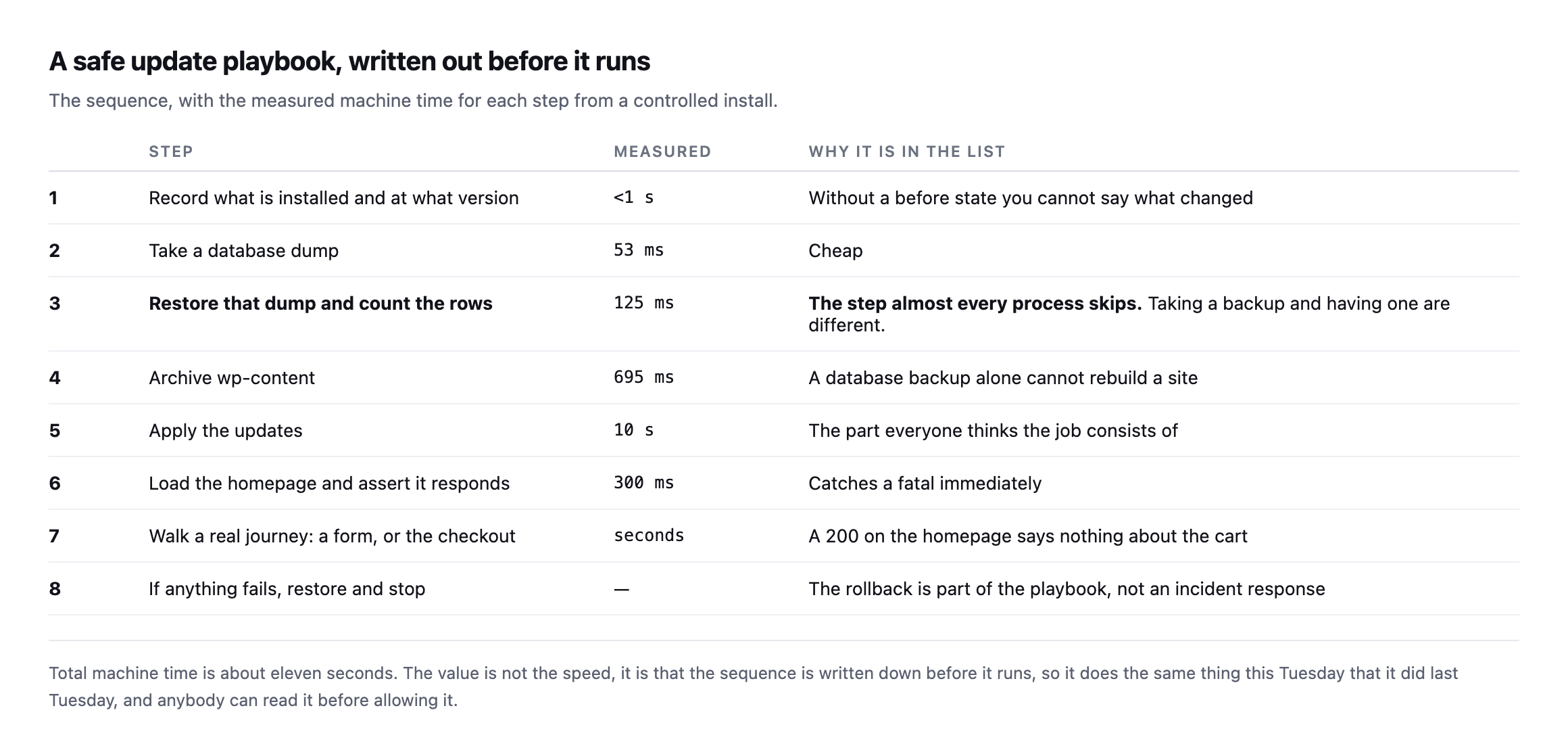
sequence is written down before it runs, so it does the same thing this Tuesday that it did last Tuesday.*
| # | Step | Measured | Why it is in the list |
|---|---|---|---|
| 1 | record installed versions | <1s | without a before-state you cannot say what changed |
| 2 | take a database dump | 53ms | cheap |
| 3 | restore the dump, count the rows | 125ms | the step almost every process skips |
| 4 | archive wp-content | 695ms | a database backup alone cannot rebuild a site |
| 5 | apply the updates | 10s | the part everyone thinks the job consists of |
| 6 | load the homepage, assert it responds | 300ms | catches a fatal immediately |
| 7 | walk a real journey: a form, or checkout | seconds | a 200 on the homepage says nothing about the cart |
| 8 | if anything fails, restore and stop | n/a | the rollback is part of the playbook, not an incident response |
Caveat: these timings are one controlled install, small database, local disk. Scale them for a real client site with a larger database and a remote backup destination. The relative shape holds: steps 2 through 4 are consistently the cheap ones, step 5 dominates because it waits on a third party, and none of that changes what steps 3 and 7 are protecting against.
Step three is the one I would argue for hardest. Taking a backup and having a backup are different things, and a truncated dump that restores 8 tables out of 77 looks identical to a good one in a folder listing.
Step seven is the other. A homepage returning 200 says nothing about whether the checkout still works, which I demonstrated by breaking one deliberately while every other URL stayed green.
Running the same eight steps again, on an install closer to a real client site
The original timings came from a controlled, small install. I ran steps one through four again on a second, much busier install, forty plugins, WooCommerce, Elementor, several page-builder add-ons, to see how far the numbers actually move once the site looks like something a real agency would inherit rather than a clean lab environment.
step 1  record versions              instant
step 2  database dump                250ms
step 3  restore under renamed prefix, count rows   750ms, 26 posts confirmed
step 4  archive wp-content           41.1 seconds, 405 MB
Steps two and three barely moved, still comfortably sub-second, because the database itself stays small regardless of how many plugins are installed. Step four is where the difference actually lives: 695 milliseconds on the original near-empty install against 41 seconds here, because wp-content/plugins alone accounts for 1.4 GB on this install, Elementor and its add-ons being the overwhelming majority of it. That is not a criticism of the site. It is exactly the shape a real, actively maintained WordPress install takes, and it confirms this post’s own caveat directly: step 5, applying the updates, dominates the original budget because it waits on a third party, but step 4 is the one whose cost scales hardest with how much plugin weight a specific site is actually carrying.
The practical consequence worth adding to the playbook: budget step 4’s time per site rather than assuming the original eleven-second total transfers unchanged. A portfolio of forty client sites with wildly different plugin footprints will see wildly different step-4 times, and a playbook that assumes every site archives in well under a second will be surprised, repeatedly, by the handful of sites carrying a gigabyte or more of plugin code.
What each step is actually for
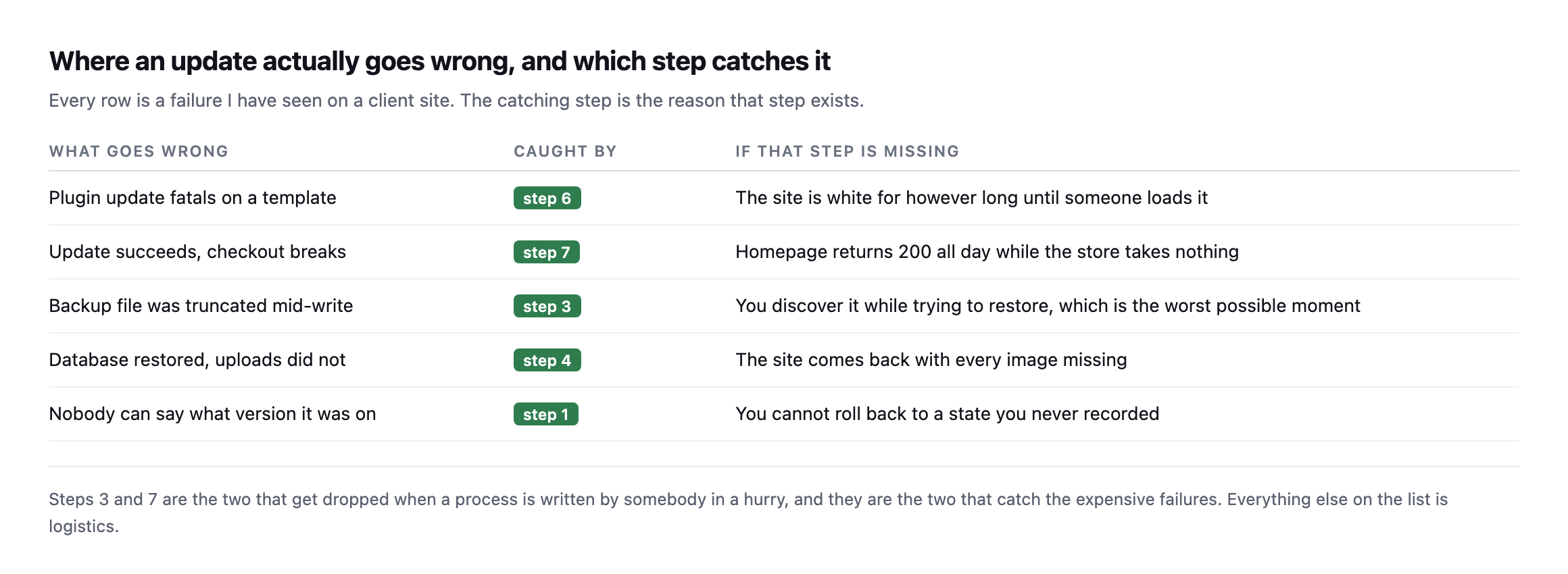
two that catch the expensive failures. Everything else is logistics.*
| What goes wrong | Caught by | If that step is missing |
|---|---|---|
| a plugin update fatals on a template | step 6 | the site is white until someone loads it |
| the update succeeds, checkout breaks | step 7 | homepage returns 200 all day while the store takes nothing |
| the backup was truncated mid-write | step 3 | discovered while restoring, the worst possible moment |
| database restored, uploads did not | step 4 | the site comes back with every image missing |
| nobody can say what version it was on | step 1 | you cannot roll back to a state you never recorded |
Steps 6 through 8, run for real rather than described
The homepage check, the journey walk, and the rollback are the three steps that only mean anything once something has actually gone wrong, so I forced a real failure on a separate test run to confirm all three fire correctly together rather than trust each one in isolation.
Corrupting a plugin’s main file to simulate a bad update produced a genuine site-wide 500, caught immediately by step 6, a plain homepage request. Restoring only the plugin’s files, never touching the database, brought the site back to 200 in one request, and a real order created before the fault was introduced survived the whole cycle untouched, confirmed by checking its status directly rather than assuming the restore left it alone. That full sequence is written up in detail separately, and it is the same eight-step shape this post describes, run end to end rather than only described in a table.
Step 7 is the one worth being most honest about, because it is also the hardest to automate correctly. A checkout-walking probe built to assert on rendered payment-method HTML worked perfectly against one WooCommerce install and passed silently, wrongly, against a second one running the newer block-based checkout, where that exact assertion never has anything to match against regardless of whether the store is healthy or completely broken. That gap is documented in full in the checkout probe post, and it is the clearest evidence available that step 7 cannot be written once and trusted forever. It has to be verified against the specific site it is meant to protect, the same way this playbook argues for verifying every other step, because “the probe passed” and “the probe is actually testing the right thing” are two different claims that can silently diverge.
The step people argue about
Step three, the restore test, gets pushed back on more than any other, and the objection is reasonable: it doubles the storage and the time for something that has never gone wrong.
Two answers. The time is 125 milliseconds on a small site and a few seconds on a large one, which is not the constraint anybody thinks it is. And “it has never gone wrong” is not evidence when nobody has ever checked, which is the exact situation the step exists to correct.
The genuine version of the objection is about scale: restoring a 40 GB database into a scratch environment on every update is not free. The practical compromise is to verify structurally on every run, by confirming the dump completed and the table count matches, and to do a full restore test on a schedule rather than on every update. That is weaker than verifying every time and much stronger than never verifying, and it is worth saying which one you are doing.
Why a fixed list rather than a clever one
This is the part worth arguing about, because the obvious modern answer is to let something reason about each site individually.
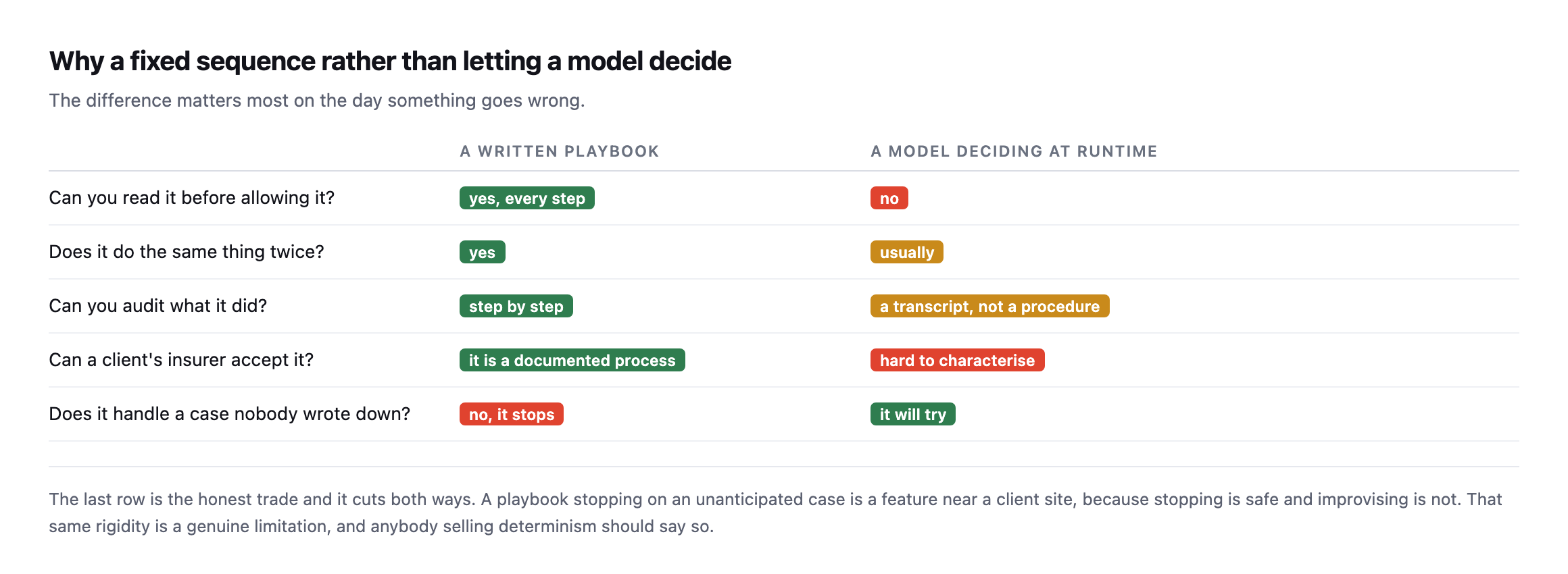
unanticipated case is a feature near a client site, because stopping is safe and improvising is not.*
An agency cannot audit a judgement call. It can audit a list of steps.
That is the entire reason to write the sequence down in advance: you can read it before you allow it. A client asking what exactly will happen to their site gets a document rather than a reassurance.
The cost is real and I would rather state it than gloss it. A fixed playbook does not handle the case nobody anticipated. It stops, and somebody has to look. On a client site that is the correct behaviour, and it is still a limitation.
Writing a WordPress update process for your own agency
You do not need software to benefit from this. The document is most of the value.
Write the steps in the order you actually do them, including the ones that feel too obvious to write down. Those are the ones that get skipped under time pressure.
Put the verification steps in explicitly. “Take a backup” is a step. “Restore the backup into a scratch database and confirm the row counts match” is a different step, and only the second one is a guarantee.
Define the stop condition. What makes you abandon the update and restore? Decide that when nothing is on fire, not at the moment it is.
Keep the before state. Versions, a database dump, an archive. You cannot roll back to a state you never recorded, which is step one and the least interesting item on the list.
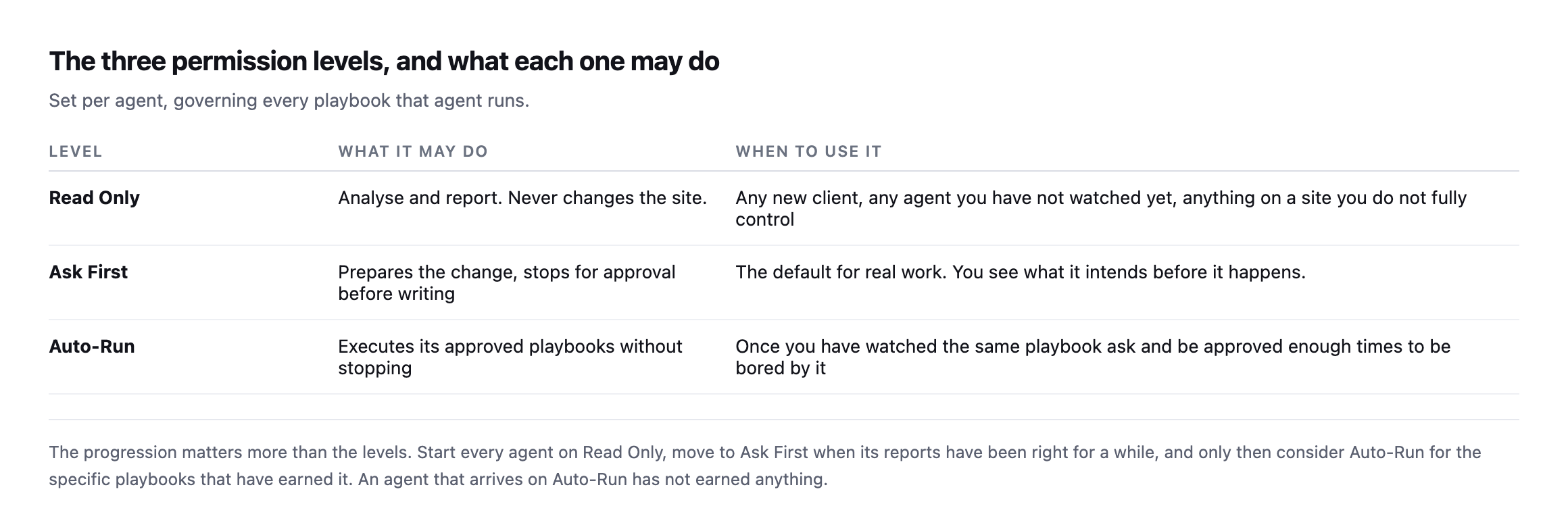
as the steps. Start on Read Only, move to Ask First when the reports have been right for a while, and treat Auto-Run as something a specific playbook earns rather than a setting you switch on.*
Then run it identically every time, on every site. The consistency is what turns it from a habit into something you can charge for and show a client afterwards.
Protuno’s Care agent, Wren, runs exactly this sequence, and the eleven-second measurement above came from timing it. Straight with you as on every post here: Wren is built and named but not live yet.
There is one more decision that belongs in the document rather than in somebody’s head: what happens to the update that should not be applied at all. A plugin flagged as incompatible, a major version that crosses a breaking change, a site still on a PHP branch that the new version does not support. A playbook that applies everything it finds is not safe just because it takes a backup first. The list of updates to hold, and who decides, is part of the process.
The other thing worth writing down is what you do when the update succeeds and something breaks a day later. Rollback within the run is the easy case. A regression that surfaces on Thursday needs the before-state from step one to still exist, which means retention is a decision too: how long you keep each backup, and where.
Until it ships, the document is the useful half. Write your update sequence down this week, add the two steps that are probably missing from it, and use the same one on every site. The consistency is worth more than the cleverness.
Comments