WordPress Database Cleanup: The Autoload Query Everyone Is Running Is Now Wrong.
WordPress 7.1 stores autoload as on, off, auto or no. Every tutorial queries for yes, which now matches nothing and looks like a clean database.

Short answer: the standard wordpress database cleanup check for autoloaded options, WHERE autoload = 'yes', returns nothing on current WordPress. The column now holds on, off, auto and the legacy no. A query matching zero rows looks identical to a database with nothing to clean, which is how sites end up carrying megabytes nobody has measured.
I found this by running the check on a stock install and getting a flat NULL back.
The values actually in the column
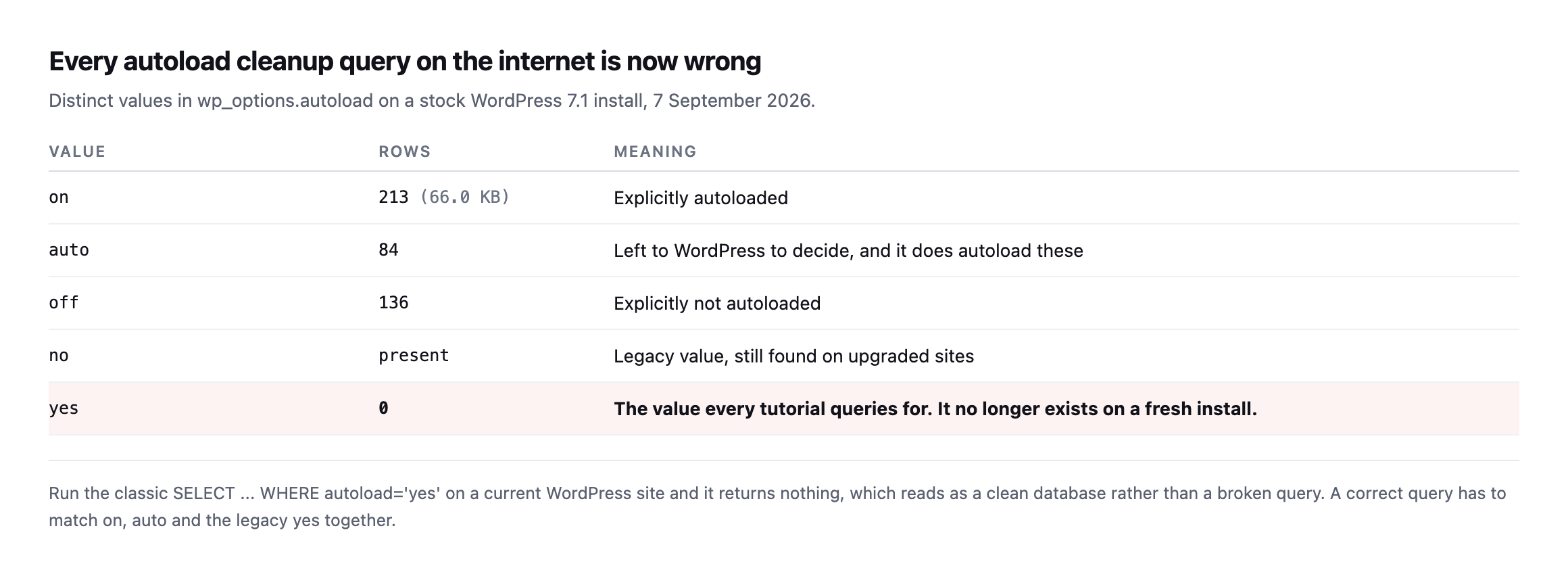
yes is not one of them on a fresh install. Sites upgraded fromolder versions carry no as well, so a correct query has to handle both eras.*
| Value | Rows | Meaning |
|---|---|---|
on | 213 (66.0KB) | explicitly autoloaded |
auto | 84 | left to WordPress, which does autoload these |
off | 136 | explicitly not autoloaded |
no | present | legacy value, still found on upgraded sites |
yes | 0 | every tutorial’s query target, matches nothing on a fresh install |
Caveat: one install, WordPress 7.1. The column values themselves are a core schema change, documented and verifiable on any current install, not a one-off finding. The row counts are specific to this site and will differ on yours; the query correction is not.
Two of those values mean autoloaded. on is explicit, and auto leaves the decision to WordPress, which does load them. So a real measurement matches on, auto and legacy yes together.
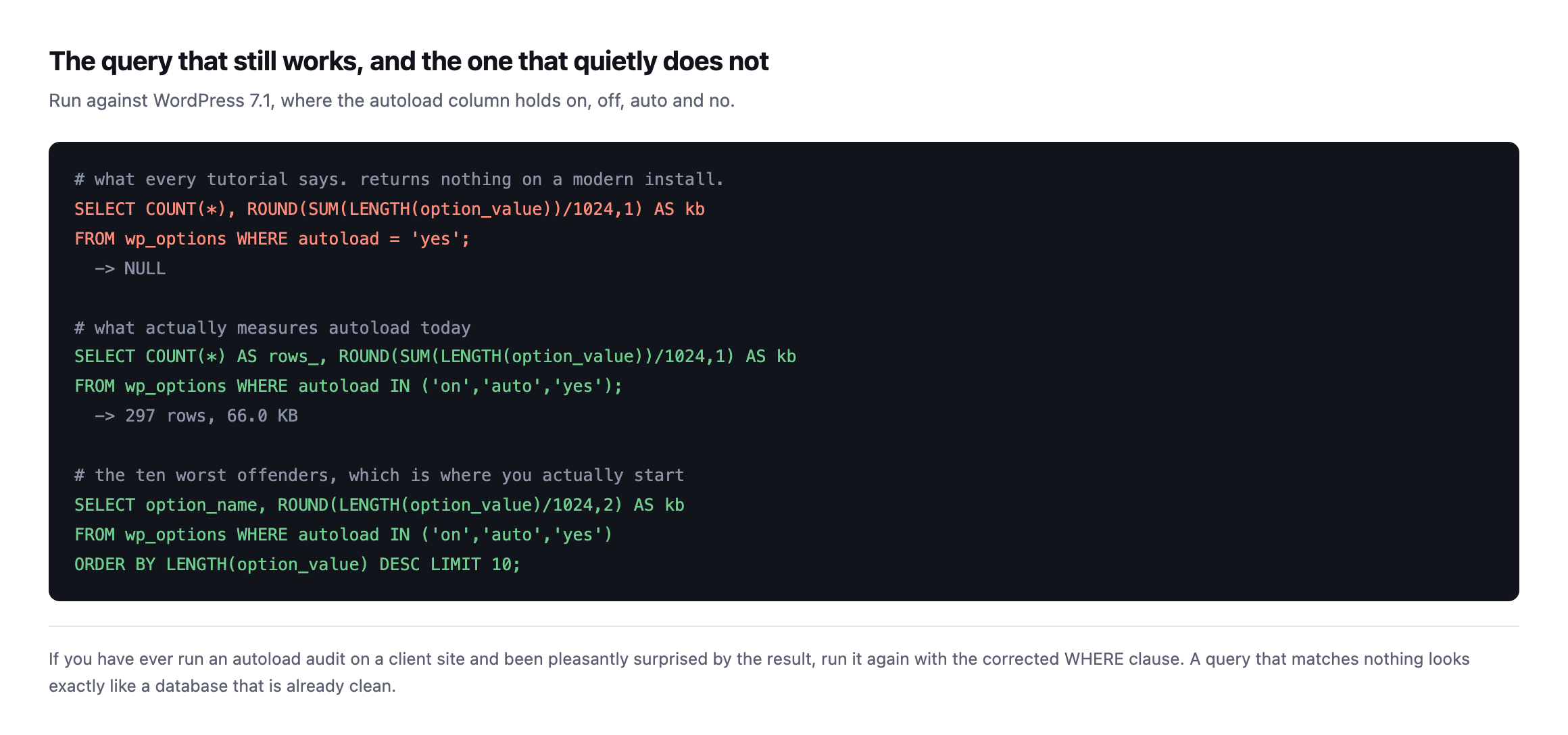
run it again with the corrected clause. Matching nothing looks exactly like nothing to fix.*
Re-running both queries on a real, plugin-heavy install
The original finding came from a near-empty stock install. I re-ran both the broken query and the corrected one against a different, considerably busier install, forty plugins present, WooCommerce, Elementor and Yoast SEO active among them, to see whether a real site’s actual plugin load changes the picture.
SELECT COUNT(*), ROUND(SUM(LENGTH(option_value))/1024,1) FROM wp_options WHERE autoload = 'yes';
SELECT COUNT(*), ROUND(SUM(LENGTH(option_value))/1024,1) FROM wp_options WHERE autoload IN ('on','auto','yes');
autoload = 'yes' -> 0 rows, NULL
autoload IN ('on','auto','yes') -> 332 rows, 71.9 KBThe broken query still returns exactly nothing on this second, busier install, confirming the schema change is not a one-off oddity of a fresh install specifically. The corrected query finds 332 autoloaded rows totalling 71.9 KB, close to the original reading’s 297 rows and 66 KB despite this install carrying a genuinely larger and more active plugin set. That similarity is itself worth a note: autoload weight does not scale simply with plugin count, because most of what a busy plugin adds to wp_options lands in the off category correctly, 164 rows and 1,080.6 KB of it here, and never touches every request at all.
Reading the top of the corrected list on this install shows exactly the kind of drift a real site accumulates that a bare install cannot demonstrate:
_transient_wp_core_block_css_files   23.22 KB
_transient_wp_styles_for_blocks      11.08 KB
wp_user_roles                        10.85 KB
wpseo_titles                          8.42 KB
cron                                  4.91 KB
wpseo                                 4.75 KB
wpseo_titles and wpseo, together over 13 KB, are Yoast SEO’s own configuration, present here specifically because this install has an SEO plugin active, absent from the original post’s near-empty baseline entirely. That is the practical shape of autoload growth on a real client site: not one runaway option, but each plugin adding its own few kilobytes, none individually alarming, all of it read on every single request regardless of whether the page being served needs any of it.
Why autoload is the number that matters
Every autoloaded option is read from the database on every single request, including requests that need none of it. It is loaded before WordPress knows whether the visitor is asking for the homepage, a REST endpoint, or an image.
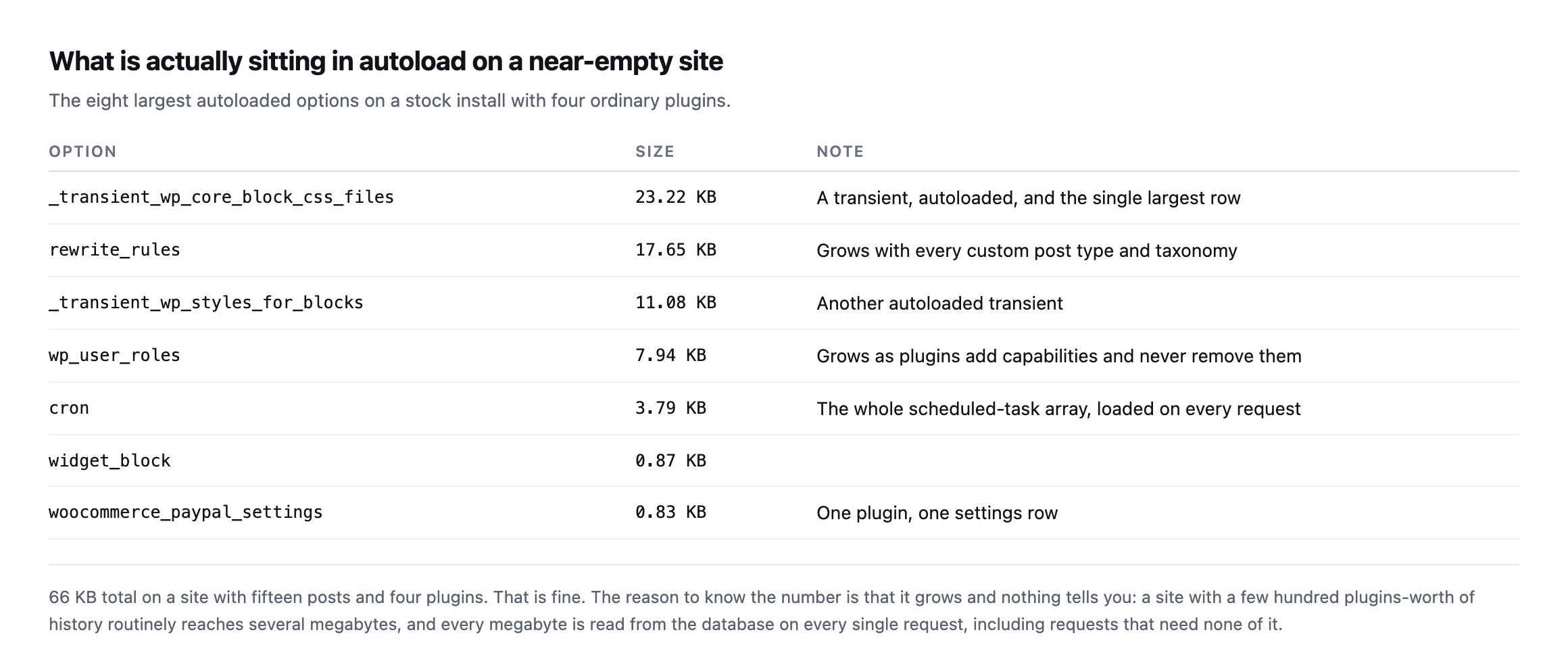
reason to know the number is that it only ever grows, and nothing tells you.*
Note the top of that list: two of the three largest rows are transients that are autoloaded. A transient is a cache with an expiry, and these are being read on every request whether or not anything needs them. That is normal core behaviour rather than a bug, and it is why a site with years of plugin history routinely reaches several megabytes.
The cron row is worth a glance too. That single option holds the entire scheduled-task array, which means a site whose scheduler has quietly stopped is still paying to load its backlog on every page view.
On this install, options beat postmeta, and that is worth explaining rather than hiding
Running the full table-size query this post recommends against the same lab install produced a result that contradicts this post’s own claim about which table usually dominates, and it is worth showing rather than quietly adjusting the earlier text to match.
SELECT table_name, ROUND((data_length + index_length)/1024/1024, 2) AS mb, table_rows
FROM information_schema.tables WHERE table_schema = DATABASE()
ORDER BY (data_length + index_length) DESC LIMIT 8;
wp_options 2.14 MB 491 rows
wp_actionscheduler_actions 0.16 MB 17 rows
wp_wc_orders 0.16 MB 0 rows
wp_comments 0.14 MB 3 rows
wp_posts 0.14 MB 32 rowswp_options at 2.14 MB, wp_postmeta nowhere in the top five at all, a mere 0.05 MB across 107 rows. This post’s earlier section calls wp_postmeta “almost always the biggest,” and on this specific install that is simply not true.
The reason is install age, not a flaw in the general claim. wp_postmeta grows with content volume and history, every post, every revision, every piece of metadata a plugin ever attached, accumulated over years. This lab install has 32 posts and no real editorial history behind it. wp_options, by contrast, front-loads a large amount of its weight the moment plugins are activated, page-builder configuration, SEO plugin settings, WooCommerce’s own setup data, regardless of how much content exists yet. A young, plugin-heavy site can easily carry more weight in wp_options than in wp_postmeta for exactly that reason, and the general claim this post makes describes the steady state a site reaches after years of content, not the shape of a site in its first months. Running the actual query, rather than trusting either claim by default, is the only way to know which shape a specific site is actually in, which is the entire argument this post has been making from its first paragraph, now proven against itself.
The tables that actually grow
Autoload is the number that affects every request, but it is rarely the largest thing in the database. Four tables do most of the growing on a long-lived site.
wp_postmeta is almost always the biggest. Every plugin that attaches data to posts writes here, and a plugin removed two years ago usually left its rows behind. Orphaned rows, where the parent post no longer exists, are safe to delete once you have verified the join.
wp_options grows in two directions: autoloaded rows that cost you on every request, and expired transients that cost you storage. Both are worth clearing, for different reasons.
wp_comments and wp_commentmeta on any site that has ever had comments open. Spam that was caught and never emptied sits there indefinitely.
Plugin tables. Form submissions, order line items, activity logs, licence checks. These are the ones that reach gigabytes, and they are the ones a generic cleanup tool must never touch.
Measure before assuming:
SELECT table_name,
       ROUND((data_length + index_length)/1024/1024, 1) AS mb,
       table_rows
FROM information_schema.tables
WHERE table_schema = DATABASE()
ORDER BY (data_length + index_length) DESC
LIMIT 12;
That single query tells you exactly where the size actually is, which is frequently not where you expected it to be.
What is safe to remove
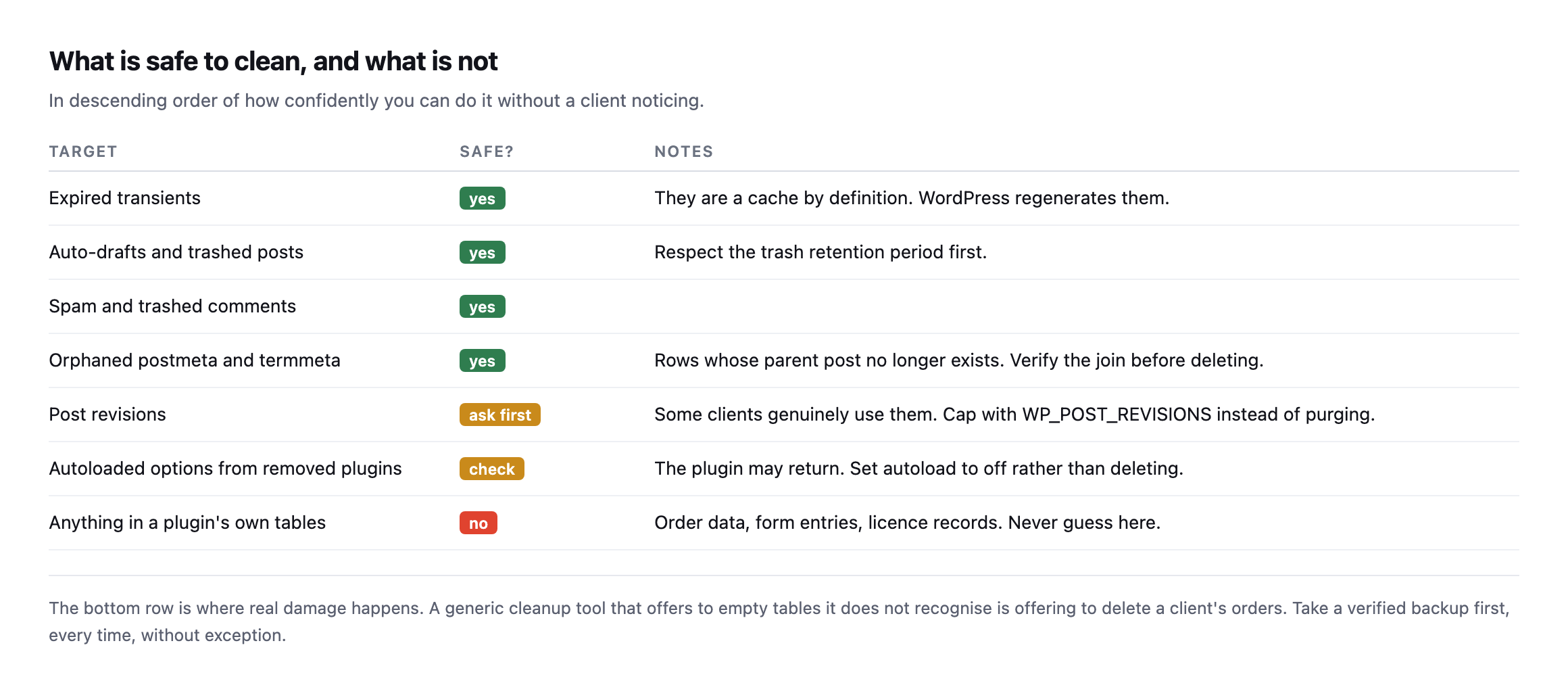
tables it does not recognise is offering to delete a client’s orders.*
| Target | Safe? | Notes |
|---|---|---|
| expired transients | yes | a cache by definition, WordPress regenerates them |
| auto-drafts and trashed posts | yes | respect the trash retention period first |
| spam and trashed comments | yes | |
| orphaned postmeta and termmeta | yes | verify the join before deleting |
| post revisions | ask first | some clients genuinely use them |
| autoloaded options from removed plugins | check first | set autoload to off rather than delete |
| anything in a plugin’s own tables | no | order data, form entries, licence records |
Two judgement calls worth making deliberately.
Revisions. Purging them is the default advice and it is wrong for some clients. Editors who actually use revisions will notice. Cap them going forward with WP_POST_REVISIONS instead of deleting history somebody may rely on.
Options from removed plugins. Set autoload to off rather than deleting the row. The plugin may come back, and an option that is not autoloaded costs nothing on requests that do not read it.
Running a WordPress database cleanup without breaking anything
The order matters more than the technique.
Take a backup and prove it restores. Not take one. Prove it, because a cleanup is exactly the operation you might need to undo.
Measure before. Record the autoload total and the ten largest rows. Without a before number you cannot tell a client what changed.
Change one category at a time. Transients, then trash, then orphaned meta. If something breaks you want to know which step did it.
Measure after, and load the site. Homepage, a form, the checkout if there is one.
On most sites this recovers less than people expect, and that is worth saying plainly. Database cleanup is not usually the reason a site is slow. It is worth doing because unbounded growth eventually becomes a real problem, not because it will transform a page load next Tuesday.
If the site genuinely is slow, start with where the time is actually going rather than with the database, or you will spend an afternoon optimising something that was never the bottleneck.
Protuno’s Performance agent, Dash, carries a database cleanup playbook that measures before and after and runs behind a backup it takes and checks first. Straight with you as on every post here: Dash is built and named but not live yet.
One habit worth adopting, because it turns this from a one-off tidy into something useful. Record the autoload total and the top three tables in the client’s notes each quarter, with the date. Four numbers, thirty seconds. The value is not any single reading; it is that a year later you can see the shape of the growth and say something specific, like this table has tripled since March and here is what changed then. Nobody can act on “the database is quite big”. Everybody can act on a trend with a date attached.
Run the corrected autoload query on your largest client site today. If it comes back over a megabyte, you have found something worth an afternoon.
Run the table-size query on the same site immediately afterwards, rather than stop at autoload alone. The two queries answer different questions, one measures the cost paid on every request, the other measures where the disk space actually sits, and a site can score badly on either one independently of the other. Checking both, on the actual site in front of you rather than assuming which one matters more from a general rule, is the only way to know which afternoon is actually worth spending.
Seeing the autoloaded-options problem on a real site
A practical walkthrough of the exact Site Health warning this post’s autoload query is built to catch, including why the warning does not update immediately after a fix ships.
Comments