Verify A WordPress Backup, Or You Only Have A File With A Hopeful Name.
We truncated a backup mid-write. It was 879KB, sat in the folder looking normal, and restored 8 tables out of 77 with no posts at all.

Short answer: to verify wordpress backup files you have to restore them. Into a scratch database, then count the rows and compare with live. Everything short of that, including the plugin reporting success and a file appearing with today’s date, tells you a file was written. It does not tell you the file works.
I proved this to myself this week rather than repeating it as received wisdom, and proved it again later on a different install with a more restrictive set of database credentials, which turned out to matter more than the first test alone would have shown.
Two files, one useless
I took a complete, working backup of a WordPress database, then made a second copy truncated mid-write, which is exactly what happens when a disk fills, a process is killed, or a connection drops midway.
Then I restored both, carefully, into a location where a mistake could not touch anything that actually mattered.
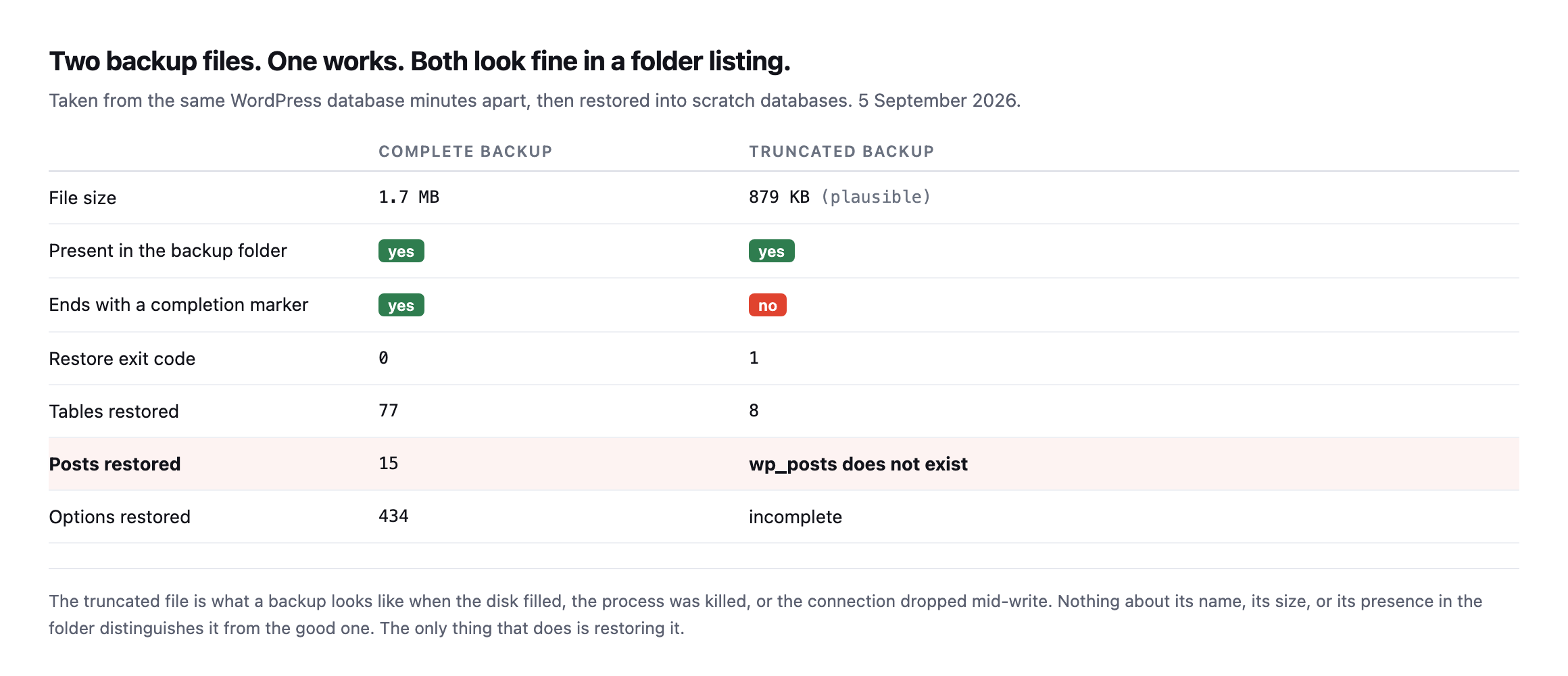
eight tables out of seventy-seven, and wp_posts was not among them.*
| Complete backup | Truncated backup | |
|---|---|---|
| File size | 1.7MB | 879KB (plausible) |
| Present in the backup folder | yes | yes |
| Ends with a completion marker | yes | no |
| Restore exit code | 0 | 1 |
| Tables restored | 77 | 8 |
| Posts restored | 15 | wp_posts does not exist |
Caveat: one deliberately truncated file on one test database, built to show the mechanism cleanly. It is not a claim about how often real backups fail this way. It is a demonstration that “the file exists and is a plausible size” tells you nothing about whether it restores.
Nothing about the broken file announces itself. Right name, plausible size, correct folder, today’s date. Every check most agencies run would have passed it.
The only single check that actually failed it was restoring it in full.
How to verify a WordPress backup, in under a second
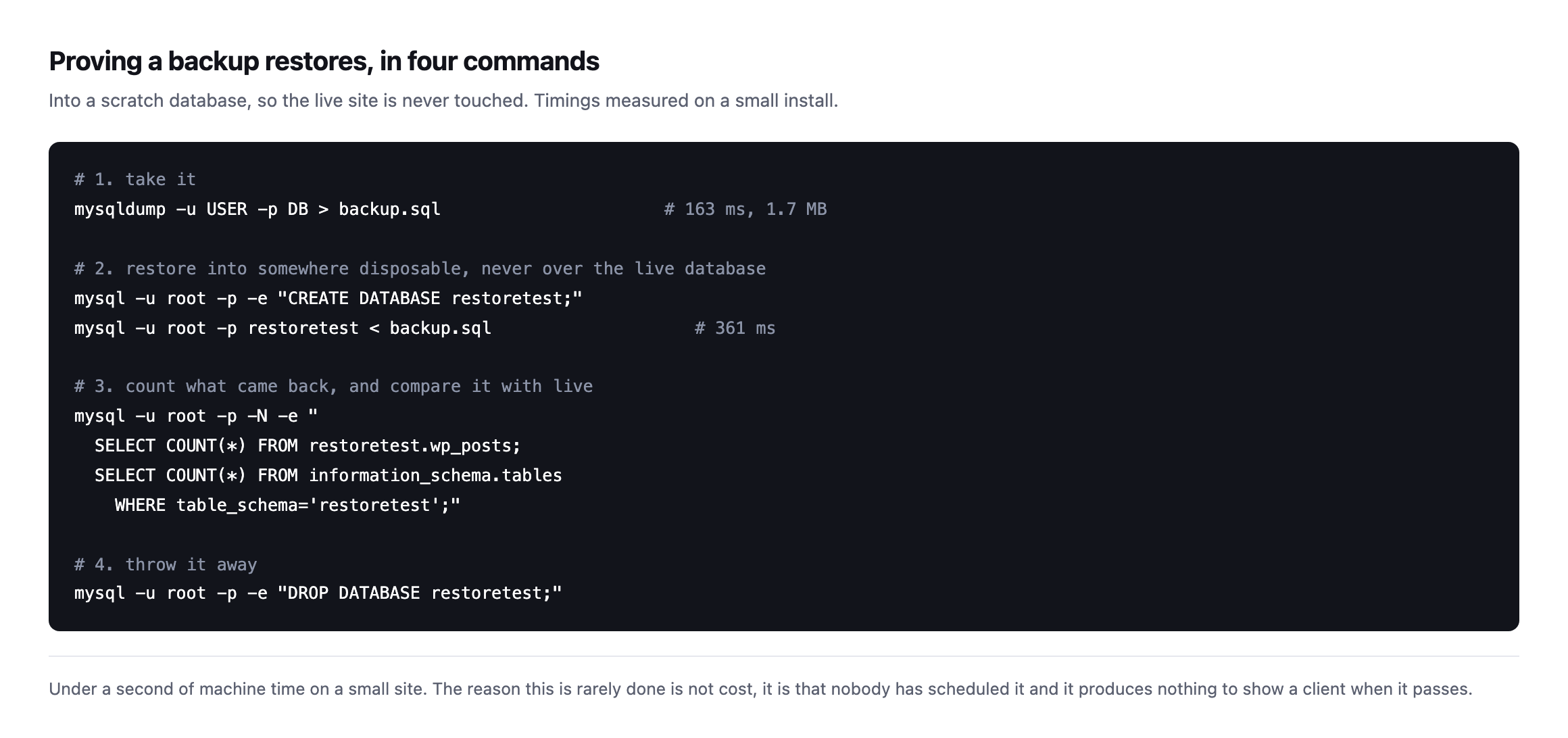
touched, because the restore goes into a database created for the purpose and dropped afterwards.*
Two rules for doing this safely, and the first one is not negotiable.
Never restore into the live database to test a backup. Create a scratch one. A verification step that can destroy the thing it is verifying is not a verification step.
Compare row counts, not just success. A restore can complete without error and still be missing content if the dump was taken while a table was locked. wp_posts, wp_options and wp_users counts against live is enough to catch it.
Reproducing it fresh, and hitting a permissions wall worth knowing about
I re-ran this exact experiment on a different install while expanding this post, and the first attempt failed for a reason worth documenting on its own: the database user WordPress was configured with had no privilege to create a new database at all.
mysql -h db -u wp -pwp -e "CREATE DATABASE IF NOT EXISTS wp_verify;"ERROR 1044 (42000): Access denied for user 'wp'@'%' to database 'wp_verify'SHOW GRANTS confirmed why: GRANT ALL PRIVILEGES ON wp.* TO wp@%, full control over the one database WordPress already uses, nothing beyond it. That is an extremely common shape for database credentials on shared and managed hosting specifically, where an account is scoped to exactly one schema for isolation reasons, and it means the scratch-database method this post recommends first is not always available to whoever is actually running the check.
The workaround, and it is a real, usable one rather than a theoretical fallback: restore into the same database, under a different table prefix, rather than a different database.
sed 's/`wp_/`verify_/g' backup.sql > backup-renamed.sql
mysql -h db -u wp -pwp wp < backup-renamed.sql
Rewriting every backtick-quoted wp_ prefix to verify_ before restoring means the import creates a parallel set of tables, verify_posts alongside the live wp_posts, inside the one database the credentials actually permit writing to. Nothing about the live tables is touched, because the restored tables have entirely different names, and the same row-count comparison this post already recommends works identically against them.
With that in place, the reproduction ran cleanly. A full backup, 1,417,073 bytes, 58 tables, restored in 0.73 seconds with a clean exit code. The same file truncated to 850,000 bytes exited with code 1 and left exactly 9 tables behind, verify_options, verify_comments, verify_links and six others, all of the site’s actual content tables, verify_posts included, absent. The live wp_posts count, checked immediately after, was untouched at 29, exactly what it was before the test started.
That is the same mechanism this post opened with, reproduced on different infrastructure, under real credential constraints rather than an idealised scratch-database setup, and it still found the same shape of failure: a plausible file size, a clean-looking folder listing, and a restore that silently drops the one table that actually matters.
What each check is actually worth
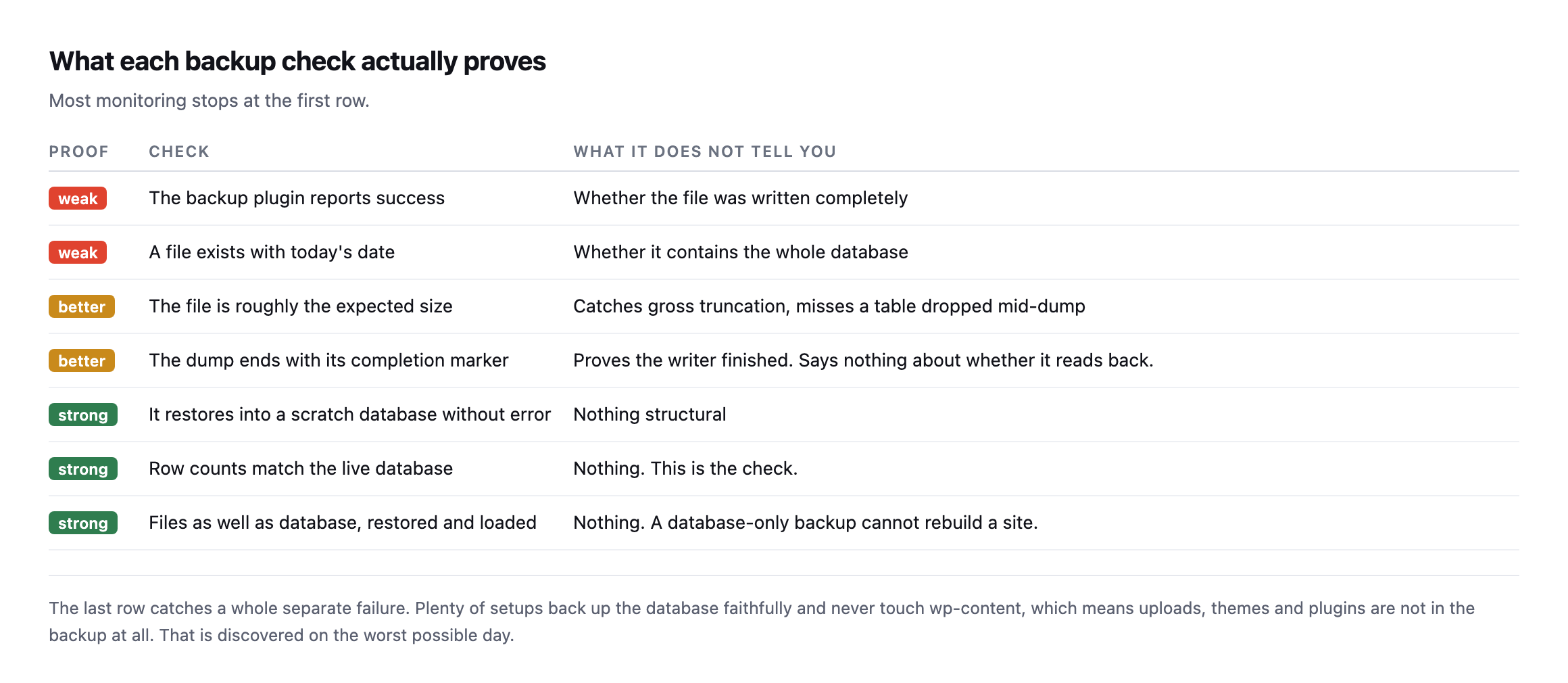
entirely: plenty of setups back up the database faithfully and never touch wp-content, so uploads, themes and plugins are not in the backup at all.*
| Proof | Check | What it does not tell you |
|---|---|---|
| weak | plugin reports success | whether the file was written completely |
| weak | a file exists with today’s date | whether it contains the whole database |
| better | file is roughly the expected size | misses a table dropped mid-dump |
| better | dump ends with a completion marker | says nothing about whether it reads back |
| strong | restores into a scratch database without error | nothing structural |
| strong | row counts match the live database | nothing, this is the check |
| strong | files as well as database restore and load | nothing, a database-only backup cannot rebuild a site |
It is also worth confirming the backup is stored somewhere the site cannot reach. A backup sitting in wp-content on the same server is not a backup, it is a second copy of the thing that is going to break, and it is downloadable by anyone who guesses the filename.
That last one is worth a specific check on any site you inherited. Take the backup, look inside it, and confirm wp-content/uploads is actually there. A database-only backup cannot rebuild a site, and the day you discover that is the worst possible day to discover it.
Verifying the files half the same way, not just the database
The row-count comparison above proves the database restores. It says nothing about the wp-content/uploads, wp-content/themes and wp-content/plugins directories, which is the half of a backup this post already names as the one people forget to check exists at all.
The same discipline applies, cheaply. Extract the files archive into a scratch directory, never over the live install, and count what actually landed:
mkdir /tmp/restore-check
tar -xzf backup-files.tar.gz -C /tmp/restore-check
find /tmp/restore-check/wp-content/uploads -type f | wc -l
find /var/www/html/wp-content/uploads -type f | wc -l
Two numbers, compared directly. A backup archive that unpacks cleanly but produces a file count noticeably lower than live is the files-side equivalent of the truncated database dump: present, plausible, and missing exactly the content a restore actually needs. A mismatch here is worth investigating before trusting the archive, the same way a mismatched row count is worth investigating before trusting the SQL dump, and for the same underlying reason: an archive tool interrupted partway through a large uploads directory produces a smaller, still-valid-looking .tar.gz file, not an error anyone sees at backup time.
Running both checks together, database row counts and file counts, against the same backup job is worth treating as one verification step rather than two separate ones, because a backup that fails only on the files half, database perfect, uploads directory silently truncated, is just as capable of turning a routine restore into a lost client’s media library as the reverse case this post opened with.
Why the prefix-swap method belongs in a portfolio-wide script
The credential constraint found while reproducing this test, a database user scoped to one schema with no privilege to create another, is worth treating as the default assumption rather than the exception when building a verification script meant to run across a whole portfolio of client sites. Managed hosts, shared hosting panels and several popular hosting providers’ control panels all commonly provision exactly this kind of scoped credential, and a script that assumes CREATE DATABASE will always succeed will fail silently, or noisily and confusingly, on a meaningful share of the sites it is meant to protect.
The table-prefix rewrite is not a workaround to reach for only when the preferred method fails. Building it in as the default method from the start, with a full scratch database as the upgrade path on hosts that permit it, means one script handles both cases without needing to detect which kind of host it is running against first. That is a small design decision with a disproportionate effect on how often the check actually gets run: a verification script that occasionally throws a permissions error on a subset of a portfolio is a script someone eventually stops trusting, in exactly the same way an alert that fires on the wrong things trains people to ignore alerts generally.
Why this is the check that never gets done
It is not difficult and it is not slow. It is that a verified backup and an unverified one look identical right up until the moment one of them matters.
There is nothing to show a client. No line on an invoice. No visible improvement to the site. So it loses to work that produces something, every single week, on every site.
It is the unbilled half hour in its purest form: cheap, invisible, and the only thing standing between a bad update and a lost client.
And it compounds with the other silent failures. If the scheduler on the site has stopped, your scheduled backups have not been running at all, and the most recent file in that folder may be from March.
This is why the update playbooks in Protuno re-open the backup they just took before anything writes to a site, rather than simply taking one first. The archive has to open and hold files, the database dump has to decompress, carry the statements a dump carries and account for every table on the site. What that check does not do is restore the backup to see what comes back, so it is a verified file rather than a rehearsed recovery. Taking a backup and having a backup are different things. Straight with you as on every post here: Wren, the Care agent that runs those playbooks, is built and named but not live yet.
Do the manual version this week on one client site. Take the backup, restore it into a scratch database or a renamed table prefix if that is what the credentials on that host actually allow, count the posts, and count the files while you are there. If the numbers match, you have learned something real. If they do not, you have just avoided a very bad afternoon, on a day you got to choose rather than one a failed restore chose for you.
Why backup storage itself is worth a second look
A recent, practical walkthrough of where WordPress backups actually go wrong once they leave the server, and why the destination matters as much as the restore test this post argues for.
Comments