The Half Hour Nobody Bills: What A WordPress Maintenance Plan Actually Costs You.
We timed the machine work in a safe update at 11 seconds. Agencies spend half an hour. Here is where the other 29 minutes go, and what it costs.

Short answer: the machine work in a safe WordPress update takes about eleven seconds. Agencies spend about thirty minutes. The other twenty-nine are attention, not computation, which is why a wordpress maintenance plan should be priced per portfolio and sold on the record it produces, not on the hours it consumes.
Somebody on your team opened a client site last Tuesday. They took a backup, ran four plugin updates, loaded the homepage to check it still answered, clicked through to the checkout because one of those plugins touches Woo, and closed the tab.
Call it half an hour. Nothing to show the client. Nothing on the invoice.
I wanted to know what that half hour is actually made of, so I measured it. The answer turned out to be uncomfortable, and it changes how a wordpress maintenance plan should be priced.
The machine work takes eleven seconds
I built a controlled WordPress install, put three outdated plugins on it, and timed every mechanical step of a safe update: dump the database, prove the dump restores, archive wp-content, apply the updates, load the site again.
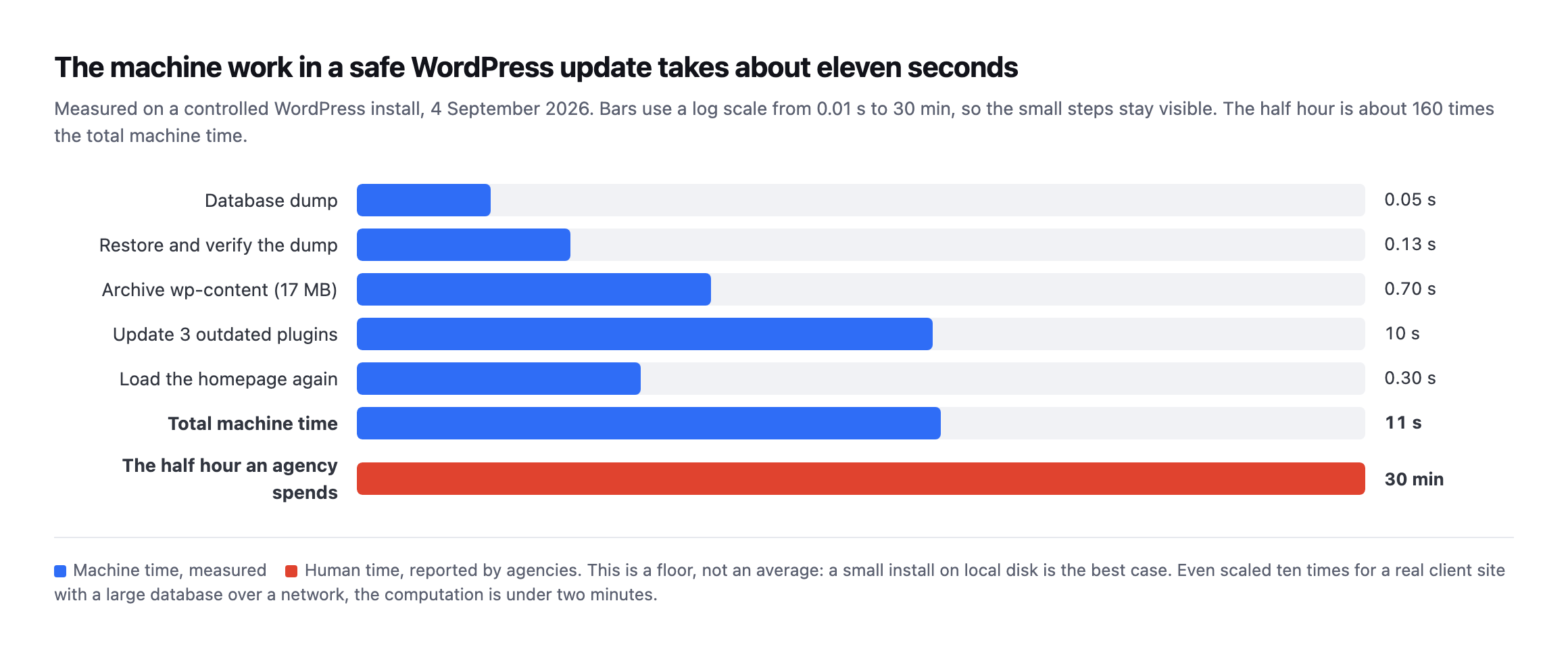
milliseconds for 1.2MB. Restoring that dump into a scratch database and counting the rows back took 125 milliseconds. Archiving 17MB of wp-content took 695 milliseconds. Updating the three plugins took ten seconds, and almost all of that was waiting on wordpress.org. Total: about eleven seconds.*
The same numbers as a table:
| Step | Measured time |
|---|---|
| Database dump | 53ms |
| Restore and verify | 125ms |
Archive wp-content (17MB) | 695ms |
| Update three plugins | 10s (mostly waiting on wordpress.org) |
| Reload homepage | 300ms |
| Total | ~11s |
Caveat: a small install on local disk with no network in the way is the best case, not the average. Scale it ten times for a real client site with a large database and a remote backup destination and you are still under two minutes. Be careful with that number, and I want to be first to say so.
The gap is not close. The half hour is roughly 160 times the computation.
So you are not paying for compute. You have never been paying for compute.
Where the other twenty-nine minutes go
Once you accept that the machine work is seconds, the half hour has to be something else, and it is. It is all attention.
Opening the site. Finding which password manager entry this client is under. Waiting for wp-admin. Remembering that this is the one on the legacy theme where the checkout broke last time. Deciding whether to take the update at all.
That last one is the expensive part, and here is what it actually looks like:
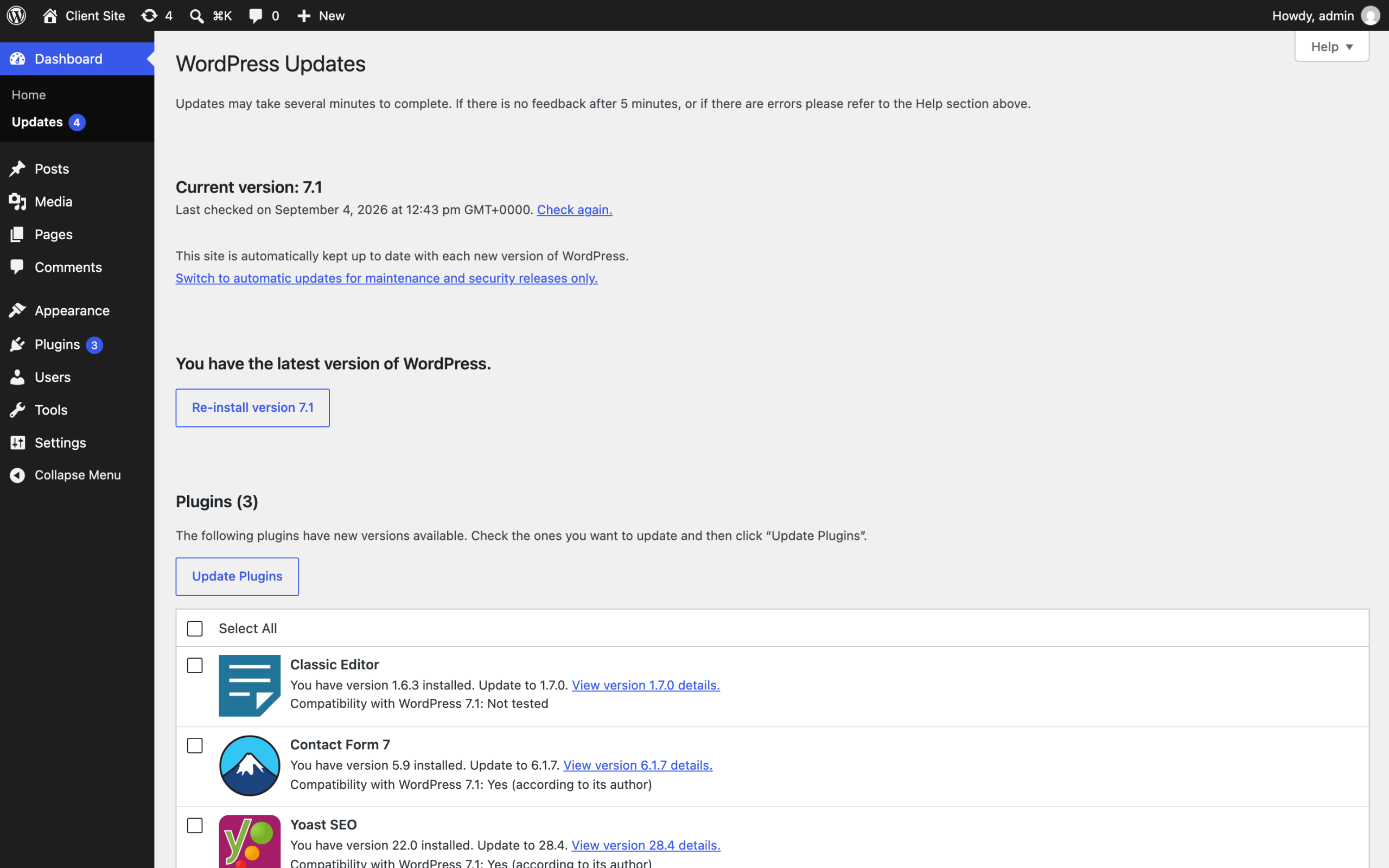
Contact Form 7 crosses a major version. And Classic Editor says “Compatibility with WordPress 7.1: Not tested” in plain text. That line is the whole job. A machine can apply the update. Deciding whether an untested plugin goes on a client’s live store on a Tuesday afternoon is judgement, and judgement is what you are actually selling.*
Then the context switch. You do not go back to the design work you were doing. You go back to the state of mind you were in, and that reload is not free.
Multiply by fifteen sites. Twenty. Forty. It does not scale linearly, it scales worse, because each site carries its own history: the one whose owner installs plugins without asking, the one you inherited with a database nobody has ever cleaned.
The arithmetic underneath every agency
Here is where it stops being about time and starts being about whether the business works.
The Admin Bar surveyed 622 people running WordPress agencies across 51 countries in March 2026. The median team size is one. One person, the whole portfolio, every Tuesday.
The same survey splits profitability by how much revenue recurs, and the split is stark. Of agencies with no recurring revenue at all, 58.3% report being rarely or never profitable. Move to just 25 to 49% recurring and that collapses to 9.7%, with 47.4% consistently profitable.
Six to one. That is the difference recurring revenue makes.
The survey is careful about the direction of causation and so am I: stronger agencies gravitate to retainers, so the number reflects a healthy business as much as it creates one. The gap is still six to one.
Now put the two findings side by side. The invisible work is exactly the work a retainer would pay for. It is also the first thing to go when there is no retainer protecting it. The agencies that most need the recurring revenue are the ones doing this work for free.
What the search demand actually looks like
I pulled the real numbers behind “wordpress maintenance plan” rather than guessing at demand, because the phrase sits at an odd angle to who actually buys the work.
| Query | Monthly volume | Difficulty | Intent |
|---|---|---|---|
| wordpress maintenance services | 880 | 11 | commercial |
| wordpress maintenance service | 880 | 7 | commercial |
| wordpress website maintenance | 480 | 33 | commercial |
| wordpress maintenance plans | 390 | 15 | commercial |
| wordpress maintenance plan | 390 | 26 | commercial |
| wordpress maintenance company | 320 | 11 | commercial |
| wordpress maintenance | 260 | 23 | commercial |
| wordpress maintenance packages | 210 | 14 | commercial |
Read from DataForSEO on 11 September 2026, United States, desktop and mobile combined.
Every row is genuinely searched, and every row is a site owner looking to hire somebody, not an agency looking to run its own operations better. That is the gap this post keeps returning to: the query volume that exists describes a buyer’s decision, and the arithmetic above describes the seller’s cost structure. They are related and they are not the same content problem.
Caveat: eight related phrases, one data pull, one country. Search demand shifts by season and by market, and I would re-check this before building a paid campaign on it. What does not shift is the shape: every high-volume variant here reads as commercial buyer intent, and none of them reads as an agency researching its own pricing model, which is the actual audience for this post.
That distinction is why the retainer conversation has to happen in the sales call rather than on the page a prospect finds by searching. Nobody searches “how much should my agency charge for wordpress maintenance” in volume worth optimising for, and no keyword tool will ever surface that query, because it describes a decision made inside a business rather than a problem searched for by a stranger. The number worth optimising for is the client conversation this data cannot replace, not a ranking position on a page the client’s own prospects are reading.
What you are actually protecting the client from
If a wordpress maintenance plan is going to be defensible, it has to be tied to things that genuinely break. Two of them are measurable across the whole ecosystem right now.
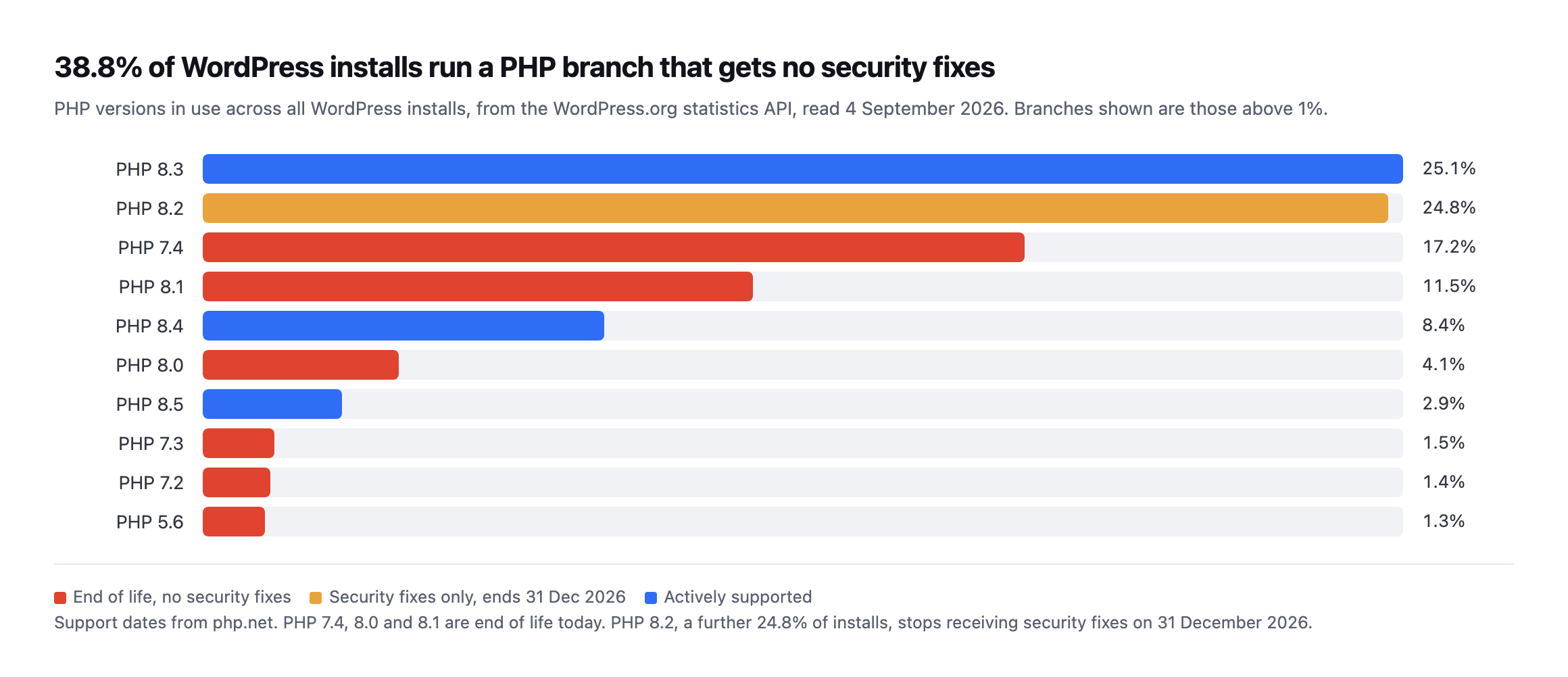
source cannot drift. Red bars are branches that receive no security fixes at all. PHP 7.4 alone is 17.2% of all WordPress installs.*
38.8% of WordPress installs run a PHP branch that is past end of life, because php.net lists 7.4, 8.0 and 8.1 as no longer supported. There is a second wave behind it: PHP 8.2 is another 24.8% of installs and its security support ends on 31 December 2026. On New Year’s Day, on today’s numbers, roughly six in ten WordPress sites will be running PHP that nobody patches.
The plugin side is worse because it is silent. Patchstack counted 1,614 plugins and themes removed from the WordPress.org repository during 2024 over security issues the developers never fixed. A removed plugin does not uninstall itself. It stops receiving updates, it stops appearing in the search box, and nobody gets an email. We probed the directory API to see what a site can actually detect about that, and the answer is less than you would hope.
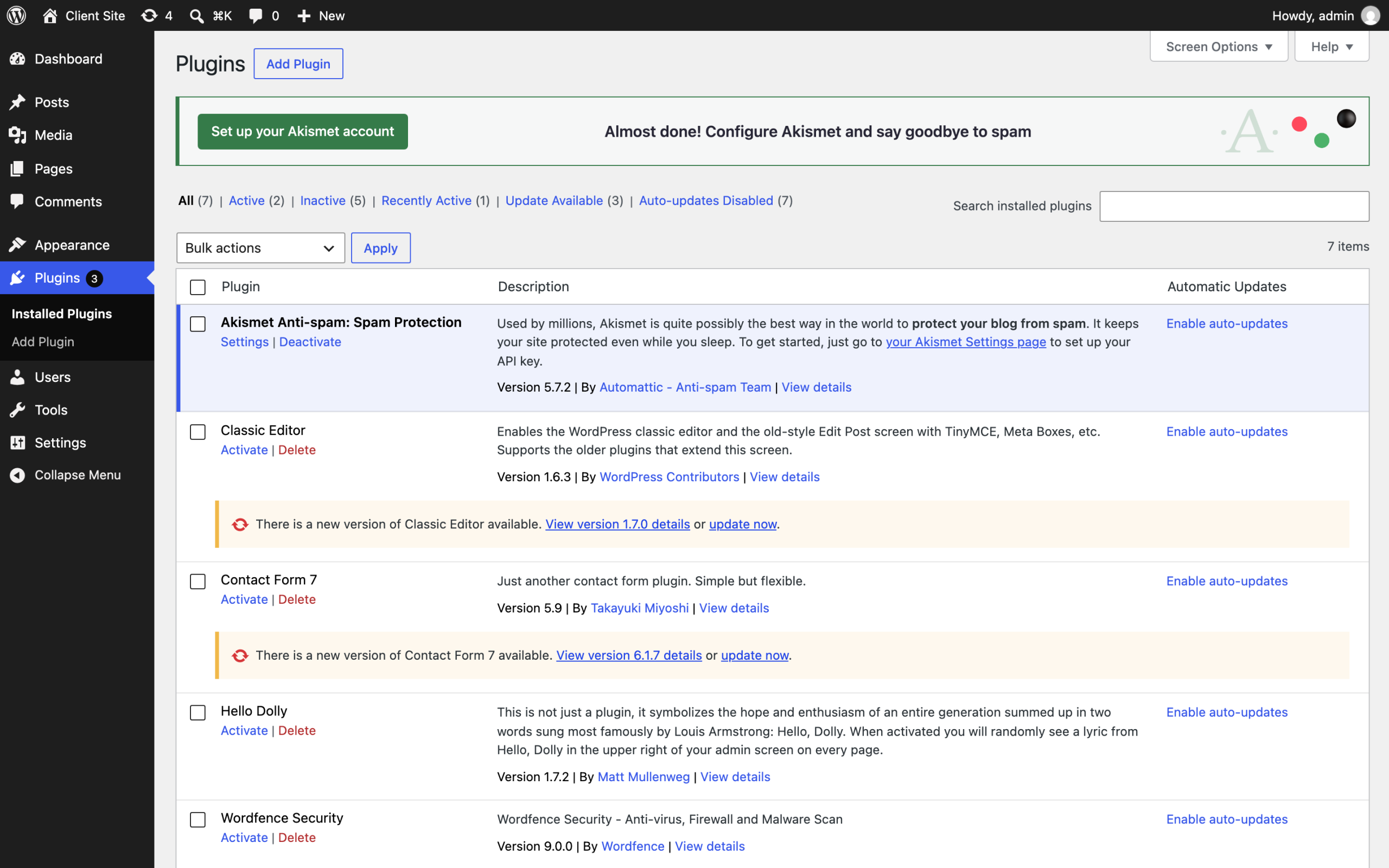
not tell you that a plugin was pulled from the directory in March, or that the version you are pinned to has a published advisory. That check has to come from outside the site, matched against what is actually installed here.*
How should you price a WordPress maintenance plan?
The mistake is pricing the half hour, because the half hour is not the product. If it were, the correct price would be eleven seconds of compute and everybody would be out of business.
What the client is buying is the standard being met whether or not anyone got to it, and the evidence that it was.
Three things follow.
Price the portfolio, not the site. Your cost per additional site is nearly flat once the mechanical work is automated. Per-site pricing punishes you for the exact efficiency you should be building.
Sell the record, not the activity. An agency that can show a client what was checked, when, and what was done about it wins work from one that cannot. Talent has nothing to do with it. Proof does.
Charge for judgement explicitly. “Compatibility: Not tested” is a decision somebody has to own. That is a professional service. The backup and the update are logistics.
The honest version of where this goes
I run marketing at POSIMYTH and we are building Protuno, so treat this next part as interested rather than neutral.
Our bet is that the mechanical eleven seconds should run whether or not anybody opened the site, on every site, at the same standard, with a backup that has been checked underneath it, and, for plugin updates, an automatic rollback if the site stops answering. The person moves up a layer: reading what happened, deciding what to allow, handling the case that genuinely needs a human.
Being straight about status, because the whole argument here is that you should be able to trust software near a client site: the free audit is live and runs 54 read-only checks from a domain alone. The Super Agents are built and named but not live yet. They are not running on anyone’s sites today, including ours.
What is useful to you right now costs nothing. Take the client you have not opened in a fortnight, look at their PHP version against the php.net dates, and check whether anything installed has quietly left the directory. If your answer to “is the site alright” is built from instinct rather than evidence, that is the gap this whole category exists to close.
And if the scheduler on that site has stopped, none of your backups ran either. That one is worth checking before you do anything else.
You can run the free audit on a real client domain without installing anything. Do not use a demo site. Use one you actually look after.
Comments