WordPress Rollback After An Update: What It Can Undo, And What It Destroys.
A database rollback on a live store destroys every order taken since the backup. Files and database are not the same decision.

Short answer: an automatic wordpress rollback update path should restore files freely and restore the database carefully. A database restore reverts the site to the moment the backup was taken, which destroys every order, form entry and comment created since. On a busy store that can be worse than the failure it is fixing.
This is the part of the design that took us longest, and it is the part most discussions skip.
Rollback is a structural property, not a promise
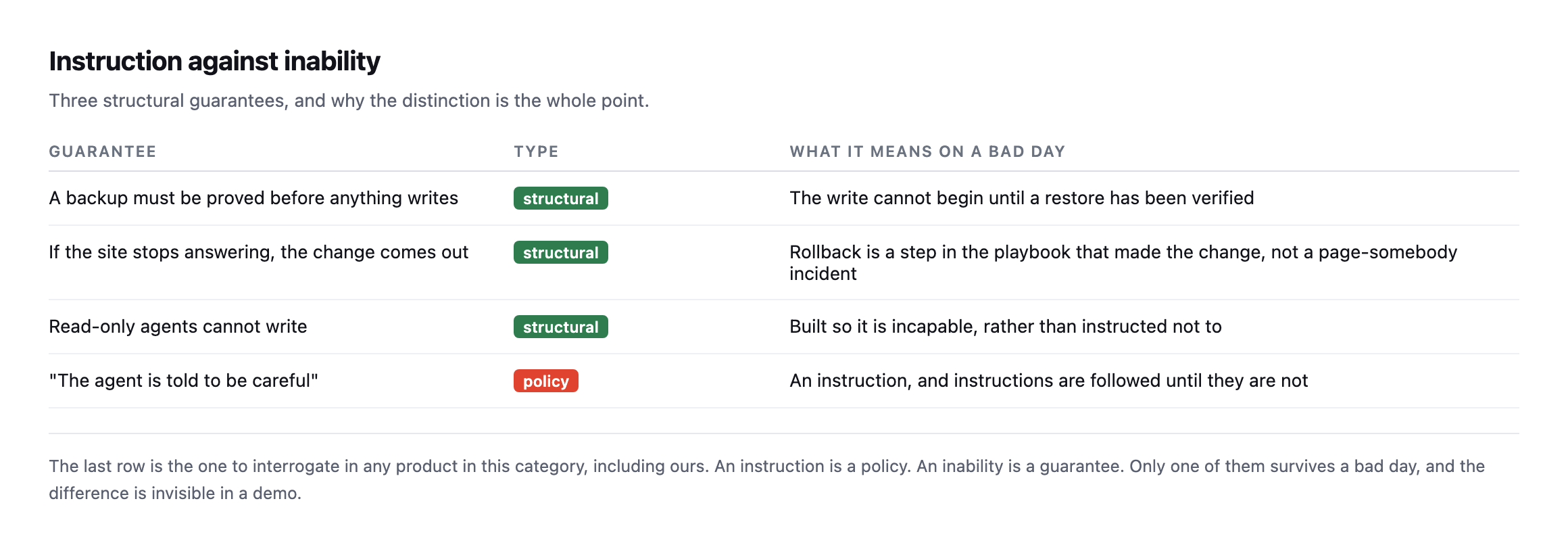
policy.*
The key design decision is that rollback is recorded as the run happens, change by change, rather than left to an incident process somebody triggers afterwards. If reverting requires a human to notice, decide and act, then the broken state is live for as long as that takes.
What counts as broken
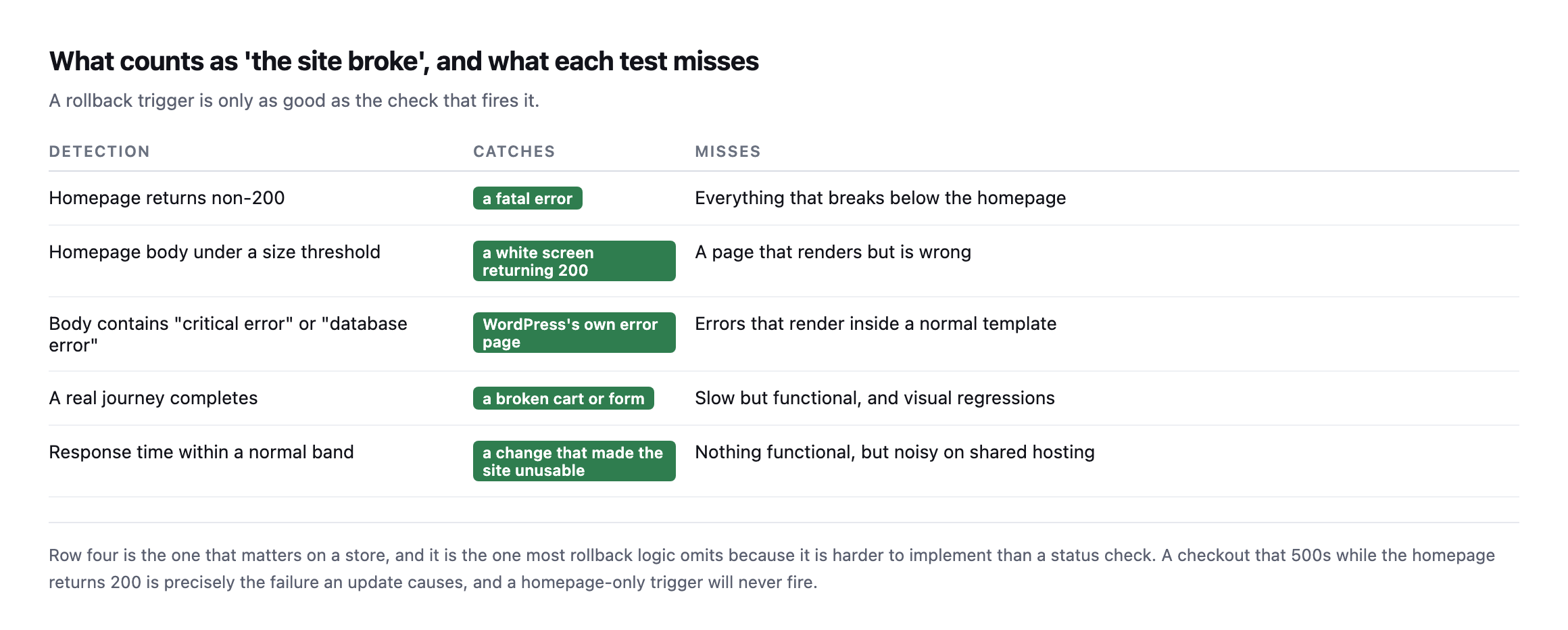
because it is harder to implement than a status check.*
| Detection | Catches | Misses |
|---|---|---|
| homepage returns non-200 | a fatal error | everything that breaks below the homepage |
| homepage body under a size threshold | a white screen returning 200 | a page that renders but is wrong |
| body contains “critical error” / “database error” | WordPress’s own error page | errors that render inside a normal template |
| a real journey completes | a broken cart or form | slow but functional, visual regressions |
| response time within a normal band | a change that made the site unusable | nothing functional, noisy on shared hosting |
A homepage-only trigger never fires on the most common real failure: an update that leaves the homepage returning 200 while the checkout 500s. I demonstrated exactly that failure with three green URLs and one red one.
So the verification step has to walk something real. On a store, a cart and a checkout. On a brochure site, a form. The homepage is the weakest possible signal and the easiest to implement, which is why it is usually the only one there.
What a WordPress rollback after an update actually reverses
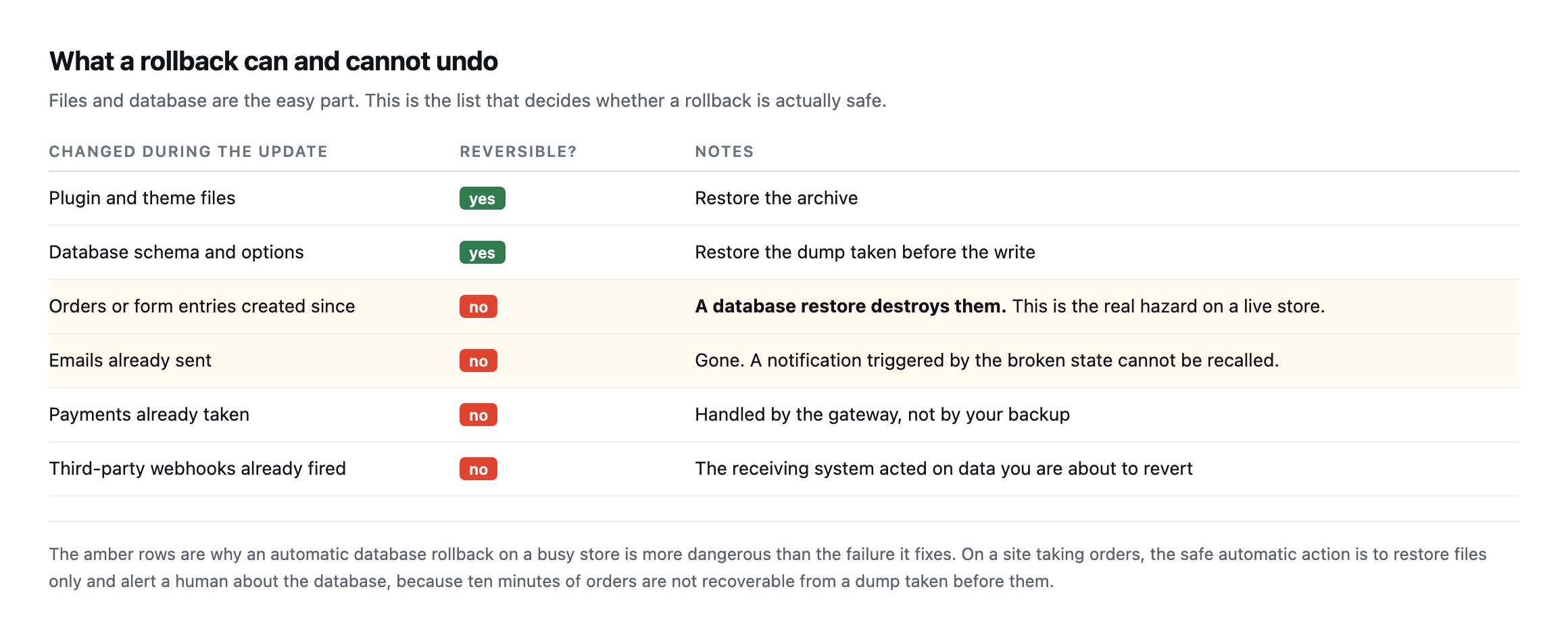
than the failure it fixes.*
| Changed during the update | Reversible? | Notes |
|---|---|---|
| plugin and theme files | yes | restore the archive |
| database schema and options | yes | restore the dump taken before the write |
| orders or form entries created since | no | a database restore destroys them, the real hazard |
| emails already sent | no | gone, cannot be recalled |
| payments already taken | no | handled by the gateway, not your backup |
| third-party webhooks already fired | no | the receiving system already acted on it |
This is the argument I would most want an agency to take from this post.
Restoring files is nearly always safe. The plugin was replaced, you put the old one back, and nothing a customer did is affected.
Restoring the database is a different act entirely. It rewinds state. Ten minutes of orders on a store doing real volume are simply gone, and unlike a broken checkout, that damage is not recoverable by fixing the code.
So the safe automatic behaviour on a transactional site is: restore files automatically, never the database, and get a human involved. The database rollback is a decision with commercial consequences and it deserves a person.
Breaking a real site and restoring only the files, to see if the claim holds
The argument that a file-only restore is safe while a database restore destroys business activity is easy to state and worth actually testing rather than taking on faith. I did, against a real WordPress install with a real order on it.
First, a real order, representing business that happened since the last backup:
wp wc shop_order create --status=processing --set_paid=true
# Success: Created shop_order 117.
Then a real backup of one plugin’s files, and a deliberately broken update, corrupting the plugin’s main PHP file the way a bad release or a failed deployment actually does:
tar -czf plugin-backup.tar.gz wp-content/plugins/contact-form-7
echo '<?php syntax error not valid php {{{' >> wp-content/plugins/contact-form-7/wp-contact-form-7.php
curl -s -o /dev/null -w '%{http_code}\n' https://example.com/500A genuine, site-wide fatal error, not a simulation described in prose. The homepage, every page, everything running PHP on that install, returned 500. Then the file-only restore, deliberately touching nothing in the database:
rm -rf wp-content/plugins/contact-form-7
tar -xzf plugin-backup.tar.gz -C wp-content/plugins
curl -s -o /dev/null -w '%{http_code}\n' https://example.com/200Site recovered, plugin back to its working version, confirmed. And the order created before any of this happened:
wp post get 117 --field=post_status
# wc-processing
Untouched. Still there, still in the same status, because a file-only restore never opened the database at all. That is the entire argument of this post’s central table, demonstrated end to end on a real install rather than asserted: the fatal was real, the recovery was real, and the business data created in between survived because the two categories of restore genuinely are independent operations, not merely described as independent in theory.
The window
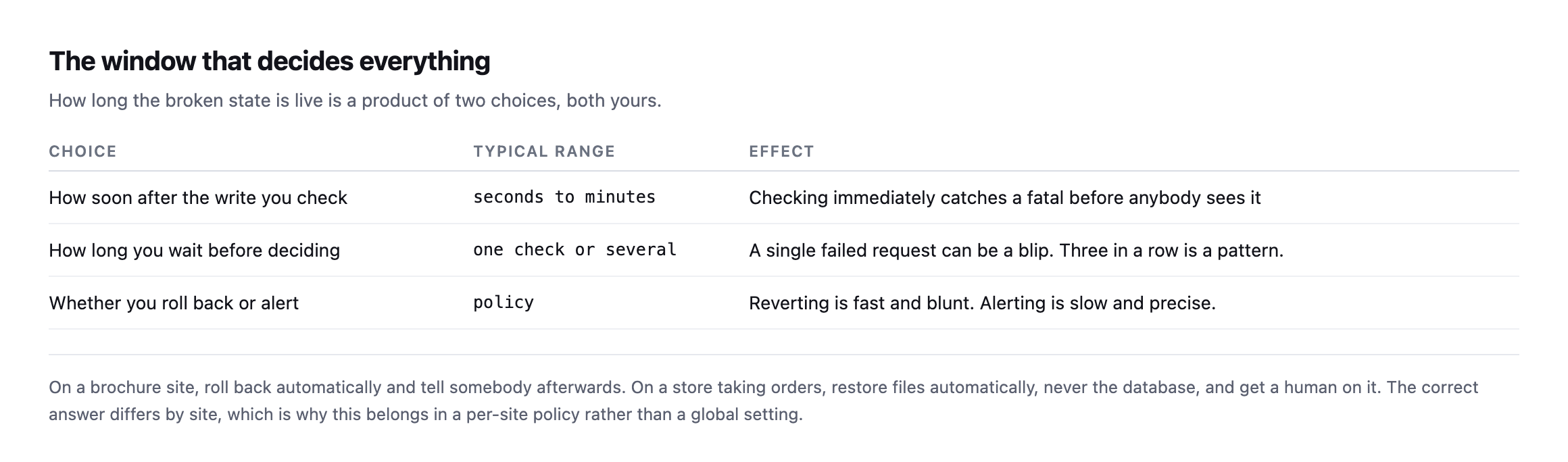
restore files automatically and get a human on the database.*
One check immediately after the write catches the fatal before a visitor sees it. Waiting for three consecutive failures avoids reverting because of one unlucky request. Both are defensible, and the right answer depends on how much traffic the site takes.
What is not defensible is having no policy, which is where most agencies are: the update runs, and whether anybody notices a problem depends on who happens to look.
The failure that arrives late
Everything above deals with an update that breaks the site immediately. The harder case is the one that surfaces on Thursday.
A plugin update that works fine until a scheduled job runs. A change that only affects logged-in users, on a site whose traffic is mostly anonymous. A theme update that broke one template nobody loads until the weekend. In each case the post-update check passed honestly, because at that moment nothing was wrong.
Two things help, and neither is a rollback.
Keep the before-state longer than the run. If backups are discarded once the check passes, you cannot revert a regression found two days later. Retention is a policy decision, and “until the next backup” is not enough.
Watch the things that fail quietly. The failure that surfaces late is nearly always in a surface nobody looks at: a scheduled job that stopped, a form that began silently failing, a checkout that broke for one payment method. Those need their own checks, running on their own schedule, independent of any update.
An update rollback protects the ten minutes after a write. It does nothing about the rest of the week, and pretending otherwise is how agencies get surprised.
What to do without any of this
The manual version is worth writing down even if nothing automates it.
Before the update, record the versions and take a backup you have actually proved restores. After the update, load the homepage and walk one real journey. If either fails, restore files first and only consider the database if the files alone did not fix it.
And decide the store policy in advance. “Do we ever automatically restore the database on this site?” is a question with a different answer for a brochure site and a shop, and the worst time to answer it is at the moment it matters.
Protuno records what a run changed as it changes it, and the run report lets you undo the playbooks whose changes are reversible: plugin updates, spam comments and broken links. Changes made by running PHP are recorded as unable to be undone, and those runs are gated on a backup that has been checked instead. The Super Agents are live now.
One last practical point, because it is the cheapest safeguard on this page and nobody does it: update in an order that limits blast radius. One site at a time rather than the whole portfolio, and the least commercially important site first. If a plugin update is going to fatal, you would rather learn that on the site nobody visits than on the store. Staggering costs nothing and turns a portfolio-wide incident into a single-site one.
Write down, for your three largest client sites, what should happen automatically if an update breaks them. If the answer differs between the three, you have just discovered why a global setting was never going to work, and you have written the first useful line of your own rollback policy.
What the test did not cover, and why that matters
The demonstration above proves the mechanism this post argues for. It is worth being precise about what it does not prove, because a single clean test on a lab install is not the same claim as “this always works.”
The break I introduced was a fatal PHP error, the easiest failure mode there is to both cause and detect: the homepage went straight to 500, exactly the top row of this post’s own detection table, the one signal every basic rollback tool already checks. That is deliberately the easy case. A real bad update is just as likely to produce the harder failures this post spends most of its length on: a homepage that stays at 200 while the checkout breaks, a regression that only shows up for logged-in users, a template fault that nobody hits until the weekend. A file-only restore would fix all of those the same way it fixed the fatal here, because the mechanism, put the old files back, does not care what kind of bug the new files introduced. What differs entirely is detection, and this test intentionally used the one failure every rollback system already catches, precisely so the restore step itself, not the detection step, could be verified cleanly and unambiguously.
The order surviving is also a smaller claim than “nothing about the site is ever affected by a file-only restore.” It proves the database was never touched, which is the actual argument this post makes about orders and form entries specifically. It says nothing about whether the corrupted plugin, while broken, could have caused other damage in that window, a partial write, a failed webhook, a queued email that errored out mid-send. Those are separate risks with separate mitigations, not something a files-versus-database distinction resolves on its own, and conflating “the order record survived” with “nothing bad happened during the outage” would overstate what this specific test actually showed.
Why the test still matters despite those limits
None of that weakens the core point. It sharpens it. The easiest possible failure to detect and the cleanest possible restore to perform is the floor this mechanism has to clear before it is worth trusting on anything harder. It cleared it: real fatal, real recovery, real order untouched, no approximation anywhere in the chain. A file-only restore that failed to recover a site from its own easiest case would not be worth building a rollback policy around at all. One that succeeds cleanly on the easy case, and is architecturally identical regardless of which kind of bug caused the failure, is worth trusting on the harder cases too, precisely because the restore mechanism itself does not know or care what kind of bug it is undoing. The part that still needs a human, or a much better detection system than a homepage status check, is finding the harder failures in the first place. Fixing them, once found, is the same tar-and-restore this test just proved works.
Comments