AI Agent Permissions On WordPress: What To Ask Before Connecting Anything.
The credential decides the ceiling, not the vendor’s settings screen. Five questions, and the one about what it does when unsure.

Short answer: ai agent permissions on a WordPress site are decided by two things, and only one of them is the vendor’s settings screen. The other is the credential you hand over, which inherits the capabilities of the user it belongs to. A tool promising restraint, connected as an administrator, has whatever access the connector exposes.
The five questions
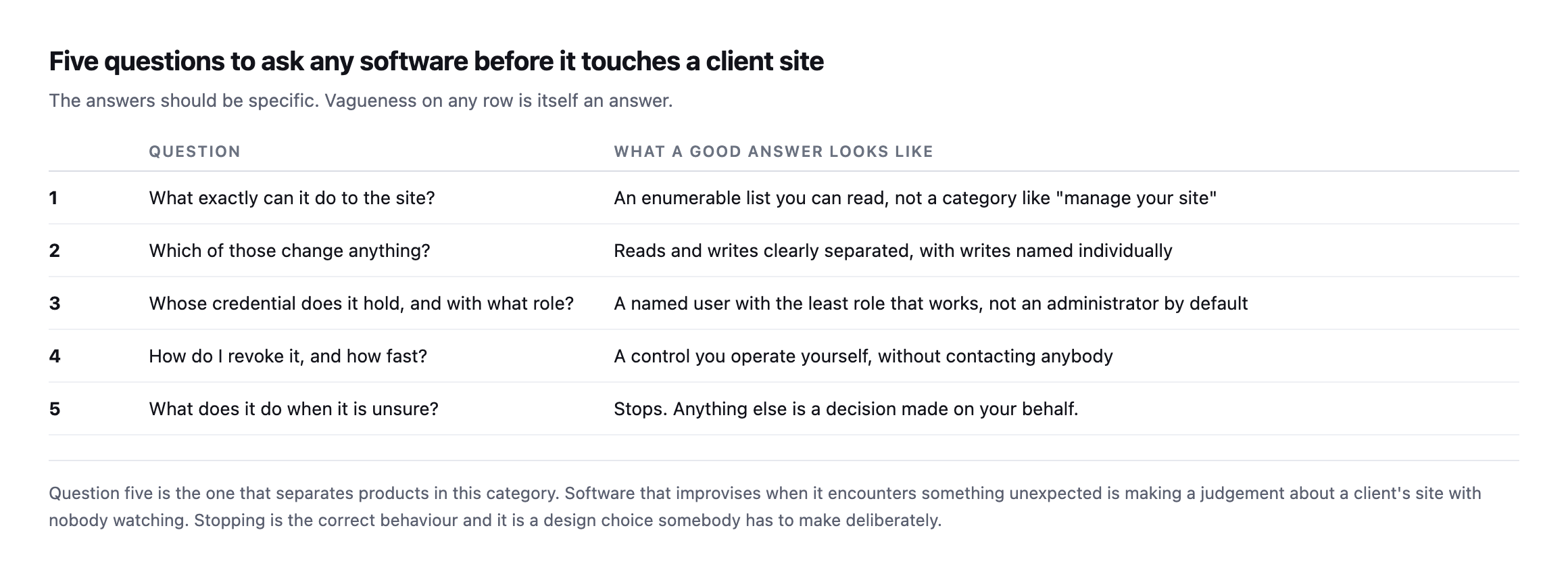
| # | Question | What a good answer looks like |
|---|---|---|
| 1 | what exactly can it do to the site? | an enumerable list, not a category like “manage your site” |
| 2 | which of those change anything? | reads and writes separated, writes named individually |
| 3 | whose credential, what role? | a named user with the least role that works |
| 4 | how do I revoke it, how fast? | a control you operate yourself, no contacting anybody |
| 5 | what does it do when unsure? | stops; anything else is a decision made on your behalf |
Question one is now answerable in a way it was not two years ago. A WordPress site with the Abilities API can be asked directly what it permits, and the list is readable before you connect anything. On the site I checked, three abilities came from core and everything capable of changing anything came from an installed plugin.
Question five is the one that separates products in this category. Software that improvises when it meets something unexpected is making a judgement about a client’s site with nobody watching.
With AI agent permissions, the credential is the real control
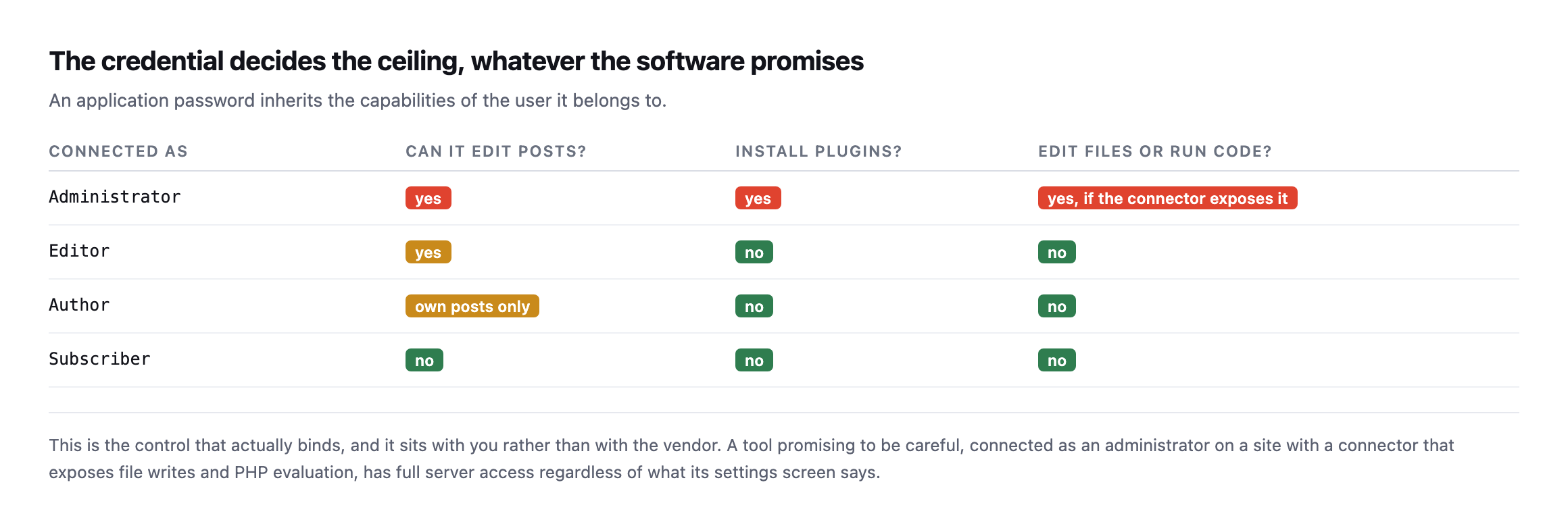
| Connected as | Edit posts? | Install plugins? | Edit files / run code? |
|---|---|---|---|
| Administrator | yes | yes | yes, if the connector exposes it |
| Editor | yes | no | no |
| Author | own posts only | no | no |
| Subscriber | no | no | no |
An application password inherits the role of the user that created it. So the meaningful question is not what the tool promises, it is what the account could do if the tool did something unintended.
Connect with the least role that does the job. If a tool needs to publish posts, it does not need to install plugins. If it needs to read the site, it does not need to write at all.
And verify the revocation path before you rely on it. It lives in the user’s own profile screen, it kills the connection immediately, and it takes ten seconds to test on a site you control. A safety mechanism nobody has exercised is a backup nobody has restored.
Three levels, and the progression between them
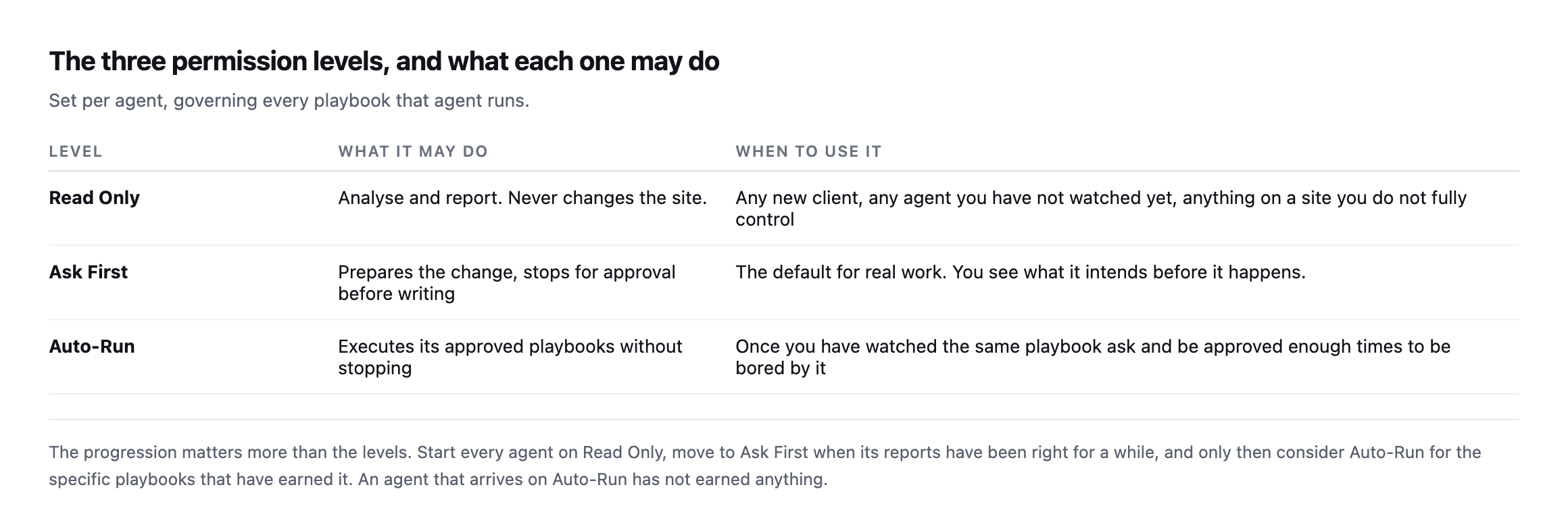
earned anything.*
The sequence I would use on a client site: Read Only until its reports have been right for several weeks, Ask First until approving its proposals has become boring, and Auto-Run only for the specific playbooks that reached that point.
Note that it is per playbook rather than per product. “Take a backup and run plugin updates” and “clean the database” are different risks, and deserve different answers, even from the same agent.
The exact connector this post describes, read again while writing this sentence
The “site I checked” reference earlier in this post is not a hypothetical. It is cms.protuno.com, and I read its full ability list again while expanding this post, through the same connector currently carrying out the research for this very session.
GET /wp-abilities/v1/abilities38 abilities came back. Three from core, all read-only: core/get-site-info, core/get-user-info, core/get-environment-info. Eleven from the connector plugin itself, agent-connector-for-wp, exactly the count this post’s original text names. Reading their descriptions rather than only their names:
agent-connector-for-wp/shell-exec  -> Run an arbitrary shell command on the server and
                                       capture stdout, stderr, and the exit code.
agent-connector-for-wp/php-eval    -> Execute arbitrary PHP inside the loaded WordPress
                                       runtime. Captures printed output, the returned
                                       value, and any thrown error.
agent-connector-for-wp/file-delete -> Delete a file, or a directory, optionally
                                       recursively. Relative paths resolve against ABSPATH.
Four of the eleven are genuinely read-only: env-inspect, file-read, file-list, search-media. The other seven, shell-exec, process-exec, wp-cli, php-eval, file-write, file-delete, and create-admin-login-link, are not an integration in any narrow sense. They are unrestricted server access, described plainly rather than hidden behind softer language, which is itself worth crediting: nothing in those descriptions pretends to be less than it is.
The remaining 24 abilities come from an SEO plugin’s own namespace, rank-math/..., split between genuine reads, get-seo-scores, get-top-keywords, analyze-post-content, and a long run of set-* writes covering sitewide SEO configuration, sitemap settings, breadcrumb structure, and plugin preferences. None of those touch the server the way the connector’s own eleven do, but each one is a real write to production configuration, and “SEO plugin” is not a category most agencies think to audit for write access at all.
I am the one reading this list, through this exact credential, while writing a post that argues for reading it. That is not a coincidence worth glossing over. It is the actual test this post asks a reader to run on their own tools, applied here to ours, and the honest result is that the connector is exactly as powerful as its own documentation says it is, nothing hidden, nothing softened, which is the property this post argues matters most regardless of which specific vendor is on the other end of the credential.
What a connector can expose
The ceiling is set by the credential, but the surface is set by whatever plugin provides the connection. That is worth reading rather than assuming, because the range is enormous.
On the site I inspected, the connector plugin registered eleven abilities. Four of them read things. The other seven included writing arbitrary files, running shell commands, and evaluating PHP inside the loaded WordPress runtime. Those last three are not an integration in any meaningful sense; they are server access with a friendlier name.
That is not a criticism of the plugin, which documents exactly what it does. It is the reason the decision of which connector to install belongs to whoever is responsible for the site, rather than being a technical detail delegated to whoever set the tool up.
The practical check takes a minute: request the ability list, group it by namespace, and read the description of anything containing write, exec, eval or delete. If that list surprises you, you have learned something the marketing page did not tell you.
Instruction against inability
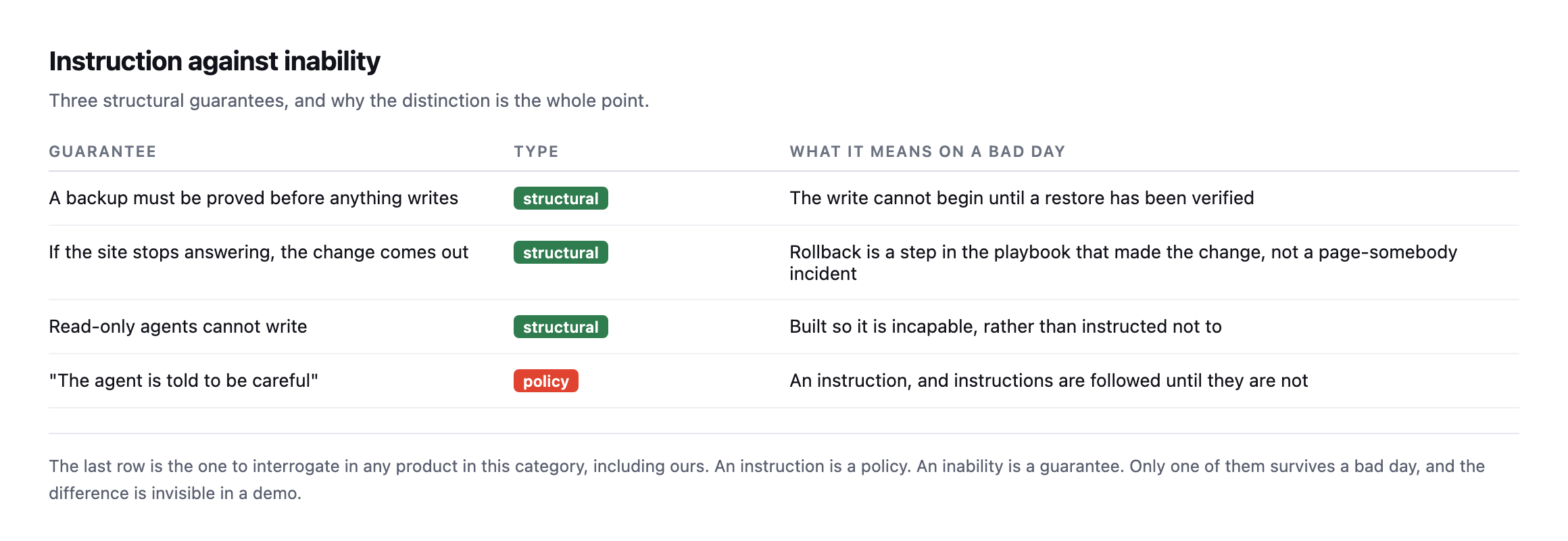
instruction is a policy. An inability is a guarantee.*
| Guarantee | Type | What it means on a bad day |
|---|---|---|
| a backup must be proved before anything writes | structural | the write cannot begin until a restore is verified |
| if the site stops answering, the change comes out | structural | rollback is a step in the playbook, not an incident |
| read-only agents cannot write | structural | built incapable, rather than instructed not to |
| “the agent is told to be careful” | policy | an instruction, followed until it is not |
This is the question I would put to any vendor, and the answer is usually revealing. When you ask whether a read-only mode can write, “it is designed not to” and “it has no code path that writes” are very different sentences.
The distinction is invisible in a demo, because in a demo nothing goes wrong.
Checking whether our own connector answers its own sixth question
This post argues for a sixth question beyond the original five: what record does the tool leave of what it actually did. I checked whether the same 38-ability list includes anything answering that question for our own connector, rather than assume it does.
grep -i "log\|audit\|history" <ability names>Two near-matches, neither a real answer. rank-math/audit-site-seo audits a site’s SEO content quality, unrelated to logging agent activity. agent-connector-for-wp/create-admin-login-link only matched because “login” contains the substring “log.” Nothing in the actual 38-ability surface returns a record of which ability was called, on which site, at what time, with what result. That capability may exist elsewhere in the connector’s own admin screens, outside what the Abilities API itself exposes, but it is not discoverable the same way the abilities themselves are, through the one interface this post already argues is the right place to look first.
That is worth stating plainly as a real gap in our own tooling rather than glossing past it: the sixth question this post recommends asking is one our own connector, read honestly today, does not yet answer through its ability list. Naming that here is the same discipline the rest of this post asks of a reader evaluating anybody else’s product, applied without an exception for the one we use ourselves.
The question nobody asks about logging
There is a sixth question I would add after using this category for a while: what record does it leave?
Not a chat transcript. A record of what was done to the site: which playbook, on which site, at what time, what changed, and what the state was before. That is the artefact you need when a client asks why their site looks different on Thursday, and it is the difference between an agency that can answer and one that is guessing.
It is also the commercially useful part, which is easy to miss while worrying about safety. An agency that can show a client what was checked, when, and what was done about it wins work from one that cannot. The permission model protects you on the bad day. The record earns you the retainer on every other day.
What this means for an agency
You are the one carrying the risk. The client’s site is your responsibility, and no vendor assurance transfers that.
So the practical position is: connect with the smallest credential that works, start read-only, read the ability list yourself rather than the marketing page, and confirm you can revoke it without asking anybody. All four are things you control.
That is also why Protuno sets permission per site rather than per agent, why a playbook that changes a site takes a backup and checks it before it proceeds, and why a site left on Read Only has the changing tools removed from the run before it starts. Straight with you as on every post here: the Super Agents are live now, since 27 October 2026, and the questions above are the ones to ask of any product, ours included.
It is the same discipline as reading a plugin’s actual behaviour rather than its settings screen: configuration describes intent, and only observation describes what happens.
Ask them of whatever you are already using. The answers are more interesting than the feature list.
The broader case for this kind of permission tiering
IBM Technology on sandboxing and role-based access control for agentic systems generally, the same architectural instinct behind the three-tier model this post argues for.
Comments