WordPress Core Update Readiness: The Playbook, Step By Step.
A WordPress core update needs a plan. See how a two-step, read-only playbook lists which plugins say they were tested with the new version.

Open the WordPress dashboard and click Updates.
A new version is waiting, with an Update Now button next to it.
The click is easy. The harder question is which of your active plugins say they were tested with that version, and you would like the answer before you press the button, not after.
Short answer: A WordPress core update means moving to a new version of WordPress itself. A minor release such as 7.1.3 can install in the background on most sites, while a major release such as 7.2 usually waits for you to start it, depending on how the site was set up. Each plugin states which WordPress version it was tested up to. The Major Update Readiness playbook reads that stated version for up to 20 active plugins and your theme from wordpress.org, compares each one with a target version you set, and writes a planning report that rates the site Not ready yet, Check first or Looks ready on paper. It only reads. It starts no update, and “declared compatible” never means the update will go well.
What this post is, and is not: A method write-up of one read-only playbook, based on its two step files as shown in the Protuno dashboard and on its public page on 26 October 2026. It is not a result from a real run: no playbook was run for this post, and every plugin name, version and count in it is an illustration with example values.
Minor Releases Install Themselves, Major Ones Usually Wait For You
The WordPress documentation on updating describes two kinds of core update. Minor and security releases can be applied in the background on most sites. For major feature releases, the same page says you still click Update Now yourself.
That is the default most sites follow, not the only one. The developer documentation says installations created on WordPress 5.6 or later get major core updates by default, unless a version control checkout is detected, while older ones keep the old behaviour. So whether 7.2 waits for a click depends on the site. WordPress Auto Updates: Which Ones To Switch On covers how to check yours.
That split matches the release page today. WordPress 7.1.3, released on 6 October 2026, is a maintenance and security release with 7 security fixes and 4 bug fixes, and its notice says sites that support automatic background updates will begin updating automatically. WordPress 7.2 is a different kind of release. Beta 1 came out on 20 October 2026, the notice says not to install or test it on production or mission-critical sites, and the scheduled final release date is 8 December 2026.
So there is a date, and the work comes before it: knowing what is installed and what each plugin says about the new version. After the final release, moving to 7.2 is a major update, which on many sites waits for a click and on some may start on its own.
This post uses 7.2 as the example target because it is the next major release. Neither notice names a plugin, and this post does not test any plugin against 7.2.
What “Tested Up To” Actually Means
Every plugin on wordpress.org carries a readme file, and the developer documentation on how that file works defines the field. “Tested up to” is the version of WordPress that the plugin has been tested against. It ignores minor versions, so a plugin only needs to name the major version, and the plugin directory adds the minor version automatically.
Three things follow from that wording:
- It is a statement by the plugin’s developers. The readme is theirs. The field is a claim about testing, not a check anyone else ran.
- It covers minor releases. A plugin that says it was tested up to 7.1 is covered for 7.1.3, because the field ignores minor versions.
- A lower number is a gap, not a verdict. A plugin that says 7.1 when the target is 7.2 has not declared the new version yet. That can mean a real gap or a readme nobody has updated. The field cannot tell you which, and the playbook does not pretend it can.
The playbook is strict about its words for the same reason. Its step files say “declared compatible” means the plugin’s wordpress.org page says it was tested up to that version, nothing more. They forbid the phrases “will work”, “is safe to update” and “will break”.
The Playbook, Step By Step
The Major Update Readiness playbook has two steps, in a fixed order. In the dashboard it carries a Beta label, sits in the Maintenance group and only reads. The public page files it under Care, says it needs no connector, and says it runs when you start it with no schedule set. This post uses the public page’s category.
Set The Target First
You set the target in the playbook’s Instructions with a line like “Target WordPress version: 7.2”. Step 1 takes its major and minor numbers.
Without that line the run stops and checks nothing. Step 1 makes no tool calls at all, and step 2 prints a short “not run” note that says how to add the line. The step files say the playbook never guesses a target and never borrows the plugins’ own tested values as one, because a verdict without a target would mislead.
Step 1: Inventory And Compatibility Lookup
Step 1 is read-only. It does five things, in order:
- It asks the site, through its REST API, for the active plugins and the active theme. It leaves out Protuno’s own connector plugins, matched by exact folder name, so a plugin that merely has “protuno” in its name is judged like any other.
- It takes at most 20 active plugins, in alphabetical order by folder name, and looks each one up on wordpress.org. It reads the version, the tested-up-to version, the minimum WordPress version, the PHP requirement and the last-updated date.
- It looks up the active theme the same way. If the theme returns no tested value, it is “not scored (no compatibility data)”.
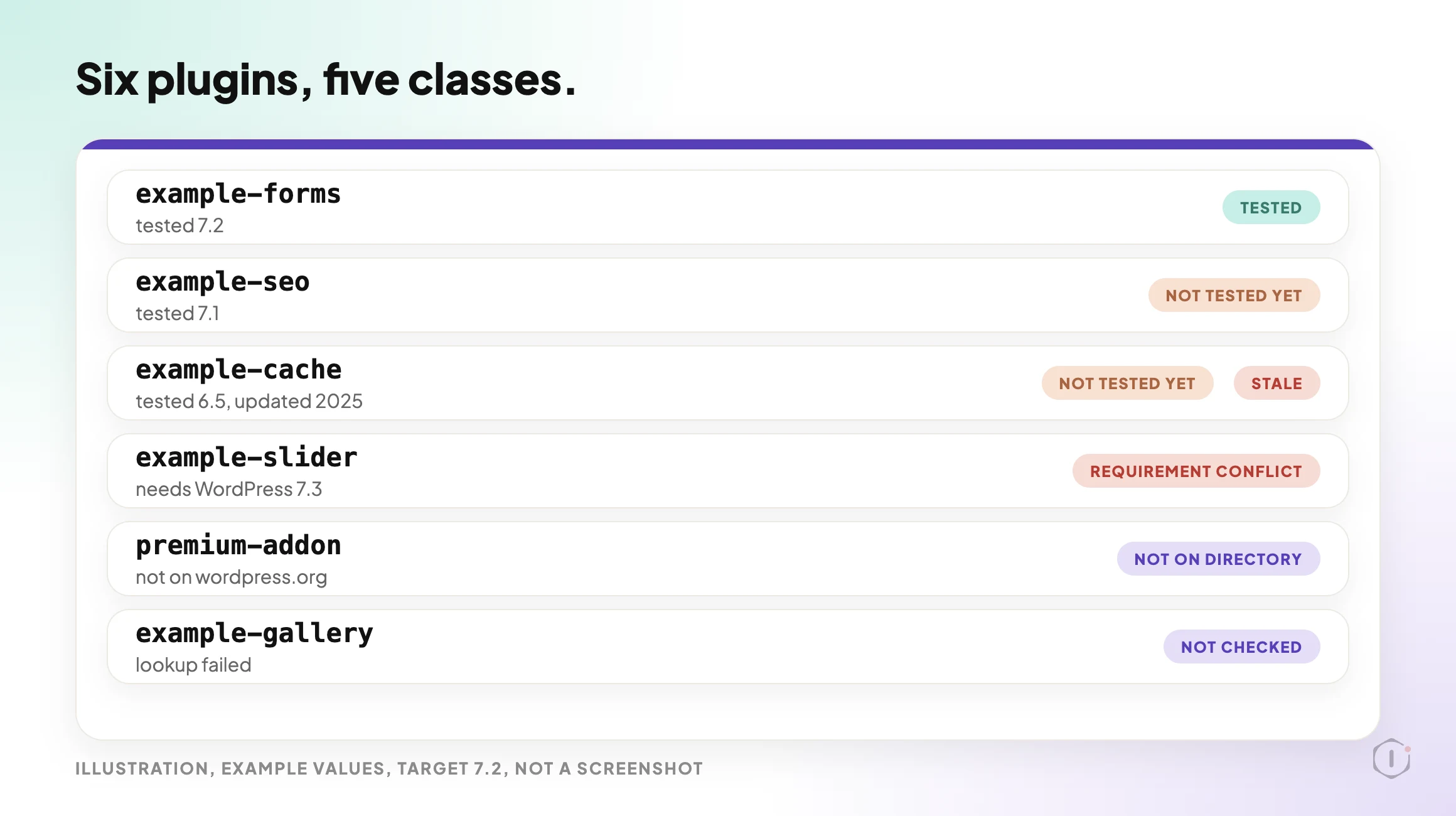
- It sorts each plugin into exactly one class. The first match wins.
- It flags a plugin as STALE when its last update is 12 months or more old, and notes whether wordpress.org has a newer version than the installed one.
The five classes, in the order the step file applies them:
- NOT ON DIRECTORY: wordpress.org has no listing. The plugin is not scored.
- NOT CHECKED: the lookup failed. The step file says never to call this “not tested”.
- REQUIREMENT CONFLICT: the plugin’s minimum WordPress version is higher than the target.
- NOT TESTED YET: the tested-up-to version is lower than the target. The versions are compared as numbers, so 6.10 counts as higher than 6.9.
- TESTED: the tested-up-to version equals or exceeds the target.
Step 2: Readiness Report
Step 2 makes no calls. It reads the block step 1 produced and writes one planning report. If step 1’s block is missing or step 1 failed, it says “BROKEN CHAIN” and stops.
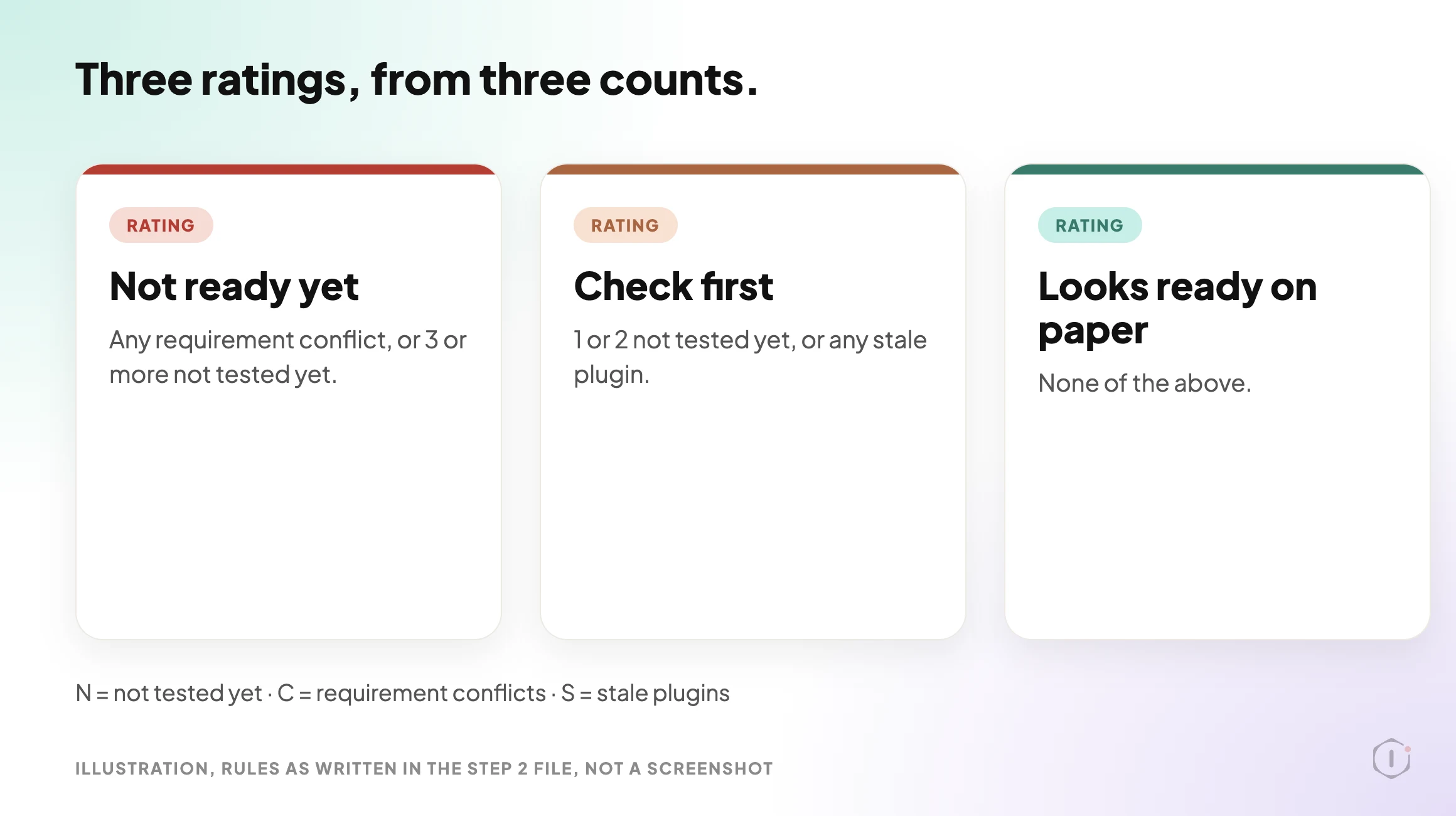
It counts before it decides. N is the number of NOT TESTED YET plugins, C the number of requirement conflicts and S the number of stale plugins. A plugin that is both NOT TESTED YET and STALE counts in both N and S. The rating then follows fixed rules:
| Rating | When it applies |
|---|---|
| Not ready yet | Any requirement conflict, or 3 or more NOT TESTED YET |
| Check first | 1 or 2 NOT TESTED YET, or any STALE plugin |
| Looks ready on paper | None of the above |
The “Check these first” table is ordered the same way every time: requirement conflicts, then plugins that are NOT TESTED YET and STALE, then NOT TESTED YET, then STALE only, then NOT CHECKED. Every row gets one action. The three allowed actions are “wait for an update that declares” the target, “test on staging first”, and, for stale plugins only, “consider a maintained alternative”.
The report has a fixed layout: a rule-check line that shows N, C and S and the rating they give, the rating, a summary line, the “Check these first” table, the plugins declared compatible, the plugins not scored (with the theme), a “Before you update” list, a “Not checked” list and a closing note that nothing was changed.
How To Read A Rating
The rating is a count, not a prediction. Take an illustrative site with 12 active plugins. If 2 are NOT TESTED YET and none is stale or in conflict, the rating is Check first, because 1 or 2 is Check first. If a third joins them, it becomes Not ready yet. If one plugin requires a higher WordPress version than the target, the rating is Not ready yet even when every other plugin is TESTED.
The rule-check line prints N, C and S so you can see why the rating came out the way it did. The wording “on paper” is deliberate: the best rating still only says what wordpress.org pages declare.
What The Settings And The Public Page Say
The two sources agree on the substance. Both say the playbook only reads, has two steps and needs no connector, and the public page says no step is set to pause for your approval. The only difference I found is the group label: the dashboard says Maintenance, the public page says Care.
I opened the settings panel for both steps in the dashboard, view only. Both show Automatic backup None and Approval checkpoint Off. For a playbook that changes nothing, that fits: there is nothing to back up and nothing to approve.
What The Playbook Does Not Do
The step files and the public page set clear limits:
- It starts no update. It does not edit the site, and it is a planning report only.
- It checks at most 20 active plugins and the theme. Plugins beyond the first 20 are not checked.
- It does not check inactive plugins, custom code inside plugins and themes, or the host’s PHP version against each plugin’s PHP requirement.
- It does not score premium or custom plugins that are not on wordpress.org. They are reported as not on the directory.
- It does not read known issues reported outside wordpress.org.
- “Declared compatible” is not a promise that the update will go well.
Two of those limits are covered by other Protuno posts. A premium plugin that is not on wordpress.org is outside this playbook, and the Premium Plugin Licenses post covers premium plugins whose updates stop quietly. The host’s PHP version is a separate question, and the PHP version post covers it. A plugin that has been pulled from the directory should also come back as not on the directory, and the removed plugin post explains why nobody tells the site.
A Careful Version You Can Do By Hand
You can do the same reading without a playbook. It takes longer as the plugin count grows.
- Write down the target version, for example 7.2.
- Open Plugins, filter to Active, and list every plugin and the theme.
- For each one, open its wordpress.org page and read the Tested up to and Last updated values. For a premium plugin, read the vendor’s changelog or support page instead.
- Mark each plugin as tested, not tested yet, or not found. Flag anything not updated in 12 months.
- Take a restore point, and check that it restores. The backup verification post explains why a file with a hopeful name is not a backup.
- Run the update on a staging copy first and check the front end, forms and checkout. The staging drift post lists what stops a staging copy matching the live site.
- Know how you would undo it. The rollback post explains what a rollback after an update can and cannot undo.
At 20 plugins, step 3 is 20 page visits and a spreadsheet nobody keeps. That is the repeatable part, and it is the part the playbook takes over. The judgement stays with you: which plugin matters most, and what you will test.
The report’s own closing advice is a restore point, a staging test and plugin updates before the WordPress update. If a site already has two plugins doing the same job, the plugin conflicts post covers a separate read-only report on that.
Two Outside Views
A short video and a forum thread. Neither is an endorsement, and neither describes the Protuno playbook.
Ahosting INC’s “Problems Auto-Updating Plugins and Themes: Fix It (2026)“, published 14 October 2026, is about the Site Health warning “Your site may have problems auto-updating plugins and themes”. It is not about plugin compatibility or core updates. Its useful point is what a green result measures: in the presenter’s account, a pass only means your code is not blocking updates, so a full disk or locked file permissions can still stop real ones.
A clean diagnostic report proves your code and your interface are aligned.
Ahosting INC, Problems Auto-Updating Plugins and Themes: Fix It (2026), auto-generated English captions, 14 October 2026
The parallel is worth keeping in mind. A “tested up to” value and a “Looks ready on paper” rating also measure one narrow thing. The video is a hosting company’s explainer tied to its own blog post.
In an r/Wordpress thread titled “Did your sites actually update to 7.1.2, or do you just have auto-updates turned on?”, the poster argues that the sites that fall behind are often the managed ones, not the neglected ones:
It’s the client site with change control and a staging step, where the 7.1.2 ticket is still waiting on a reviewer who’s on holiday until Monday.
u/Capital_Attention702, r/Wordpress, 30 September 2026
One commenter in the same thread recommends setting WP_AUTO_UPDATE_CORE to 'minor' in wp-config.php, so that urgent security patches arrive without major updates. That matches what the developer documentation says the 'minor' value does. These are people’s accounts, not data. The thread also makes claims about attacks on 7.1.2 that I did not check, so I have left them out. A readiness list is something that reviewer on holiday could pick up and work from.
Where Protuno Fits
The Major Update Readiness playbook is the reading part of this job. It lists the active plugins and the theme, looks each one up on wordpress.org, compares them with a target you set, and writes a rating with a “Check these first” list. It needs no connector, runs when you start it and has no schedule set. It starts no update.
A different playbook, Plugin Safe Update, is the one that applies plugin updates one at a time and then checks the site. The update process post is a written-out sequence for applying updates. Protuno publishes its playbooks as written-out steps you can read first. The playbooks page lists them, and this one has its own page at Major Update Readiness.
The Point
A major WordPress release comes with a date. The plugins on your site each say what they were tested with, and that is information you can read before you press the button.
Set the target, read what each plugin declares, treat a gap as a question, and keep the judgement about what to test first. A rating on paper is a reading list, not a promise.
If WordPress 7.2 were released tomorrow, could you list the plugins on your busiest site that say they were tested with it?
Sources And Further Reading
- Updating WordPress, WordPress Documentation
- Upgrading WordPress, Configuring Automatic Background Updates, WordPress Developer Resources
- How Your readme.txt Works, Plugin Handbook, developer.wordpress.org
- WordPress 7.1.3 Maintenance and Security Release, WordPress.org News, 6 October 2026
- WordPress 7.2 Beta 1 is Ready for Download and Testing, WordPress.org News, 20 October 2026
- Problems Auto-Updating Plugins and Themes: Fix It (2026), Ahosting INC, YouTube, 14 October 2026
- Did your sites actually update to 7.1.2, or do you just have auto-updates turned on?, r/Wordpress, 30 September 2026
- Major Update Readiness, Protuno playbook page
Comments