When A WordPress Plugin Is Removed From The Repository, Nobody Tells The Site.
A plugin pulled from WordPress.org stays installed, stays active, and stops getting updates. We probed the API to see what a site can actually detect.

Short answer: when a wordpress plugin removed from repository is sitting on a site, nothing happens. It stays installed, stays active, and stops receiving updates. WordPress shows no badge, sends no email, and the plugins screen looks completely normal. The only outward signal is an absence, and an absence is not something anyone notices.
Patchstack counted 1,614 plugins and themes removed from the WordPress.org repository during 2024 over security issues the developers never fixed.
Every one of those is still running somewhere.
Why does a removed plugin keep working?
Because removal is a change to the directory, not to the site.
WordPress asks wordpress.org “is there a newer version of this plugin”. A delisted plugin returns no newer version, which is byte for byte the same answer as a plugin that is perfectly up to date. The site cannot tell those apart, so it does the sensible thing and shows you nothing.
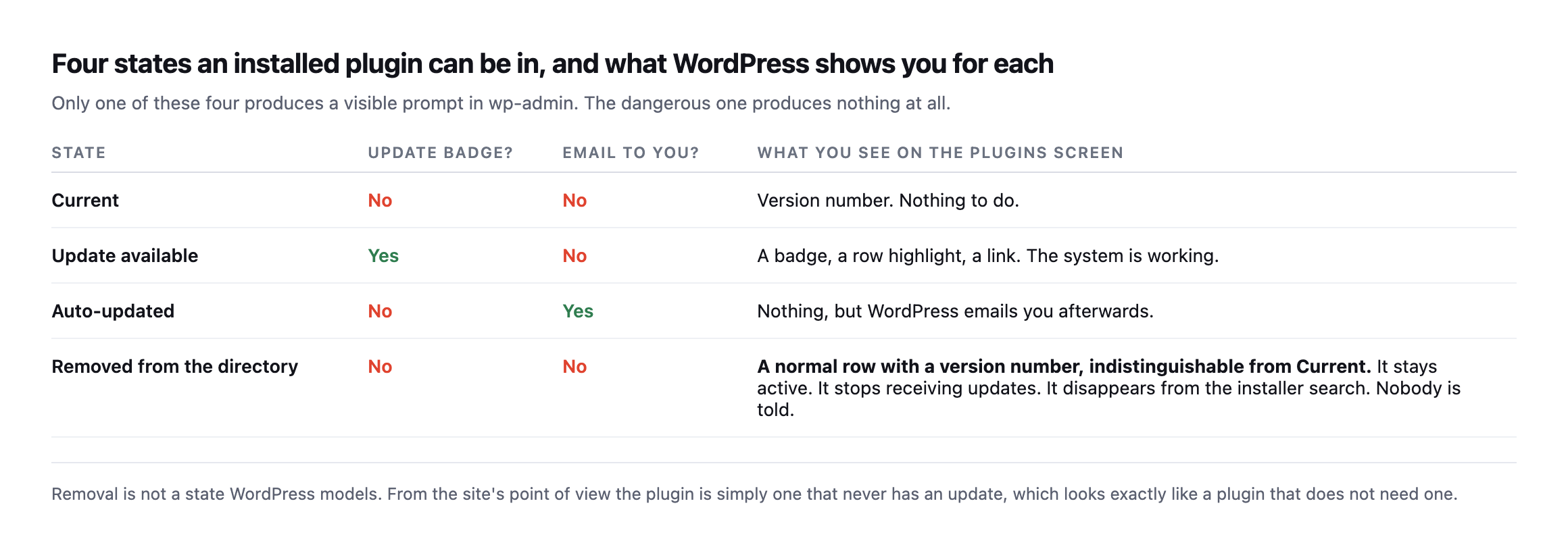
visible signal somewhere. The fourth, the one that means an unfixed vulnerability was serious enough for the directory to pull the plugin, produces nothing.*
| State | Update badge? | Email? | What the plugins screen shows |
|---|---|---|---|
| Current | no | no | version number, nothing to do |
| Update available | yes | no | badge, row highlight, link |
| Auto-updated | no | yes | nothing on screen, an email afterwards |
| Removed from the directory | no | no | a normal row, indistinguishable from Current |
Can you tell if a WordPress plugin was removed from the repository by asking the directory?
This is where it gets worse, and I tested it rather than assuming.
I queried the WordPress.org plugin information API for four slugs: two plugins I know are listed, one that has been delisted, and one slug I invented purely as a control.
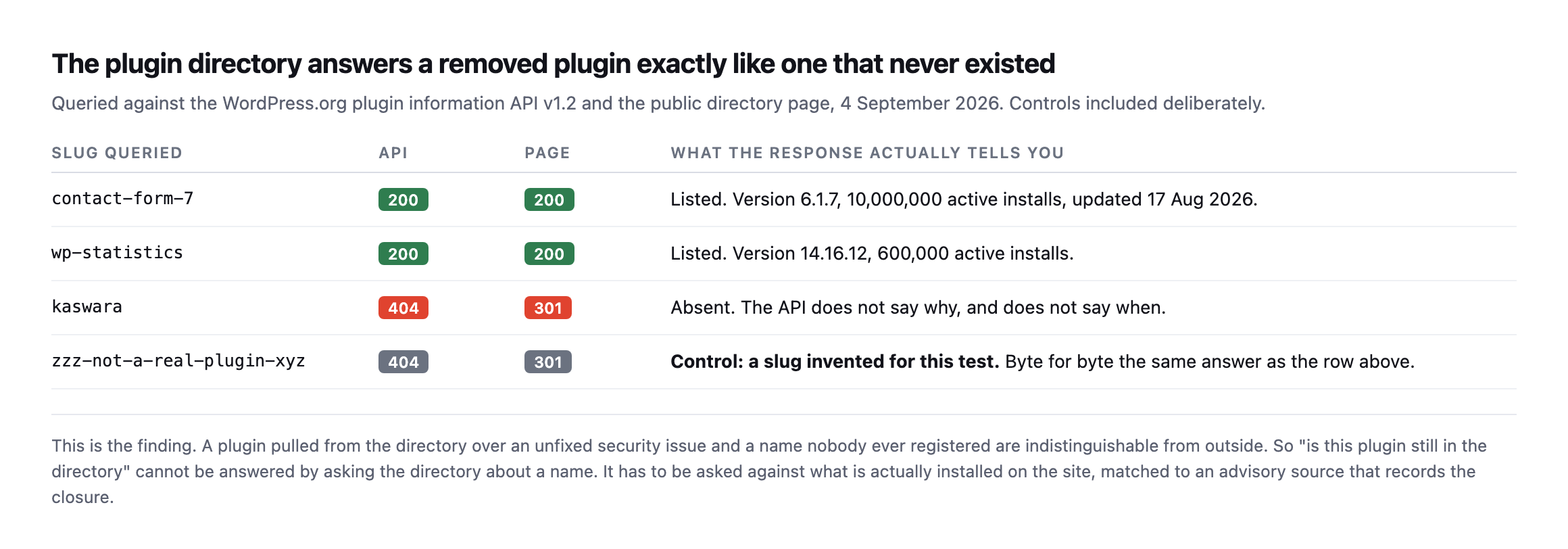
directory page. The delisted slug and the slug I made up for this test return exactly the same thing: 404 from the API, 301 from the directory page. The control row is there on purpose, because without it you would read the 404 as proof of removal.*
| Slug queried | API | Page | What it actually tells you |
|---|---|---|---|
contact-form-7 | 200 | 200 | listed, v6.1.7, 10M active installs |
wp-statistics | 200 | 200 | listed, v14.16.12, 600K active installs |
kaswara | 404 | 301 | absent, API does not say why or when |
zzz-not-a-real-plugin-xyz (control) | 404 | 301 | invented for this test, byte-identical to kaswara |
Caveat: four slugs is a demonstration of the mechanism, not a survey of the directory. The point this table proves is narrow and load-bearing: the API’s 404 cannot distinguish “removed for a vulnerability” from “never existed.” Treat every 404 as a fact worth checking further, never as a verdict on its own.
So the directory will not tell you why a plugin is absent. It will not tell you when it went, or what it went for. “Pulled over an unpatched vulnerability” and “never existed” are the same response.
Inside wp-admin the effect is quieter still. Search the installer for a delisted plugin that is running on the site right now:
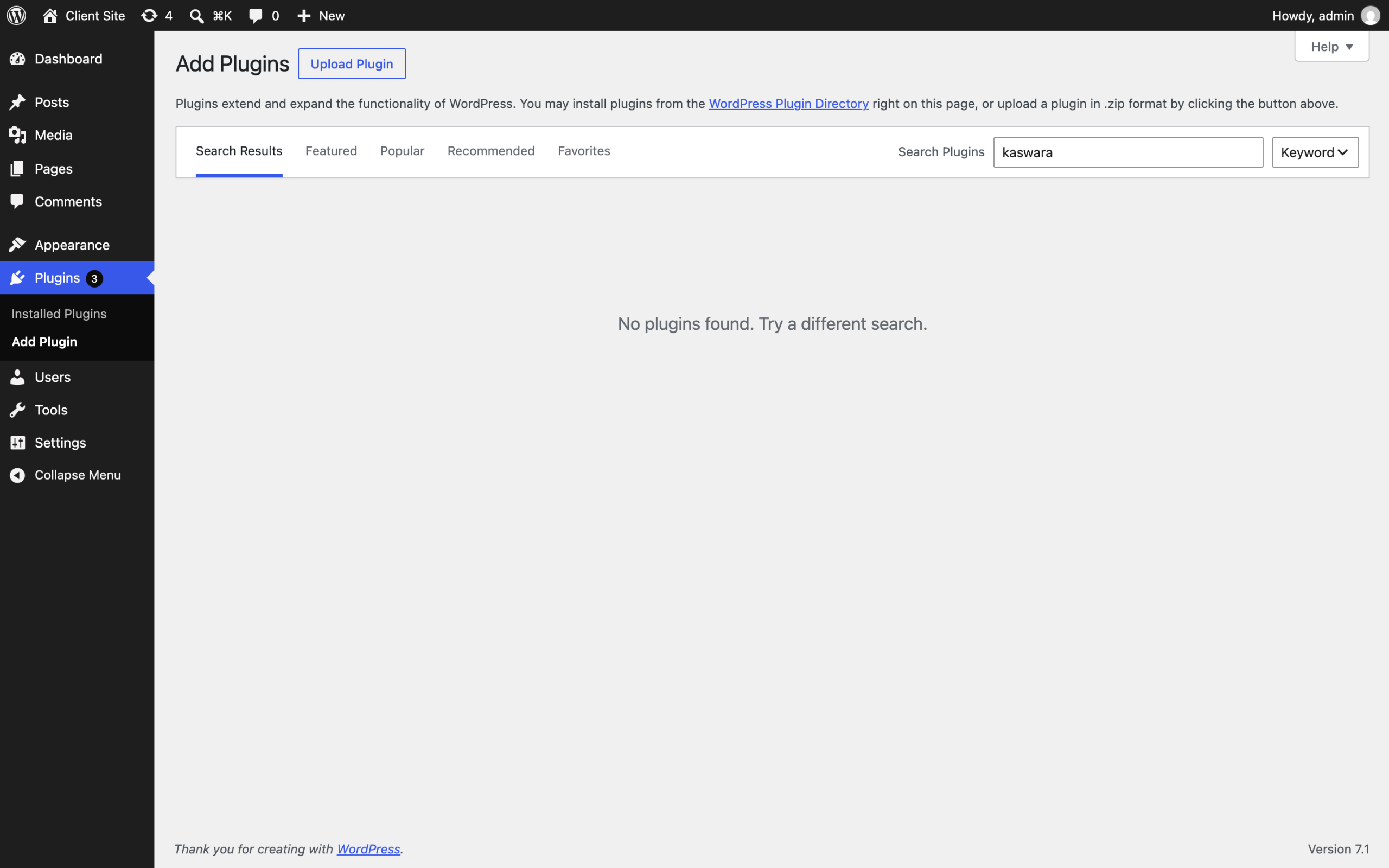
that code may be installed and active. WordPress does not connect those two facts, because nothing in the software is looking for the contradiction.*
Does removal take the code down too, or just the listing?
That was worth testing separately, because the two are not the same claim. The plugin information API says whether a slug is listed. It says nothing about whether the actual files are still reachable, and a site’s own updater talks to a different endpoint entirely.
I requested the direct download and the SVN repository for the same delisted slug, and for two currently-listed plugins as a control.
| URL pattern | contact-form-7 (listed) | hello-dolly (listed) | kaswara (delisted) |
|---|---|---|---|
downloads.wordpress.org/plugin/ | 200 | 200 | 404 |
plugins.svn.wordpress.org/ | 200 | 200 | 404 |
Both routes are gone for the delisted plugin, not just the search result. That answers a question worth having answered before you rely on it: a site’s automatic updater cannot silently re-fetch a delisted plugin from wordpress.org’s own infrastructure, because the file it would fetch no longer exists there either. Whatever copy is running on a site is whatever was already on disk when the plugin was pulled, and it will stay exactly that version forever, because there is nothing left to update to and nothing left to update from.
That has a practical consequence the earlier table does not cover. If you are rebuilding a site from a partial backup, or restoring wp-content onto a fresh WordPress install, and that restore is missing the plugin’s files, you cannot simply reinstall it from the directory the way you would with anything still listed. The 404 you get back looks identical to a typo in the slug, which is one more reason to keep a copy of anything you know has been delisted rather than assume you can fetch it again if you ever need to.
The GPL means the code itself does not disappear from the internet, only from wordpress.org’s own infrastructure. A delisted plugin frequently survives on GitHub mirrors, on GPL redistribution sites, or in whatever a developer’s own site still hosts. None of that is authoritative, none of it is guaranteed current, and none of it comes with the update channel you lost. Finding a copy is not the same problem as trusting one, and a plugin worth keeping around after a directory removal is worth the time to read the vulnerability report first, so you know whether the version you found is the one with the problem or a later one that fixed it before the whole thing was pulled anyway.
My own preference, having tested this, is not to go looking for a mirror at all. If a plugin was serious enough to pull, the honest response is to replace it, not chase down the last copy of the thing that got it pulled in the first place. Treat the 404 as the directory closing a door on purpose, and spend the time finding what replaces the functionality instead.
What actually detects it
Three signals, and only the third is reliable.
The plugin’s readme, as shipped. Compare the version installed on disk against the last version the directory ever published. Useful, but it only works while the directory still remembers, and it tells you nothing about severity.
A long-quiet plugin. Anything with no release in eighteen months deserves a look. This catches genuinely abandoned code as well, which is a feature. It also produces false positives on small, finished plugins that simply do not need changes.
An advisory feed matched against the installed inventory. This is the one that works. Not “what is in the directory”, but “what is actually installed here, at what version, and does anything in the advisory record say that version is a problem”.
Note the direction of the question. Every unreliable version of this check starts from a name and asks the directory about it. The reliable version starts from the site and asks an advisory source about what it found.
That is also why this particular check cannot run from the outside. A scan of a domain can see plenty, but the list of what is installed and at which version is only readable from inside the install.
Running the check across a whole portfolio
The check is one API call per plugin, so it scales to a portfolio easily. Here it is against every plugin on one install:
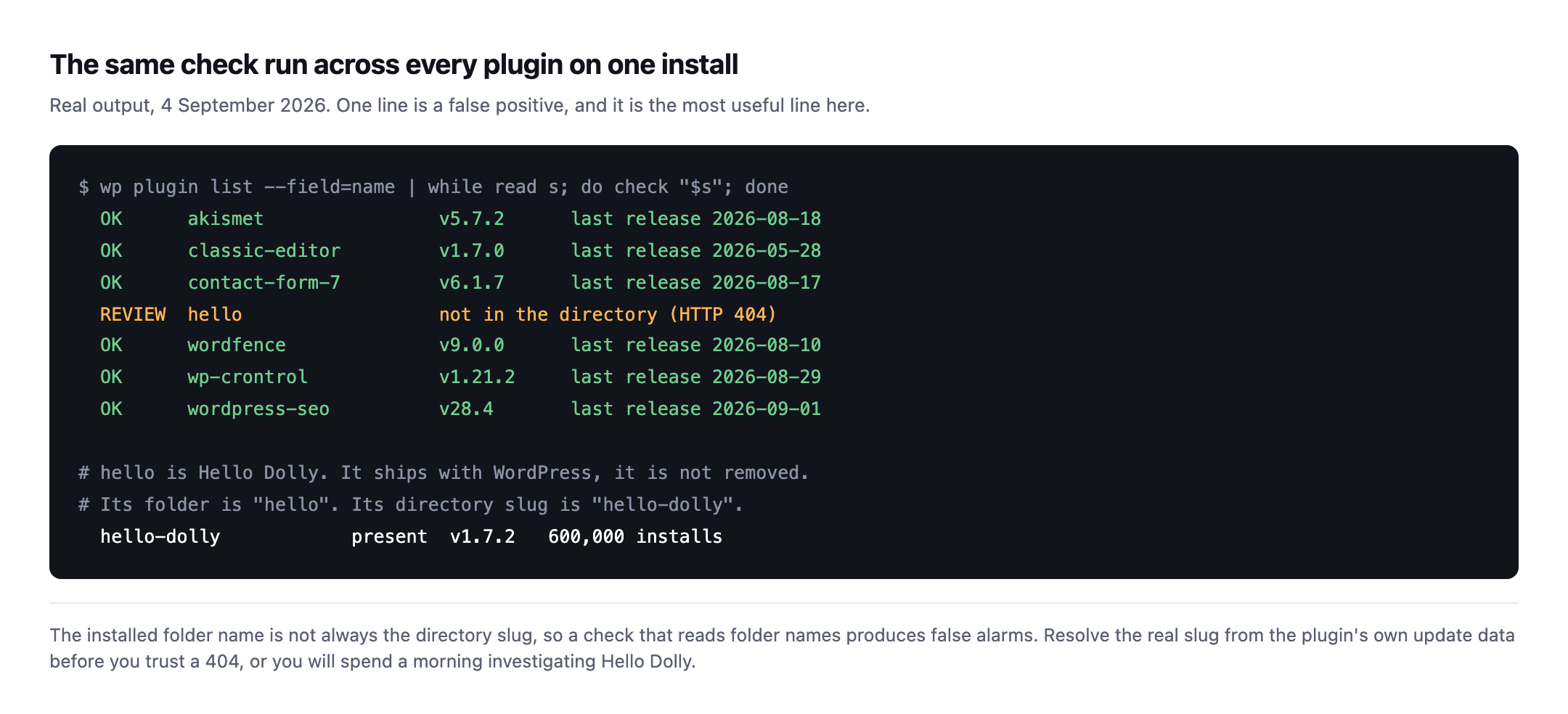
REVIEW line is a false positive and it isthe most instructive line on the screen. Hello Dolly ships with WordPress. Its folder is hello, its directory slug is hello-dolly, and both are on version 1.7.2. A check that reads folder names and trusts the 404 sends you investigating a plugin that prints song lyrics in the admin.*
Two rules fall out of that, and they are the difference between a check you can run unattended and one that cries wolf:
- Resolve the real slug before trusting a 404. The folder name on disk is not
authoritative. Read the slug the plugin’s own update data reports.
- Treat a 404 as “review”, never as “removed”. As the earlier probe showed, the API
cannot distinguish removal from a name that never existed. A check that reports removal from a 404 alone is stating something it does not know.
If your monitoring tells an agency a plugin was pulled and it turns out to be Hello Dolly, you have not built a security check. You have built something people switch off.
What to do on Monday
Pick the client site you have not opened in a fortnight and do three things.
Sort the plugins list by whatever your install shows for last update, and look at the bottom of that list. Take the five oldest and search each slug in the installer. Anything that returns “No plugins found” while sitting active on the site is your answer, and it wants a decision today rather than at the next review.
Then check whether that plugin has a maintained fork or a documented replacement, because “remove it” is rarely available when the thing renders half the client’s pages.
While you are in there, the same site is worth checking for the PHP version it runs on, since an abandoned plugin and an unsupported PHP branch tend to be found on the same install.
Where Protuno fits, and where it does not
We are building this check into Rook, the Security agent, as Vulnerability Watch: it reads what is actually installed on a connected site and matches it against advisory feeds every morning, so you hear the day something you run becomes a problem rather than at the next audit.
Straight about status, because that is the whole argument of this blog: the Super Agents are built and named but not live yet. Not on your sites, not on ours. The free audit is live and runs 54 read-only checks from a domain alone, and this is deliberately not one of them, for the reason above: it needs to read inside the install.
Until it ships, the manual version is the plugins list and the installer search box. It takes about four minutes per site, which is fine for one site and is exactly the arithmetic that breaks down across a portfolio.
And if the scheduler on that site has stopped, its auto-updates have not been running either, which is worth ruling out first.
Comments