AI SEO Optimiser: Fix Titles, Descriptions And Alt Text.
A post goes live with no meta description, a title that says “Home – My Site”, and images whose alt text is a file name. Nobody notices for months, because the page loads fine and nothing shows an error. Search engines fill the gaps themselves, and the snippet they pick is rarely the one you […]

A post goes live with no meta description, a title that says “Home – My Site”, and images whose alt text is a file name. Nobody notices for months, because the page loads fine and nothing shows an error. Search engines fill the gaps themselves, and the snippet they pick is rarely the one you would have written.
AI SEO Optimiser is a Protuno playbook built for that gap. It works on one post you choose, drafts a better title, meta description, image alt text and structured data, applies what passes its checks, and hands back a report. This guide explains what it does step by step, what it refuses to touch, and how to do the same job by hand if you prefer to.
What AI SEO Optimiser Is
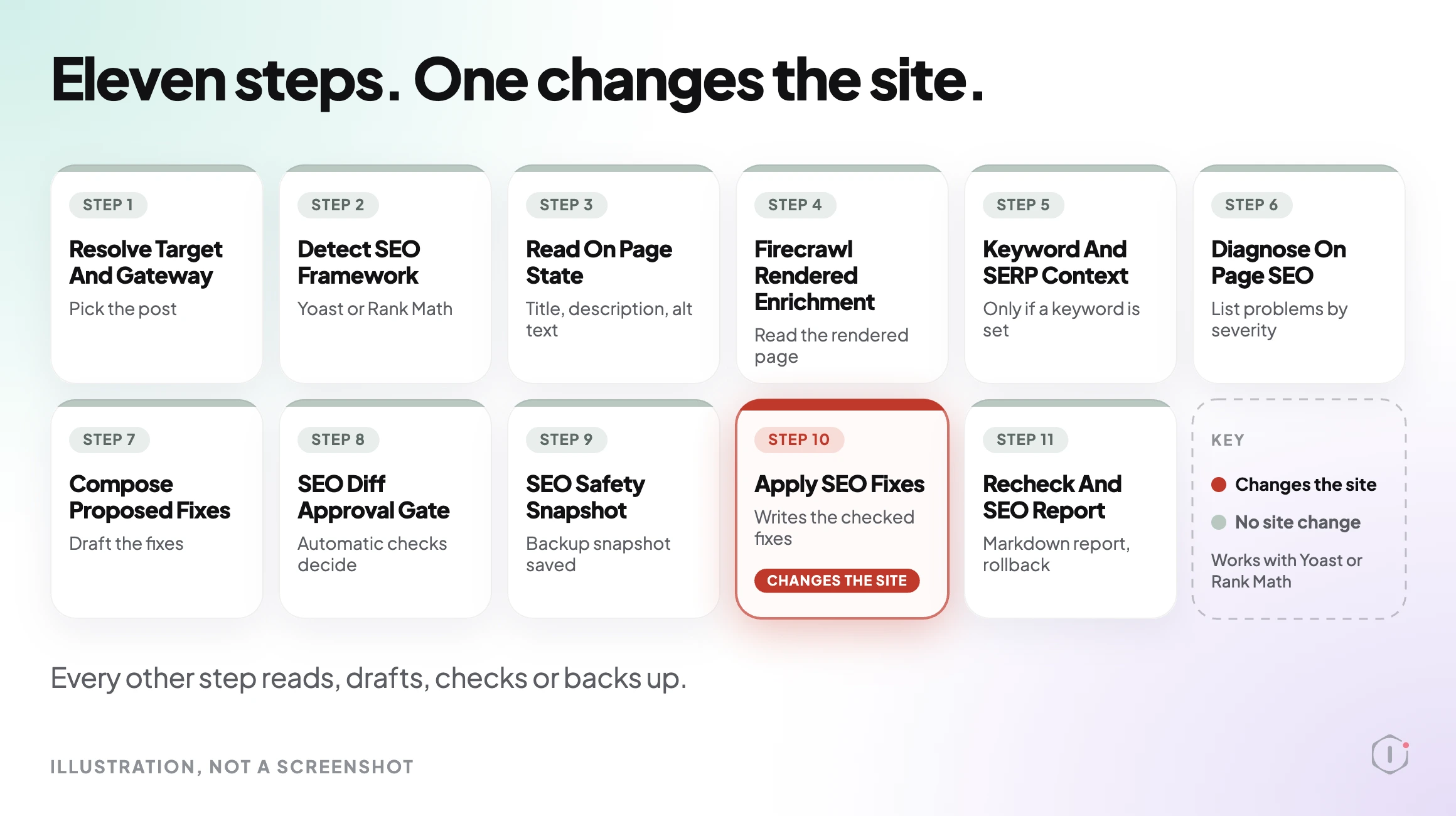
It is one of the playbooks run by Super Agent Iris, in the SEO category. It has 11 steps, and exactly one of them changes the site. You start it from your AI app with a plain request: “Iris, run AI SEO Optimiser on my site.” Before that, you tell it which post to work on. With no post set, it stops and changes nothing.
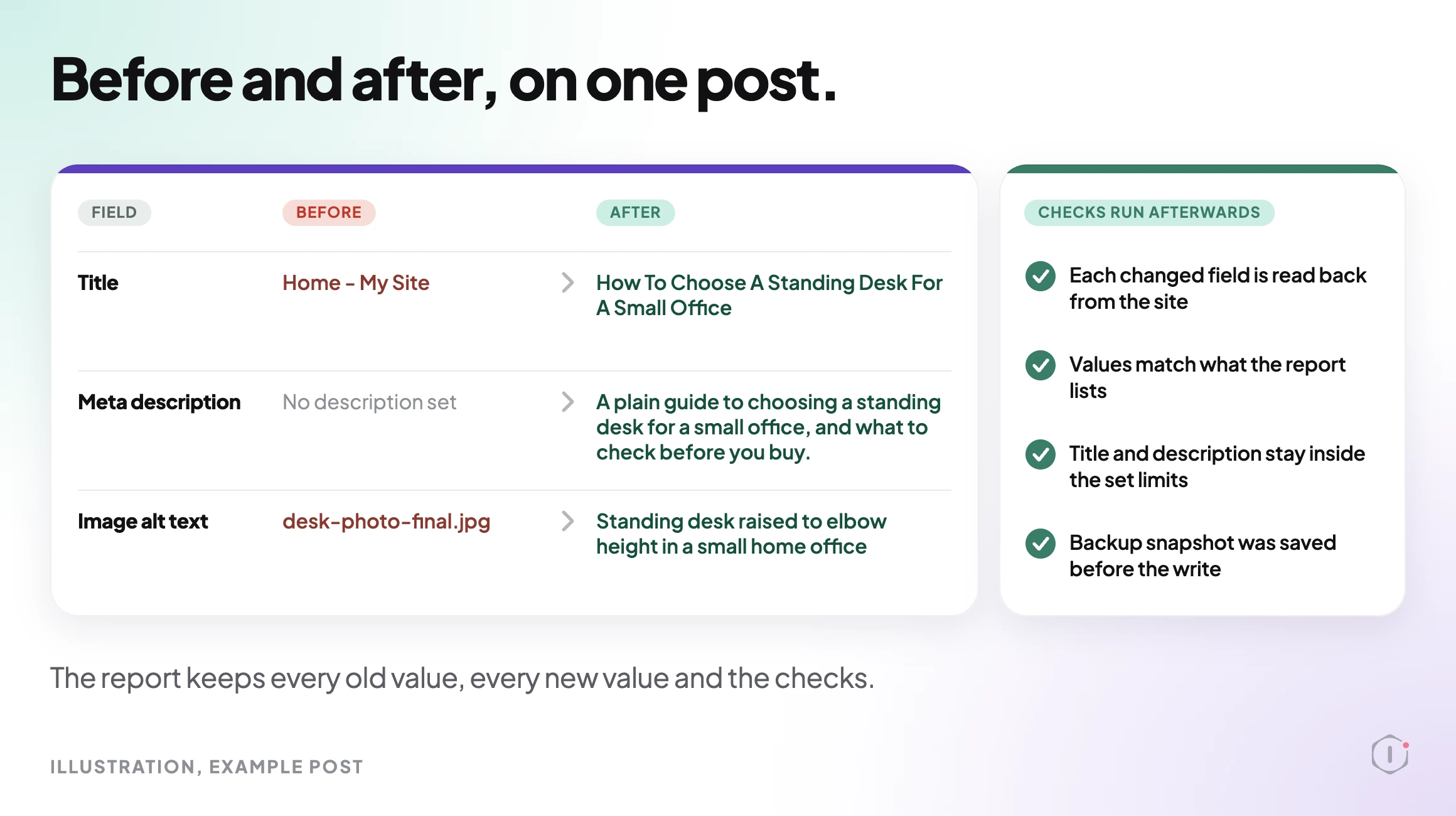
Its output is a written Markdown report. For each change it records the value before, the value after, and the checks run afterwards. That report is the thing you keep, so you can see exactly what happened to the post.
Why Missing SEO Data Piles Up
SEO fields are optional in WordPress. Publishing works without them, so they get skipped under deadline, and a site with a few hundred posts ends up with a long tail of empty descriptions. Google’s own documentation says it may build a snippet from the page content or from the meta description, depending on what it judges to be the better match for a query. An empty field does not stop that. It just hands the choice to the search engine.
Our on-page SEO checklist lists the fields worth checking on any post, and the technical SEO audit guide covers the site-wide layer above them. This playbook is the part that writes and applies the per-post fixes.
Steps 1 To 6: Choose, Read, Diagnose
The first six steps only read.
- Resolve Target And Gateway. It reads the post or page you chose, confirms it is published, and stops if none is set or it is not published.
- Detect SEO Framework. It checks which SEO plugin you use. Titles and descriptions are written only for Yoast and Rank Math. Without one of them, it leaves those fields alone.
- Read On Page State. It collects the current title, meta description and image alt text.
- Firecrawl Rendered Enrichment. It reads the rendered page through Firecrawl, or fetches from the site itself if Firecrawl is not connected.
Steps 5 and 6 follow the same rule. Reading the rendered page matters because what a visitor and a crawler see can differ from what the editor shows. Structured data in particular is often added by plugins at render time.
Step 5, Keyword And SERP Context, runs only when a target keyword is set. When it runs, it looks at competing search results for that keyword. When no keyword is set, it is skipped and the playbook carries on without it.
Step 6, Diagnose On Page SEO, lists the problems it found and gives each a severity. This is a diagnosis, not a change. If you stopped here, you would still have a useful list.
Most of the value of a diagnosis is in the severity order. A missing meta description on a page that already has a clear title is a small gap. A page whose structured data is broken, or whose images all lack alt text, is a larger one. Seeing the list ranked tells you whether the post needs a light touch or a proper rewrite, and it is the point where you can decide not to proceed. If a page is blocked from crawling, none of these fields help it, so check that first with our guide to robots.txt blocking.
Step 7, Compose Proposed Fixes, drafts four things, each inside set limits: a title, a meta description, image alt text and structured data. Headings and internal links are different. It only recommends those and never writes them to the post. If you want to see how alt text is judged, our image alt text audit walks through what good and bad examples look like.
Steps 7 And 8: Drafting, And A Gate With No Person In It
The step is called SEO Diff Approval Gate, and the name is easy to misread. It lists each proposed change with the before value, the after value and the reason. Automatic checks then drop any change that breaks the limits. No person approves. If you expect a “click to approve” screen at this point, you will not get one, and it is better to know that before you run it.
That is why choosing the post in advance matters. A wrong choice here is the one mistake the checks cannot catch, because they judge the drafts, not whether you picked the right page. Read the post’s title in the report’s first lines before you read anything else. The scope is set by you, and the checks only decide which of the drafts inside that scope are safe to write.
Steps 9 And 10: Snapshot, Then Apply
Step 9, SEO Safety Snapshot, saves the current title and description to a backup before anything is written. The old post text is recorded when it is changed.
Step 10, Apply SEO Fixes, is the only step that changes the site. It applies the checked fixes to that one post and its SEO fields. It touches no files and no other posts.
Step 11 And How Rollback Works
Recheck And SEO Report rereads each changed field and reports before and after. That is the Markdown report you receive.
Undoing a change works in two ways, depending on what was changed. Post text edits are recorded, so Roll back can undo them, and WordPress keeps its own revision as well. Title and description can be rolled back only on sites that support it. Otherwise they are restored from the saved backup. Check which case your site is in before you run it on a post you care about. The same habit applies to bulk text changes; our guide to WordPress find and replace explains why a backup comes first there too.
It runs when you ask in your AI app. On Pro and Agency you can also put it on a routine. The playbook page lists it as able to change the site, so treat it the way you would treat any tool with write access: start with a post that is easy to restore.
The report is the part most worth keeping. Because it lists every field that changed and what it said before, you can compare the new title against the old one, show a client exactly what was done, or revert a single field by hand without rolling back the rest. If a draft reads wrongly to you, you can edit the field directly in Yoast or Rank Math, and the report still tells you what the playbook originally wrote. It runs when you ask in your AI app. On Pro and Agency you can also put it on a routine. The playbook page lists it as able to change the site, so start with a post that is easy to restore.
What The Playbook Does Not Do
- It does not work on more than one post per run. You choose the post first.
- It does not write titles or descriptions without Yoast or Rank Math.
- It does not change headings or internal links. Those are recommendations only.
- It does not ask a person to approve each change. Automatic checks decide.
- It does not touch files or other posts.
- It does not rank anything for you. It improves fields that search engines read. What a search engine does with them is outside its control. For the AI-search side of that question, see our notes on AI citations on WordPress.
A Careful Version You Can Do By Hand
- Pick one published post and note its URL.
- Copy its current title, meta description and image alt text into a document with the date.
- Check you are using Yoast or Rank Math, so the fields exist.
- Write a new title and description for the page’s real topic, in your own words.
- Write alt text that describes what each image shows, not the file name.
- Save the post. WordPress keeps a revision for the post text.
- Reload the page and view the source to confirm the new values are what is output.
- Keep your before and after notes as the record.
That is the same sequence the playbook follows: read, draft, back up, write, recheck. The difference is time. Doing it once is fine. Doing it across a long list is where a playbook earns its place.
Two Outside Views
The problem this addresses is common enough that a plugin tutorial opens with it:
“Now, what if you have hundreds of posts missing SEO data?”
Sheet Editor, How to Bulk Generate Yoast SEO Titles and Descriptions with AI (YouTube)
A Reddit thread from 2025 shows a more cautious route, where a person asks about an SEO plugin with AI generation and one reply points elsewhere:
“You can use a non-plugin AI tool to help you with meta tag generation.”
r/Wordpress, 2025
Both views agree on the need. They differ on where the AI should sit. Protuno’s answer is a fixed list of steps with a backup in the middle, rather than a free-form prompt that writes to the database.
Where Protuno Fits
Protuno gives you AI SEO Optimiser as one of its playbooks. You ask for it in your AI app, it works through the 11 steps above on the post you chose, and the only step that changes the site is step 10. The output is the Markdown report with before and after values. Because the checks are automatic, the decision that stays with you is which post to run it on. Our sitemap audit is a good companion check once the individual posts are in order.
The Point
Missing titles, descriptions and alt text are quiet problems, and fixing them one by one is slow. AI SEO Optimiser narrows the job: one chosen post, Yoast or Rank Math only, a backup before the write, one step that changes anything, and a report with before and after values. Start with a single post, read the report, and decide from there.
Comments