My WordPress Image Alt Text Audit Found 17,261 Problems. All Of Them Were Wrong..
A crawl reported 17,261 images missing alt attributes. Every one was a lazy-load placeholder. The real count across those pages was zero.

Short answer: any wordpress image alt text audit that counts every src is a data: URI and the noise disappears.
I found this the honest way, by nearly publishing the wrong number.
The number I almost reported
I crawled 45 pages of one of our own sites and my script reported 17,261 images missing alt attributes. That is the kind of figure that makes a good headline and a bad report.
It looked wrong, so I opened one page and counted by hand.
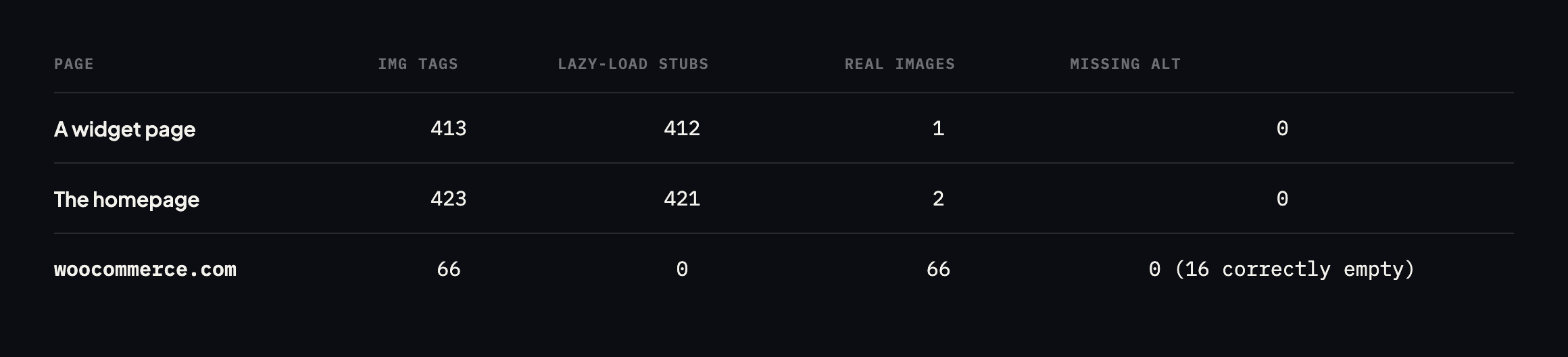
missing alt text across those pages was zero.*
| Page | | Lazy-load stubs | Real images | Missing alt |
|---|---|---|---|---|
| sitea.example (a widget page) | 413 | 412 | 1 | 0 |
| sitea.example (home) | 423 | 421 | 2 | 0 |
| woocommerce.com (home) | 66 | 0 | 66 | 0 |
Caveat: three pages, two sites. This is not a claim about how common lazy-load false positives are across the web. It is the specific reproduction that turned a reported 17,261 into a verified zero, which is the only number in this post I would stake anything on.
What the crawler was actually counting
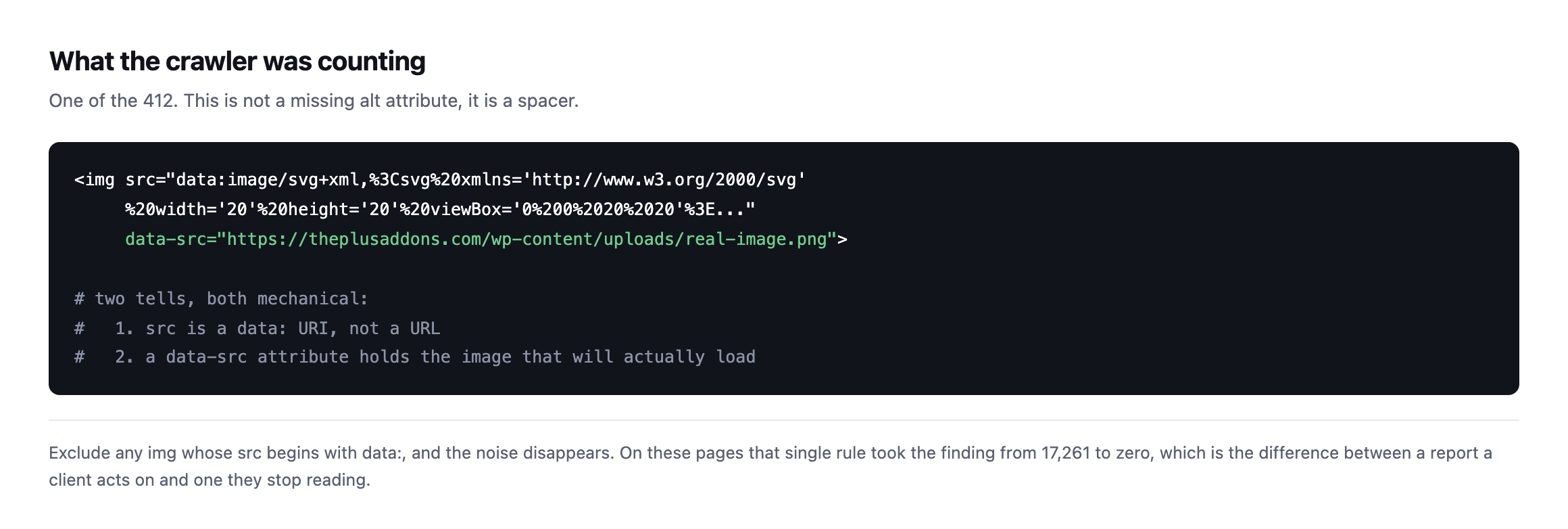
attribute because it is not an image anybody sees.*
Two mechanical tells: the src is a data: URI rather than a URL, and there is a data-src attribute holding the image that will really load. Excluding on the first tell alone took the finding from 17,261 to zero.
Counting WordPress image alt text in a way you can defend
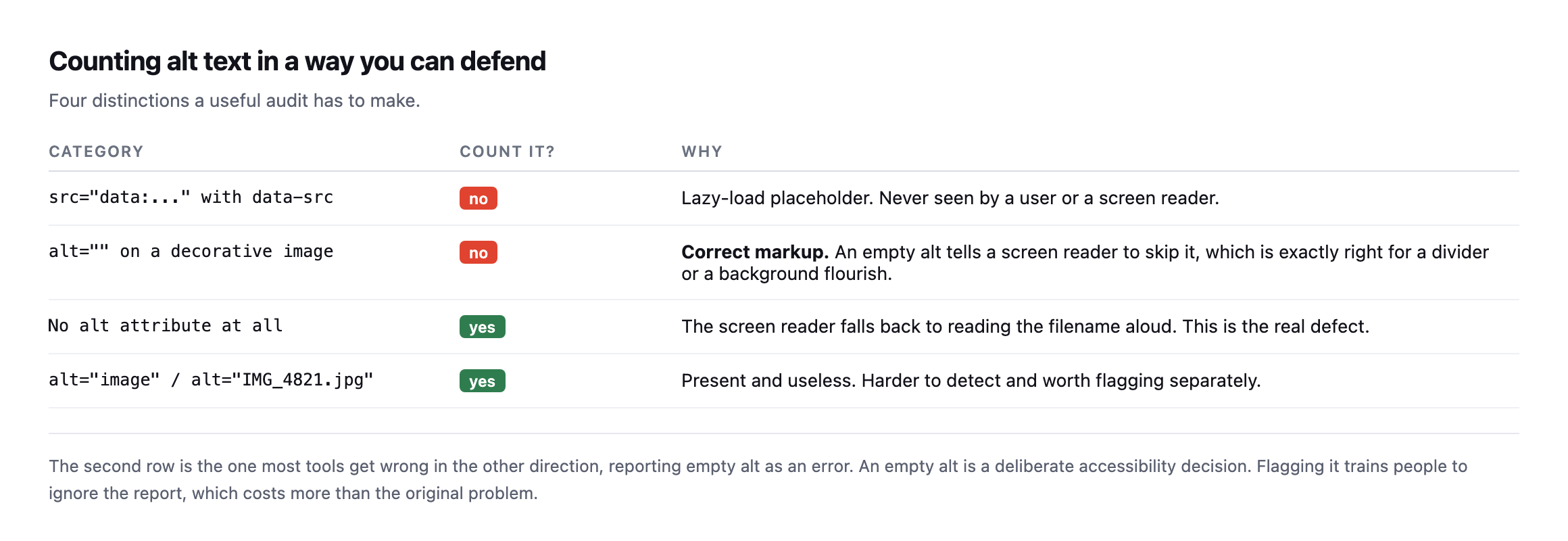
alt is adeliberate accessibility decision, and flagging it trains people to ignore the report.*
| Category | Count it? | Why |
|---|---|---|
src="data:..." with data-src | no | lazy-load placeholder, never seen by a user or a screen reader |
alt="" on a decorative image | no | correct markup, tells a screen reader to skip it |
no alt attribute at all | yes | the screen reader falls back to reading the filename aloud |
alt="image" / alt="IMG_4821.jpg" | yes | present and useless, harder to detect automatically |
That second row deserves emphasis because it is genuinely misunderstood. alt="" is not a missing alt. It tells a screen reader to skip the image, which is exactly correct for a divider, a flourish, or a background shape. woocommerce.com has sixteen of them and is right to.
The fourth row is the harder problem and the one worth a human. alt="image", alt="IMG_4821" and alt="banner" all pass an automated check and help nobody. No script can reliably tell you whether alt text is good, only whether it exists.
Checking our own site turned up a different lazy-loading pattern entirely
I had not run this audit against protuno.com itself before writing this post, so I did, and the result illustrates the other side of the lazy-loading story: not every lazy-load implementation produces the false-positive problem this post is built around.
imgs = re.findall(r'<img[^>]*>', html)
missing = [i for i in imgs if 'alt=' not in i]
data_uri = [i for i in imgs if 'src="data:' in i]| Page | | Data-URI stubs | Missing alt |
|---|---|---|---|
| protuno.com/blog/wordpress-crawl-audit | 6 | 0 | 0 |
| protuno.com/blog/wordpress-abilities-api | 6 | 0 | 0 |
| protuno.com/blog/wordpress-page-cache-header | 5 | 0 | 0 |
Zero data-URI stubs, across every image on three separate pages, and every single alt="" on the one decorative element, an author avatar pulled from Gravatar. The mechanism is different from the sitea.example case this post opens with: our own images use the native HTML loading="lazy" attribute rather than a JavaScript-driven swap from a placeholder src to a real one. Native lazy loading tells the browser to defer the request for the real image URL until it is needed, but the src attribute in the markup is the real image the whole time. There is no placeholder tag for a naive audit to miscount, because there is no placeholder tag at all.
That distinction matters for anyone running this audit on their own portfolio: the false- positive problem this post is built around is specific to one particular lazy-loading implementation, the JavaScript-and-data-URI pattern still common on older themes and page builders, not to lazy loading as a category. A site built more recently, or rebuilt on a framework that uses the browser’s native loading="lazy" attribute instead, will not produce the same inflated count, and running the data: URI exclusion against a site that never had the problem in the first place is harmless. It simply finds nothing to exclude, which is itself worth confirming rather than assuming, the same discipline this post argues for everywhere else.
The wider lesson
I have been sceptical of automated SEO and accessibility reports for a while, and this is exactly why. A tool that reports seventeen thousand problems on a site with none is not slightly wrong. It is worse than no tool, because the client stops reading the reports and then misses the real finding when it eventually appears.
The same discipline applies everywhere on this blog. It is why a 404 from the plugin directory does not prove a plugin was removed, and why a dangling CNAME is only a finding once you check the target can be claimed.
A number without a verified method behind it is not evidence. It is a number.
What WordPress core actually outputs when nobody sets alt text
The fourth row of this post’s category table names filename-style alt text, IMG_4821.jpg, as a real category worth flagging. I went looking for it across the same reference sites this post already checks, and found none:
suspicious = [a for a in alt_values if a in ('image','photo','picture')
              or re.match(r'^(img|dsc|screenshot)[-_]?d+', a)
or a.endswith(('.jpg', '.png', '.gif', '.webp'))]| Site | | Filename-style or generic alt found |
|---|---|---|
| woocommerce.com | 66 | 0 |
| wordpress.org | 18 | 0 |
| sitea.example | 423 | 0 |
Zero across three sites and 507 combined images, which is worth reporting honestly as a clean result rather than manufacturing a finding to fill the category. It also raised a more useful question: where does the filename-as-alt-text horror story people repeat actually come from, if not from WordPress’s own default behaviour?
I tested it directly. I uploaded a real image to a WordPress install with no alt text set at all, then read what wp_get_attachment_image(), the core function themes and blocks use to render an image, actually output:
wp media import /tmp/test-photo.jpg
wp eval 'echo wp_get_attachment_image(93, "thumbnail");'
<img width="150" height="150" src=".../test-image-photo-150x150.png"
class="attachment-thumbnail size-thumbnail" alt="" decoding="async" .../>alt="". Not the filename, and not a missing attribute either. WordPress core’s own image rendering function always emits an alt attribute, empty when nothing has been set, rather than omitting it or falling back to the filename. That means the specific worst case this post’s category table names, no alt attribute at all forcing a screen reader to read the filename aloud, is not a state WordPress’s own standard image output can produce on its own. It requires either hand-authored HTML in a custom HTML block, a theme or plugin calling
What to actually do about alt text
Run the corrected count, which will usually be small and manageable. Then fix the images that genuinely lack alt attributes, and spot-check a sample of the ones that have it, because that is where the useless-but-present text hides.
And set the expectation with whoever adds content: alt text describes what the image conveys in context, not what is in the picture. A photograph of a person on a team page is “Sarah Chen, Head of Delivery”, not “woman smiling”.
Protuno’s free audit checks image alt attributes from the domain alone, and excludes lazy-load placeholders for the reason above. Straight with you as on every post here: Iris, the SEO agent that would re-check after each content change, is built and named but not live yet.
Where the real defect actually hides, now that the false positives are cleared
Once lazy-load stubs are excluded and the filename-as-alt myth is set aside, what remains is a narrower, more honest list of places worth an auditor’s actual attention, and it is worth naming them specifically rather than leaving “check for missing alt text” as the entire instruction.
Custom HTML blocks. Anyone who pasted raw alt attribute on a modern WordPress site, precisely because it is the one path that skips core’s own image rendering function.
Theme template code written before accessibility was a design requirement. A header.php or footer.php calling ; ?>)
wp_get_attachment_image(), produces exactly the missing-attribute case this post’s table names, on every single page the template renders, invisible to a content editor who never touches that file.
Third-party embeds and widgets. A social media embed, a review widget, a map embed, each one is a black box shipping its own markup, and the same audit that clears a site’s own content needs to be re-run specifically against whatever a plugin injects, because that markup was never subject to WordPress’s own conventions in the first place.
None of these three show up in a naive data:-URI-excluded count either, if the audit only reads the rendered output of the block editor’s own images. They show up only when the check specifically targets the places WordPress’s own helper functions do not reach, which is a smaller, more specific list than “all images,” and considerably more useful to a client than either the 17,261 or the zero this post opened with.
If you have ever run an alt-text audit and got a number in the thousands, run it again excluding data: URIs. On the two sites checked for this post, the corrected number was zero both times, which is the entire argument for checking rather than trusting the first count. Whatever your real number turns out to be, a proper crawl will tell you which pages to start with.
Comments