The robots.txt Myth: What ‘Discourage Search Engines’ In WordPress Really Does.
Discourage search engines does not add Disallow slash to robots.txt. It emits a noindex tag on every page and deletes your sitemap line. We tested it.

Short answer: ticking “Discourage search engines” in WordPress does not put Disallow: / in your robots.txt. It leaves robots.txt almost untouched, removes the sitemap line, and adds to every page. That is a stronger action than the wording suggests, because noindex removes pages that are already ranking.
Nearly everyone I talk to believes that checkbox writes a Disallow: / into robots.txt. I did too, until I tested it.
What actually changes when you discourage search engines in WordPress
I took a clean WordPress install, captured robots.txt and the page source, ticked the box in Settings then Reading, and captured both again.
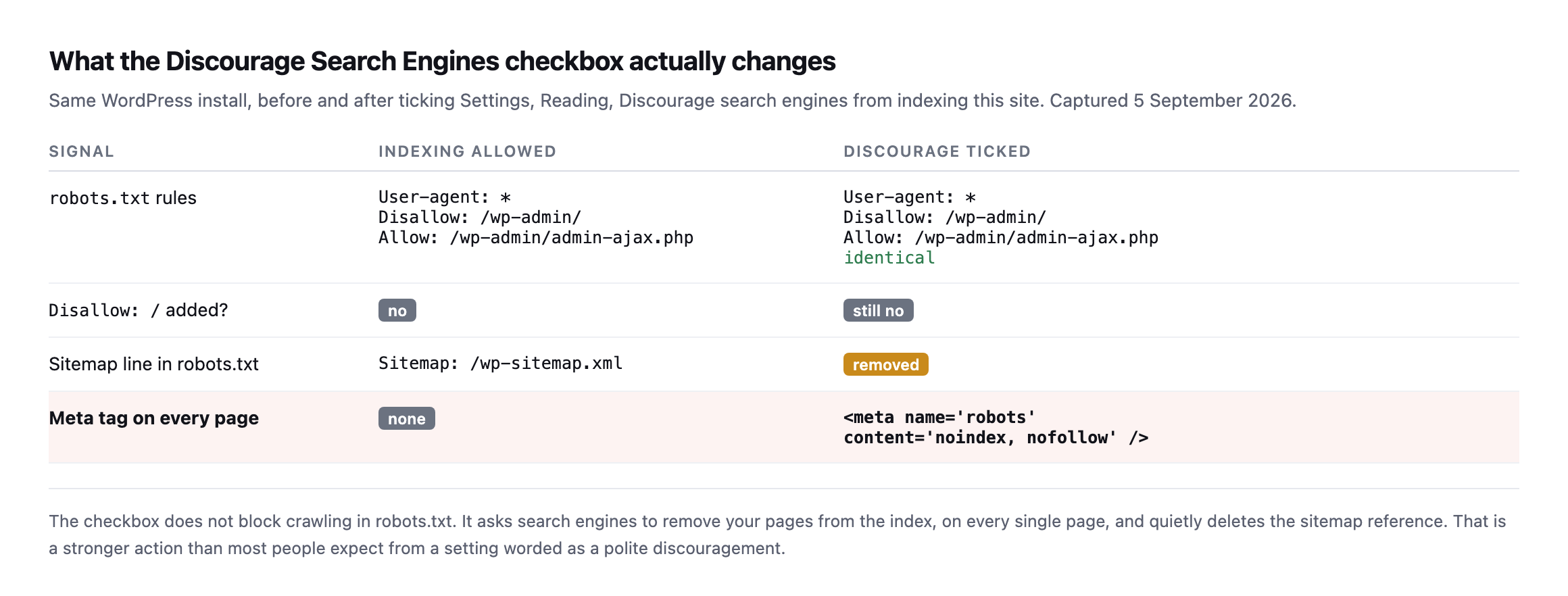
the disappearance of the sitemap line and the arrival of a noindex tag on every page. Neither of those is what the setting appears to promise.*
Two consequences worth sitting with.
The setting is worded as a polite request and behaves as a removal order. noindex does not merely discourage. It asks search engines to drop pages they already have.
And because robots.txt is untouched, anyone auditing robots.txt alone will find nothing wrong. That is the failure I keep meeting on inherited sites: the SEO plugin looks fine, robots.txt looks fine, and the site is being actively removed from the index by a checkbox somebody ticked on a staging copy eight months ago and never unticked after launch.
Disallow and noindex are not two flavours of the same thing
This is the distinction that causes the most damage, because the two get used interchangeably.
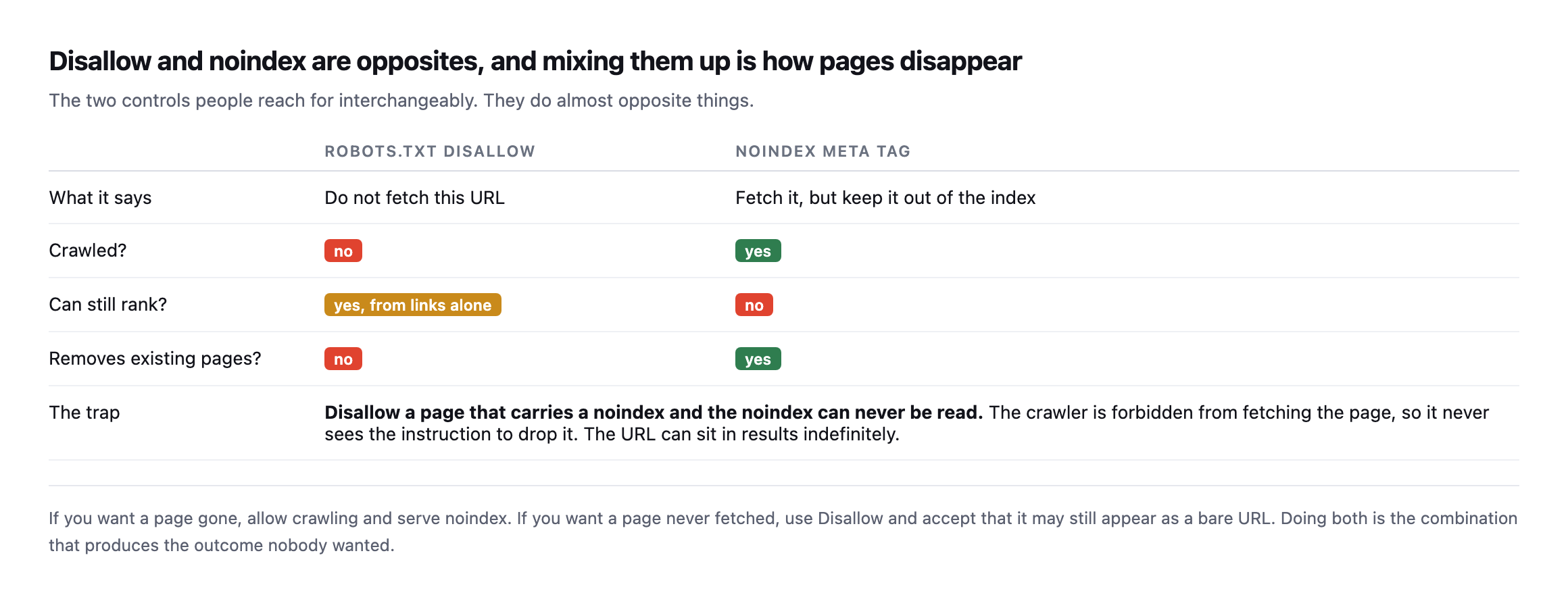
Disallow a URL that serves a noindex, the crawler is forbidden from fetching it, so it never reads the instruction to drop the page. The URL can sit in results indefinitely.*
The same comparison as text:
robots.txt Disallow | noindex meta tag | |
|---|---|---|
| What it says | do not fetch this URL | fetch it, but keep it out of the index |
| Crawled? | no | yes |
| Can still rank? | yes, from links alone | no |
| Removes existing pages? | no | yes |
The trap:
Disallowa page that also carriesnoindex, and thenoindexcan never be read. The crawler is forbidden from fetching the page, so it never sees the instruction to drop it. The URL can sit in results indefinitely, which is the opposite of what both settings were trying to do.
The rule I use:
- Want it gone from results? Allow crawling, serve
noindex. - Want it never fetched?
Disallow, and accept it may still show as a bare URL. - Doing both is almost always a mistake.
Checking a client site in thirty seconds
The method is three requests against the live domain: read robots.txt, check the response for a noindex tag, and confirm WordPress’s own indexing setting. Here is each one:
# 1. does robots.txt block anything wholesale
curl -s https://example.com/robots.txt | grep -A2 -i "user-agent: *"

# 2. is a noindex being served on the pages that matter
curl -s https://example.com/ | grep -i "name=["']robots["']"

# 3. does WordPress think it should be indexed at all
#    (wp-admin, Settings, Reading, or via WP-CLI)
wp option get blog_public     # 1 = indexable, 0 = discouraged
Check two and three on the homepage and a money page, not just the homepage. Plenty of sites carry a stray noindex on a template that only affects one post type.
blog_public returning 0 on a production site is nearly always a launch that never got finished.
What good robots.txt files look like
For calibration, here is what four production sites publish today.
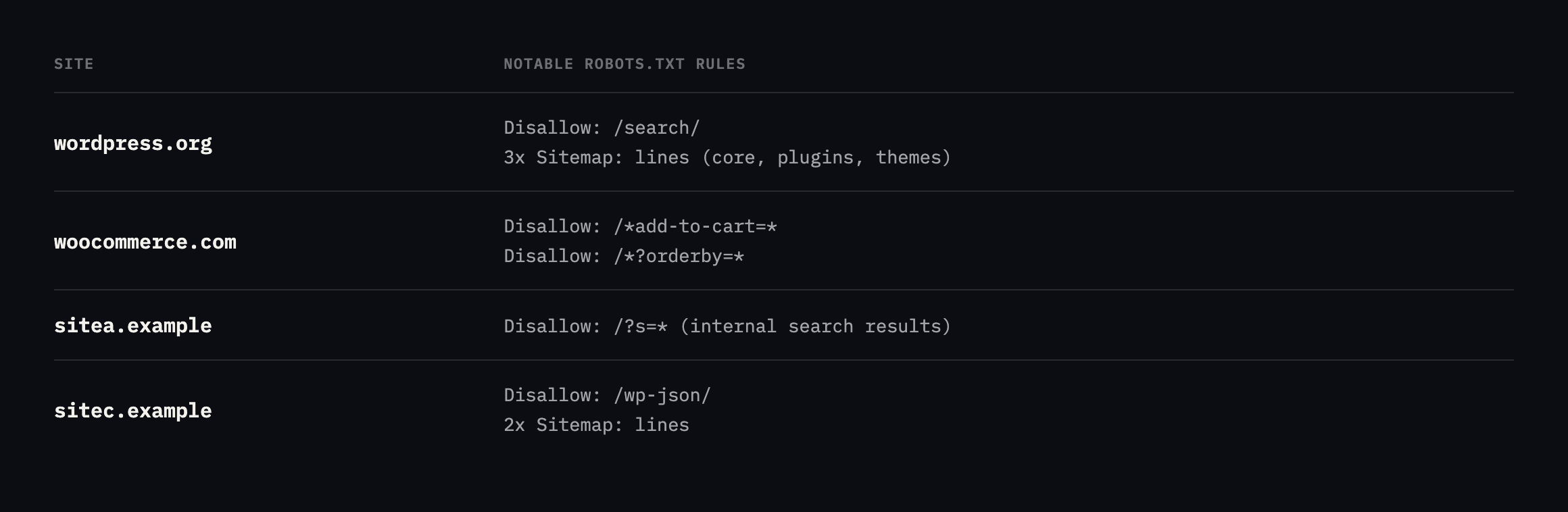
add-to-cart query strings so crawlers donot spend their time filling shopping baskets. Block internal search results so they do not become indexable thin pages. And list every sitemap you publish, not only the index.*
None of them uses Disallow: /. On a live site that line is almost always an accident.
The one exception almost every real site carries, and why
There is one Allow line that shows up on nearly every production WordPress robots.txt alongside Disallow: /wp-admin/, and it is worth understanding rather than copying blindly:
Disallow: /wp-admin/
Allow: /wp-admin/admin-ajax.php
admin-ajax.php lives inside /wp-admin/, which is exactly the directory the line above it just disallowed, but it is not an admin screen. It is the endpoint themes and plugins call for ordinary frontend behaviour: infinite scroll, a live search box, an “add to cart” button that updates without a page reload, a comment form that submits without leaving the page. Block it wholesale and a crawler that respects robots.txt strictly can be denied the one URL a page’s own JavaScript depends on to finish rendering what a visitor sees.
I checked whether real sites actually carry the exception, rather than assuming the pattern is universal:
for d in wordpress.org woocommerce.com sitec.example sitea.example siteb.example; do
  echo "=== $d ==="
  curl -s "https://$d/robots.txt" | grep -iE "admin-ajax|wp-admin"
done| Site | Disallow: /wp-admin/ | Allow: .../admin-ajax.php |
|---|---|---|
| wordpress.org | yes | yes |
| woocommerce.com | yes | yes |
| sitea.example | yes | yes |
| siteb.example | yes (as /wp-admin/) | yes |
| sitec.example | no | no |
Four out of five carry the exception. The fifth, sitec.example, is the interesting row, and it is not a mistake: this site is a headless Next.js frontend with no /wp-admin/ surface to protect in the first place, so there is nothing to disallow and nothing to carve an exception out of. Its own robots.txt disallows /admin, /dashboard and /api/ instead, which are the actual route names this stack uses. Reading that as “sitec.example forgot the WordPress rule” would be wrong. It is a different architecture answering a question that does not apply to it.
Real robots.txt files often have two blocks fighting for the same user-agent
Pulling the full files instead of grepping for one line surfaced something none of the earlier tables in this post caught, because every table above only ever showed one canonical block per site.
$ curl -s https://woocommerce.com/robots.txt | grep -c "User-agent: *"
2
$ curl -s https://wordpress.org/robots.txt | grep -c "User-agent: *"
3
Both sites declare User-agent: * more than once, in separate, non-adjacent blocks. Here is woocommerce.com’s file in full:
User-agent: *
Disallow: /wp-content/uploads/wc-logs/
Disallow: /wp-content/uploads/woocommerce_transient_files/
Disallow: /wp-content/uploads/woocommerce_uploads/
Disallow: /*?add-to-cart=
Disallow: /*?*add-to-cart=
Disallow: /wp-admin/
Allow: /wp-admin/admin-ajax.php
Sitemap: https://woocommerce.com/sitemap_index.xml

# START YOAST BLOCK
User-agent: *
Disallow: /wp-admin/
Disallow: /wp-login.php*
Disallow: /wp-json/
Disallow: /sso?*
Disallow: /sso/*
Disallow: /*?q=*
Disallow: /*?quid=*
Disallow: /?s=
Disallow: /start/square
Sitemap: https://woocommerce.com/sitemap_index.xml
# END YOAST BLOCK
The comment answers the question before I had to guess at it: the second block is machine- generated by the Yoast SEO plugin, appended after a first block someone wrote by hand. Neither tool checked whether a User-agent: * section already existed. Each just wrote its own.
wordpress.org’s file has the same shape in miniature: a Disallow: /wp-admin/ / Allow: admin-ajax.php block, a second block a few lines later disallowing internal search (/search, /?s=), a run of named-crawler blocks for GPTBot, ClaudeBot, Google-Extended and others, and then a third, separate block at the very end disallowing /plugins/search/, almost certainly added later by whoever last touched the plugin directory’s search feature without noticing the other two * blocks already sitting in the file above it.
The robots.txt specification (RFC 9309) says a crawler that finds multiple groups matching the same user-agent should union their rules, treating them as one combined group rather than letting a later block override an earlier one. Google, Bing and the other major crawlers do implement it that way, so none of these files are actually broken. What they are is hard to read, because “what does do on this site” now requires collecting rules from two or three places in the file and combining them yourself, and smaller or less-maintained crawlers are not guaranteed to implement the union behaviour correctly. A tool that only reads the first block it finds, which is a plausible shortcut for a hastily written crawler, would miss admin-ajax.php on wordpress.org’s third block entirely, or every Yoast-added disallow on woocommerce.com.
The practical cause, both times, is the same one this whole post keeps returning to in different clothing: more than one thing thinks it owns robots.txt. A manually written block from whoever first set up the site, plus a plugin that generates its own block and appends it rather than merging into what is already there, produces a file that is correct by the letter of the spec and genuinely confusing to a human reading it top to bottom.
# check your own site for the same pattern
curl -s https://example.com/robots.txt | grep -c "User-agent: *"
A result of 1 means one source of truth. Anything higher is worth opening the file and reading both blocks together, not because it is necessarily broken, but because the next person to edit it, plugin or human, is about to add a third.
The AI crawlers get their own named blocks now, separate from *
Reading these files in full also surfaced something that would not have shown up in a single grep for admin-ajax: several of them carry dedicated, named blocks for AI crawlers, sitting apart from the User-agent: * rules entirely.
wordpress.org names ten of them individually: GPTBot, ClaudeBot, anthropic-ai, Google-Extended, Applebot-Extended, PerplexityBot, Bytespider, CCBot, Copilot, each with its own Allow: /. That is deliberate, not decorative. A blanket Disallow in the group does not automatically apply to a named crawler; per the same union-by-group logic from the section above, a crawler that identifies itself as GPTBot matches the GPTBot group specifically and ignores the group’s rules for anything the GPTBot group also covers. If a site wants an AI crawler treated differently from search engines, generically, it has to say so by name.
Two of the other domains checked earlier carry a second layer worth naming: a “Content-Signal” directive, which is a newer, separate proposal (contentsignals.org) sitting inside robots.txt rather than replacing it:
Content-Signal: ai-train=yes, search=yes, ai-input=yesThat line is not part of the original robots.txt exclusion standard the rest of this post has been describing. It answers a different question: not “can you crawl this,” which Disallow already covers, but “what are you allowed to do with what you crawled,” search indexing, AI training, or feeding a live AI answer. A site can Allow a crawler’s access and still say no to training on the content, and the two settings are read from completely different lines, so checking one and assuming it answers the other is the same category of mistake as confusing Disallow with noindex earlier in this post.
# check whether a site declares AI-specific crawler rules or content signals
curl -s https://example.com/robots.txt | grep -iE "gptbot|claudebot|anthropic|content-signal"
An empty result does not mean AI crawlers are blocked. Most of them fall back to whatever the * group says, exactly like any other crawler that is not named individually. It means the site has not made a specific decision about them yet, one way or the other, and is currently letting the general-purpose rule decide by default.
Why this survives so long on real sites
Because nothing complains.
The site loads. Analytics still records the visitors it has. Nobody gets an email. The traffic decline reads as seasonality for the first month and as a content problem for the second.
By the time someone connects it to a checkbox, a quarter has gone. It is the same economics as every other unbilled check: a thirty-second fix that nobody is scheduled to perform.
That is the same shape as the scheduled jobs that stop without a word and the backup file left sitting in the web root: cheap to fix, invisible while it runs, and expensive precisely because it is quiet.
Protuno’s free audit reads robots.txt and the indexing signals from the domain alone, so you can see across a portfolio which sites are telling search engines to go away. Being straight about the rest, as always: Iris, the SEO agent that would re-check this on a schedule, is built and named but not live yet.
In the meantime, run the three commands above against the client site you launched most recently. That is where I find it.
Straight from Google on the question this post keeps circling
Google Search Central’s own answer to exactly the kind of robots.txt judgement call this post walks through: when blocking a path helps, and when it just hides a problem instead of fixing it.
Comments