WordPress Sitemap Not Updating: Published, Valid, And Quietly Wrong.
A stale sitemap is still valid XML and still returns 200. Compare its newest lastmod against your last publish, and check the URLs resolve.

Short answer: a wordpress sitemap not updating still returns 200 and still validates. The check is not whether it exists, it is whether its newest lastmod is more recent than your last publish, and whether the URLs inside it actually resolve.
What a healthy one looks like
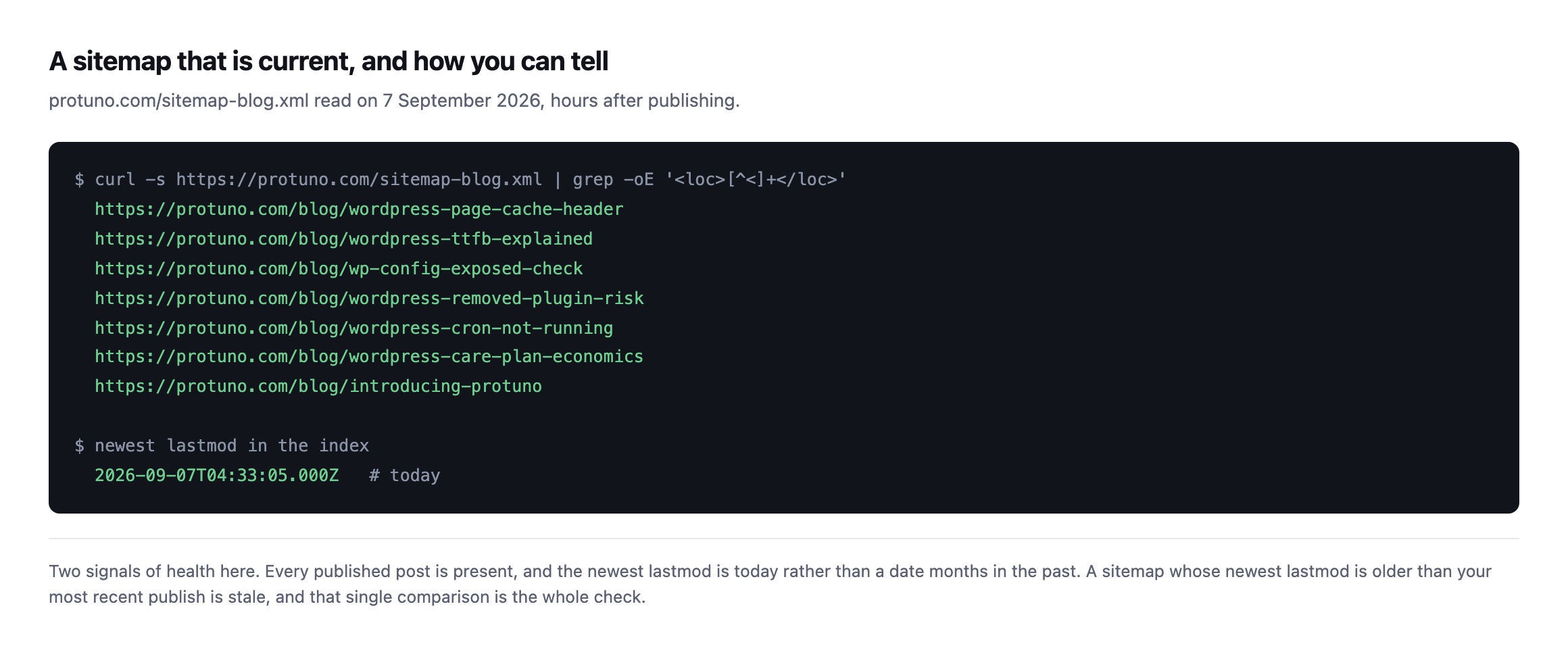
lastmodis today rather than a date months in the past.*
That comparison is the entire health check. Newest lastmod against your most recent publish date. If the sitemap is older, something between WordPress and the served file has stopped.
Why a WordPress sitemap stops updating
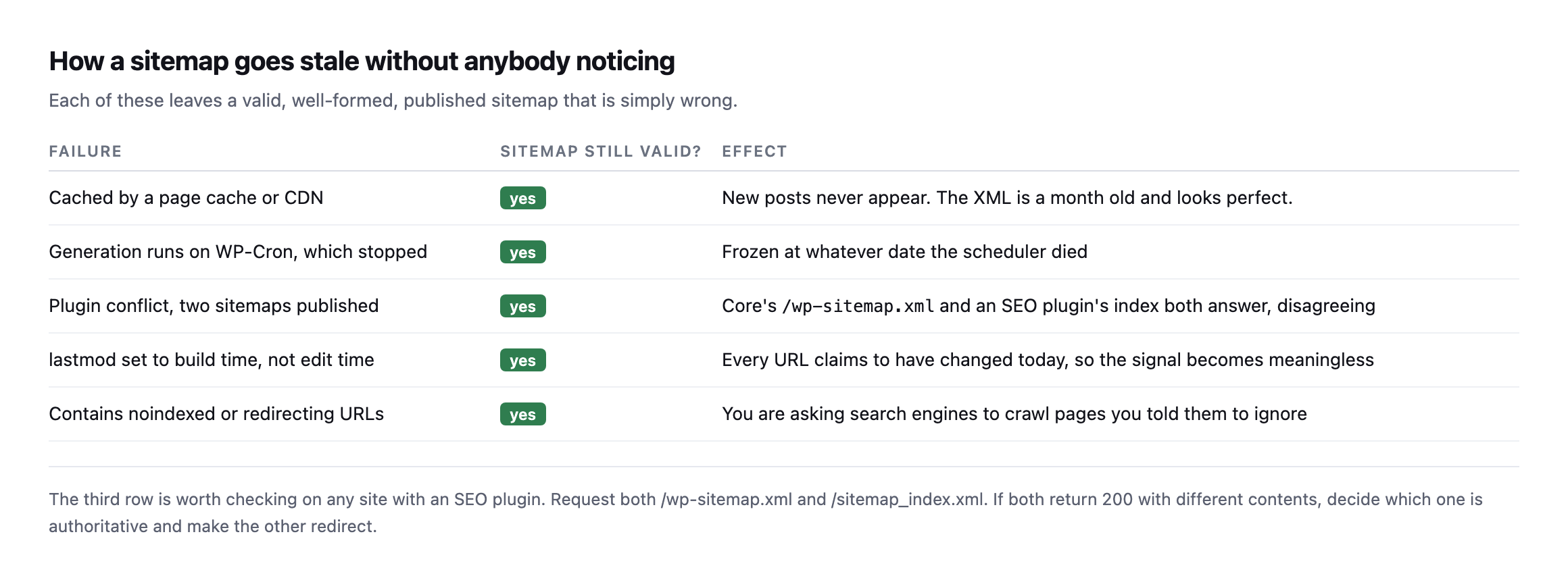
problem; what it says is.*
| Failure | Still valid XML? | Effect |
|---|---|---|
| cached by a page cache or CDN | yes | new posts never appear, the XML is a month old and looks perfect |
| generation runs on WP-Cron, which stopped | yes | frozen at whatever date the scheduler died |
| two sitemaps published, core and a plugin | yes | both answer, disagreeing |
lastmod set to build time, not edit time | yes | every URL claims to have changed today, meaningless |
| contains noindexed or redirecting URLs | yes | crawling pages you told search engines to ignore |
The second row is the one I hit most often. Plenty of SEO plugins regenerate their sitemap on a scheduled event, so a site whose WP-Cron has stopped has a sitemap frozen at whatever date the scheduler died. The site publishes normally. The sitemap simply stops changing, and nothing anywhere reports it.
The third row is worth a specific check on any site with an SEO plugin installed. Core publishes /wp-sitemap.xml and most SEO plugins publish their own index. If both answer with different contents, you are sending search engines two contradictory maps.
The audit
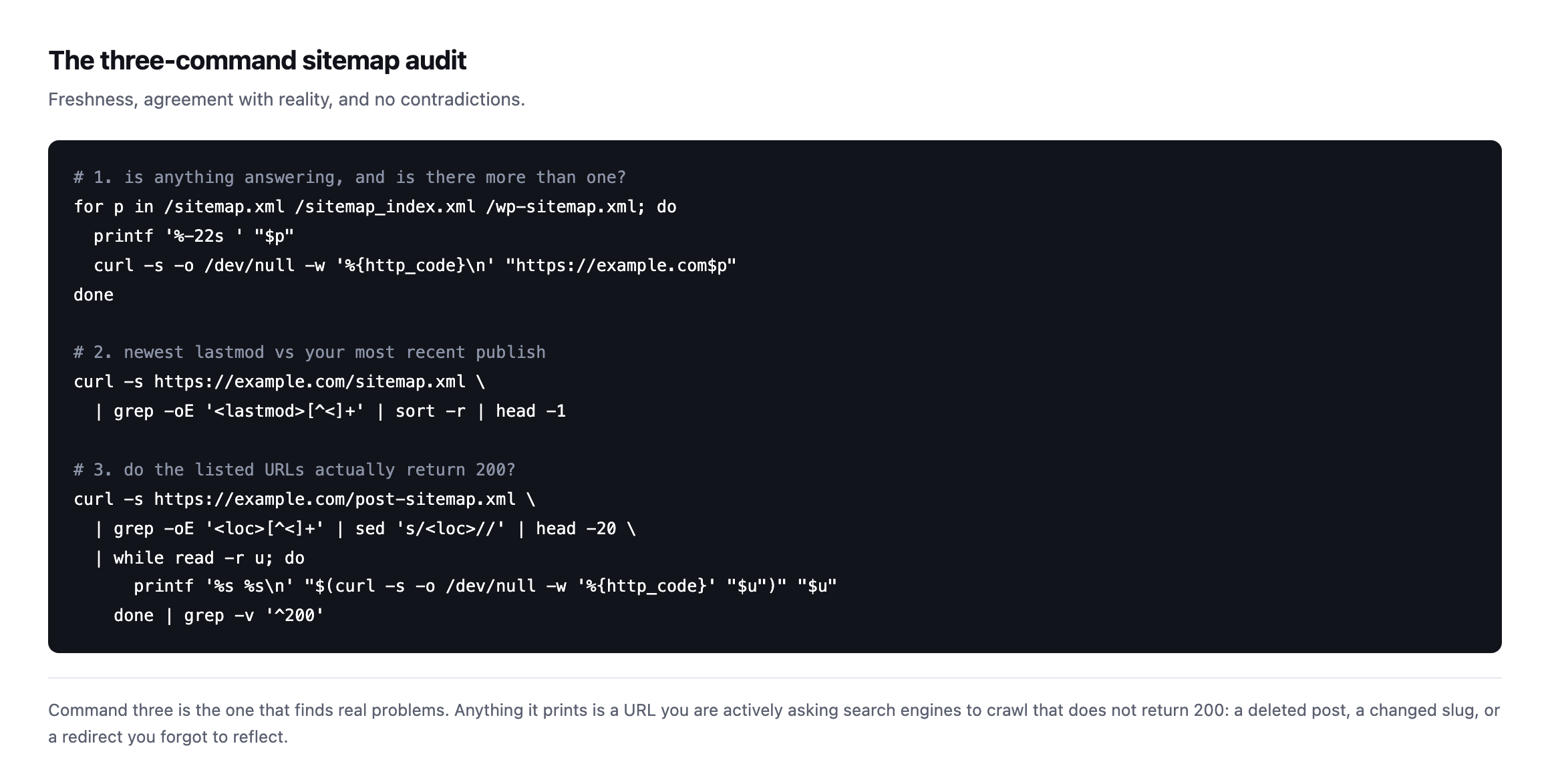
actively asking search engines to crawl that does not return 200.*
Two things worth knowing about lastmod.
It should reflect when the content changed, not when the file was generated. Some setups stamp every entry with the build time, which makes every URL claim to have changed today and destroys the signal’s usefulness entirely.
And it is a hint, not an instruction. A correct lastmod helps a crawler prioritise; it does not compel anything. Sites that game it by touching every date achieve nothing except making their own diagnostics useless.
What should not be in it
A sitemap is a list of pages you want indexed. So it should not contain:
- URLs carrying a
noindex, which is a direct contradiction and the same confusion behind
the discourage-search-engines setting
- Redirecting URLs, which waste crawl budget pointing at their own replacements
- Paginated archives and tag pages nobody intends to rank
- Anything disallowed in robots.txt, since a crawler cannot fetch it to read the sitemap’s advice
That last combination appears constantly on WordPress sites and is entirely self-inflicted.
The noindex row is not a hypothetical example picked for tidiness. It is the exact finding further down this post, caught on our own infrastructure rather than borrowed from somebody else’s audit: a sitemap that lists pages correctly marked not to be indexed, generated by a plugin doing exactly what it was configured to do, on a domain the sitemap check itself was never pointed at until writing this section made it worth checking.
I checked our own sitemap against the actual publishes of today
The freshness check earlier in this post is easy to state and easy to skip verifying, so I ran it against protuno.com’s own sitemap while several posts were being published today, rather than trust that the comparison works the way I described it.
curl -s https://protuno.com/sitemap-blog.xml | grep -o "<loc>[^<]*</loc>\|<lastmod>[^<]*</lastmod>"| URL | lastmod |
|---|---|
/blog/wordpress-robots-txt-blocking | 2026-09-11T16:06:47Z |
/blog/wordpress-crawl-audit | 2026-09-11T16:01:06Z |
/blog/wordpress-page-cache-header | 2026-09-11T15:57:05Z |
/blog/wordpress-ttfb-explained | 2026-09-11T15:53:24Z |
/blog/wp-config-exposed-check | 2026-09-11T15:50:52Z |
/blog/wordpress-removed-plugin-risk | 2026-09-11T15:44:39Z |
/blog/introducing-protuno (untouched today) | 2026-09-01T11:17:38Z |
Six posts republished within roughly twenty-two minutes of each other show six distinct lastmod timestamps, each within a minute or two of the actual edit, while a post nobody touched sits at a date ten days old. That is what a sitemap doing its job looks like: the timestamp tracks the edit, not the last time someone regenerated the file wholesale, and a stale entry stands out immediately next to fresh ones instead of blending in with a site-wide regeneration date that moves for every URL at once.
That last distinction is worth being specific about, because it is the difference between a useful lastmod and the meaningless kind described earlier in this post. If every URL in a sitemap shared the same timestamp, down to the second, that would be a signal the file was regenerated on a schedule rather than updated per edit, and it would tell a crawler nothing about which pages actually changed. Six different timestamps, each matching a real edit, is the opposite of that failure mode, confirmed on the file this post itself just caused to update.
The noindexed pages sitting in our own sitemap
The earlier section on what should not be in a sitemap names noindexed URLs first. I went looking for one on our own infrastructure rather than assume the rule only applies to other people’s sites, and found one within a few requests.
Protuno’s frontend at protuno.com is headless, served by Next.js, with its own sitemap system entirely separate from WordPress. The WordPress install behind it, at cms.protuno.com, is a second, independent web server, and it runs Rank Math, which generates its own sitemap the moment the plugin is active, whether or not anyone intends the CMS domain itself to be crawled:
curl -s https://cms.protuno.com/robots.txt
# Sitemap: https://cms.protuno.com/sitemap_index.xml

curl -s https://cms.protuno.com/sitemap_index.xml
That index lists a post-sitemap.xml containing 23 URLs, all on the cms.protuno.com domain rather than protuno.com, one per published post, plus the CMS homepage. I requested one of them directly:
| Check | Result |
|---|---|
GET https://cms.protuno.com/wordpress-robots-txt-blocking/ | 200 |
| noindex, nofollow |
| absent |
Is /sitemap_index.xml itself disallowed in robots.txt? | no |
Every individual page correctly declares noindex, nofollow, which is right: the CMS domain is infrastructure, not a page meant to rank, and the actual public copy lives at protuno.com/blog/.... But the sitemap listing those same URLs is not blocked, is not marked in any way as a duplicate, and carries no canonical tag pointing a crawler at the real, indexable version. It is, byte for byte, the exact contradiction named earlier in this post: a sitemap advertising URLs that explicitly ask not to be indexed, on a domain search engines can reach freely because nothing in robots.txt stops them from requesting the sitemap file itself.
The practical risk is narrower than it sounds, because noindex is respected on every one of those 23 pages individually, so none of them should actually enter a search index. What the finding shows is not “our content is at risk of appearing twice.” It is that a plugin turned on for one purpose, in this case Rank Math handling on-page SEO fields for the editorial team, ships a sitemap generator nobody asked for as a side effect, and that side effect produces the exact anti-pattern this post has been describing the whole way through, on infrastructure I did not think to check until writing this section. A Disallow on /sitemap_index.xml and /*-sitemap.xml in cms.protuno.com‘s robots.txt, or turning the sitemap module off entirely since the CMS domain is not the canonical source for anything, closes it. Neither has happened yet, so this is a finding, not a fix, exactly in the spirit of the still-open items in the crawl audit post.
The check worth taking away, if a site of yours runs a similar headless setup: the sitemap to audit is not only the one your visitors’ browsers ever see. Any WordPress SEO plugin running on a backend that a frontend has replaced is still generating its own sitemap unless someone has explicitly told it to stop, and that sitemap answers requests on its own domain whether or not anyone remembers it exists.
The sitemap file itself can be cached, on top of everything above
One more layer worth checking, because it interacts with the freshness comparison rather than replacing it: the sitemap XML file is itself a URL, and a URL can sit behind a CDN like any other page.
curl -sI https://protuno.com/sitemap-blog.xml | grep -iE "cache-control|cf-cache-status"cache-control: public, max-age=0, s-maxage=3600, stale-while-revalidate=86400
cf-cache-status: DYNAMICThe header declares up to an hour of edge caching, s-maxage=3600. DYNAMIC on this particular request means Cloudflare answered from the origin rather than a cached copy, which is why the lastmod values in the earlier table lined up with the actual edit times to within a minute or two rather than lagging by up to an hour. Had that request come back HIT instead, the freshness comparison earlier in this post would still run and still look sensible, just against whatever snapshot of the file the edge happened to be holding, which could be anywhere up to an hour stale relative to the newest publish.
This is the same gap the page cache header post describes for ordinary pages, applied to one specific URL that happens to be your sitemap rather than a landing page: a passing signal on its own, 200 and well-formed XML, sitting on top of a caching layer that can silently be serving something older than what WordPress or your frontend actually generated most recently. Checking cf-cache-status or the equivalent header on the sitemap URL itself, alongside the lastmod comparison, is the difference between trusting a number and trusting a number you have confirmed was not served from an hour-old edge copy.
Where it fits
Sitemaps are a low-effort, low-drama check that fails silently and gets audited once at launch. The failure is invisible because the file is still there and still valid, which is the same category as a caching plugin that caches nothing.
Protuno’s free audit checks whether a sitemap is published and reachable from the domain alone, alongside robots.txt and the other crawl signals. Iris is live now.
Run command two on the client site that publishes most often. If the newest lastmod is older than their last post, you have found something worth an hour.
Then run the same three commands against whatever sits behind the site you can see, if there is one: a headless backend, a staging copy, a subdomain nobody remembers is still live. The finding earlier in this post did not turn up on the domain anyone actually visits. It turned up on the one nobody thought to check.
Reading the report that the checks in this post feed into
A sitemap that is fresh and correct is only useful once Google actually indexes what it points to. This walks through the Search Console report that tells you whether that happened.
Comments