WordPress Crawl Depth: Why Buried Posts Never Rank.
Open Google Search Console’s Page Indexing report on a site with more than a few hundred posts and the same two lines show up: “Discovered – currently not indexed” and “Crawled – currently not indexed.” Click into either one and the URLs are almost never the newest posts or the homepage. They are the posts […]

Open Google Search Console’s Page Indexing report on a site with more than a few hundred posts and the same two lines show up: “Discovered – currently not indexed” and “Crawled – currently not indexed.” Click into either one and the URLs are almost never the newest posts or the homepage. They are the posts buried four, five, six clicks deep, the ones no menu, no “related posts” widget, and no other article links to. Google found them. It just never came back.
That gap between “found” and “indexed” has two names. People who build site navigation call it click depth, the number of clicks from the homepage. Google’s own documentation calls the same distance crawl depth. This post uses crawl depth, since that is the term Google’s own pages use, but every count below is the same count either way.
The Screen That Started This Check
“Discovered – currently not indexed” means Googlebot’s crawl scheduler put a URL on the list and then never got around to fetching it. Google’s own help documentation defines the status plainly: “The page was found by Google, but not crawled yet. Typically, Google wanted to crawl the URL but this was expected to overload the site; therefore Google rescheduled the crawl.” (Google Search Console Help, Page Indexing report) The practical pattern reported across SEO forums and tools is consistent: pages with a high crawl depth, especially anything more than three or four clicks from the homepage, show up disproportionately in this bucket.
The fix is rarely “write a better page.” It is “put a link somewhere Google already looks.”
What Crawl Depth Actually Counts
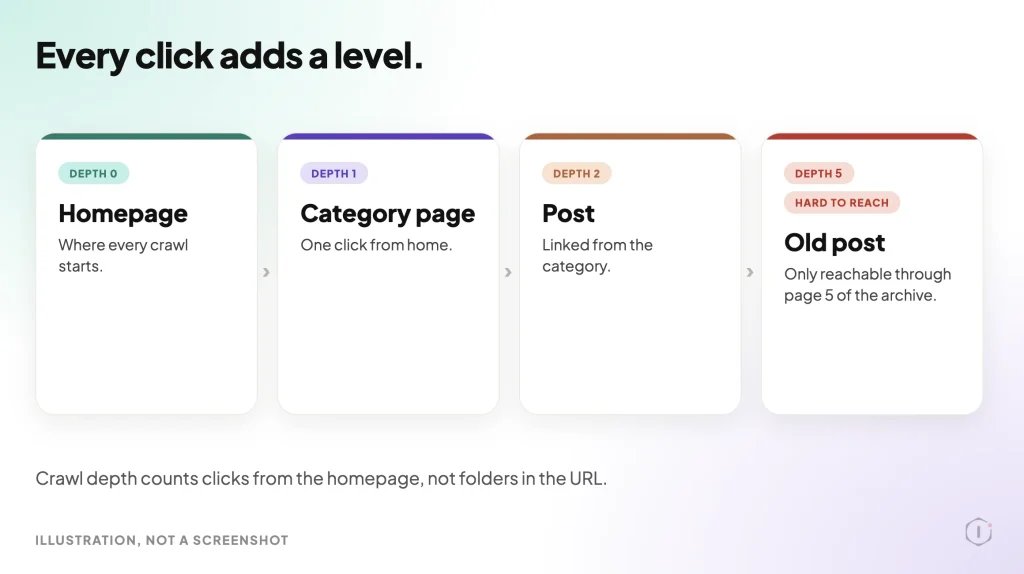
Crawl depth, or click depth, is the smallest number of clicks it takes to get from the homepage to a given page, following only the links a browser could actually follow. A page linked directly from the main navigation menu sits at depth 1. A page one click into a category archive from that menu item sits at depth 2. A blog post that only shows up on page 5 of the blog archive sits at depth 5: four clicks through the archive pages (2, 3, 4 and 5), then one more click to open the post.
The homepage is depth 0. Nothing sits at a negative depth, and nothing below the homepage counts the click needed to load the homepage itself.
This is a structural measurement, not a visual one. A link in the footer counts exactly the same as a link in the hero banner, as long as both are real, crawlable anchor tags in the rendered HTML. A link that only appears after a reader clicks a “load more” button that fires JavaScript with no underlying URL does not count, because Googlebot never gets the click.
Why Depth Zero Is The Homepage, Not The Logo
A common mistake when counting depth by hand is starting from a page rather than the actual root URL. The homepage is whatever resolves at the bare domain, not the page the site’s logo links to if that happens to differ (some sites point their logo at a different “home” than the domain root, usually by accident after a migration or a find and replace on URLs). Before counting anything else, confirm the domain root and the logo link go to the same URL. If they do not, the site has two different depth-zero candidates depending on how a visitor arrived, and any depth count built on the wrong one will be off by one everywhere downstream.
How Google Treats A Page Three Clicks Deep
Google’s own crawl budget documentation lists “popularity” as one of two drivers of crawl demand, and defines it in one plain line: “URLs that are more popular on the Internet tend to be crawled more often to keep them fresher in our systems.” (Google Search Central, Crawl Budget Management) A page reachable in one or two clicks, linked from dozens of other pages on the same site, looks more “popular” by that measure than one reachable only by chance. This is distinct from PageRank in the classic sense, but it borrows the same intuition. Depth is a proxy for how much the site itself seems to vouch for a page.
The practical effect shows up as a widening gap the deeper a page sits. A page at depth 1 or 2 on a well-linked site gets recrawled on a schedule close to the site’s overall crawl rate. A page at depth 5 or 6 might get its first crawl weeks after publish, and a recrawl only when something else on the site changes enough to trigger a fresh pass. For a site publishing daily, that lag compounds: today’s post is buried under tomorrow’s before Google ever came back to look twice.
Where Depth Quietly Grows: Menus, Pagination, Tags
Three structural habits add depth without anyone deciding to:
- Paginated archives. A category page showing 10 posts per page puts post 11 at depth 3 (category, then page 2, then the post) and post 31 at depth 5, just from pagination, with no other link path shortening it.
- Tag and taxonomy sprawl. Tags that exist mainly as metadata, with no link to them anywhere but the post footer, create a path that technically “links” to related posts but adds a hop that readers and crawlers rarely use on purpose.
- Menu pruning. Every time a navigation menu gets trimmed for a cleaner header, whatever used to hang off the removed menu item loses its shortest path to the homepage and falls back to whatever the next-shortest internal link offers, which is often a lot deeper. If the old menu target was deleted rather than unlinked, also check which 404 errors actually cost you.
None of these habits are mistakes on their own. A publication with thousands of posts cannot put all of them in the main menu. The problem is that none of these choices get revisited once made, so depth creeps upward every time new content is added below the fold of an existing archive.
Measuring Crawl Depth On Your Own Site
A rough measurement takes four steps and no paid tool:
- List the main navigation links. These sit at depth 1 by definition, assuming the homepage links to them directly.
- Open each one and list what it links to. Everything found this way, that was not already counted at a shallower depth, sits at depth 2.
- Repeat outward. Depth 3 is everything newly reachable from a depth-2 page, and so on. Stop once a check of 15 to 20 sample URLs, picked from across the site’s age and traffic range, stabilizes into a clear pattern (most content lands at depth 2 to 3, with a long tail past depth 5).
- Cross-check against Search Console. Export the Page Indexing report, filter to “Discovered – currently not indexed” and “Crawled – currently not indexed,” and spot-check ten of those URLs for how many clicks it actually takes to reach each one from the homepage. A strong correlation between high depth and non-indexed status confirms the diagnosis; a weak one means something else (duplicate content, a noindex tag left on by accident, a canonical pointing elsewhere) is the more likely cause.
Dedicated crawler tools automate steps 1 through 3 and report depth directly, but they are optional for a site under a few thousand URLs. The manual version above is slower, not less accurate, and depth is only one line in a fuller technical SEO audit.
Three Fixes That Do Not Require A Redesign
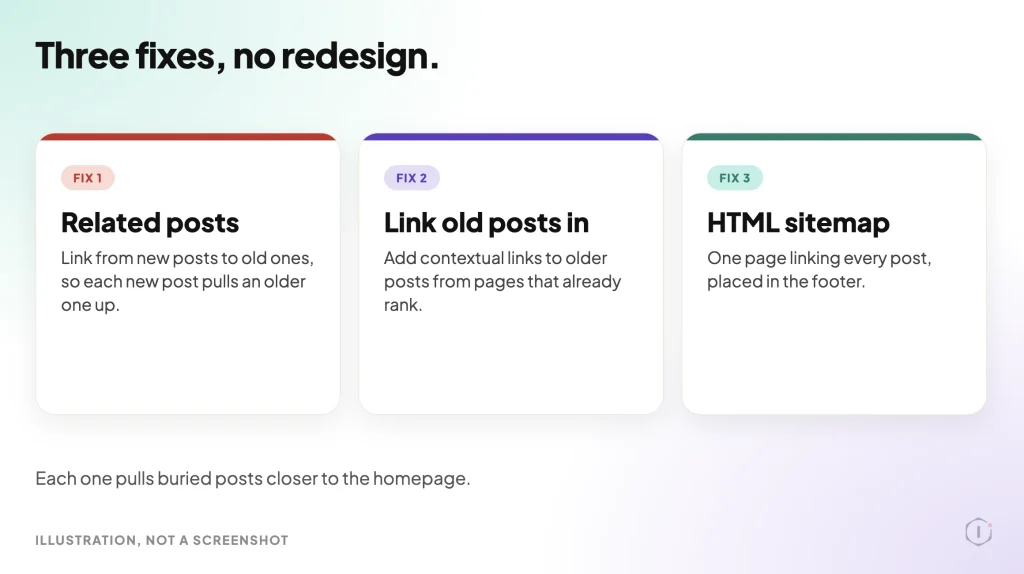
- Add a “recent in this category” or “related posts” block that links by topic, not just by date. This creates new depth-2 and depth-3 paths into older content without touching the main menu.
- Link forward from new posts into relevant older ones, inside the body text. A single contextual link from a high-traffic new post can cut an old post’s depth by two or three in one edit.
- Build or fix an HTML sitemap page, and link to it from the footer. This does not replace the XML sitemap submitted to Search Console, but it gives Googlebot, and readers, one more guaranteed short path to everything the site considers worth listing.
None of these require touching the primary navigation, which is usually the part of the site most resistant to change because it affects every visitor, not just the ones arriving from search.
What Shallow Crawl Depth Does Not Solve
Reducing crawl depth gets a page crawled more often. It does nothing for page speed, for whether the content actually answers the query, or for whether the server itself responds fast enough to make a healthy crawl rate worth having. A CDN that is not actually serving cached responses undercuts crawl efficiency in a different way than depth does, by making every fetch, shallow or deep, slower and more expensive for the crawler’s time budget. The two problems get confused because they both show up as “pages not getting indexed,” but they need separate checks and separate fixes.
Depth also does not fix duplicate or near-duplicate content. A page reachable in one click that duplicates another page’s content is not going to outrank or out-index its twin just because it is shallow. Depth is a necessary condition for a healthy crawl pattern. It is not a sufficient one, and redirect chains waste crawls in their own way.
A Careful Version You Can Do By Hand
For a site with no budget for a crawler subscription, the honest manual version is exactly the four-step process above, done with a spreadsheet and a few hours of clicking. The limitation is scale: hand-counting depth past a few hundred URLs becomes impractical, and any manual count is a snapshot, not a live monitor, so it goes stale the moment the menu or a major archive page changes. For a site that size, rerun the check quarterly, or any time the navigation changes, rather than treating one count as permanent.
Two Outside Views
A thread in r/SEO asked the direct question: “Does click depth have an impact on seo?” The original poster described a site with “3 clicks depth for strategic pages” and asked whether adding a mega menu to cut that to one click would help rankings.
Short answer is yes, but 3 clicks is fine. Most people are trying to reduce it from 6-9 clicks.
r/SEO, 2022
Another reply in the same thread cautioned against over-correcting with navigation changes: “The mega menu can affect your DOM and your site speed. You can try to internal linking from the other blog articles, also your blog category structure has to be great.”
A short YouTube explainer, “What is Crawl Depth in SEO?” from the channel Sabir Ali, frames the same idea from the crawler’s side rather than the link structure’s side.
This video will explain what crawl depth is in SEO and why it’s important for your website’s ranking.
Sabir Ali, YouTube
Both sources land on the same practical number that keeps surfacing in this research: three clicks or fewer for anything that matters, with real damage usually starting past six.
The Point
Crawl depth is the kind of problem that never announces itself. Nothing breaks, no error appears in wp-admin, and the posts affected still look fine to a human who finds them directly. The only visible symptom is a Search Console report quietly filling up with “discovered” and “crawled” rows that never flip to “indexed.” Counting clicks from the homepage, by hand if needed, is one of the few SEO checks that costs nothing but time and tells a site owner exactly which pages the site itself is hiding from its own crawler.
Sources And Further Reading
- r/SEO: “Does click depth have an impact on seo?” read live, thread dated 2022.
- YouTube: “What is Crawl Depth in SEO?” (Sabir Ali) short explainer, verified live.
- Google Search Console Help: Page Indexing report, “Discovered – currently not indexed”
- Google Search Central: Crawl Budget Management for large sites
Comments