Technical SEO Audit: The Playbook, Step By Step.
A technical SEO audit starts inside WordPress, not with a crawl. See the eight read-only steps Protuno runs, and a small version you can do today.

A technical SEO audit can crawl fifty pages and still miss the one setting that hides all of them.
That setting is a single checkbox. No crawler reads it from the outside, and it can sit switched on for months while every other report looks tidy.
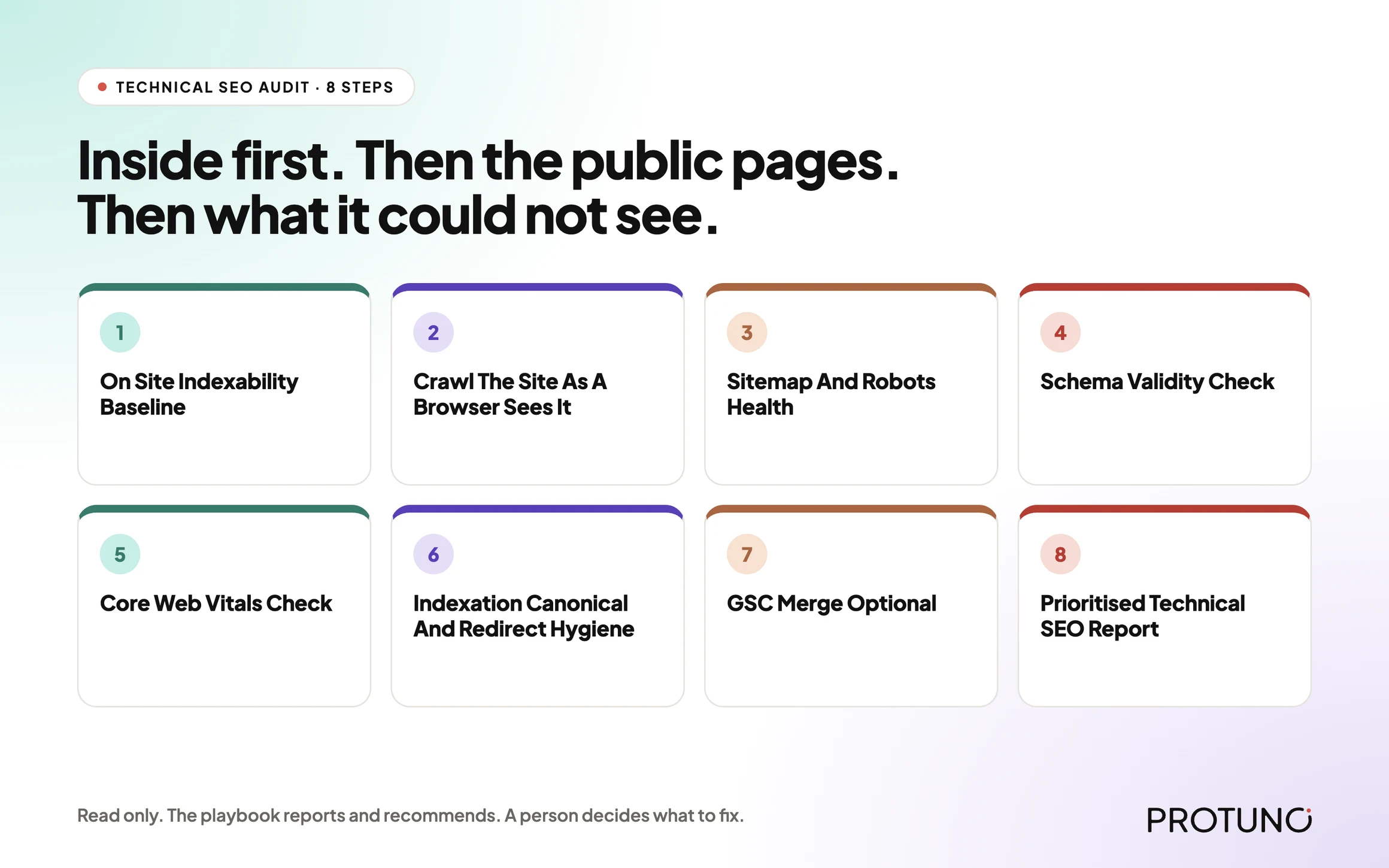
Short answer: a technical SEO audit is a fixed list of questions about whether a site can be found, read and trusted by a search engine. The useful ones start from inside WordPress, where the indexing switch lives, then check the public pages, then say plainly what they could not see. Protuno’s Technical SEO Audit is an eight-step, read-only playbook built in that order.
What this post is, and is not: it is a practical walk through how one audit is put together and how to run a small version by hand today. It is not a promise that a clean audit will rank anything. Technical SEO removes reasons not to rank. It does not supply a reason to.
An audit tool tells you what it found. A good audit also tells you what it could not look at.
Why A Crawl Alone Is Not An Audit
Most technical SEO audits begin with a crawler. Point it at the homepage, let it follow links, collect status codes, titles and canonicals, then sort the list.
That is a useful view. It is also a view from the outside, and the outside has three blind spots.
The first is configuration. A crawler can see a noindex tag on a page, but it cannot read the WordPress option that tells search engines to stay away from the whole site. We wrote about what that setting does and does not change in the robots.txt myth post, where Disallow and noindex turn out to be two different instructions.
The second is reach. A crawler follows links. A page nothing links to never appears in the crawl, which is why orphan pages need a different source of truth.
The third is honesty about coverage. A crawl that quietly stops at its page limit, or gets an interstitial page instead of the real site, produces a clean-looking report built on partial data.
None of this makes crawling wrong. It makes crawling one step in a sequence, not the whole job. For what a crawl actually produces on a real site, see our crawl audit write-up.
Three Ways To Look At The Same Site
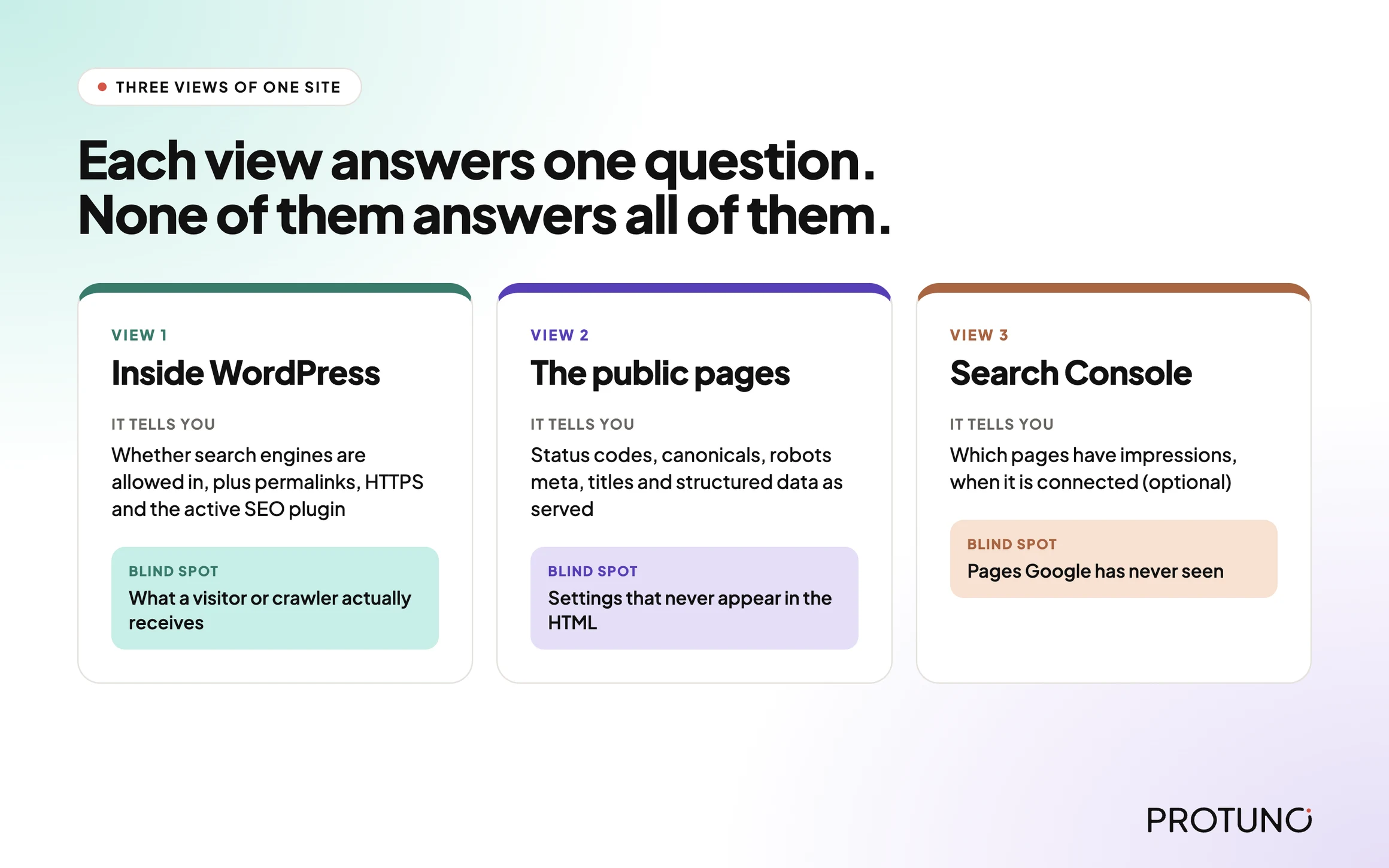
A site can be examined from the inside, from the public pages, and from a search engine’s own records. Each answers a different question.
| View | What it tells you | What it cannot prove alone |
|---|---|---|
| From inside WordPress | Whether search engines are allowed in at all, the permalink structure, HTTPS, which SEO plugin is active, how many pages are published | What a visitor or a crawler actually receives |
| From the public pages | Status codes, canonicals, robots meta, titles, descriptions, structured data as served | Settings that never show up in the HTML |
| From Search Console | Which pages have impressions and how Google treats them | Anything about pages Google has never seen |
The third view is optional in Protuno’s playbook, and the playbook says so out loud. More on that below.
A Small Test You Can Run Today
You do not need a tool to check the highest-impact items. Pick one site and record these:
- Is “Discourage search engines from indexing this site” switched on under Settings, Reading?
- Does
/robots.txtreturn 200, and does it contain a blanketDisallow: /for every user agent? - Does a sitemap exist at
/sitemap.xml,/wp-sitemap.xmlor/sitemap_index.xml? - Does the
http://version of the homepage redirect tohttps://? - Does your homepage declare a canonical that points to itself?
- Does your latest post carry a robots meta tag with
noindex?
Three of those take one command each:
curl -s https://example.com/robots.txt | head -20
curl -sI http://example.com/ | head -5
curl -s https://example.com/ | grep -i -E 'rel="canonical"|name="robots"'
Write the answers down next to the date. Then do the same for four more sites. You now have the shape of a technical audit, and you will see why it needs a fixed order.
The Playbook, Step By Step
Technical SEO Audit is a Protuno SEO playbook. In the Protuno dashboard it is a Beta playbook handled by the SEO agent, Iris. It runs a fixed sequence of eight steps and only reads the site. It changes nothing. It is not on the public playbooks page yet, so treat it as a new playbook that is still being rolled out.
| # | Step | What it does |
|---|---|---|
| 1 | On Site Indexability Baseline | Reads the signals only the plugin can see: the search engine visibility option, permalink structure, HTTPS, which SEO plugin is active, whether core sitemaps are on, and how many posts and pages are published |
| 2 | Crawl The Site As A Browser Sees It | Crawls the public pages, bounded to about 50, and records status, canonical, robots meta, title and description length, and whether structured data is present |
| 3 | Sitemap And Robots Health | Fetches robots.txt and looks for a sitemap at the usual addresses, checking it stays inside protocol limits |
| 4 | Schema Validity Check | Scans for JSON-LD blocks and checks they parse and declare a context and a type |
| 5 | Core Web Vitals Check | Asks the public PageSpeed API for a lab estimate on the homepage, and reports unknown if it cannot |
| 6 | Indexation Canonical And Redirect Hygiene | Fetches the homepage and the most recent posts and pages, comparing canonicals and robots meta, and tests whether plain HTTP redirects |
| 7 | GSC Merge Optional | Adds Search Console impressions if a source is connected, and skips cleanly if not |
| 8 | Prioritised Technical SEO Report | Builds one ranked report with evidence, and lists any pillar it could not check |
Order matters here. Step 1 comes first because every later step depends on it, and the playbook treats a missing baseline as a broken chain, not as a pass. The crawl is step 2, not step 1, because a crawl with no baseline cannot tell a deliberate noindex from an accidental one.
Step 1 In Detail: The Baseline Nobody Crawls
The baseline reads the WordPress option that decides whether the whole site asks to be indexed. If that option says no, the playbook records a critical finding. A site asking Google not to index it is the most expensive technical problem you can have, and it is the least visible.
It also flags a plain permalink structure (the ?p=123 style) and a site not served over HTTPS as high-severity findings. It notes the active SEO plugin and whether core sitemaps are enabled, because a site with neither has no sitemap source.
Step 2 In Detail: A Crawl With Its Limits Stated
The crawl is bounded to roughly fifty pages. If the crawl engine hits an interstitial page, such as a tunnel warning, the playbook discards that page rather than treating it as the site. If every page is an interstitial, it falls back to fetching pages from the server itself.
The playbook also names a gap that most audits skip: signals injected by JavaScript can be invisible to a server-rendered read. That is stated as a coverage gap in the report, not hidden.
Steps 3 To 6: One Pillar Each
Robots and sitemap come from the site fetching itself, so nothing in front of the site can interfere. A robots file that blocks everything for all user agents is a critical finding. One that cannot be reached is a low finding, because an unreachable file does not prove there is none.
Schema is checked structurally: does it parse, and does it declare a context and a type? The playbook says that is not full validation and points to Google’s Rich Results Test for the authoritative answer. It never claims rich-result eligibility.
Core Web Vitals are lab estimates against the usual thresholds: LCP at 2.5 seconds, INP at 200 milliseconds, CLS at 0.1. INP is a field metric with no lab equivalent, so the playbook reports Total Blocking Time as a proxy and labels it as one. If the PageSpeed call fails, the pillar says unknown with the reason.
Indexation hygiene looks at a small sample, the homepage plus the most recent posts and pages, and compares each page’s canonical to its own address. It flags a missing canonical, a canonical pointing elsewhere, unexpected noindex, and an HTTP version that does not redirect.
What A Technical SEO Audit Does Not Solve
A technical audit is narrow on purpose. It does not tell you:
- Whether the content is any good, or whether anyone wants it.
- Whether other sites link to you.
- Whether a clean report will lead to rankings. It will not guarantee that.
- What real visitors experience. Lab estimates are not field data.
- Which fixes are safe to make. The playbook recommends, a person decides.
Protuno’s own report footer says the same: technical audit only, no content quality or backlink judgment.
Questions To Ask Your Current Audit Tool
- Does it read the WordPress indexing option, or only what is in the HTML?
- What is its page limit, and does the report say when the limit was hit?
- What does it do when the site returns an interstitial page instead of content?
- Does it separate “clean” from “could not check”?
- Are Core Web Vitals labelled lab or field?
- Does every finding come with the URLs it affects and the evidence behind it?
If a tool cannot answer the fourth question, treat every green tick with suspicion. A false zero issues is worse than an honest “could not check”.
Which Check Are You Actually Running?
| If you need to know | Evidence that answers it | Next action |
|---|---|---|
| Is the site allowed to be indexed? | The visibility option, robots.txt, meta robots on key pages | Fix the setting first, before anything else |
| Can a search engine find the pages? | Sitemap present and in limits, internal links | Repair the sitemap, see the sitemap audit post |
| Are the pages consistent? | Canonicals and redirects on a sample | Correct the canonical or flatten the redirect |
| Does the markup parse? | JSON-LD scan, then Rich Results Test | Fix the invalid block |
| Is it fast enough? | Lab estimate, then field data | Treat the lab number as a pointer, not a verdict |
| Which pages deserve effort first? | Search Console impressions | Connect Search Console or accept severity-only ordering |
Fixing Findings In The Right Order
The playbook ranks findings by severity, and by traffic too when Search Console is connected. That is a sensible default for a manual audit as well.
| Priority | Examples | Why this order |
|---|---|---|
| Critical | Site-wide noindex, robots blocking everything | Nothing else matters while the site asks to be ignored |
| High | Plain permalinks, no HTTPS, unexpected noindex on a page | These change what can rank |
| Medium | Missing sitemap, canonical mismatch, redirect chain, HTTP not redirecting | These dilute signals |
| Low | Unreachable robots.txt, high Total Blocking Time | These need a second look before action |
Two practical rules apply to every fix. Take a restore point before changing a setting or a redirect rule. Re-run the same check after the change, so you know the fix did what you intended and nothing else.
A Five-Site Audit You Can Do This Week
Pick five sites you look after. For each, record the visibility setting, robots.txt status, sitemap address, canonical on the homepage, and whether HTTP redirects to HTTPS.
Then decide, for each finding, one of these:
- Fix now, because it is critical or high.
- Test first, because the change could affect live traffic.
- Replace, because the plugin producing it is the problem.
- Remove, because the setting or file is no longer needed.
- Accept, with an owner and a date.
- Investigate, because the evidence is incomplete.
“Investigate” is a legitimate answer. It is better than guessing. If you want the longer version of the crawl side, the broken link audit post covers why a 404 is only the easy half.
Why Optional Does Not Mean Unimportant
Step 7, the Search Console merge, is labelled optional in the playbook. If no source is connected, it skips and the report says findings are ranked by severity alone, not severity times traffic. It does not invent impressions.
That honesty matters. A page with a medium finding and ten thousand impressions deserves attention before a page with a high finding and none. Without the traffic data you cannot tell them apart, and the report says so.
Speed is a related case. If a slow response is part of what worries you, the TTFB explainer covers why the usual number is easy to misread.
Where Protuno Fits
In the Protuno dashboard, the SEO agent, Iris, covers this work. The Technical SEO Audit playbook is read-only. It reports, a human decides what to fix, and the report hands the top pages on to a separate per-page playbook, the AI SEO Optimiser, for the fix layer.
If you want to see how a Protuno playbook is laid out before running anything, the SEO agent page shows what is built and what is still in build.
The Point
An audit is a list of questions asked in a sensible order, with an honest note on the ones it could not answer.
Start with whether the site is allowed in. Then check what a visitor and a crawler receive. Then say what you could not see.
Which of your sites would you trust to pass question one today?
Comments