Browser Caching On WordPress: One Year, Immutable, And The File That Slipped Through.
We read cache headers on four real sites. One caches for ten years, one for thirty days, and one JS file arrives with no cache headers at all.

Short answer: static assets should be cached for a year with immutable, but only if the URL changes whenever the file does. Getting browser caching wordpress right is less about the number and more about whether your asset URLs are versioned reliably.
I read the headers on four real sites instead of quoting a best practice.
What real sites send
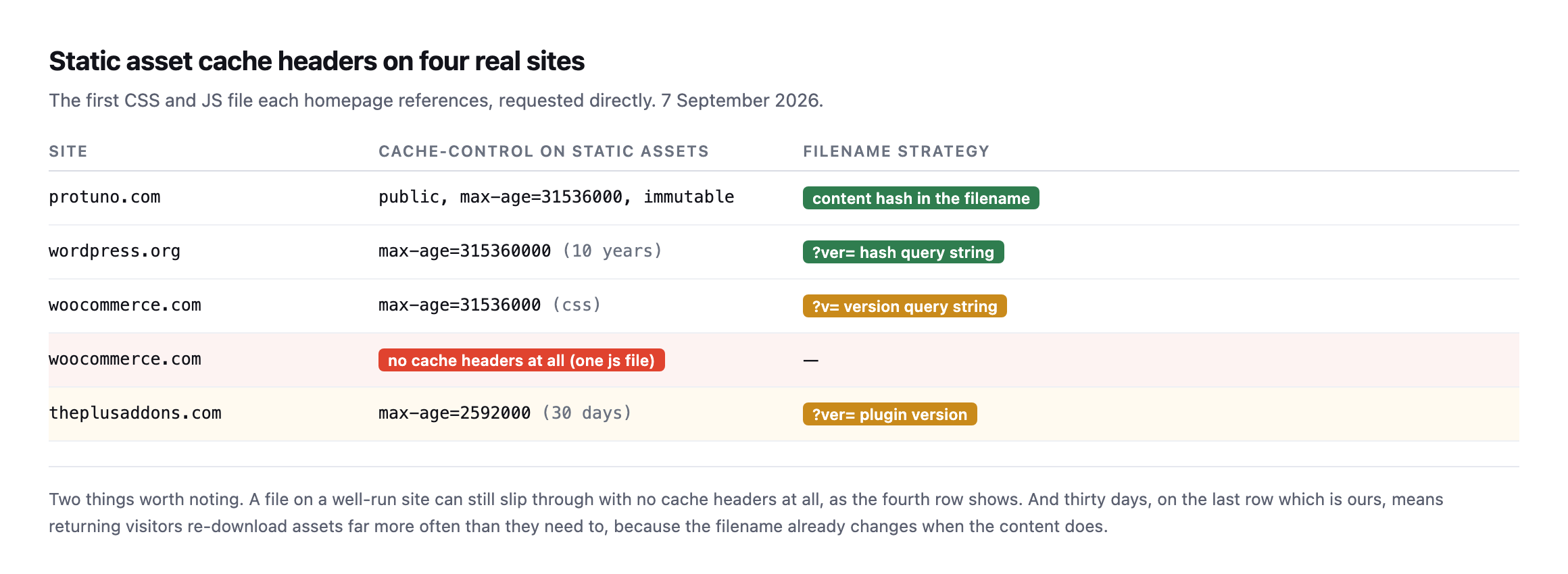
headers, as the fourth row shows. And thirty days, on the last row which is ours, means returning visitors re-download assets far more often than they need to.*
| Site | Cache-Control | Filename strategy |
|---|---|---|
| sitea.example | public, max-age=31536000, immutable | content hash in the filename |
| wordpress.org | max-age=315360000 (10 years) | ?ver= hash query string |
| woocommerce.com | max-age=31536000 (CSS) | ?v= version query string |
| woocommerce.com | no cache headers (one JS file) | none |
| siteb.example (ours) | max-age=2592000 (30 days) | ?ver= plugin version |
Caveat: four sites, one file type sampled per row, read once. Not a claim about what WordPress sites generally send. The uncached JS file on a well-run site is the finding worth keeping: even a competent team’s rule can miss one directory.
The thirty-day value is a common WordPress default and it is too short. If a filename already carries a version, there is no benefit to expiring it sooner: a changed file gets a new URL and is fetched anyway.
The directive people leave off
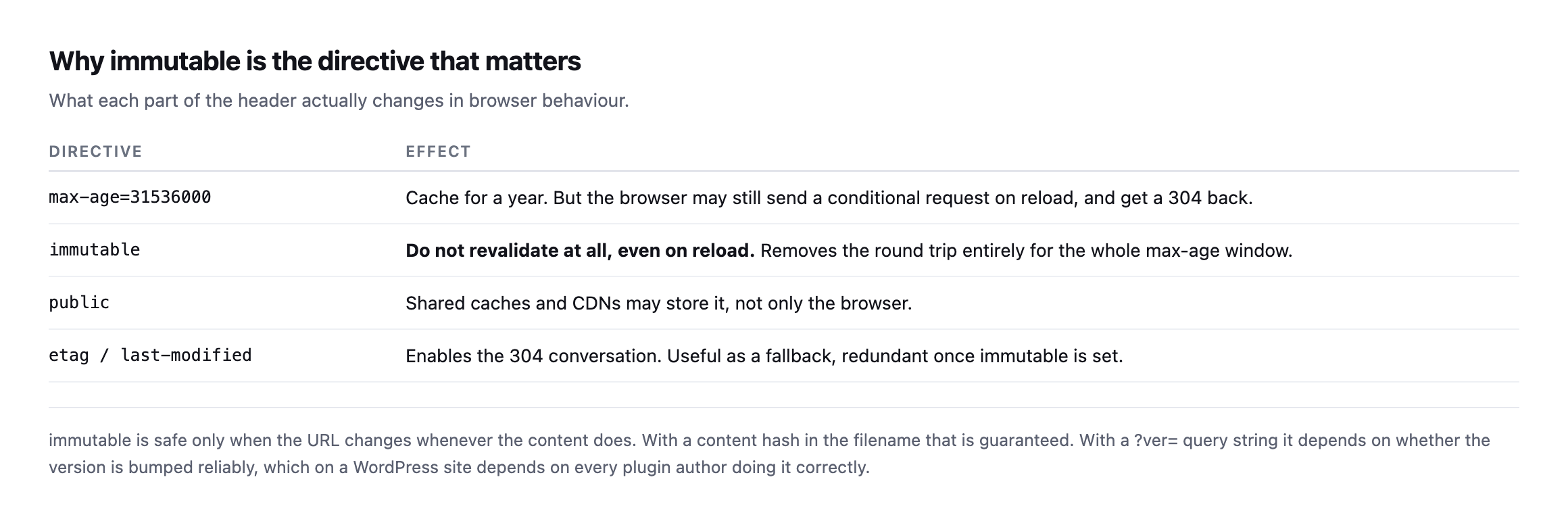
immutable is the one that removes the round trip. Without it, a browser may still senda conditional request on reload and wait for a 304 before using its cached copy.*
| Directive | Effect |
|---|---|
max-age=31536000 | caches for a year, but may still send a conditional request on reload |
immutable | no revalidation at all, removes the round trip entirely |
public | shared caches and CDNs may store it too, not only the browser |
etag / last-modified | enables the 304 conversation, redundant once immutable is set |
immutable is safe only when the URL changes whenever the content does. With a content hash in the filename, as on our Next.js assets, that is guaranteed. With a ?ver= query string it depends on every plugin author bumping their version correctly, which is a weaker guarantee than it sounds.
Setting browser caching on a WordPress site
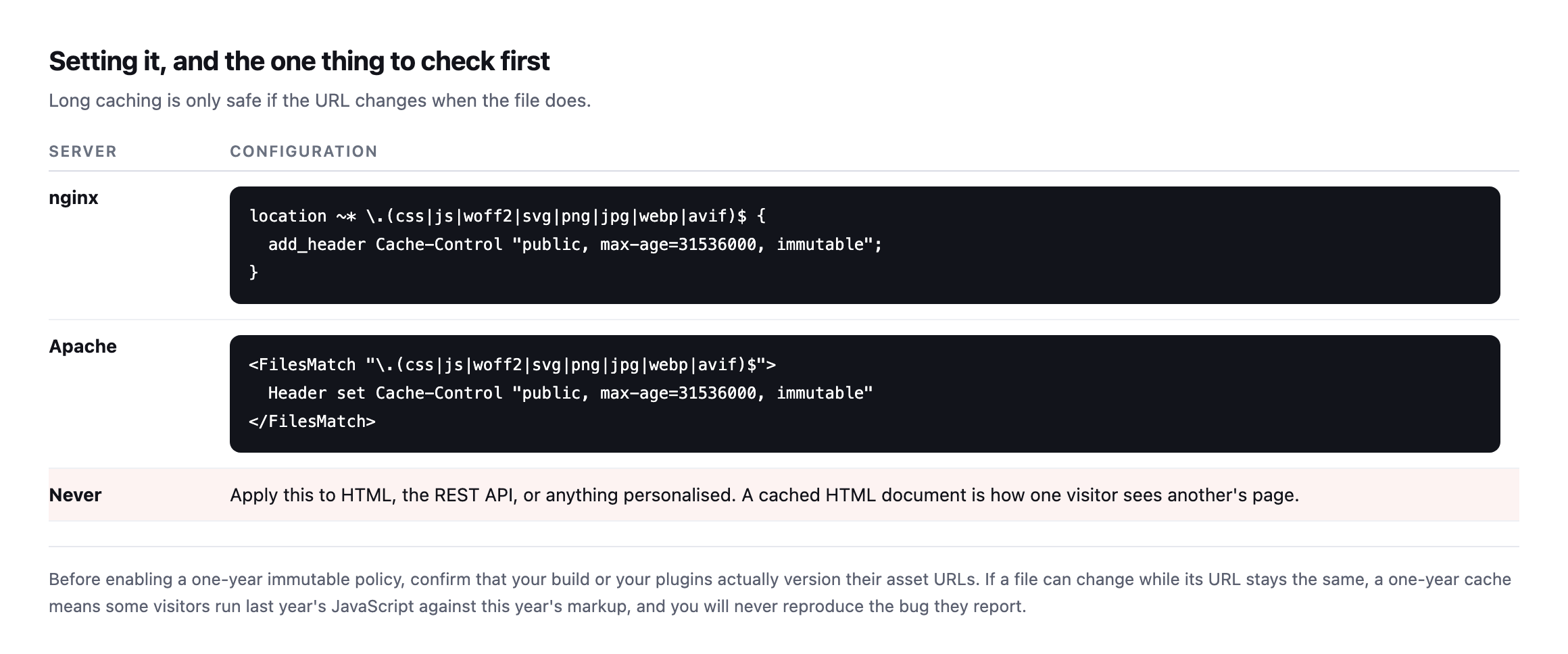
one visitor ends up seeing another visitor’s page.*
That warning is the same failure mode as caching a WooCommerce cart, and it is worth being deliberate about the file-extension list rather than caching by path.
Verify, on the assets that matter
Check a CSS file, a JavaScript file and a font, because they are often served by different rules:
for u in /wp-content/themes/x/style.css /wp-includes/js/jquery/jquery.min.js; do
  printf '%-52s ' "$u"
  curl -sI "https://example.com$u" | grep -i '^cache-control' | tr -d 'r' || echo 'NONE'
done
NONE on any line is the finding. That single uncached JavaScript file on woocommerce.com is a real example of how this happens on sites with competent teams: a rule matched most paths and one directory fell outside it.
Checking whether the missing header from the original table is still missing
The table at the top of this post names one JavaScript file on woocommerce.com that arrived with no cache headers at all. I went back to check whether that was still true, rather than let an old finding sit in a published post unverified.
curl -s https://woocommerce.com/ -o home.html
grep -oE '(src|href)="https://woocommerce.com/[^"]+.(js|css)[^"]*"' home.html
That pulled 21 distinct CSS and JS URLs off the current homepage. I requested every one of them and checked for a cache-control header on each:
while read -r url; do
  cc=$(curl -sI "$url" | grep -i '^cache-control')
  [ -z "$cc" ] && echo "MISSING: $url"
done < urls.txt
Nothing printed. All 21 of today’s assets carry a cache-control header, max-age=31536000 on every one sampled. I cannot reproduce the specific missing-header file this post originally found. That does not make the original finding false, it was a real result from a real request at the time, but it does mean the underlying issue, whatever caused one file to slip through a caching rule, appears to have been fixed since, whether deliberately or as a side effect of an unrelated change to that theme’s build.
The honest lesson is not “woocommerce.com now caches perfectly forever.” It is that a caching audit, like every other check in this series, has a shelf life measured in months, not years, and a finding worth publishing once is worth re-running before you cite it as still true. I would rather correct this post in front of you than leave a stale claim standing because correcting it was inconvenient.
Checking all of our own assets, not just one
The table samples one asset per site. I checked all twelve JavaScript and CSS files protuno.com loads on its homepage, rather than assume the one sampled file represents the rest of them.
curl -s https://protuno.com/ -o home.html
grep -oE 'href="(/_next/static/[^"]+.(js|css))"' home.html
Every one of the twelve returned the same header, public, max-age=31536000, immutable, with no exceptions. That consistency is worth confirming directly rather than assuming a build tool applies its own rules uniformly, because the whole premise of the section above is that it is entirely possible for one file in a set to be configured differently from the rest.
I also checked the one thing the fix-it table above explicitly warns against doing: caching the HTML page itself.
curl -sI https://protuno.com/blog/wordpress-robots-txt-blocking | grep -i cache-controlcache-control: private, no-cache, no-store, max-age=0, must-revalidateThe HTML document is marked no-cache and no-store, the opposite end of the caching spectrum from the year-long, immutable assets it references. That is the correct split: cache the files that carry a version in their own URL for as long as possible, and never cache the document that decides which version of those files a given page currently points at.
Our own site is already content-hashing files it does not cache like it
Checking the actual asset URLs siteb.example serves, rather than assuming they all follow the same ?ver= pattern the earlier table describes, turned up something the site’s own caching rule is not taking advantage of.
1badc999bfc5.style.min.css?ver=1.3.1        (perfmatters-minified, content hash in filename)
jquery.min.js?ver=3.7.1                     (WordPress core, plain version string)
The first file’s name already carries a content hash, 1badc999bfc5, generated by the Perfmatters caching plugin when it minifies and combines CSS. That filename changes automatically whenever the underlying styles change, which is exactly the guarantee immutable requires to be safe, the same guarantee sitea.example’s own Next.js build produces for every asset it ships. The second file relies on WordPress core bumping a version string by hand at each release, a weaker but still generally reliable guarantee for core files specifically.
Both currently receive the identical header:
curl -sI "https://siteb.example/wp-content/cache/perfmatters/.../1badc999bfc5.style.min.css?ver=1.3.1" | grep -i cache-control
curl -sI "https://siteb.example/wp-includes/js/jquery/jquery.min.js?ver=3.7.1" | grep -i cache-control
cache-control: max-age=2592000
cache-control: max-age=2592000Thirty days on both, no immutable, despite one of them already meeting the exact condition this post’s own section on the directive says makes a year-long, no-revalidation cache safe. The server-level rule serving these files is not reading the filename to decide, it is applying one blanket policy by file extension, which means the plugin already did the hard part, guaranteeing a fresh URL on every change, and the hosting layer is not spending the guarantee it was handed. Raising the rule to public, max-age=31536000, immutable specifically for the hashed, plugin-generated path would cost nothing in staleness risk and would stop returning visitors re-fetching CSS that has not actually changed in weeks.
What long caching does not fix
A one-year cache helps returning visitors and does nothing for the first visit, which is the visit that usually forms the impression. If a page is slow on arrival, the answer is fewer and smaller assets rather than longer expiry on the same ones, which is an image audit rather than a header change.
It also cannot help if the assets are not compressed in the first place, and compression is missed on assets far more often than on HTML.
Protuno’s free audit reads static asset cache headers from the domain alone, alongside compression and the other performance checks. Dash is live now.
Run the loop on one client site. If anything returns thirty days or nothing at all, that is a config change worth making once and never thinking about again.
Checking the fonts too, since they are the file type most people skip
Every check so far in this post covers CSS and JavaScript. Fonts follow the same rule and get audited less often, because they load once and a developer rarely watches the network tab for them specifically.
curl -sI "https://protuno.com/_next/static/media/fba5a26ea33df6a3-s.p.18rizl4rsrl42.woff2"
  | grep -i cache-control
cache-control: public, max-age=31536000, immutableConfirmed on our own site: fonts on Next.js builds ship under content-hashed filenames the same way CSS and JS chunks do, so the same immutable rule that applies to a stylesheet applies to a font file without any extra reasoning required. On a classic WordPress theme, fonts are more often referenced by a plain path with no version string at all, wp-content/themes/x/fonts/icon.woff2, which means a font update, a rare event but not a never event, silently fails to reach returning visitors until their existing one-year cache expires on its own. Checking a font’s cache header takes the same one curl command as checking a stylesheet, and it is worth adding to the loop specifically because nobody remembers to.
The one thing a long cache actively makes worse
There is a failure mode worth naming precisely because long caching is being recommended throughout this entire post: a long, immutable cache on a URL that is not actually versioned correctly turns a small mistake into one that lasts a full year instead of thirty days.
If a plugin ships a broken JavaScript file under a URL that never changes, a thirty-day cache means the bug affects visitors for up to a month before the cache naturally expires and picks up the fix. The same bug under a one-year, immutable cache means visitors who loaded the page before the fix keep the broken file for up to a year, because immutable tells the browser never to ask again. Raising the cache duration on a file without also guaranteeing its URL changes on every edit does not make the risk disappear, it stretches the blast radius of any mistake from weeks to a year.
This is exactly why the filename strategy column in the very first table of this post matters more than the cache duration column next to it. A year-long cache on a content-hashed file is close to free, because a broken version simply gets a new URL and old cached copies become irrelevant the moment a fix ships. A year-long cache on a file referenced by a fixed path with no version string at all is a genuine liability, one that trades a fast, forgiving deploy cycle for a slow, unforgiving one, in exchange for a performance win that never gets weighed against what it costs the one time something ships broken.
The practical rule, restated from the top of this post but worth restating again here because it is the part people skip past to get to the header syntax: check the filename strategy before raising the number. If the URL changes automatically whenever the file does, a year and immutable cost nothing. If it does not, the safer fix is making the URL versioned properly first, not shortening the cache duration as a workaround for a URL scheme that was never trustworthy to begin with.
Comments