WordPress CDN: Prove It Is Serving.
A WordPress CDN dashboard saying active is not evidence. Read the response headers, check each heavy asset, and prove which bytes come from an edge.

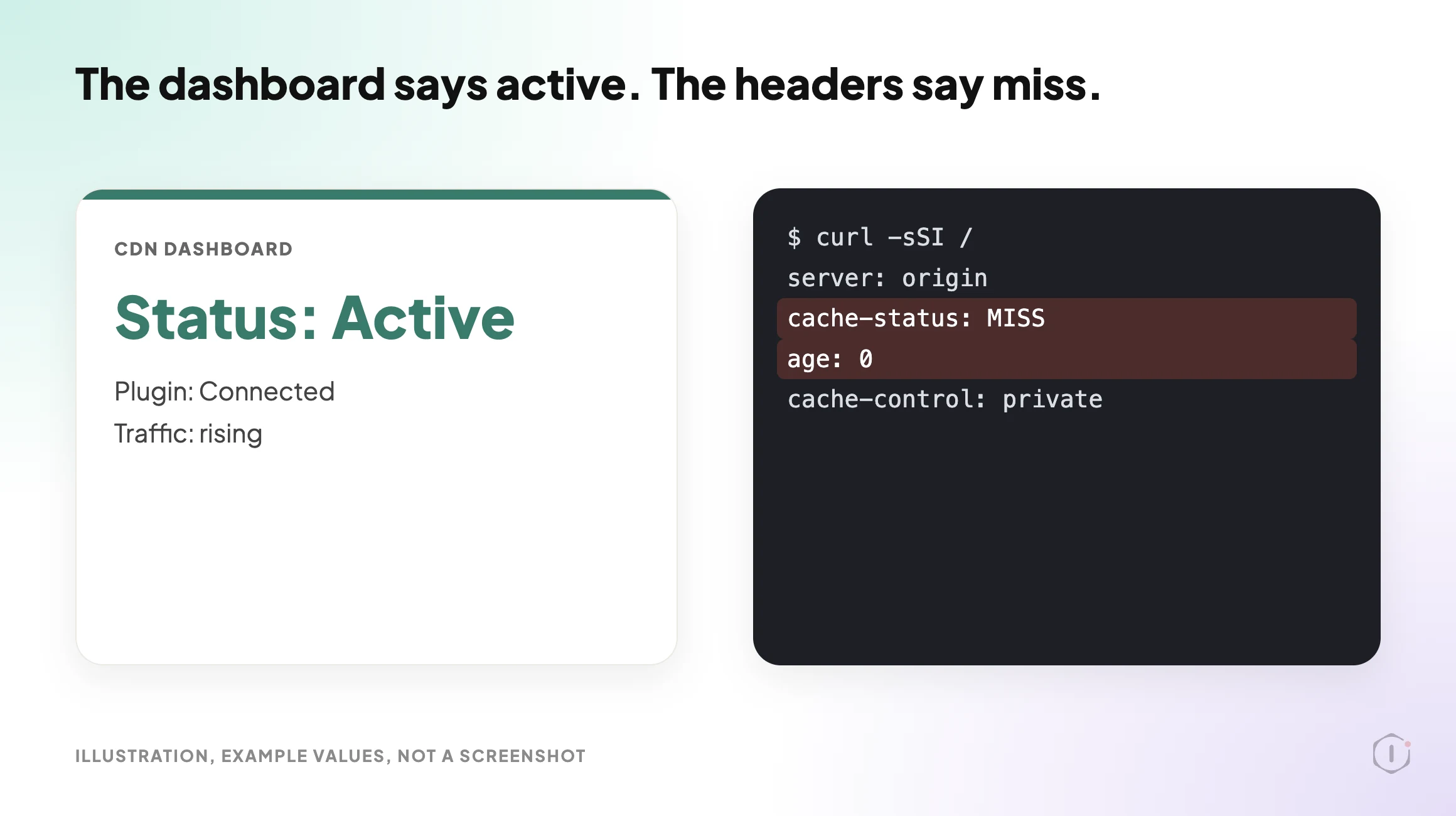
The CDN dashboard is green. The traffic graph shows requests. The plugin settings page says “Connected”.
Then someone pulls the response headers for the homepage and for the nine heaviest files on it. The CSS and JavaScript come from an edge. The hero image, the webfonts and the HTML document do not. Three of the heaviest things on the page are still travelling from the origin, on every request, for every visitor.
Nothing is broken and nothing alerts. The dashboard is telling the truth about the account. It says nothing about the page.
Short answer: a CDN is proven by response headers, not by a settings screen. Request the HTML document and each heavy asset separately, then read the server, cache status, age and cache-control headers on each one. The CDN is serving only the exact URLs that come back as an edge cache hit. Everything else is still your origin, whatever the dashboard says.
What this post is, and is not: this is a walk-through of outside-in verification you can run yourself with curl and a browser, on a site you are authorised to test. It shows which responses were served from an edge at the moment you asked. It does not measure end-user speed, it does not prove the CDN is configured well, and header names differ between providers, so read your own provider’s documentation before deciding that a missing header means a miss.
Why This Matters Now
WordPress 7.1.3 shipped on 6 October 2026 as a maintenance and security release, and most sites will have updated since. An update can touch the files and URLs a CDN is serving, and a changed plugin can change what the origin tells the edge. A check from last quarter does not describe the site you have today.
That is the practical case for a check you can repeat: it costs a few minutes, and it tests the one thing the dashboard cannot.
What Set Up Actually Means
At least four states get called “we have a CDN”.
| State | What is true | What is not true |
|---|---|---|
| Account created, DNS not moved | The provider has a zone for your domain | No visitor traffic reaches the edge |
| DNS proxied, nothing cached | Requests pass through the edge | The edge forwards almost everything to the origin |
| Static assets cached | CSS, JS and images can come from an edge | The HTML document is still built per request |
| HTML cached at the edge | Full pages can be served without PHP running | Logged-in and cart pages must be excluded correctly |
A site that feels slow despite a CDN is often in state two or three while being described as state four. The dashboard reports account health. It does not report, per URL, whether the bytes a visitor received came from an edge.
Read The Headers, Not The Settings Page
Start with the HTML document, because it gates everything else. On a site you control:
curl -sSI https://example.com/ | sed -n '1p;/^[Ss]erver:/p;/[Cc]ache/p;/^[Aa]ge:/p;/^[Vv]ia:/p'Four fields carry most of the answer.
| Header | What it tells you | What to watch for |
|---|---|---|
server or via | Whether an intermediary answered at all | If it names only your web server, the request may never have touched an edge |
| A cache status header | HIT, MISS, BYPASS, DYNAMIC, EXPIRED and similar | The name and values are provider-specific. Confirm them in your provider’s docs |
age | Seconds the object has been held in a cache | A value of 0 on every repeat request suggests it is not being kept |
cache-control | What the origin told caches to do | private, no-store or max-age=0 from the origin can stop edge caching |
Two cautions. First, a cache status header can be present and still say MISS. Finding the header is not the same as finding a hit. Second, one request proves nothing on its own. The first request to a cold edge is expected to miss. Run the same request twice, a few seconds apart, from the same place, and compare the pair.
Cloudflare documents its own cache status values on its cache responses page, and by default it caches by file extension rather than caching HTML, which its default cache behavior page explains. Other providers differ, which is why the table above says to confirm the names.
The same confusion appears one layer down, where a page cache plugin reports a hit that the response does not support. That is worked through in The WordPress Page Cache Header Lies, and it is worth reading before you trust any single cache header at either layer.
Per-Asset, Because The Page Is Not One Request
A page is one document plus, typically, dozens of subresources. A CDN can serve some of them and not others.
The method is plain. Open the page in a browser with the network panel recording, hard reload, then sort by size. Take the ten heaviest responses and check each for an edge cache status. Do it twice, so the second load shows what was kept.
Things that often bypass the edge while everything else is fine:
- Fonts loaded from a path that was never rewritten to the CDN hostname, or from a third party with its own cache policy.
- Images inserted with absolute origin URLs in post content, so a rewrite filter never sees them.
- Admin-ajax and REST responses, which usually should bypass, but are worth confirming rather than assuming.
- Files a plugin enqueues using a hardcoded site URL.
- Uploads added before the CDN was connected, when the integration only rewrites URLs for new content.
A miss on a 3KB icon costs almost nothing. A miss on the hero image costs the point of the exercise. If the heavy responses on your page are images, the CDN question and the file-size question are the same question, and the file-size half usually has the bigger win. WordPress Image Optimization: Find The 794KB File Before Your Visitor Does covers that audit.
HTML Caching Is A Different Decision
Caching static assets at an edge is close to free. Caching the HTML document is not, and the two are often discussed as one feature.
When the edge holds the HTML, a visitor can get a complete page without your PHP running. That is the largest win available on many sites. It also means the edge must be told, correctly and reliably, never to serve a cached page to someone who is logged in, has items in a cart or is mid-checkout. The failure is not slowness. It is one person seeing another person’s page.
So verify two things, in this order:
- Logged out, request a public page twice. Does the second response show an edge hit with a non-zero age?
- Logged in, request the same page. Does the response bypass the cache?
If the second check does not bypass, fix that before celebrating the first. The cart version of this failure is described in WooCommerce Cart Caching: One URL, Two Customers, One Very Bad Morning, and it is the clearest case for giving HTML caching its own verification pass.
Headers That Look Like Proof And Are Not
| Signal | Why it feels conclusive | Why it is not |
|---|---|---|
| The CDN plugin says “Connected” | It made a successful API call | It says nothing about any visitor request |
| A provider header is present | Something sat in the path | Present is not the same as HIT |
| Traffic appears in the provider dashboard | Requests reached the edge | Proxied and forwarded still counts as traffic |
| A speed test score improved | Something changed | Many things change at once, so attribute carefully |
| The IP resolves to the provider | DNS is proxied | That is state two in the table above |
The last row deserves a pause. Pointing DNS at a provider is the step people remember doing, so it becomes the thing they believe they verified. It proves routing. It proves nothing about caching.
Where The Origin Still Decides
An edge largely obeys your origin. If WordPress sends cache-control: no-cache on the document, most setups will forward every request. If vary is too broad, the cache splits into many near-unique entries and hits become rare, as MDN’s Vary reference explains. A cookie set on every response, including anonymous ones, commonly stops HTML being cached by default.
So a CDN rarely fixes a slow origin. It changes who answers, not how long the answer takes when nobody has it yet. The first visitor in each region still waits for your server. When that wait is long, measure time to first byte properly first, using WordPress TTFB: The Number Everyone Quotes And Almost Nobody Measures Properly. Two checks sit beside this one: Enable Gzip Compression On WordPress, Then Check What It Missed for compression on edge-served files, and Browser Caching On WordPress for what the visitor’s own browser keeps.
Two Outside Views
A tutorial and a forum thread. Neither is an endorsement, and neither describes Protuno.
In a June 2026 video, Learn With Miller sets up Cloudflare’s CDN from the dashboard in about three and a half minutes. It confirms the site’s DNS records are proxied (the orange cloud), leaves mail records unproxied, sets the caching level and browser cache TTL, switches on compression and HTTP/3, and ends by opening analytics to read the cache hit ratio. That ratio is a site-wide figure. It cannot say which URL on a given page came from an edge, which is the question this post is about.
On Reddit, an r/Wordpress thread titled “design looked broken after css changes – plugin cache clear wasn’t enough” makes the same point one layer down. The original poster cleared the browser and plugin caches and the layout was still wrong, until the server and CDN page cache were purged:
u201cplugin cache alone is not always the full stack.u201d
Original poster, r/Wordpress, 9 October 2026
A reply adds that a stylesheet enqueued with a fixed version string can be kept by the browser and the CDN long after the page HTML is fresh.
What This Does Not Solve
Header verification tells you where a response was answered. It does not tell you:
- whether the visitor experienced the page as fast, since render order, layout shift and script execution never appear in a header;
- whether the edge you reached is the edge a visitor in another region gets, because your result is specific to your location;
- whether the cache is purged correctly when content changes, which needs an edit and a re-request;
- whether a hit came from a stale copy of a page you updated an hour ago;
- whether the CDN costs more than it saves on a low-traffic site; or
- whether an asset should exist at all, which is usually the larger win and never a CDN question.
It also proves one moment. A deploy, a plugin update, a rewrite rule change or a provider default changing underneath you can quietly put the site back in state two. The check is cheap enough to repeat, which is the main argument for repeating it rather than filing the result.
Sources And Further Reading
- Cloudflare docs: Cache responses lists the cache status values Cloudflare returns and what each means.
- Cloudflare docs: Default cache behavior explains what is cached by default and why HTML usually is not.
- MDN: Age header defines how long an object has been held in a cache.
- MDN: Cache-Control header documents the directives an origin uses to tell caches what to do.
- MDN: Vary header explains how a broad Vary splits a cache into many entries.
- WordPress 7.1.3 Maintenance and Security Release is the release announcement of 6 October 2026.
- [How To Use Cloudflare CDN To Speed Up Any Website (Step-By-Step) [2026 guide], Learn With Miller, YouTube, 21 June 2026](https://www.youtube.com/watch?v=hB9j-2ARFGg)
- design looked broken after css changes – plugin cache clear wasn’t enough, r/Wordpress, 9 October 2026
The Point
“We put a CDN on it” describes a purchase. “The HTML document and the nine heaviest assets returned an edge hit on a second request, and the logged-in request bypassed correctly” describes a site.
The two sentences cost about the same time to produce. Only one survives a client asking what changed.
So for the sites you look after: when did you last read the actual response headers, rather than the dashboard built to reassure you?
Comments