WordPress Redirect Loops And Chains: Find The Hop.
WordPress too many redirects? A loop takes the site down and a chain hides. Trace every hop from outside with four requests and find the layer adding one.

A client calls because the site will not load. The browser shows a “too many redirects” error and says the page redirected too many times. Nothing was deployed, nobody touched the theme, and it worked yesterday.
Three weeks later the same site is fine. Every page loads, nobody is calling, and one URL is taking three hops before it reaches the page. Nobody will ever call about that one.
Same underlying fault, two very different experiences. One is an outage with a loud alarm. The other is a quiet detour that only shows up if you go looking.
Short answer: a loop is a redirect sequence with no end, so the browser gives up. A chain is a sequence that does end, just not on the first hop. Both are diagnosed the same way: request the URL from outside with redirects turned off, follow each hop by hand, and record the status code and the Location header at every step. The hop where the destination stops making sense is the layer that is misconfigured.
What this post is, and is not: this is an outside-in tracing method you can run against any URL you are allowed to test, plus the three configuration conflicts that cause most loops. It is not a guide to any one CDN’s rule screen, and it does not measure what a chain costs in rankings or load time, because that cannot be read from one site.
A Loop And A Chain Are The Same Bug
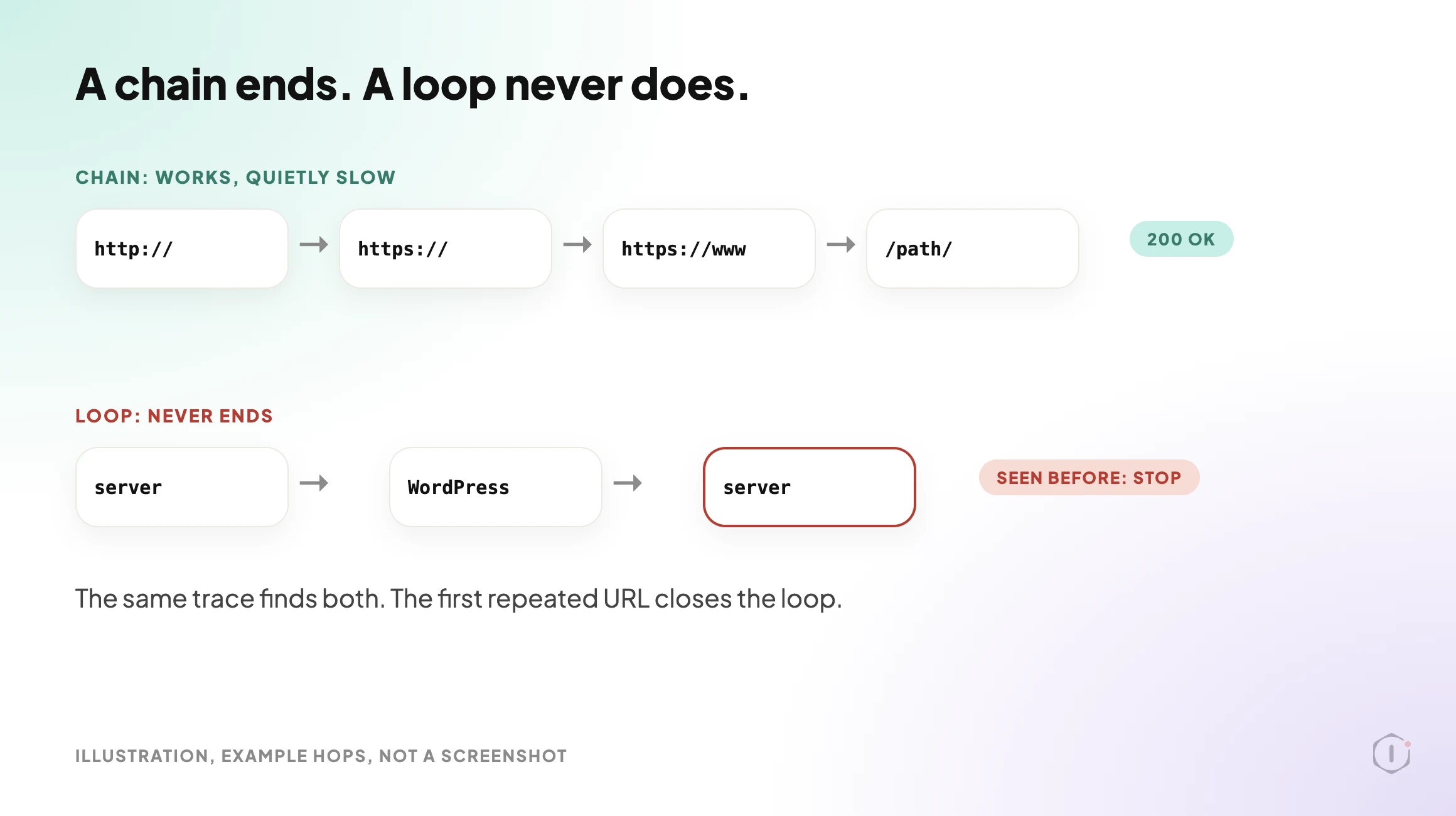
Both start the same way: more than one thing on the request path believes it is responsible for deciding the canonical URL.
A chain happens when each of those things makes a different but compatible decision. The server upgrades to HTTPS. WordPress adds the www. A redirect plugin maps the old slug to the new one. Each hop is individually correct, and the visitor still arrives at the right page after several round trips.
A loop happens when two of those decisions point in opposite directions. The server sends www to the bare domain. WordPress, whose siteurl option still has www in it, sends it back. Neither is wrong on its own. Together they never end, and the browser stops after its own limit and shows an error.
You do not need two diagnostic routines. The same trace finds both. For what a chain does to a link audit, and why a clean 200 can hide it, see why a 404 is the easy half of a link check. This post stays on finding the hop.
Trace Every Hop From Outside
The whole diagnosis is one habit: stop letting your tools follow redirects for you.
A browser follows the chain silently and shows you the final page. A checker that reports “200 OK” has already walked every hop and thrown the evidence away. You want the hops, one at a time.
Request the URL with redirect following off, and record four things for each hop:
- The URL you requested.
- The status code that came back.
- The exact
Locationheader, including protocol, host, path and query string. - Whether the
Locationis absolute or relative.
With curl, a header-only request does not follow redirects by default:
curl -sI http://example.com/pathThen request the Location value and repeat, until you reach a non-redirect status or a URL you have already recorded. A repeat is the definition of a loop, and the URL that repeats tells you where the cycle closes. To let curl do the walking and stop it from running forever, cap the hops and print the count:
curl -sIL --max-redirs 10 -o /dev/null -w '%{num_redirects} %{url_effective}n' http://example.com/pathIf the cap is hit, curl reports that the maximum number of redirects was followed, which is a loop. Use this only on URLs you are authorised to test.
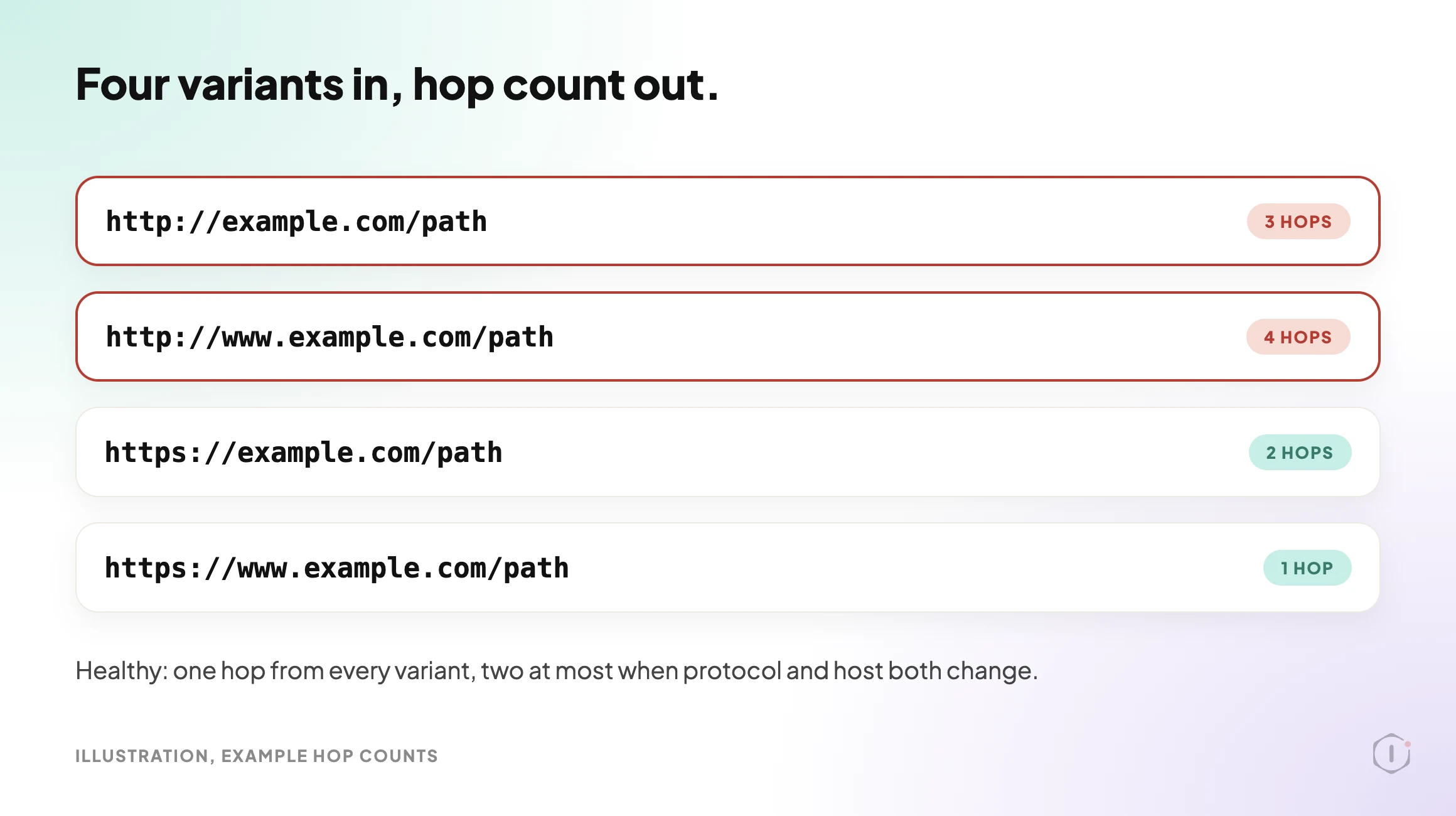
Run the trace against four variants of the same page, because the variants are where the disagreements live:
http://example.com/pathhttp://www.example.com/pathhttps://example.com/pathhttps://www.example.com/path
A healthy result is that every variant reaches the canonical URL in one hop, or two when both the protocol and the host have to change. Three or more hops from any starting point means something is doing the same job twice.
Capture the status code at each hop as well. A 301 and a 302 are both redirects, but they say different things about intent, and a chain that mixes them was probably assembled by more than one person. MDN’s page on 301 Moved Permanently and 302 Found is the quickest way to check what each one promises.
The Three Usual Culprits
Most loops and many long chains come from one of three conflicts. Check them in this order.
| # | Conflict | What it looks like in the trace | Where to look |
|---|---|---|---|
| 1 | Protocol and host settings disagreeing | A hop that adds www followed by one that removes it, or HTTPS to HTTP and back | WordPress siteurl and home options against the server rewrite rules |
| 2 | A plugin redirect fighting a server rule | Two hops to the same destination, differing by a trailing slash or letter case | The redirect plugin’s rule list against the server configuration file |
| 3 | A CDN or proxy rule added separately | A hop whose Location matches nothing in WordPress or the server config | The CDN’s own rules and SSL mode, read in its dashboard |
The first is the classic loop. Four combinations of protocol and host exist. Three of them must redirect to the fourth, and that rule should live in one place. WordPress keeps its own opinion in the siteurl and home settings, and its redirect_canonical() function redirects requests toward that address. If the server holds a different opinion about the canonical host, the request bounces between the two. The WordPress documentation on changing the site URL explains the settings, and the wp-config reference covers the WP_HOME and WP_SITEURL constants that can override them.
The second is the classic chain. A redirect plugin maps /old-page to /new-page, and the server separately enforces a trailing slash, so the visitor goes to /new-page and then to /new-page/. Both rules are right. Together they add a hop to every request that path ever gets.
The third is the one that wastes an afternoon, because the trace shows a hop that exists nowhere you can read on the server. A CDN rule runs before the request reaches your origin, so it is invisible from inside. Cloudflare documents one well-known version: an SSL mode that makes the CDN talk to the origin over plain HTTP while the origin insists on HTTPS, which loops. Its guide to too many redirects errors is the reference. The way to see it is to compare a request made through the CDN with a request made straight to the origin. If the hop appears in one and not the other, you have found the layer.
A redirect can also be cached. That means a rule you already removed may still be served to some visitors from somewhere. The WordPress page cache header lies explains why the header you would check to confirm a cached response is not conclusive on its own, so test with a cache-busting request before you declare it fixed.
Watch Out For The Browser’s Memory
One thing breaks the method quietly. Browsers remember some redirects, especially permanent ones, and a browser that remembers a 301 will skip the hop you are trying to observe.
So trace with curl or another client that keeps no memory, or use a private window and clear site data between attempts. If the browser still shows a loop while curl shows a clean path, the difference is stored on the visitor’s side: a cached redirect or a cookie. That is a useful finding on its own, because it explains why one person sees the loop and the next does not.
Two Outside Views
A tutorial and a forum thread. Neither is an endorsement.
Guides by Leonard’s tutorial on the WordPress too many redirects error goes through a short checklist: clear the browser cache and cookies, clear the CDN cache, make sure the WordPress Address and Site Address settings match and use the same protocol, deactivate plugins one by one, regenerate the .htaccess file by re-saving permalinks, and use an online redirect checker to see the path. It is a good first pass. It can clear a loop, and it does not say which layer caused it, which is what the trace in this post is for.
A beginner tutorial on the WordPress too many redirects error: clear caches, match the two URL settings, test plugins, regenerate
Guides by Leonard, “Fix WordPress Error Too Many Redirects (2026 Easy Guide)” on YouTube, 21 Feb 2026.htaccess, then check the redirect path with a tool.
On Reddit, an r/Wordpress thread describes a wp-admin redirect loop after login while the front end still loads normally. The replies were not available for this post, so it does not summarise them. The title is a useful reminder that a loop can sit on one path only, such as the login, which is why a trace should cover more than the homepage.
“WordPress wp-admin infinite redirect loop after login while frontend still works normally”
r/Wordpress, “WordPress wp-admin infinite redirect loop after login while frontend still works normally”
Fixing It Without Creating The Next One
Once you know which layer is adding the hop, the repair is short. Keeping it fixed is harder.
Decide the canonical form once and write it down. Protocol, host and trailing slash, in one line of the site’s documentation. Most of these faults exist because two people made the same reasonable decision in two places six months apart.
Enforce it in exactly one layer. Server rule, or CDN rule, or WordPress. Not two, and never a split where each handles part of the decision. The split works right up until one side is edited.
Point old rules at the final destination. When /a redirects to /b and /b later moves to /c, update the first rule to point at /c. Adding a second rule is faster today and is how long chains are born.
Re-trace after every change. The fix is not “the rule was edited”. The fix is “the four variants now resolve in one hop”, and only the trace proves it.
Take a restore point before you touch rewrite rules on a live site, because a bad rule can lock you out of the admin as well as the front end. If you have a staging copy, test the change there first, and remember that staging drifts from live in exactly the settings that matter here: the site URL, the CDN and the cache.
What Tracing Redirects Does Not Solve
A clean redirect map is real work with a real payoff. It is also a narrow fix, and claiming more for it is how these audits lose credibility with clients.
A trace cannot tell you whether:
- the destination is a good answer to the request, since a 301 to a loosely related page is technically clean and useless to the visitor;
- rankings changed because of it, because too many things move at once on a live site to credit one change;
- a crawler has re-processed the new path yet, as that happens on a schedule you do not control;
- every rule in the list is still needed, because a rule for a URL nobody has asked for in years still costs evaluation time; or
- the page at the end of the chain is reachable from anywhere a visitor would actually start.
The broader limit: a trace tells you what happens to a URL you already know about. It cannot find the URLs you have not thought to test. Finding those means crawling the site and tracing what the crawl turns up, which is the routine in the WordPress crawl audit on our own site. Redirects also belong next to the other checks, as in the technical SEO audit playbook post, rather than being scored on their own. If the redirects you are chasing started as 404s, which 404s actually cost you covers deciding what deserves a redirect in the first place.
Sources And Further Reading
- Google Search Central: Redirects and Google Search
- MDN: Redirections in HTTP
- Cloudflare docs: Too many redirects
- WordPress.org: Changing the site URL
- WordPress developer reference: redirect_canonical()
- Fix WordPress Error Too Many Redirects (2026 Easy Guide): Guides by Leonard on YouTube, 21 February 2026.
- WordPress wp-admin infinite redirect loop after login while frontend still works normally: an r/Wordpress thread.
For the wider review this belongs to, see the playbooks page.
Do You Know How Many Hops Your Sites Take?
Every site you run has a canonical form, and most of them enforce it in more than one place, quietly, on every request.
Pick five sites. Trace the four variants of the homepage and two inner URLs on each. Write down the hop count and the longest chain. It takes an afternoon, and the results tend to be worse than anyone expects.
So, across the sites in your care: do you know which ones take an extra hop on every request, or only the ones where it got bad enough that somebody phoned you?
Comments