How to Use Claude Code with WordPress: Build Locally, Manage Live Sites Safely.
Use Claude Code to build WordPress themes, plugins and blocks locally, then connect it to live sites safely: WP-CLI, WordPress MCP, and what to add on top.

Claude Code is Anthropic’s coding agent that works in your terminal and your project files. For WordPress it does two different jobs: it builds themes, plugins and blocks in your local code, and, once you connect it, it can read and act on live sites. The first is low risk. The second needs guard rails.
The short version
- Can Claude Code build a WordPress site? Yes. It writes block themes, plugins and custom blocks in your local files. Test them on a local site or in WordPress Playground.
- Can it edit a live site? Only through a connection: WP-CLI over SSH, the official WordPress MCP Adapter, or a service on top of it.
- Connect with the fewest powers you need, start read only, and keep changes behind an approval step.
- For many sites, one connection that reaches all of them beats one per site.
What we used
The screens below are from Protuno on our test site, 16 November 2026, where the jobs were run from a connected AI app. The command and settings come from Protuno’s docs and Anthropic’s Claude Code docs, read on 24 November 2026.
Building WordPress Locally With Claude Code
This is where Claude Code shines. Open your theme or plugin folder in a terminal, start Claude Code, and describe what you want. It reads your files, writes code, runs commands and explains what it changed. Good first jobs:
- “Build a block theme from this design: header, hero, three-column features, footer. Use theme.json for colours and fonts.”
- “Add a custom block that shows the three newest posts in a category, with a block setting for the category.”
- “Write a small plugin that adds a settings page for an API key, and add PHPUnit tests.”
- “Find everything in this plugin that will break on PHP 8.4, and fix it.”
Test the result on a local site, or in WordPress Playground, which runs WordPress in your browser with nothing to install. Keep the project in git so you can review and undo each change Claude Code makes. Nothing here touches a live site.
Three Ways To Let Claude Code Work On Live Sites
| Way | What it can do | Watch out for |
|---|---|---|
| WP-CLI over SSH | Anything the server user can do: plugins, database, files | No guard rails. One wrong command runs on the live site |
| WordPress MCP Adapter | Call the abilities the site exposes, as a WordPress user | One connection per site. No memory between sessions |
| Protuno, on top of WordPress MCP | Six agents with written playbooks, a Brain per site, one connection for all sites | Changes follow each agent’s mode, which you choose |
1. WP-CLI Over SSH
If Claude Code can open an SSH session to your server, it can run WP-CLI commands directly. It is powerful and fast, and there is no safety net: Claude Code decides the steps in the moment, on the live site. If you use it, use a staging copy, keep a fresh backup, and read every command before you allow it.
2. The WordPress MCP Adapter
The official MCP Adapter from WordPress turns abilities registered on a site into MCP tools. Claude Code connects to the site’s MCP endpoint and calls those tools, acting as the WordPress user it signs in as. It is safer than raw SSH because it can only call what the site exposes. WordPress’s own advice is to use a dedicated user with limited capabilities and to prefer read-only abilities on public endpoints. Our guide to WordPress MCP for Claude explains what it does and does not give you.
3. Protuno, On Top Of WordPress MCP
Protuno is Super Agents for WordPress. It extends the WordPress MCP on your sites with six agents that work from written playbooks, a Brain for each site that the agent reads before it plans, approval when you want it, and one connection for all your sites. In Claude Code, adding it is one command, from Protuno’s Connect your AI app guide:
claude mcp add --scope user --transport http protuno https://protuno.com/api/mcpThen type /mcp in Claude Code, pick protuno and sign in. A browser window opens once. --scope user makes the connection available in every project, not just the current folder.
Keep Live Sites Safe: Two Switches And A Mode
Connecting is not the same as being allowed to change things. In Protuno three separate settings decide what Claude Code can do on a site.
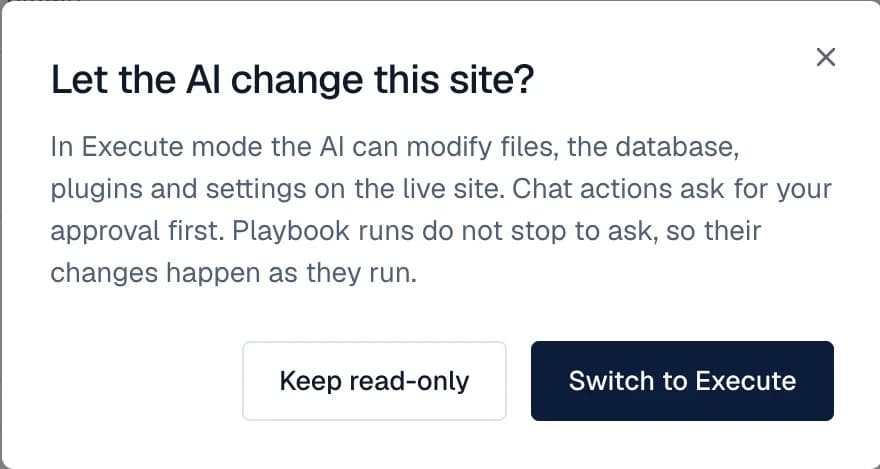
Switch 1: Read only or Execute, per site
A live site starts in Read only: agents can look but not change anything. Only you can turn on Execute, and only in Protuno. Your AI app can set a site back to Read only, never to Execute.
Switch 2: Run code, per AI app
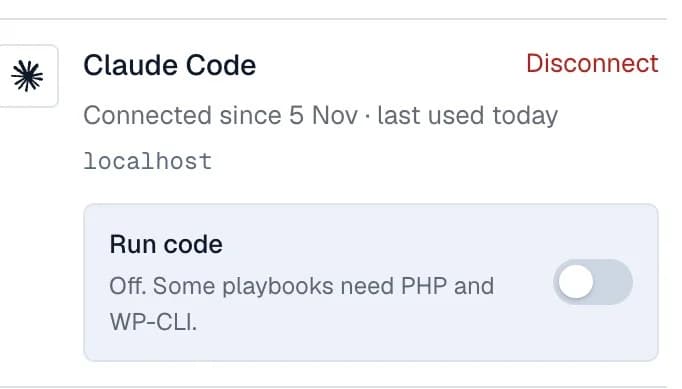
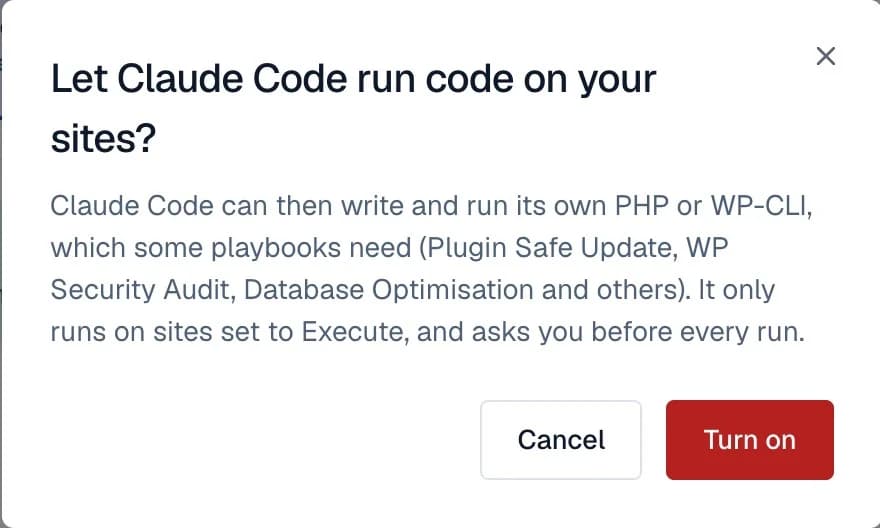
Running its own PHP or WP-CLI is a separate switch for each connected app, off unless you turn it on. Some playbooks need it, such as Plugin Safe Update and Database Optimisation. Code only runs on sites set to Execute, and it asks before each run. On our test site both switches had to be on before the code-running steps could work.
The mode: Read only, Approval or Auto, per agent per site
Each agent has a mode on each site. Read only: no changes run. Approval mode: a run starts only when you press Approve in Protuno. Auto mode: runs start on their own, with no approval. A yes typed in Claude Code never authorizes a run in Approval mode. Only the Approve button in Protuno does.
What A Fix And An Undo Look Like
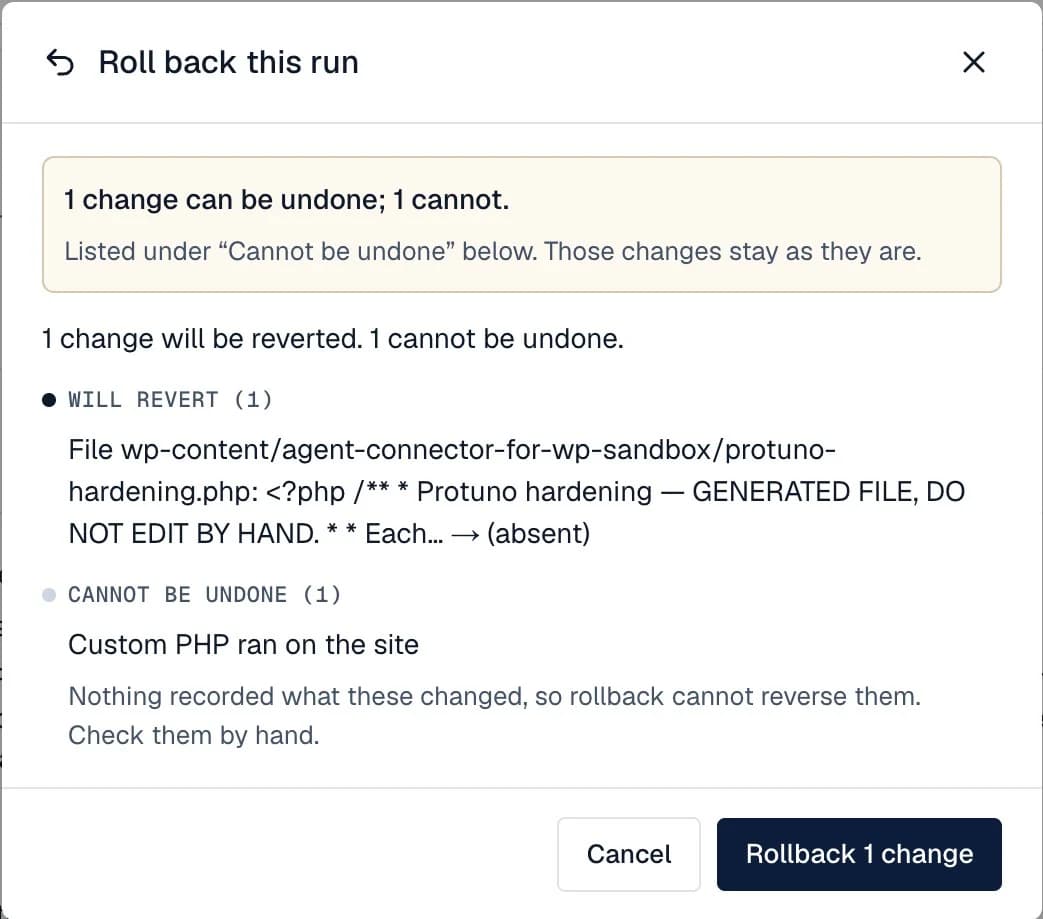
On our test site, from a connected AI app, we fixed 6 security findings in one run: XML-RPC off, the public user list hidden, two security headers added, the WordPress version removed from the page source, and the file editor disabled. It took 26.9 seconds, took a backup first, and the site’s health score went from 66 to 71. We checked each change from outside the site.
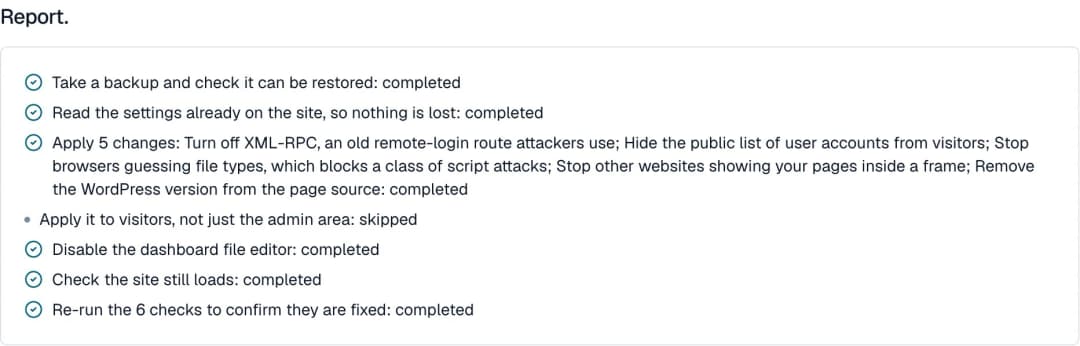
Then we pressed Roll back. Protuno said up front that 1 change could be undone and 1 could not, and that is what happened: the user list, XML-RPC and headers came back, while the file editor stayed disabled. An honest undo tells you its limits before you press it.
When Not To Point Claude Code At A Live Site
- You are writing new code. Do it locally or on staging, review the diff, then deploy it the normal way.
- You have no recent backup. Take one and check it first. Here is how.
- The site takes payments right now. Schedule changes for a quiet time, and test them on a copy. Our clone guide shows quick ways to make one.
Common Questions
Can Claude Code build a WordPress website?
Yes. It can write a block theme, custom blocks and plugins in your local files, and run tests. You still review the code, test it on a local site or in WordPress Playground, and deploy it.
Can Claude Code edit my live WordPress site?
Only through a connection you give it: WP-CLI over SSH, the WordPress MCP Adapter, or a service such as Protuno on top of WordPress MCP. Start read only and keep changes behind an approval step.
Is it safe to give Claude Code SSH access?
It is powerful but has no guard rails, because Claude Code can run any command the server user can. Prefer a staging server, a fresh backup, and reading each command before you allow it.
Does Claude Code need a plugin on my site?
Not for local work. To act on a live site over MCP, the site needs an MCP server, such as the official MCP Adapter. Protuno’s plugin finds or installs a connector for you.
What is the difference between Claude Code and the Claude app?
Claude Code runs in your terminal and works with files and code, which suits developers. The Claude app is a chat for questions and jobs. Both can connect to the same WordPress tools. See how to connect Claude to WordPress.
Related Reading
- WordPress MCP for Claude
- How to connect Claude to WordPress
- What Protuno can and cannot change
- Super Agents: ask, approve, undo
Comments