WordPress MCP for Claude: What It Does, and What to Add on Top.
What WordPress MCP is, how Claude uses it, what a raw connection cannot do (memory, fixed steps, approval, many sites) and what to add on top. Real screens.

WordPress MCP lets Claude read and act on a WordPress site. The site publishes what an AI may do as “abilities”, and an MCP server turns them into tools that Claude can discover and call from a chat. It gives Claude hands on one site. It does not give Claude a memory of the site, a fixed way to do a job, an approval step or one connection for many sites.
The short version
- WordPress 6.9 added the Abilities API. The official MCP Adapter turns those abilities into MCP tools that AI apps such as Claude Desktop, Claude Code and Cursor can call.
- Connected, Claude can call what the site exposes, as the WordPress user it connects as.
- What a raw connection leaves out: memory between chats, written steps for a job, a place to approve changes, and one connection for all your sites.
- Super Agents for WordPress add those on top of WordPress MCP. They do not replace it.
What we used
Everything below comes from real runs on our test site on 16 and 17 November 2026, from claude.ai and Claude Code, with Protuno connected once. The screens are from those runs. Tested on WordPress 7.1.4.
What Is WordPress MCP?
MCP (Model Context Protocol) is an open standard for connecting AI apps to outside tools and data. On WordPress it has two parts:
- The Abilities API, added in WordPress 6.9. Core and plugins register what they can do, each with a name, typed input and output, and a permission check. WordPress 6.9 ships with 3 core abilities: site info, user info and environment info.
- The MCP Adapter, an official package from the WordPress AI team, introduced on the WordPress Developer Blog in February 2026. It turns abilities into MCP tools and resources, so AI apps can discover and call them.
So the chain is: abilities on your site, then an MCP server, then your AI app. Claude asks the server what it can do, picks an ability that fits your request and calls it. WordPress 7.0 added more AI building blocks in core, including an AI Client and a Connectors screen.
How Claude Connects To WordPress Over MCP
There are two common ways:
- Local sites: Claude Desktop, Claude Code or Cursor start the MCP server through WP-CLI (
wp mcp-adapter serve) on your computer. - Live sites: the AI app connects over HTTP to the site’s MCP endpoint, signed in with a WordPress application password or OAuth.
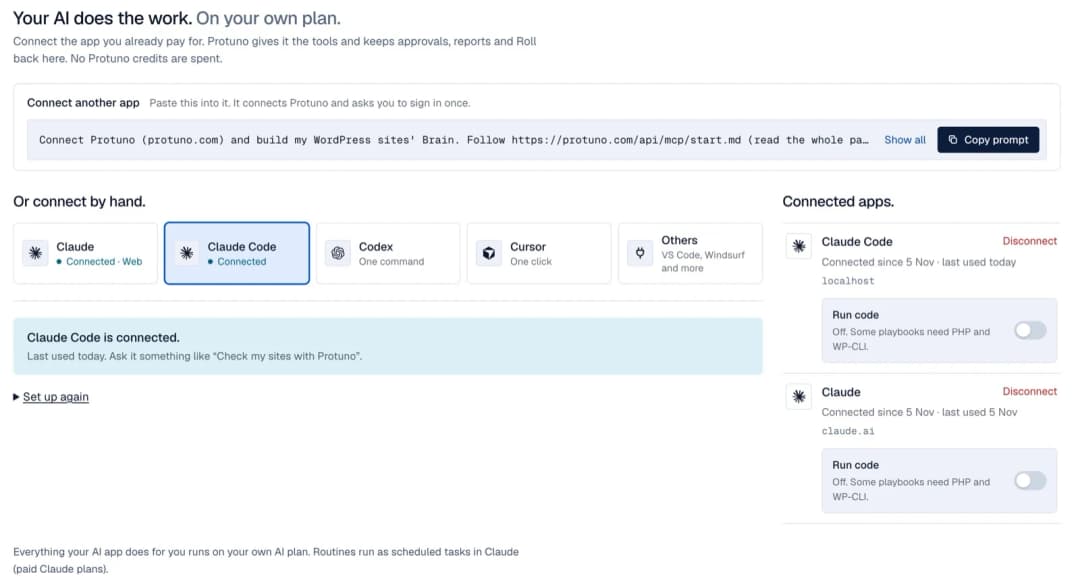
Each site is its own entry in your AI app, with its own credentials. With Protuno, you add one connector to Claude and reach every site in your workspace through it. The steps for claude.ai, Claude Desktop and Claude Code are in our guide to connecting Claude to WordPress, and for Codex and Cursor in Connect your AI app.
What A Raw MCP Connection Can And Cannot Do
| Plain WordPress MCP | What is missing | |
|---|---|---|
| Read and act on the site | Yes, through the abilities the site exposes | |
| Remember the site next time | No. Every chat starts fresh | Your rules (“no updates on Fridays”) and what went wrong last time |
| Follow the same steps every time | No. Claude plans the job in the moment | Written steps that were checked before they run |
| Wait for your approval | Only what the AI app itself asks | One place to approve or decline a job before it runs |
| Back up before a change | Only if Claude decides to | A backup taken first, every time, by the procedure |
| Many sites | One entry and one credential per site | One connection for all your sites |
None of this is a flaw in MCP. MCP is the plumbing. It decides what can be called, not how a job should be done. WordPress’s own MCP Adapter post advises running AI clients as a dedicated user with limited capabilities and preferring read-only abilities on public endpoints, which is good advice whatever you add on top.
What To Add On Top: Memory, Steps, Approval, Many Sites
Protuno is Super Agents for WordPress. It extends the WordPress MCP on your sites: the MCP server on each site still serves the abilities, and Protuno adds four things.
1. A Brain For Each Site
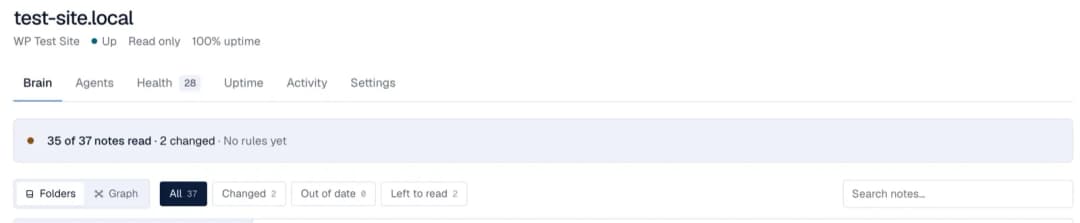
Every site gets a Brain: rules you set, lessons from past runs, patterns seen across your sites, and facts measured during runs. The agent reads it before it plans a job and follows every rule. If a rule blocks the job, it says so and stops. On our test site, the Brain held 37 notes after the first runs.
2. Written Playbooks Instead Of Improvising
Six Super Agents each own one part of a site: Wren for care and updates, Rook for security, Dash for speed and the database, Iris for SEO, Till for WooCommerce and Echo for forms and email. They work from 27 ready-made playbooks, each a fixed list of steps you can read before it runs, and you can ask your AI app to write a custom playbook for your own job. A playbook that changes a site takes a backup first and checks the site after.
3. Approval Before A Run, If You Want It
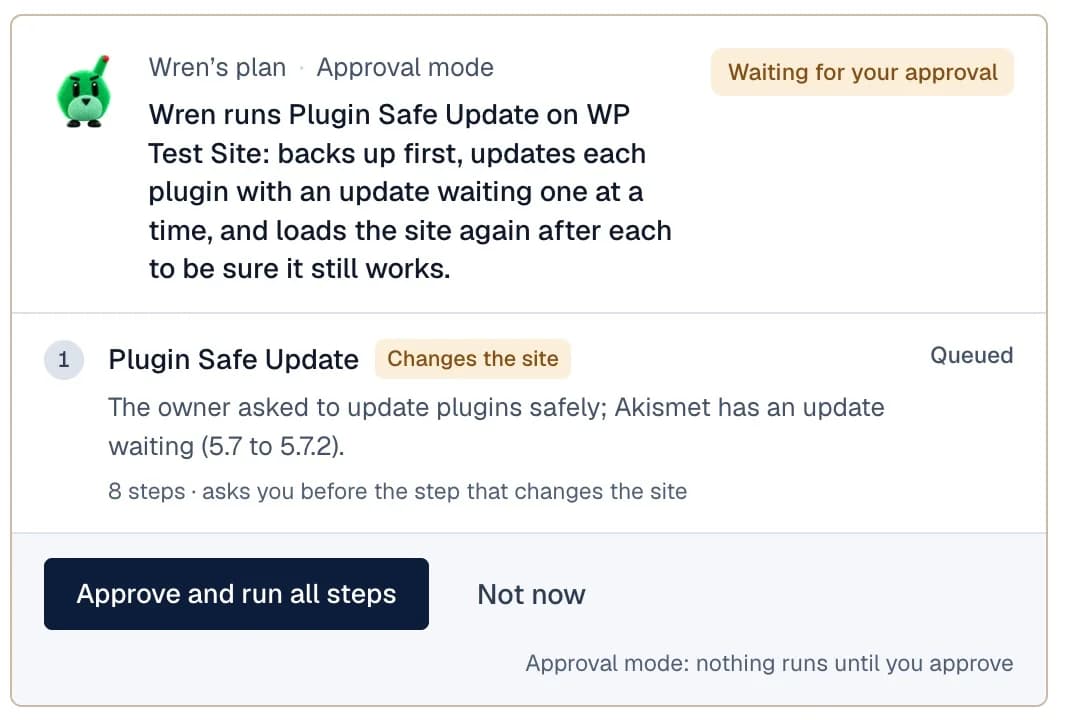
Each agent has a mode on each site. Read only: no changes run. Approval mode: a run starts only when you press Approve in Protuno. Auto mode: runs start on their own, with no approval. A yes in a chat or in Slack never authorizes a run. On our test site we set Wren to Approval mode, and the plan waited in Protuno until we approved it.

4. One Connection For All Your Sites
However many sites you look after, you connect Protuno to Claude once. Ask “Which of my sites needs attention first?” and Claude can read all of them through that one connection.

Is It Safe To Let Claude Work On WordPress?
- Start read only. In Protuno a live site starts in Read only, and nothing on it changes until the owner switches it to Execute. A staging site can start in Execute.
- Use revocable credentials. WordPress application passwords can be revoked from your profile at any time.
- Try changes on staging first. Then choose the mode per agent per site.
- Read the report. Every run is saved with what was checked and what changed.
More in what Protuno can and cannot change.
When Plain WordPress MCP Is Enough
- One site, simple questions. If you want Claude to read posts or site info on one site, the MCP Adapter alone does that.
- You are building abilities. If you are a developer exposing your plugin’s features to AI, work with the Abilities API and MCP Adapter directly.
- You are on a hosted platform with its own connector. Use what your platform provides for that site.
Add a layer on top when you look after several sites, want the same steps every time, or want changes to wait for your approval. See the six Super Agents and the Brain.
Common Questions
What is WordPress MCP?
It is how AI apps talk to a WordPress site. The site registers abilities through the Abilities API (WordPress 6.9), and the MCP Adapter exposes them as MCP tools that apps such as Claude can discover and call.
Does Claude work with WordPress?
Yes. Claude Desktop, claude.ai and Claude Code can connect to a WordPress site over MCP, either locally through WP-CLI or to a live site over HTTP with an application password or OAuth.
What is the difference between Claude Code and the Claude app for WordPress?
Both can call the same WordPress tools. The Claude app is a chat for questions and jobs. Claude Code runs in a terminal and also works with files and code, which suits developers working on themes and plugins.
Is WordPress MCP free?
The Abilities API is part of WordPress core and the MCP Adapter is open source. Your AI app has its own plan, and any service you add on top may have its own price.
Is Protuno a WordPress MCP server?
No. Protuno is Super Agents for WordPress. It extends the WordPress MCP on your sites with a Brain for each site, six agents working from written playbooks, approval when you want it and one connection for all your sites.
Related Reading
- How to connect Claude to WordPress
- Connect your AI app
- The Brain
- How Super Agents ask, approve and undo
Comments