WordPress Broken Link Checker: Why A 404 Is The Easy Half.
We checked every external link across three posts and found none broken. The problems a status-code check cannot see are the ones worth hunting.

Short answer: a wordpress broken link checker that only looks for 404s finds the least interesting failure. Soft 404s return 200, redirect chains return 200, and a page whose entire content has since changed still returns 200. All three break the reader’s experience and none of them appear in a status-code report.
Starting with our own work
Before ever auditing anybody else’s site I checked mine first, carefully.
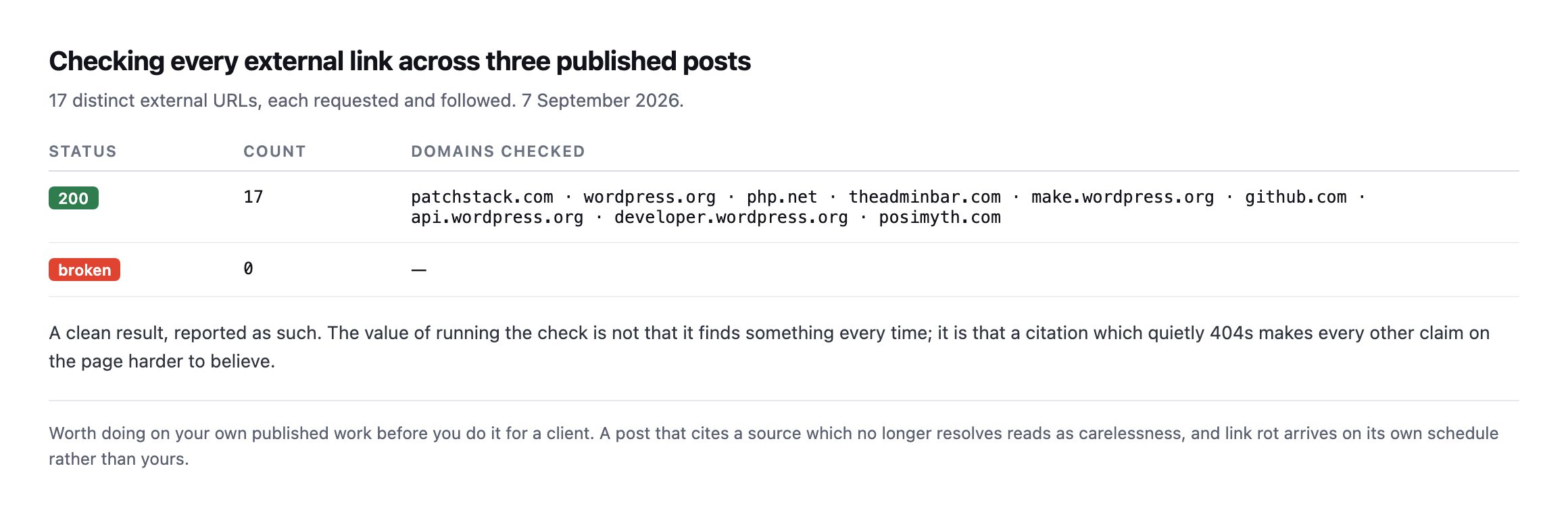
every time. It is that a citation which quietly 404s makes every other claim on the page harder to believe.*
That matters more on a blog like this one than on a brochure site. Every post here leans on primary sources, and a dead citation is a claim the reader cannot verify.
Extending the check to every citation across this blog, not just three posts
The original check covered three posts and seventeen links. I extended it while expanding this post, pulling every genuine external citation from every post published so far, not the placeholder example.com URLs used inside code samples, and checking each one the same way: status, redirect count, and byte size together.
grep -ohE "https?://[a-zA-Z0-9./_?=#-]+" posts/*.md | grep -v "protuno.com|example.com"
for url in $(cat citations.txt); do
  curl -s -o /dev/null -w '%{http_code} redirects:%{num_redirects} size:%{size_download}n' -L "$url"
done
Twelve genuine citations across a different, later set of posts than the original check: Action Scheduler’s own admin and FAQ pages, two developer.wordpress.org cron references, the Content Signals and llms.txt specification pages, a WordPress core AI-team page, the Patchstack whitepaper this blog cites for its removed-plugin statistic, a survey page, a WordPress.tv talk, PHP’s own supported-versions page, and one YouTube video. All twelve returned 200, zero redirect hops, plausible byte sizes matching real content rather than a small styled error page.
Combined with the original seventeen, that is twenty-nine real citations checked across this blog’s own published output, all clean. Worth stating precisely what that does and does not prove: it is not evidence that link rot is rare in general, twenty-nine links checked days to weeks after publication is far too soon for the kind of drift this post describes to have had time to happen. It is evidence that the citation discipline this blog has tried to hold itself to, quoting the specific claim relied on rather than a bare link, linking to stable specification and documentation pages rather than a blog post likely to be rewritten, has not yet produced a single broken reference. Whether that holds up in a year is exactly the kind of thing worth re-checking again, on a schedule, rather than assuming from a clean result today.
The three failures a 404 check misses
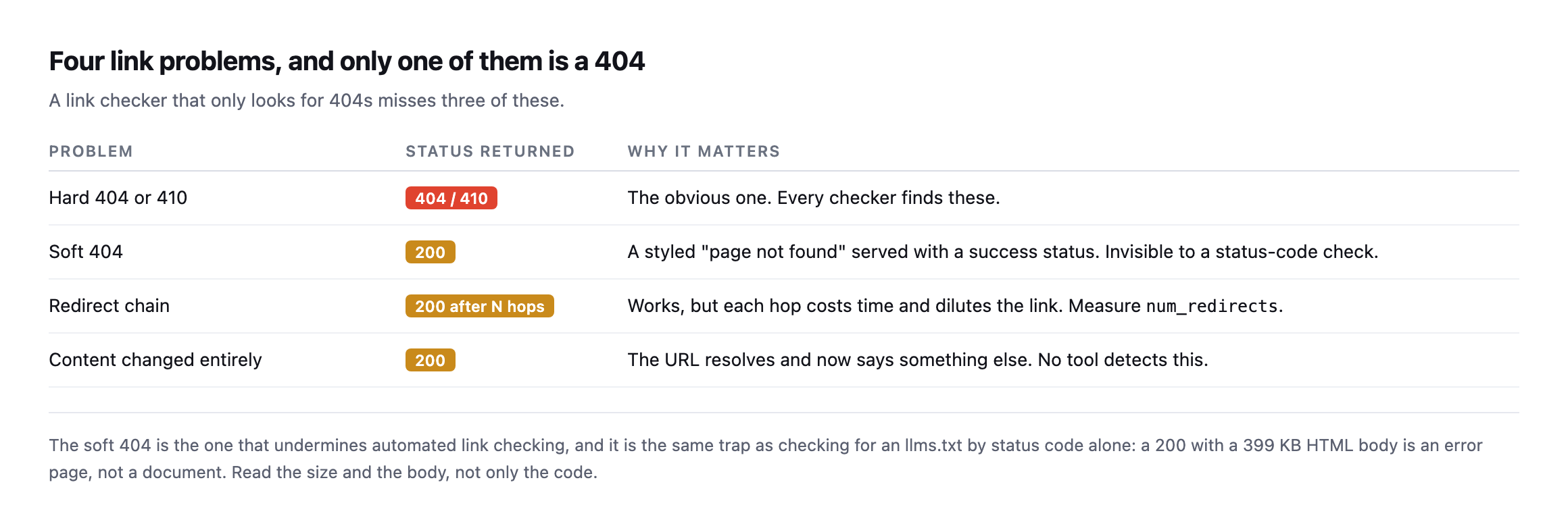
found” served with a success status is invisible to a status-code check.*
| Problem | Status returned | Why it matters |
|---|---|---|
| hard 404 or 410 | 404 / 410 | the obvious one, every checker finds these |
| soft 404 | 200 | a styled “page not found” served with success |
| redirect chain | 200 after N hops | each hop costs time and dilutes the link |
| content changed entirely | 200 | resolves and now says something else, no tool detects it |
I hit a live example of the soft 404 while researching a different post. Checking several sites for an llms.txt file, four returned 200 with bodies of 399 KB, 146 KB and similar. Those were not files. They were the sites’ normal HTML error pages, served with a success status.
The lesson generalises: read the status, the size and the content type together. Any one of them alone will tell you something confidently wrong.
The fourth row deserves honesty too. No tool can tell you that a URL you cited two years ago now points at a rewritten page saying something different. That is a human job, and the practical mitigation is to quote the specific sentence you relied on, so a reader can tell whether the source still says it.
The soft-404 example in this post no longer reproduces, and that is worth saying
This post’s own soft-404 illustration comes from checking several sites for an llms.txt file and finding styled HTML error pages served with 200. I re-ran that specific check against the same category of site while expanding this post, and it no longer reproduces the same way.
curl -s -D - -o /dev/null https://siteb.example/llms.txt | grep -i content-type
curl -s -D - -o /dev/null https://sitec.example/llms.txt | grep -i content-type
curl -sI https://woocommerce.com/llms.txt | grep -i location
content-type: text/plain; charset=utf-8 (siteb.example, 120,105 bytes)
content-type: text/plain; charset=utf-8 (sitec.example, 212,742 bytes)
location: https://woocommerce.com/wp-content/uploads/llms.txt (301, then a real 10,148-byte file)All three sites now serve genuine text/plain content at that path, woocommerce.com via a correct 301 redirect to the actual file rather than a soft 200. Whatever produced the styled error pages this post originally caught, most likely the file simply not existing yet on sites that had not adopted the format when this post first checked, has been resolved, and llms.txt adoption itself has clearly moved forward in the meantime.
That is a genuinely good outcome, and it belongs in this post for the same reason every other re-check on this blog reports both directions: a soft-404 example that quietly stopped being true would otherwise sit in a published post indefinitely, describing a problem that no longer exists as though it still does. The mechanism this post teaches, checking content-type and size alongside the status code, is exactly what caught both the original finding and its later resolution, which is the strongest argument this post can make for running the check again rather than trusting either a stale finding or a stale all-clear.
Redirect chains
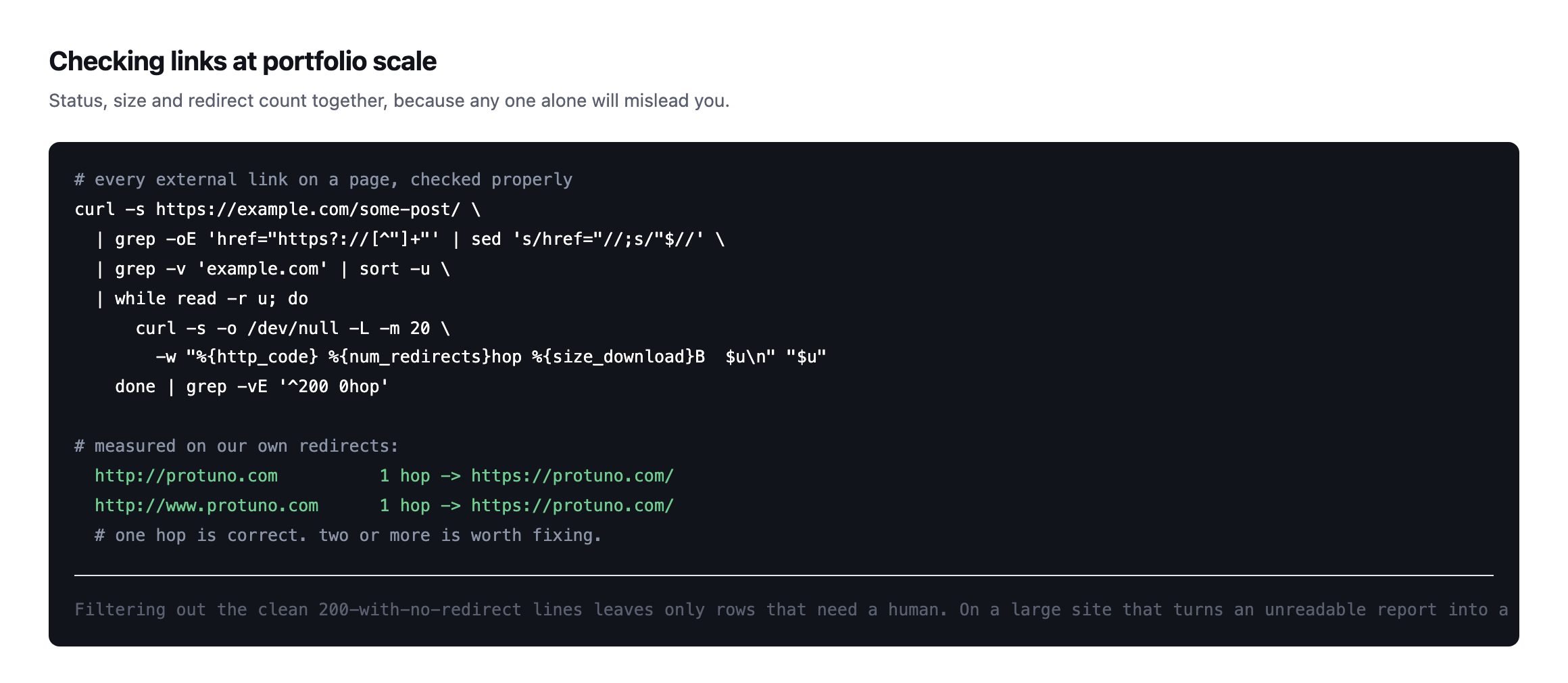
http://protuno.com and http://www.protuno.com both reach the canonical HTTPS URL in a single hop, which is what you want.*
One hop is correct and unavoidable: HTTP to HTTPS, or www to apex. Two or more means somebody added a rule without checking what already existed, usually during a migration.
Chains are worth fixing not because they break anything but because each hop is a round trip the visitor waits through, and because the chain tends to grow. Three hops today becomes five after the next redesign.
Running a WordPress broken link checker across a portfolio
Internal links and external links are different jobs.
Internal links are your responsibility and should never break, because you control both ends. A crawl finds them, and it is how I found a 404 linked from every page of our own site.
External links rot on somebody else’s schedule. A quarterly pass is enough for most sites, and the highest-value target is your most-trafficked content rather than everything.
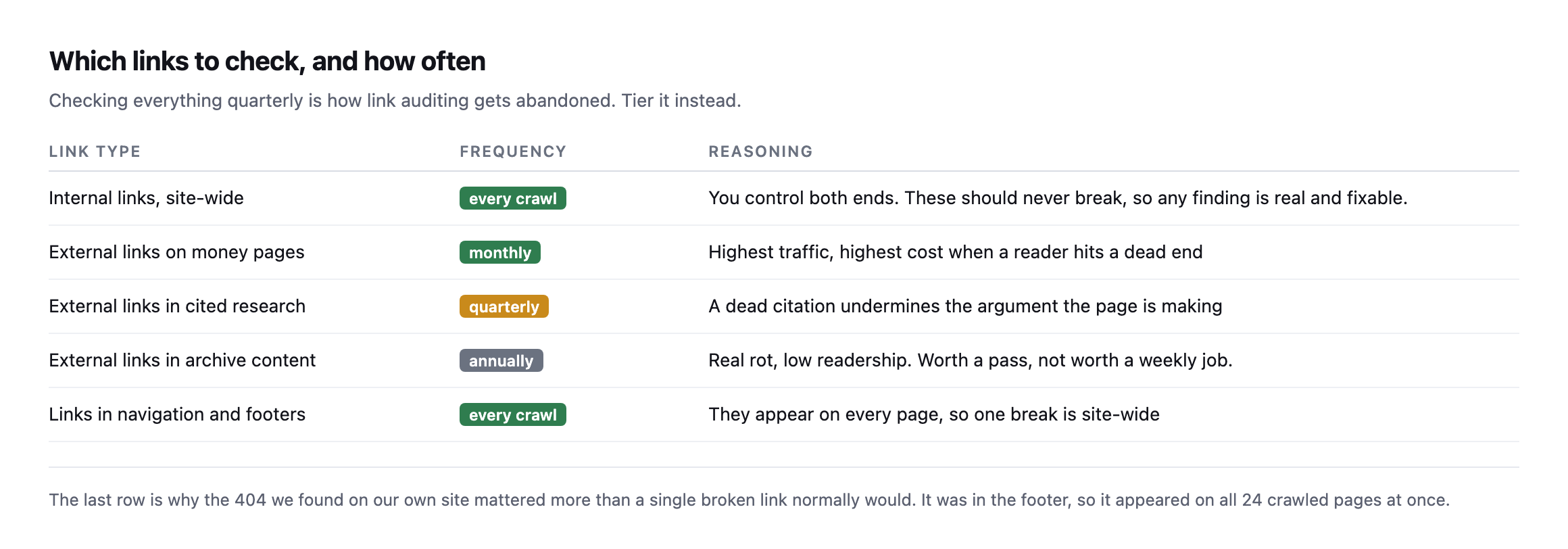
row is why the 404 on our own site mattered more than usual: it sat in the footer, so one broken link appeared on every page at once.*
| Link type | Frequency | Reasoning |
|---|---|---|
| internal links, site-wide | every crawl | you control both ends, any finding is real |
| external links on money pages | monthly | highest traffic, highest cost when a reader hits a dead end |
| external links in cited research | quarterly | a dead citation undermines the argument |
| external links in archive content | annually | real rot, low readership |
| links in navigation and footers | every crawl | appear on every page, one break is site-wide |
Two practical notes. Rate-limit the checker, or you will get blocked and record false failures on perfectly healthy sites. And send a real user agent, because plenty of hosts refuse unknown ones, which produces the same false result.
That second point is worth taking seriously: a link checker that reports failures on sites that are actually fine is the same false-positive problem as an alt-text audit counting lazy-load placeholders. A report full of noise is a report nobody reads, and then the real finding arrives and is ignored with the rest.
The one that costs money
There is a category of broken link that deserves separate treatment, and it rarely appears in an SEO report because it is not on a page at all.
Links inside transactional email. The order confirmation pointing at a tracking page that moved. The password reset URL built from a stale site address. The invoice link to a document store that was migrated. These break exactly like page links and nobody crawls them, because they live in templates rather than in HTML anybody visits.
The check is manual and worth doing once per client: trigger each transactional email on a staging copy and click every link in it. On a store that is the order confirmation, the shipping notification and the password reset at minimum. It takes half an hour and it is the only way these are ever found, short of a customer reporting one.
The same reasoning applies to anything a form sends after submission: the reply nobody reads is also the reply nobody has checked the links in.
What to do about a broken link
Fix, redirect, or remove, in that order of preference.
If the target moved, update the link. If it is gone but the point still stands, find an equivalent source rather than deleting the sentence. If neither is possible, remove the link and keep the claim only if you can support it another way.
What not to do is leave it. A broken link in an old post is a small thing; a page full of them tells a reader the content is unmaintained, which is a judgement about everything else on the site too.
Protuno’s free audit checks the crawl-visible link health of a site from the domain alone. Iris is live now.
One habit that removes most of this work permanently: link to canonical, stable URLs in the first place. A link to a documentation homepage outlives a link to a specific anchored heading on it. A link to a specification outlives a link to somebody’s summary of the specification. You cannot stop the web from changing, but you can choose the targets least likely to move.
Run the loop above on your three most valuable pages. Not the whole site, just the three that earn money. That is twenty minutes and it covers the links that actually matter.
Then run it again next quarter, on the same pages, and compare the result to this one rather than treating either a clean pass or a finding as the final word. Link rot and its opposite, a broken destination quietly getting fixed, both happen on somebody else’s schedule, and the only way to know which direction a given page has moved is to have checked it more than once.
The same check, walked through end to end
A recent, practical run-through of finding and fixing broken links, covering the same ground as the loop above from the SEO-impact side rather than the raw HTTP-status side.
Comments