I Ran A WordPress Crawl Audit On Our Own Site And Found A Broken Link On Every Page.
A crawl of our own site found a 404 linked from all 24 pages, and two URLs blocked in robots.txt while telling search engines to index them.

Short answer: a wordpress crawl audit checks the relationships between pages, which is the one thing an SEO plugin sitting inside a single page cannot do. It finds pages nothing links to, pages buried too deep to matter, and links pointing at URLs that no longer exist. Every individual page can return 200 while the site as a whole is broken.
I ran one against protuno.com while writing this. It found two things I did not know, and one of them is on every page of the site.
What a crawl actually produces
A crawler starts at the homepage, follows every internal link, and records what it finds. The useful column is not the status code. It is how many other pages point at each URL.
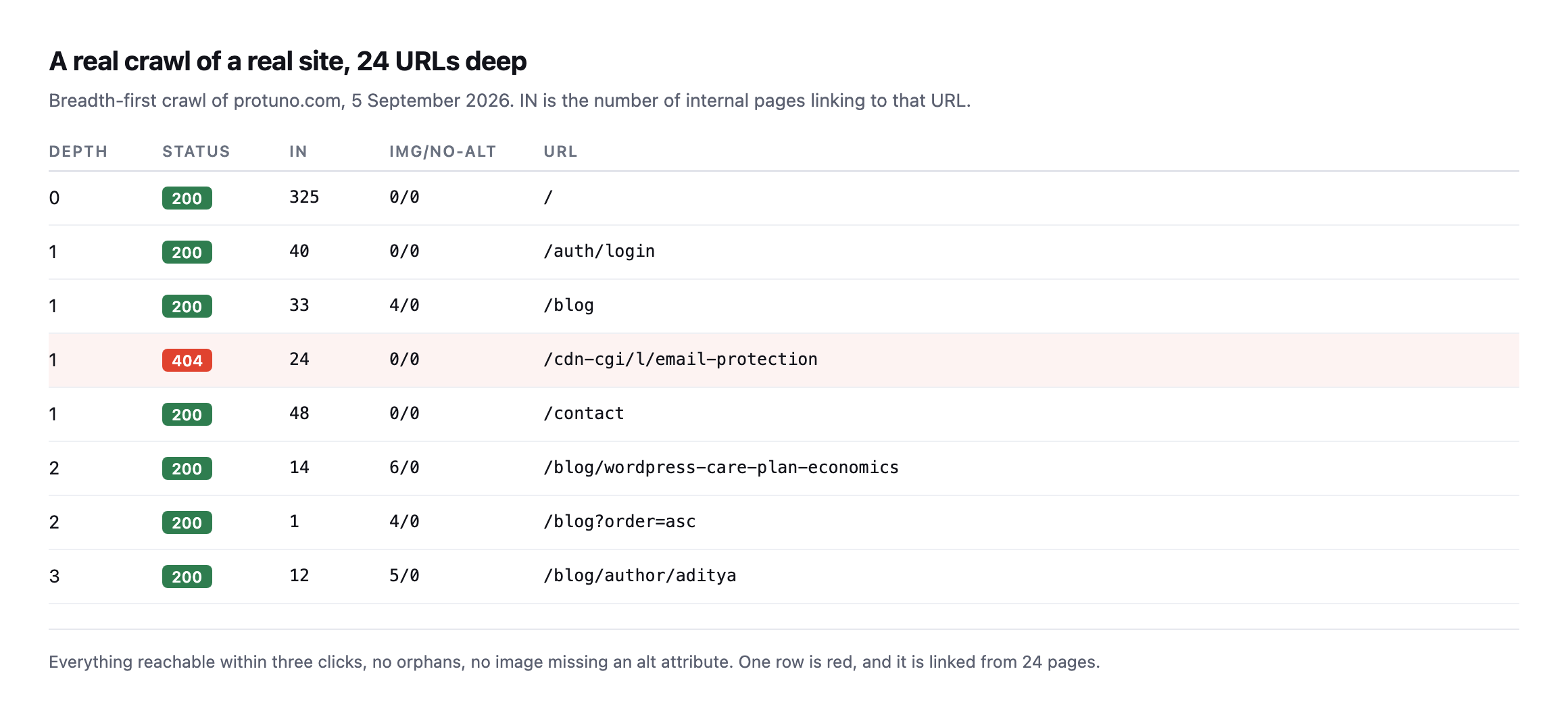
single image missing an alt attribute. One row is red. It is linked from all 24 pages.*
The good news first, because a crawl should tell you what is working: no orphan pages, no missing alt attributes, nothing buried deeper than three clicks.
Then the row I did not expect.
The defect that was on every single page
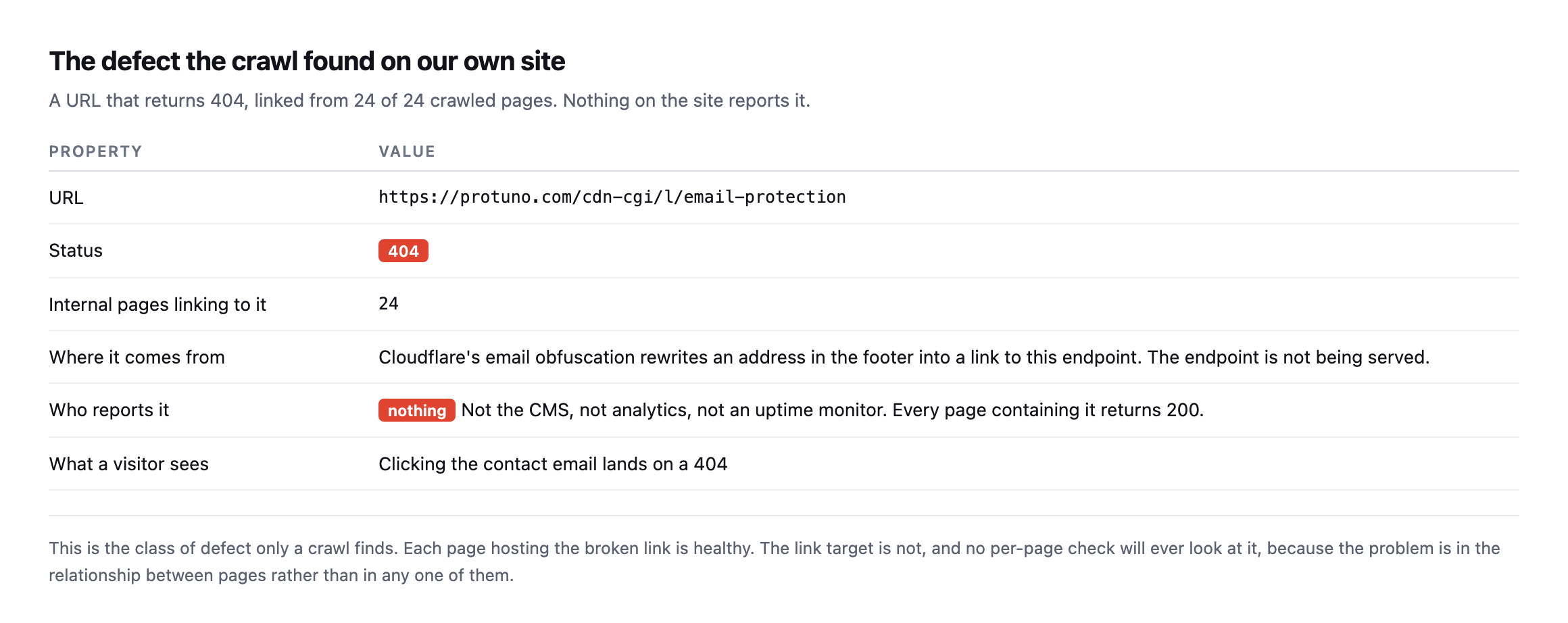
link to an endpoint that is not being served. Every page carrying that link returns 200, so nothing anywhere reports a problem.*
Click the contact email in our footer and you land on a 404.
Nothing told us. The CMS is happy, because it does not know what Cloudflare rewrote. Analytics is happy, because a 404 on a link nobody clicks generates no events. An uptime monitor is happy, because every page it checks returns 200.
This is the entire category in one example. The pages are fine. The relationship between them is broken. No per-page check will ever find it, because the problem does not live in any single page.
Why your SEO plugin will not catch this
Not a criticism of SEO plugins. They are answering a different question.
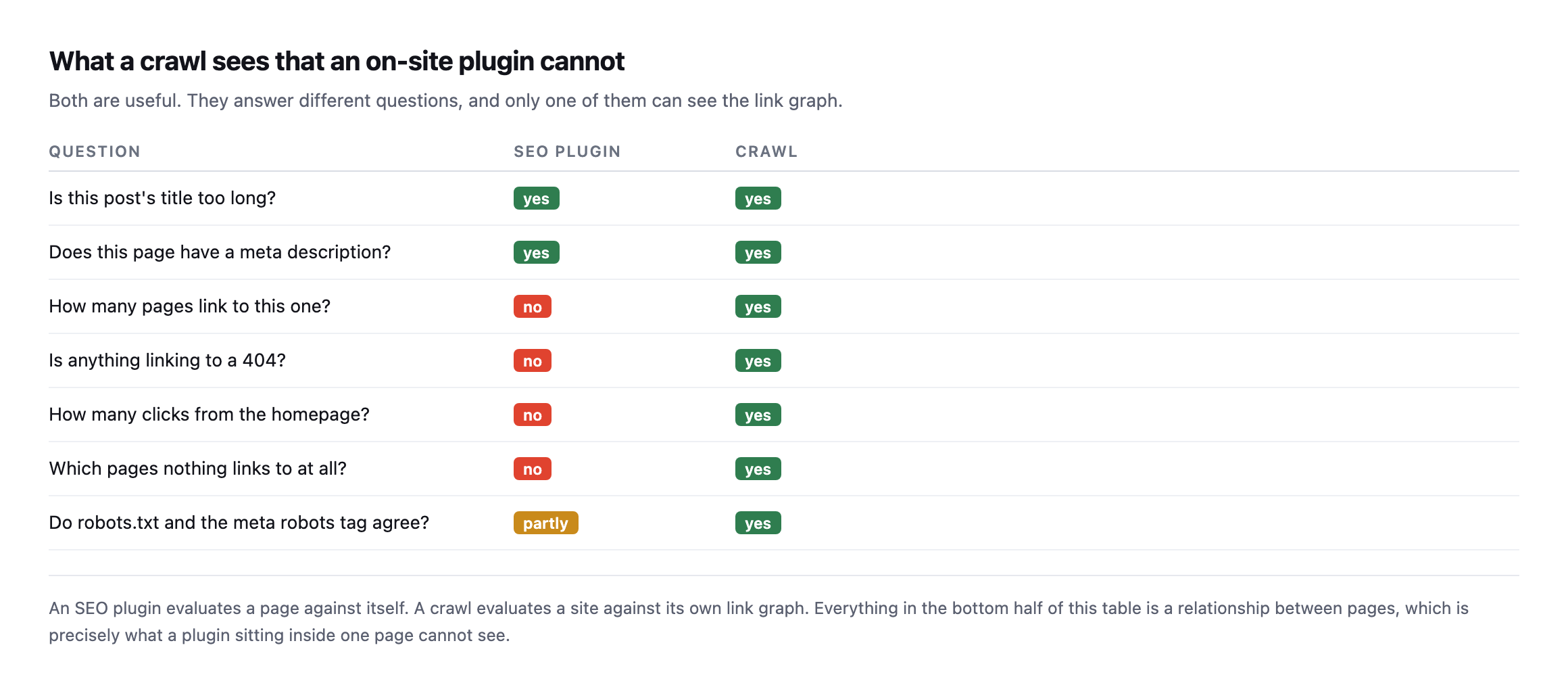
own link graph. Everything in the bottom half of that table is a relationship, which is exactly what code running inside one page cannot see.*
| Question | SEO plugin | Crawl |
|---|---|---|
| Is this title too long? | yes | yes |
| Does this page have a meta description? | yes | yes |
| How many pages link to this one? | no | yes |
| Is anything linking to a 404? | no | yes |
| How many clicks from the homepage? | no | yes |
| Which pages does nothing link to? | no | yes |
| Do robots.txt and meta robots agree? | partly | yes |
Caveat: “partly” in the last row is generous. A plugin can flag a
noindextag on the page it is looking at. It has no way to know robots.txt disallows that same URL two directories over, which is exactly the mismatch below.
The second finding, which I had just written a post about
The crawl cross-references robots.txt against the robots meta tag on each page. Ours disagree.
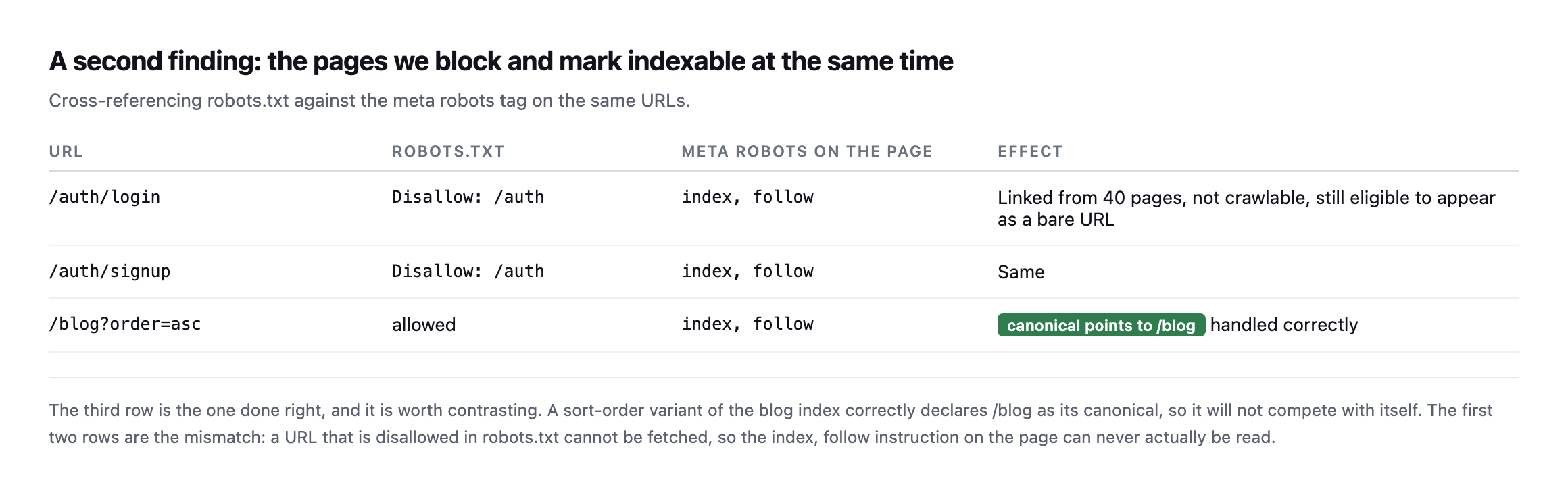
/blog as its canonical, so it cannot compete with itself. The first two rows are the mismatch.*
| URL | robots.txt | meta robots | Effect |
|---|---|---|---|
/auth/login | Disallow: /auth | index, follow | linked from 40 pages, not crawlable, still eligible as a bare URL |
/auth/signup | Disallow: /auth | index, follow | same |
/blog?order=asc | allowed | index, follow | canonical points to /blog, handled correctly |
/auth/login is linked from 40 pages, disallowed in robots.txt, and tells search engines to index it. Because it is disallowed, that instruction can never be read. The URL can sit in results as a bare link with no description.
I wrote about that exact failure mode a couple of days ago, and then found it on our own site by crawling it. Which is the argument for crawling rather than assuming.
Four days later, neither finding is fixed
I went back and checked both findings again while expanding this post, rather than let them sit as a screenshot from the day I found them.
| Finding | First found | Status now |
|---|---|---|
/cdn-cgi/l/email-protection 404, linked from every page | 7 September | still 404, still linked |
/auth/login and /auth/signup disallowed but declaring index, follow | 7 September | unchanged |
Neither is fixed. I want to sit with that rather than gloss over it, because it is a more honest demonstration of this post’s actual argument than the original finding was.
A crawl audit is not a service you buy once and file away. Both of these are cheap fixes: the first is a footer link, the second is one line in robots.txt or one meta tag. Neither has happened, four days on, on a site whose owner wrote a public blog post about finding them. That is not carelessness so much as it is the exact mechanism this whole category of check exists to describe: a finding with no invoice attached, competing against everything else on a Tuesday, loses. It is the same shape as the unbilled half hour that swallows every other quiet check, and writing about it does not exempt the writer from it.
Both are on the list now, again, with a second date attached instead of just the first one. That is the honest version of what a re-check accomplishes. It does not fix anything by itself. It turns “we should fix that” into a line with two dates on it, which is a harder thing to keep ignoring than a line with one. A crawl result that nobody looks at a second time is exactly as useful as no crawl at all, and this section is me not being the exception to that rule either.
The orphan report from the crawl tool was wrong
While re-checking the earlier findings I ran a second, larger crawl, 103 pages this time, and asked it for orphan pages: URLs nothing else on the site links to. It reported 89.
That is a number worth being suspicious of on its own. Eighty-six percent of a site being orphaned is not a plausible finding, it is a sign something upstream broke, and I want to show you how I caught it rather than just state the correction.
The same crawl records, for every single page, exactly which other pages link to it. So instead of trusting the orphan summary, I looked up four of the pages it had just listed as orphaned, in the crawl’s own raw per-page data from the same run.
| Page the summary called an orphan | Real inbound links, same crawl |
|---|---|
/blog (the blog index) | 21 |
/contact | 4 |
/privacy | 2 |
/blog/llms-txt-wordpress | 1 |
Every one of them has real, recorded inbound links. /blog alone is linked from twenty-one other pages, footer navigation on nearly everything the crawler visited. The orphan-detection feature and the raw link data disagreed with each other, inside a single crawl, from a single run, and the raw data was the one telling the truth.
I do not know the exact cause inside the tool, and I am not going to guess at someone else’s code to sound more authoritative than the evidence supports. What I do know, because I checked it directly, is that the summary figure was wrong and the underlying data was right, which is exactly the shape of every other finding in this post: the higher-level report is the one that lies, and the raw evidence underneath it is where the truth was sitting the whole time.
The only genuinely orphaned page in that list, by the crawl’s own per-page data rather than its summary, is the homepage itself, and that is a known convention rather than a defect: a crawl starting from a URL does not count arriving there as a followed link, so the seed page always shows zero inbound links in tools built this way. Knowing that distinction is the difference between reading a crawl report correctly and repeating whatever number is largest on the page.
Running a WordPress crawl audit yourself
You do not need a subscription. The check that matters most is inbound link counts, and any crawler will give you that. What to look at, in order:
Anything returning a non-200 with inbound links above zero. This is the highest-value output of any crawl. Fix these first, always.
Pages with zero inbound links. If nothing links to a page, you are asking search engines to value something you do not value enough to link to.
Click depth above three. Depth is a rough proxy for how important your own site says a page is. A commercially important page at depth five is a structural problem.
robots.txt against the meta robots tag. They should agree. When they disagree, the one that can actually be read wins, and it is usually not the one you intended.
Canonical tags on parameterised URLs. Sorting, filtering and pagination parameters should canonicalise back to the clean URL, as our ?order=asc does.
One practical note on crawling a headless site, because it caught me out mid-write. Two of the posts I published this week returned 404 to the crawler for a few minutes after going live, then 200 once the front end revalidated. If you crawl a site that renders pages on demand and caches them, a fresh URL can look broken purely because nothing has asked for it yet. Re-crawl before you report a 404 on a page you have just published, or you will file a bug against yourself.
Crawl as a logged-out visitor. It is easy to run a crawl in a browser where you are signed in and see admin-only links, draft content and navigation that no visitor gets. The crawler should carry no cookies at all. What you want is the site a stranger sees.
Why this ends up never being done
A crawl takes minutes and needs redoing after every content change, every migration, every theme update and every time a third party rewrites your HTML, which is what happened to us.
It produces nothing to show a client when it passes. So it gets run once during onboarding and then never again, exactly like the backup file left in the web root and the scheduled jobs that stopped.
Iris, Protuno’s SEO agent, is built to crawl a connected site the way a search engine does and report what changed since last time. Straight with you, as on every post here: Iris is built and named but not live yet.
The free audit checks robots.txt, the sitemap and the indexing signals from the domain today, which catches the second finding above but not the first. The broken-link finding needs a real crawl.
Run one on your own site before you run one on a client’s. I did, and it found something on every page.
What is actually doing the crawling
A look inside how Googlebot itself decides what to fetch and how often, straight from the team that builds it, useful context for why a crawl audit like this one finds what it finds.
Comments