Orphan Pages In SEO: The Ones Your Own Site Refuses To Link To.
An orphan page is one your sitemap lists and your site never links to. Finding them needs two sources, and crawling logged in hides them.

Short answer: an orphan page exists on the site and has zero internal links pointing at it. Finding them for orphan pages seo work needs two separate sources, a page inventory and a crawl, because a crawl by definition cannot report a page it never reached.
What the distribution actually looks like
I crawled our own site and counted every single internal link pointing at every page.
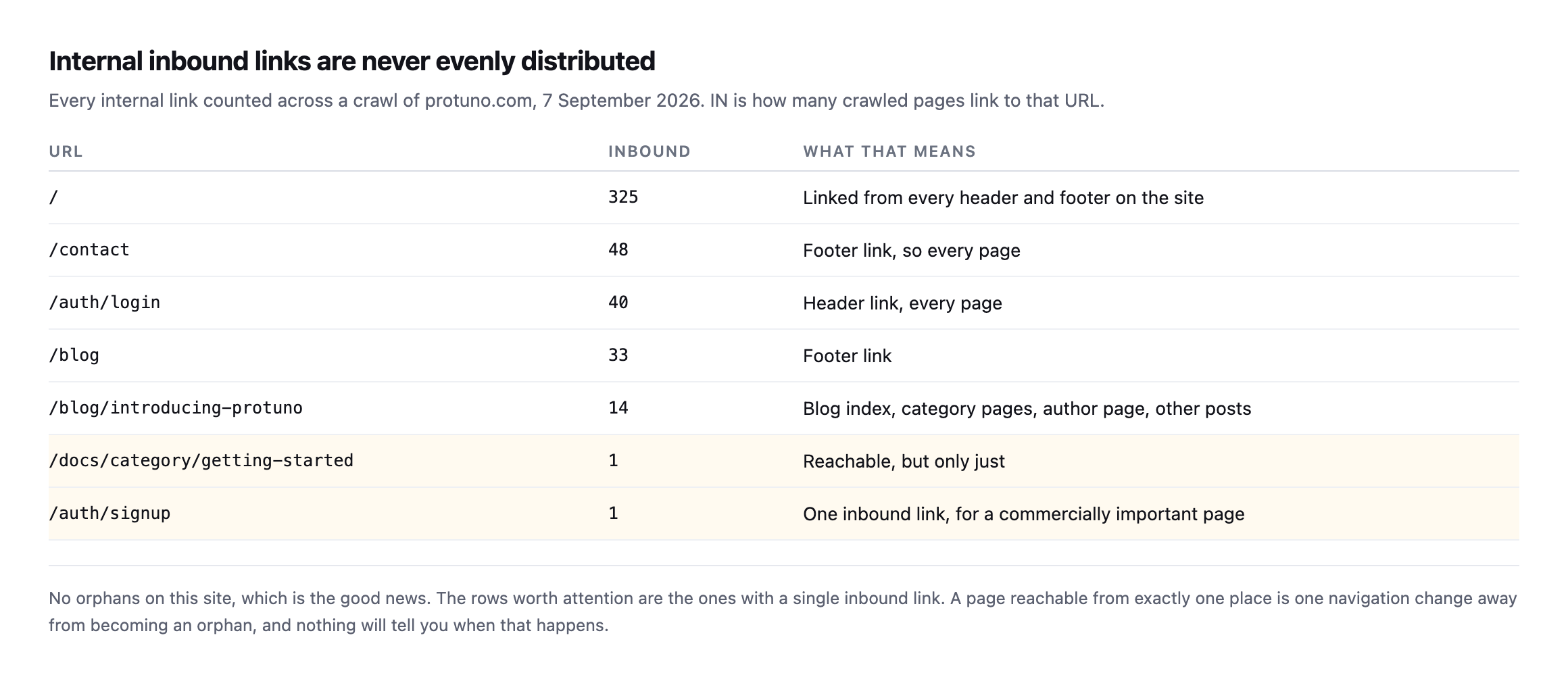
with a single inbound link.*
| URL | Inbound | What that means |
|---|---|---|
/ | 325 | linked from every header and footer |
/contact | 48 | footer link, every page |
/auth/login | 40 | header link, every page |
/blog | 33 | footer link |
/blog/introducing-protuno | 14 | blog index, categories, author page, other posts |
/docs/category/getting-started | 1 | reachable, but only just |
/auth/signup | 1 | one inbound link, for a commercially important page |
Caveat: one site, one crawl, one day. The distribution shape (a handful of huge numbers, a long tail near one) is a general pattern of site link graphs, not a claim about what your own numbers will be. Run the crawl on your own site rather than assume this one transfers.
That kind of distribution is entirely normal and it is far more useful than a binary orphan check. Header and footer links produce genuinely enormous counts. Content pages sit somewhere in the middle. And a small tail of pages are reachable from exactly one place.
A page with one inbound link is one navigation change away from being an orphan, and nothing will tell you when that happens. On our site, the signup page is in that tail, which is worth knowing given what it is for.
Re-crawling turned up the exact trap this post warns about, from the crawl tool itself
I ran a fresh crawl of protuno.com while expanding this post and asked the tool’s own orphan-detection feature for its summary before reading anything else. It reported 194 of 209 pages as orphans, every single page except fifteen.
That is not a plausible number for a working site with real internal navigation, and reading the same crawl’s raw per-page data rather than trusting the summary confirmed why:
pages = {p['url']: p for p in export['pages']}
for u in ['/blog', '/contact', '/privacy', '/blog/llms-txt-wordpress']:
print(u, len(pages[u]['linked_from']))| Page the summary called an orphan | Real inbound links, same crawl |
|---|---|
/blog | 17 |
/contact | 6 |
/privacy | 4 |
/blog/llms-txt-wordpress | 2 |
Every one of them has real, recorded inbound links sitting in the same crawl’s own raw data. The orphan-detection summary and the underlying link graph disagreed with each other inside a single crawl run, and the raw data was the one telling the truth, exactly the same failure this blog already documented on a different crawl of this same site months earlier. Finding it again, independently, on a fresh crawl ID, is stronger evidence than the original catch alone: this is not a one-off fluke in the tool’s summary logic, it is a repeatable characteristic of how it aggregates orphan status, and anyone using this tool’s own orphan report as the final word would be told, wrongly, that this site’s navigation is almost entirely broken.
The only page in the flagged list that is a genuine orphan by the raw data is the homepage itself, linked_from: 0, which is the expected, harmless seed-URL convention: a crawl starting at a URL does not count arriving there as a followed link. Every other name on that 194-page list is a false positive, caught by doing exactly what this post’s own two-source method already argues for, not trusting a single automated summary as the final answer.
What orphan pages actually cost, in SEO terms and otherwise
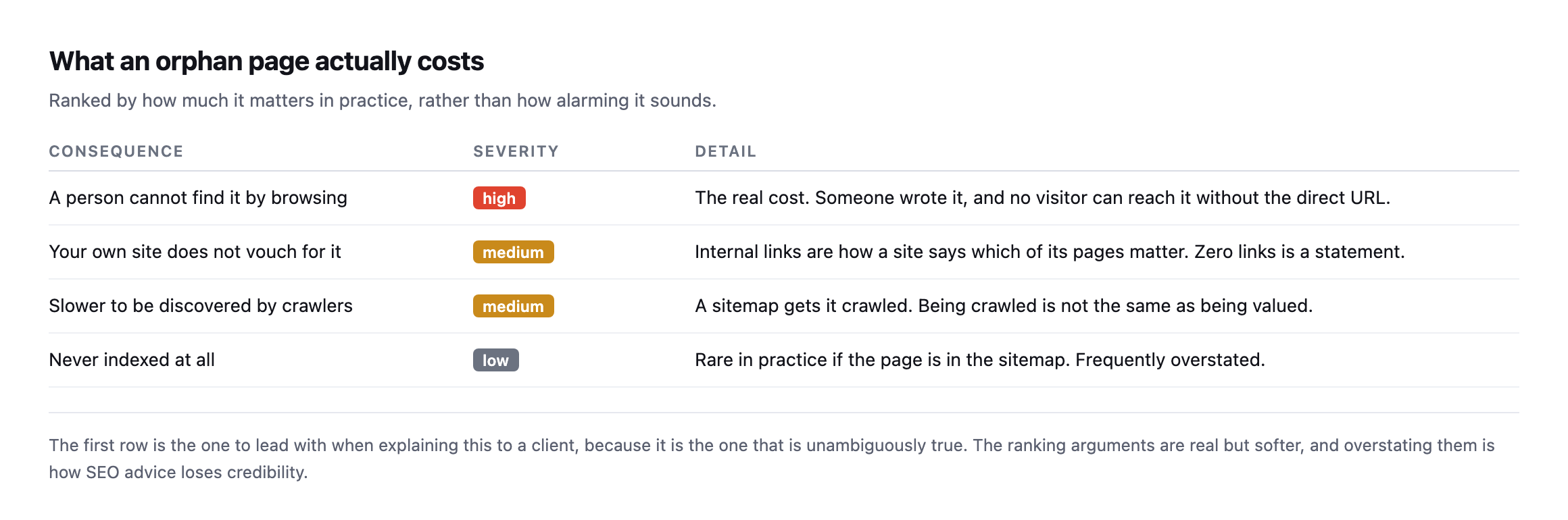
unambiguously true. The ranking arguments are real but softer, and overstating them is how SEO advice loses credibility.*
| Consequence | Severity | Detail |
|---|---|---|
| a person cannot find it by browsing | high | the real cost, no visitor can reach it without the direct URL |
| your own site does not vouch for it | medium | internal links are how a site says which pages matter |
| slower to be discovered by crawlers | medium | being crawled is not the same as being valued |
| never indexed at all | low | rare in practice if the page is in the sitemap, often overstated |
I want to be careful here, because orphan pages get oversold. A page in your sitemap will usually be crawled and can rank perfectly well with no internal links at all.
The honest problem is simpler and worse: somebody wrote that page, and no visitor browsing the site can reach it. That is a wasted asset regardless of what any search engine does.
The single-link page named as fragile is still exactly that
This post’s opening table flags /auth/signup specifically: one inbound link, for a commercially important page, one navigation change away from becoming an orphan outright. The fresh crawl’s raw data shows it sitting at exactly the same count, still one, unchanged since the original reading.
That is worth taking as confirmation rather than a non-event. A page flagged as fragile that is still exactly as fragile months later means nobody has acted on the original finding, and it also means nothing has accidentally made it worse in the meantime, which is its own small piece of good news. /auth/login, the equivalent page in the signup flow, moved only slightly, 40 to 42 inbound links, essentially stable. /contact moved considerably more, from 48 down to 6, which is worth investigating rather than reading as decline on its face: a real drop that large usually traces to a specific structural change, a footer redesign, a navigation simplification, or a template that used to link to it from every post and no longer does, and finding out which is exactly the kind of question this post’s two-source method is built to answer rather than leave as a number that moved for unknown reasons.
Finding them without fooling yourself
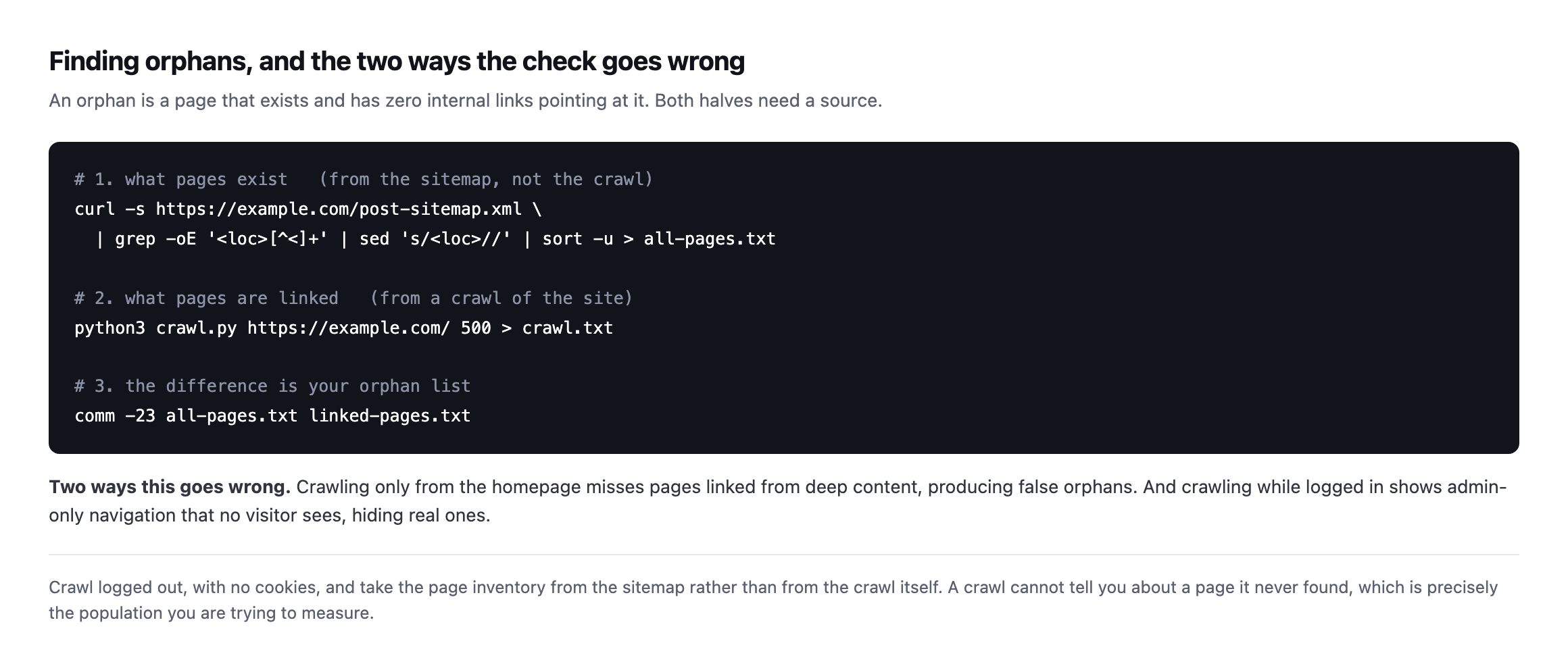
are trying to measure. The inventory has to come from somewhere else.*
Two mistakes make this check useless.
Taking the inventory from the crawl. If you only know about pages the crawl reached, every orphan is invisible by construction. Use the sitemap, or a database export of published URLs.
Crawling while logged in. Admin navigation, draft previews and role-specific menus all appear, so pages look linked when no visitor can see the link. Crawl with no cookies, as a stranger would.
What to do with the list
Not every orphan should be fixed. Three outcomes, and two of them are not “add a link”.
Link to it, if the page still earns its place. From a relevant page in the same cluster, with an anchor that describes the destination rather than saying “click here”.
Redirect it, if it has been superseded. An old service page that a newer one replaced should point at the replacement rather than sitting in the sitemap competing with it.
Remove it, if it should not exist. Test pages, duplicate landing pages from an old campaign, a staging artefact that got published. Deleting these is a genuine improvement, and it is the outcome people resist because deleting feels like loss.
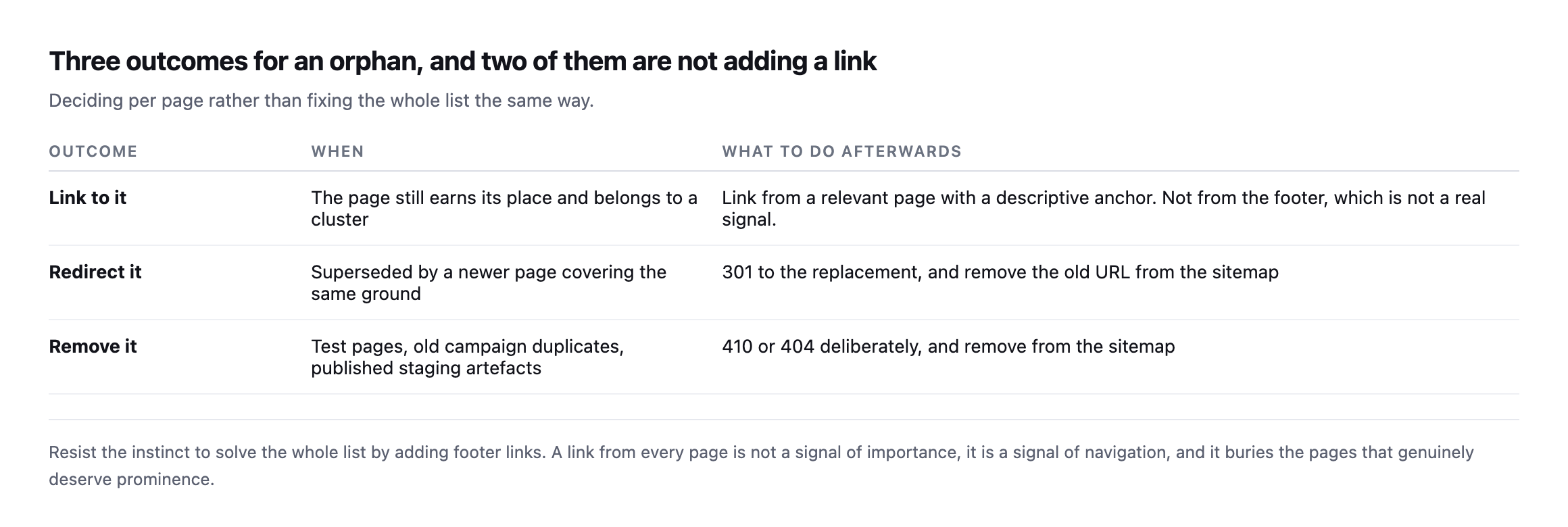
is a signal of navigation, not of importance, and it buries the pages that genuinely deserve prominence.*
| Outcome | When | Afterwards |
|---|---|---|
| link to it | still earns its place, belongs to a cluster | link from a relevant page, descriptive anchor, never the footer |
| redirect it | superseded by a newer page | 301 to the replacement, remove the old URL from the sitemap |
| remove it | test pages, old duplicates, staging artefacts | 410 or 404 deliberately, remove from the sitemap |
Whichever you choose, keep the sitemap honest afterwards. A redirected or deleted URL that stays in the sitemap is exactly the contradiction that makes a sitemap useless.
The WordPress-specific sources
Four things generate orphans on WordPress specifically, and knowing them shortens the investigation.
Retired taxonomies. Delete a category and its posts survive, but the archive that linked them disappears. If those posts were only reachable through that archive, they are now orphaned.
Page builder templates. A template that generated a listing or a loop can be replaced during a redesign, taking a whole set of internal links with it while every target page remains published.
Attachment pages. WordPress creates a page per uploaded media item by default. They are almost never linked, almost never useful, and they can quietly form the largest group in an orphan report. Disabling them is usually the right call.
Old campaign landing pages. Published outside the navigation on purpose, linked only from an ad that stopped running two years ago. Technically orphans, and often genuinely finished work that somebody should decide about.
That last group is the reason to review an orphan list with the client rather than acting on it alone. Some of those pages exist deliberately.
Why this drifts
Orphans are almost always created by a change somewhere else. A navigation redesign drops a menu item. A category is retired. A plugin that generated a listing page is removed. In every case the page survives and its only route in does not.
So this is not a one-time audit. It is a check to run after every navigation or template change, and it is the same class of quiet, structural drift as a link that starts 404ing on every page at once.
Protuno’s free audit reads the sitemap and the crawl-visible structure of a site from the domain alone. Iris is live now.
There is a related check worth running in the same pass, and it finds more on most sites than the orphan list does: pages with exactly one inbound link. They are not orphans today and they are the population that becomes orphaned next. Sorting the crawl output by inbound count ascending gives you both lists at once, and the second one is where you can act before there is a problem rather than after.
Run the two-source diff on your largest client site. The list is usually short, and about half of it is content somebody forgot they had. That half is the return on the exercise: pages already written, already paid for, and one internal link away from being useful again.
The content that survives but stops earning its place
An orphan page has lost every internal link. Decayed content is the earlier stage of the same problem: still linked, still crawlable, quietly losing relevance while nobody notices until the traffic is already gone.
Comments