WordPress Open Graph Tags Are A Client-Facing Check.
A broken share preview produces no error anywhere on the site. Here is what four real sites publish, and the six ways previews break silently.

Short answer: wordpress open graph tags decide what appears when somebody shares a page in Slack, LinkedIn, WhatsApp or anywhere else. When they break, nothing on the site errors, nothing in the dashboard complains, and the first person to notice is your client posting their own campaign page.
That last part is why I treat this as a client-facing check rather than an SEO nicety.
What good looks like
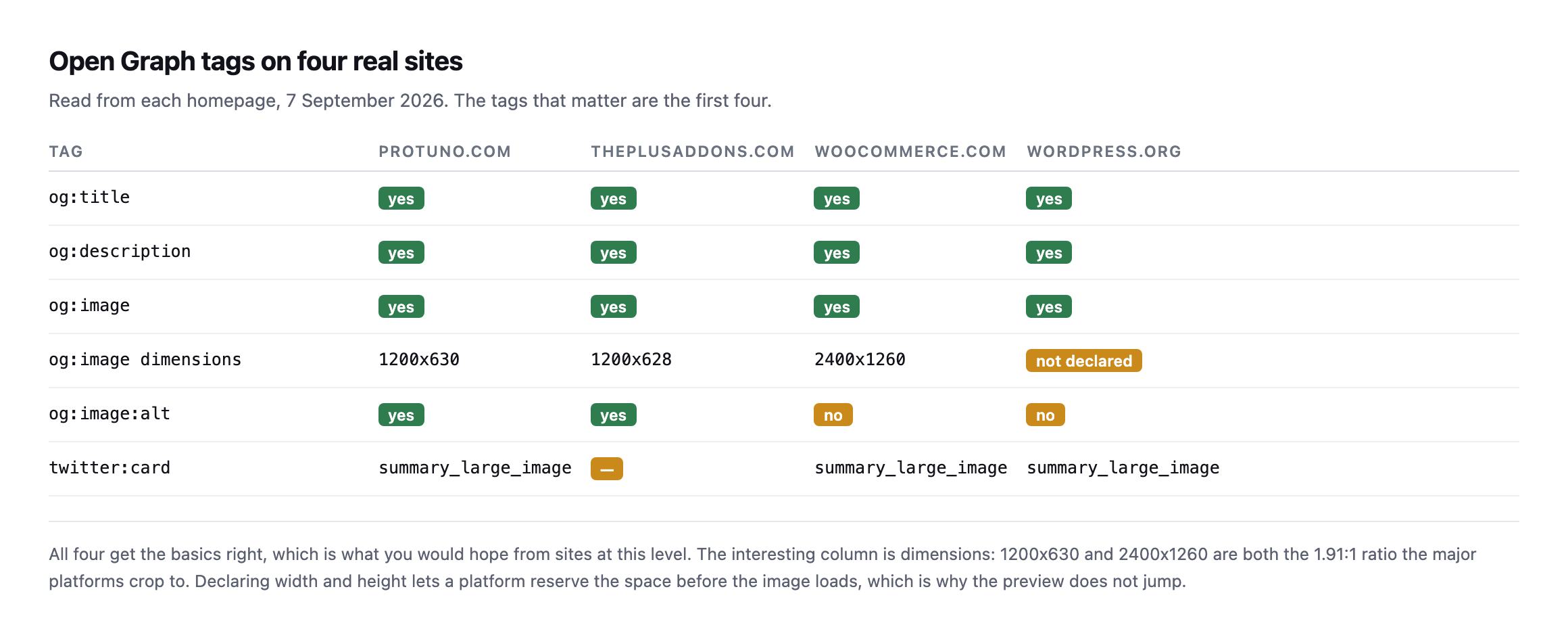
2400×1260 are both the 1.91:1 ratio the major platforms crop to.*
| Tag | sitea.example | siteb.example | woocommerce.com | wordpress.org |
|---|---|---|---|---|
og:title | yes | yes | yes | yes |
og:description | yes | yes | yes | yes |
og:image | yes | yes | yes | yes |
og:image dimensions | 1200×630 | 1200×628 | 2400×1260 | not declared |
og:image:alt | yes | yes | no | no |
twitter:card | summary_large_image | not declared | summary_large_image | summary_large_image |
Caveat: four sites, ours and three reference points. Not a claim about typical adoption, a calibration of what “good” looks like on sites we could verify directly.
Declaring og:image:width and og:image:height is the small win most sites skip. It lets a platform reserve the right space before the image downloads, which is why some previews render cleanly and others jump.
The six ways it breaks
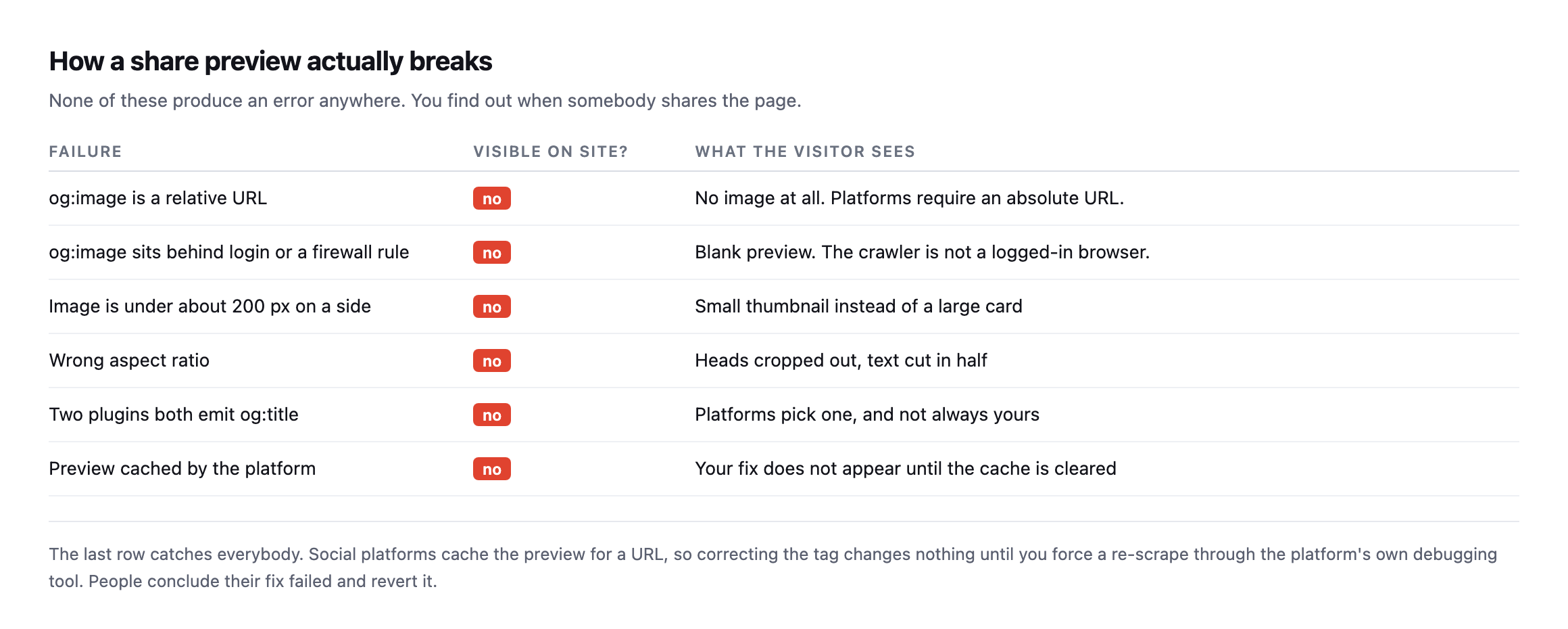
the preview for a URL, so a correct fix appears to do nothing until you force a re-scrape.*
| Failure | Visible on site? | What the visitor sees |
|---|---|---|
og:image is a relative URL | no | no image at all, platforms require an absolute URL |
og:image behind login or a firewall rule | no | blank preview, the crawler is not a logged-in browser |
| image under ~200px on a side | no | small thumbnail instead of a large card |
| wrong aspect ratio | no | heads cropped out, text cut in half |
two plugins both emit og:title | no | platforms pick one, not always yours |
| preview cached by the platform | no | your fix does not appear until the cache clears |
The duplicate-tag case is the most common one I find on WordPress specifically. An SEO plugin emits og:title, then a theme or a social plugin emits another. Platforms pick one, not always yours, and the site looks completely fine.
Check for duplicates explicitly:
curl -s https://example.com/ | grep -oiE 'property="og:title"' | wc -lAnything other than 1 is a finding, and it is worth running against your own template library specifically, since duplicates almost always trace back to two plugins both left active from an old migration rather than anything a single developer would knowingly ship.
Checking WordPress Open Graph tags properly
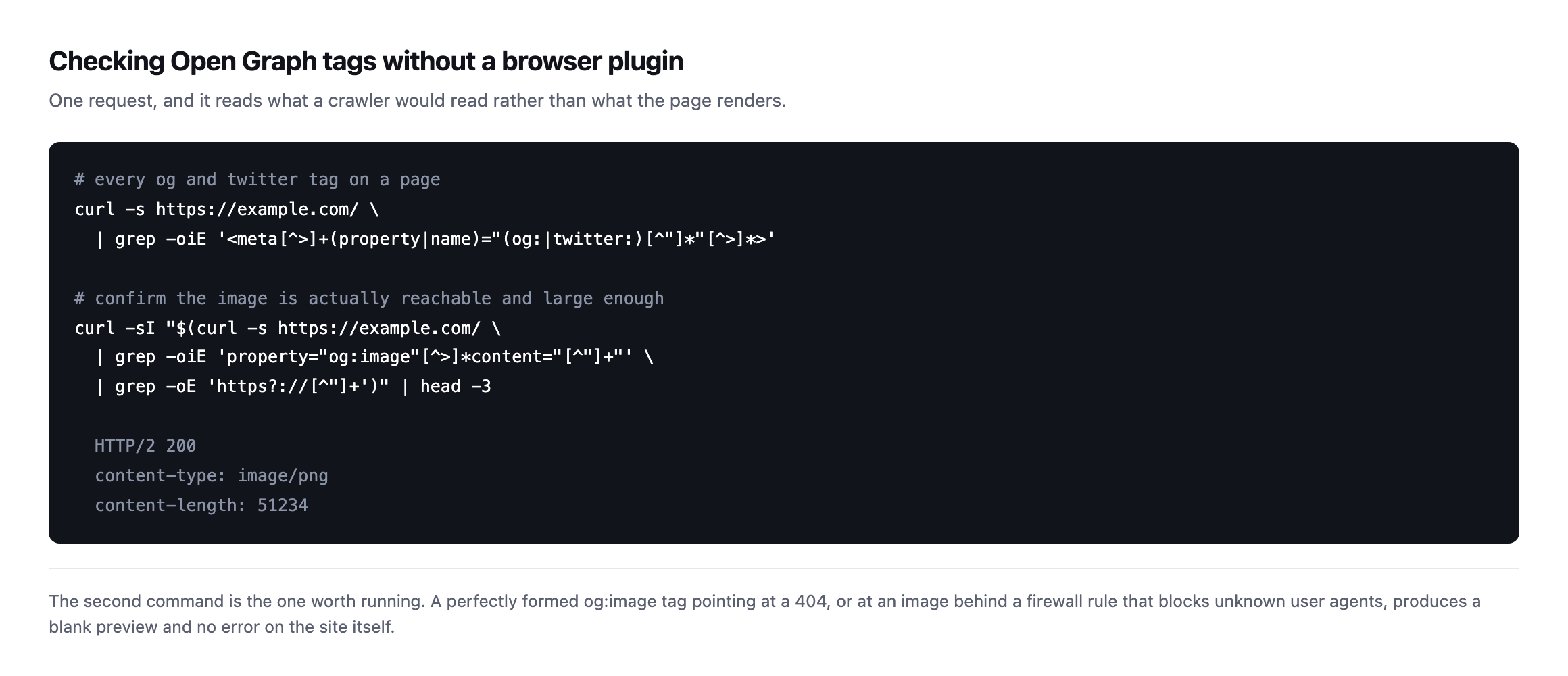
or at an image behind a rule that blocks unknown user agents, produces a blank preview and no error on the site.*
That firewall case is worth calling out. Social crawlers are not browsers and do not carry a normal user agent. A security rule that blocks unrecognised agents will block the preview crawler too, and the page will look perfect to you and blank to everybody sharing it.
The failure mode nobody lists, because it only exists for a few minutes
While writing this post I found a seventh failure that belongs next to the six above, and it is specific to a site architecture more agencies are shipping now: a headless frontend that renders pages on demand and caches the result, exactly the kind the crawl audit post warned catches you out mid-crawl.
I published a post to protuno.com and checked its Open Graph tags within minutes:
curl -s -o /dev/null -w '%{http_code}n' https://protuno.com/blog/wordpress-sitemap-audit
curl -s https://protuno.com/blog/wordpress-sitemap-audit | grep -oE 'property="og:title"[^>]*'
404
<meta property="og:title" content="Protuno · Super Agents For WordPress Automation"/>The page had not finished its first render, so the frontend answered 404, and a 404 still carries a full, valid set of Open Graph tags: the site’s tags, not the post’s. Title, description and image all point at the homepage. None of that is a bug in the ordinary sense. It is the site’s fallback behaving correctly for a page that does not exist yet from the frontend’s point of view, even though the content is live in the CMS.
The consequence is narrow but real: share that URL in the first few minutes after publishing, before the frontend has rendered and cached it, and the preview card shows your homepage’s title and image instead of the post’s. Miss that window and the exact same link, pasted a few minutes later, produces the correct preview. I confirmed it by checking the same URL again a few minutes after the first request and watching the response settle.
| Check | Result |
|---|---|
| Request within minutes of publish | 404, homepage Open Graph tags served |
| Same URL, checked again later | 200, post-specific tags served |
The practical rule this adds to the checklist above: on a headless or ISR-backed WordPress frontend, do not share the URL the moment you hit publish. Wait for the page to return 200 first, exactly the same wait the crawl-audit post recommends before trusting a fresh URL’s status code at all, and the two checks are worth running together since they are testing the same underlying render-and-cache gap from two different angles.
Verifying the pixels, not just the declared numbers
og:image:width and og:image:height are declarations. Nothing forces the number in the tag to match the file it points at, so I downloaded the image and checked.
curl -s -o og.png https://protuno.com/og.png
file og.png
og.png: PNG image data, 1200 x 630, 8-bit/color RGB, non-interlacedDeclared 1200 by 630, actual file 1200 by 630, 72KB on disk. That is not a given. A resized template, an image swapped out without updating the meta tags, or a CDN that serves a different crop at the same URL would all produce a mismatch here while the tag itself still validates as well-formed markup. The file command, or identify from ImageMagick if it is installed, takes the same few seconds as any of the other checks in this post and catches a class of error none of them do: the tag was telling the truth about a file that no longer matches it.
Twitter reads its own tags first, and falls back quietly when they are missing
Everything so far has been Open Graph, the og: prefix Facebook originated and most platforms now read. X, still branded twitter: in its own meta tag namespace, is not required to use those tags at all. It defines a parallel set, twitter:card, twitter:title, twitter:description, twitter:image, and reads those first when they exist.
curl -s https://protuno.com/blog/wordpress-robots-txt-blocking | grep -oE '<meta[^>]*name="twitter:[^"]*"[^>]*>'<meta name="twitter:card" content="summary_large_image"/>
<meta name="twitter:title" content="Discourage Search Engines WordPress: What It Really Does"/>
<meta name="twitter:description" content="Discourage search engines does not add Disallow slash to robots.txt..."/>
<meta name="twitter:image" content="https://protuno.com/blog/media/2026/09/wordpress-robots-txt-blocking-2.png"/>Ours declares all four explicitly, which is the safer of two valid approaches. The card falls back to the matching og: tag for anything left undeclared, twitter:title to og:title, twitter:image to og:image, and the specification documents that fallback as intentional rather than an error state. A site that only ships Open Graph tags and no twitter: block at all is not necessarily broken on X. It is trusting a fallback path instead of testing it.
The distinction is worth a minute of checking rather than assuming, because the fallback applies per field, not as an all-or-nothing switch. A site that declares og:title and og:image but a bare twitter:card with no twitter:image, a pattern I have seen on WordPress installs where a theme hardcodes the card type and a separate SEO plugin handles everything else, still gets a working preview through the fallback. The one worth actually watching for is a mismatched image ratio between the two: og:image sized for the 1.91:1 ratio most link previews use, alongside an explicit twitter:image pointing at something square or portrait left over from an older template, produces a preview that looks fine on LinkedIn and cropped strangely on X, because the platform found its own tag and used it instead of falling back to the one you actually tested.
Testing the firewall case directly, rather than trusting it is fine
The six-failure table earlier names a WAF or security rule blocking preview crawlers as a cause, without proof it applies to any site in particular. Proof is one curl flag away, so I ran it against our own site instead of leaving it as a theoretical risk.
for ua in "facebookexternalhit/1.1" "LinkedInBot/1.0" "Twitterbot/1.0" "Slackbot-LinkExpanding 1.0"; do
  curl -s -o /dev/null -w "%{http_code}  $uan" -A "$ua" https://protuno.com/blog/wordpress-robots-txt-blocking
done| User agent claimed | Response |
|---|---|
facebookexternalhit/1.1 | 200 |
LinkedInBot/1.0 | 200 |
Twitterbot/1.0 | 200 |
Slackbot-LinkExpanding 1.0 | 200 |
| ordinary browser UA, for comparison | 200 |
All four pass cleanly on protuno.com today. That is not a universal result, it is one site’s answer to a question worth asking about every site you manage, particularly one sitting behind Cloudflare, a WAF appliance, or a security plugin with bot-blocking turned on. Those tools often ship a default rule list that treats any user agent it does not recognise as suspicious, and a preview crawler identifying itself honestly as LinkedInBot rather than pretending to be a browser is exactly the kind of request a strict allowlist can catch by accident.
Run the same four-line loop against a client site the next time a preview reports blank with no other explanation. If any of those four come back anything other than 200, or redirect to a challenge page, you have found the cause in under a minute, and it is a firewall misconfiguration rather than anything wrong with the Open Graph tags themselves. Checking the tags first and the firewall second, when the actual fault is the firewall, is how this specific failure ends up burning an afternoon that four curl commands would have closed immediately.
Where it fits
This belongs in the pre-launch pass and in the check after any migration, because both are where header and tag configuration quietly gets lost.
It also pairs with the indexing signals, since a page that tells search engines not to index it usually has an equally accidental story behind its social tags. Both are set once, forgotten, and invisible from the site itself.
And confirm the image is a sensible size while you are there. An og:image that happens to be a 794 KB PNG is downloaded by every platform that renders the preview.
Protuno’s free audit checks Open Graph tags from the domain alone, alongside the other things a crawler reads. Iris is live now.
Take the last campaign page a client asked you to build and paste it into a Slack message to yourself. That is the complete test, and it takes five seconds.
If it comes back blank or wrong, work the list in order: check the tags exist and are not duplicated, check the image resolves and matches its declared dimensions, check a preview crawler’s own user agent is not the thing being blocked, and only then blame the platform’s cache. Four checks, all of them a single curl command, and every one of them was tested on a real site while writing this post rather than described from memory.
Comments