WordPress Cron Not Running: The Failure That Never Alerts You.
WP-Cron only fires when somebody loads a page. On a quiet client site that means backups, renewals and order emails can stop for days in silence.

The first time I saw this properly, it was a membership site. Renewal emails had not gone out for eleven days. The site was up the whole time. Nothing was broken in any way you could see from the outside.
The scheduler had simply stopped being asked to run.
If you look after client sites, wordpress cron not running is one of the purest examples of the failure class this job is actually made of: nothing crashes, nothing alerts, and the damage is measured in the days before somebody notices.
WP-Cron is not cron, and that is the whole problem
The name is the trap. A system cron is a daemon. It wakes up on a schedule because the operating system makes it.
WordPress does not have that. The documentation is blunt about it: WP-Cron “works by checking, on every page load, a list of scheduled tasks to see what needs to be run”, and it “does not run constantly as the system cron does; it is only triggered on page load”.
Read that as an agency and the consequence lands immediately. Your client’s scheduled tasks are powered by their traffic. The site nobody visits is the site whose backups quietly stop.
The docs even give the shape of it: “Scheduling errors could occur if you schedule a task for 2:00PM and no page loads occur until 5:00PM”.
Three hours is the polite version. On a brochure site for a regional client, with a caching layer in front that serves most visitors without ever booting PHP, the real number is longer.
Four reasons WordPress cron is not running, in the order I find them
1. A cache in front of the site. Full page caching means visitors get HTML without WordPress loading. No load, no cron check. Adding a CDN can silently take the scheduler offline, and the change that caused it was a performance improvement.
2. DISABLE_WP_CRON set, with no replacement. Somebody read the performance advice, added define( 'DISABLE_WP_CRON', true ); to wp-config.php, and never added the system cron that was supposed to take over. This is the most common one on sites I inherit, and it is always well intentioned.
3. A fatal error inside a cron callback. Often from a plugin that stopped being maintained, which is its own problem worth checking separately. One plugin’s scheduled task throws. The request dies mid-queue, and every hook behind it in that run never executes. The site looks perfect. A third of the schedule is dead.
4. A stuck lock. WordPress uses a transient to avoid running the queue twice. If a run dies at the wrong moment the lock can outlive it, and the next attempts decline to start.
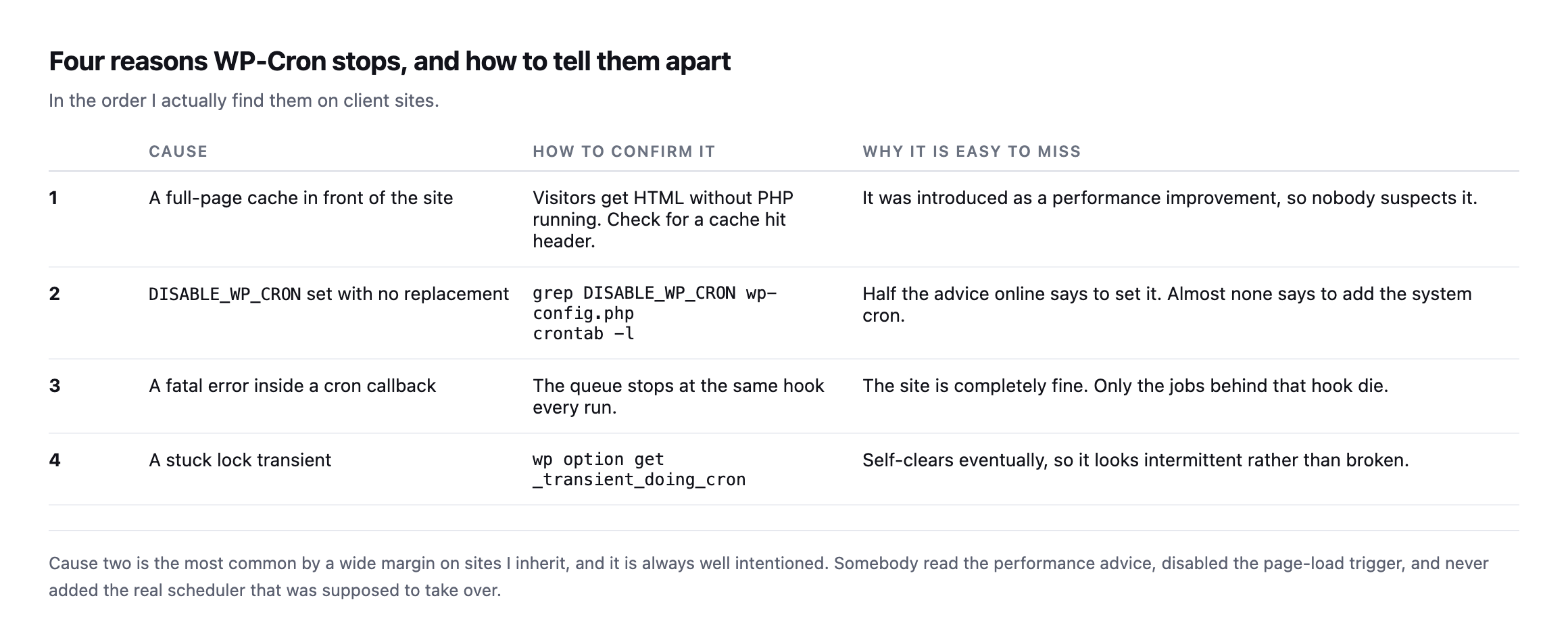
Somebody read the performance advice, disabled the page-load trigger, and never added the real scheduler that was meant to replace it.*
| # | Cause | How to confirm it | Why it is missed |
|---|---|---|---|
| 1 | full-page cache in front | check for a cache-hit header on a normal visit | shipped as a performance win, so nobody suspects it |
| 2 | DISABLE_WP_CRON with no replacement | grep DISABLE_WP_CRON wp-config.php then crontab -l | most advice says set it, almost none says add the real cron |
| 3 | fatal error in a cron callback | the queue stops at the same hook every run | the site itself is fine; only jobs behind that hook die |
| 4 | a stuck lock transient | wp option get _transient_doing_cron | self-clears eventually, looks intermittent rather than broken |
Caveat: these are the four causes I have actually found on client sites, ranked by how often I meet them, not a formal taxonomy of every way WP-Cron can stall. If you find a fifth, it is very likely one of the four above wearing a different hosting stack’s clothes.
Find it in one command
If you can reach WP-CLI, this is the whole diagnostic:
wp cron event list --fields=hook,next_run_relative,recurrenceOne thing to know before you read the output: WP-CLI does not print a negative number for a late job. Anything due now or overdue simply reads now. So a single now means nothing.
The tell is a set of hooks that still say now when you run the command again a few minutes later. A healthy queue drains. A stopped one does not move.
Run it twice:
wp cron event list --fields=hook,next_run_relative,recurrence
sleep 120
wp cron event list --fields=hook,next_run_relative,recurrence
Same hooks, still now, both times. That is a scheduler that is not running.
The admin-side view is blunter about it, which is why I usually go there first:
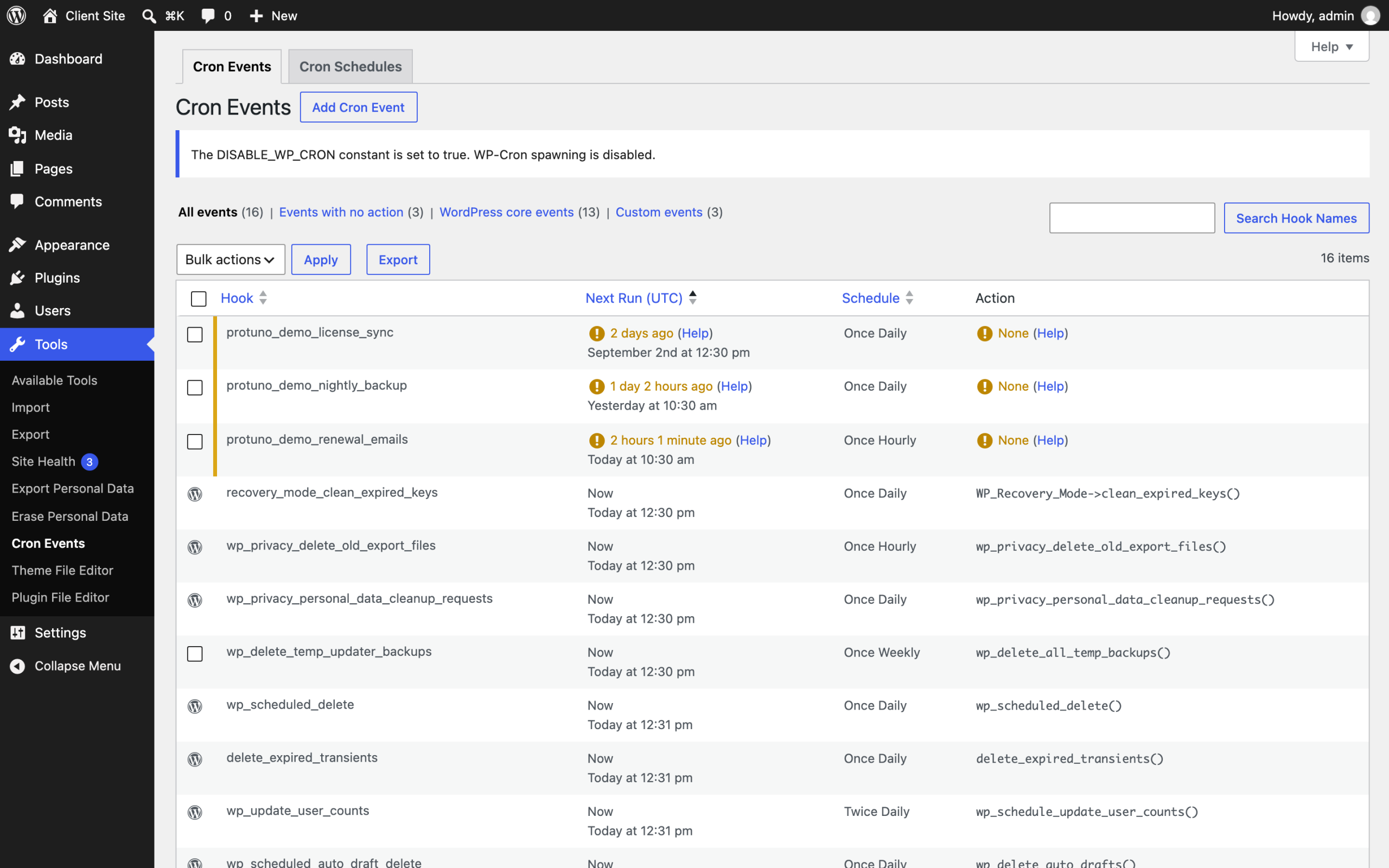
here, and both matter. The notice at the top reports that DISABLE_WP_CRON is set with nothing replacing it, which is cause two below. Underneath, three jobs are flagged as last due two days, one day and two hours ago. A renewal email hook that last ran two days ago on a membership site is the eleven days I opened this post with, caught early.*
Core will also tell you, but quietly, and this is worth seeing for yourself:
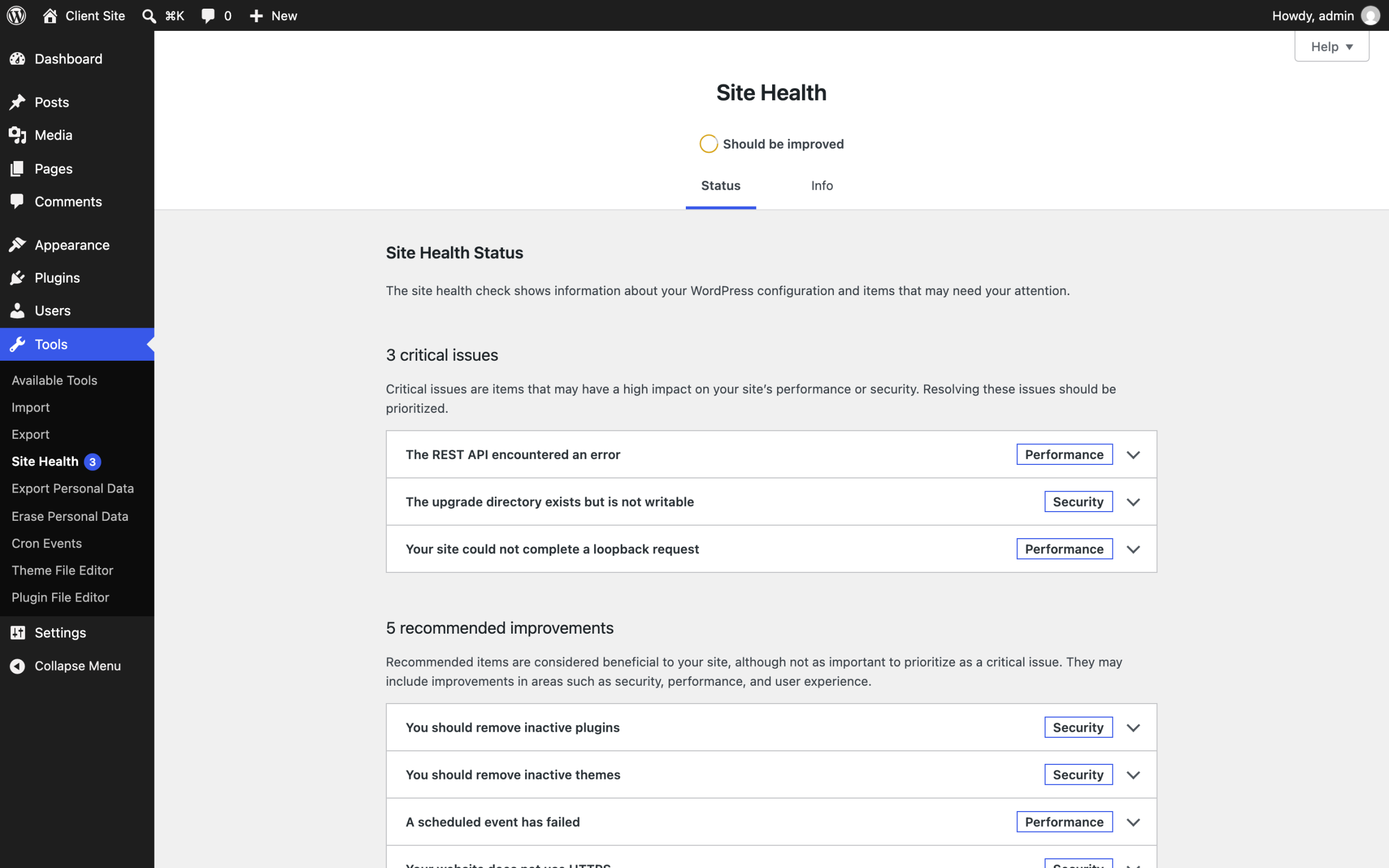
under recommended improvements, underneath “You should remove inactive themes”. A site whose backups, renewals and order emails have stopped is being reported to your client as roughly as urgent as some tidying. That ranking is why this failure survives so long.*
No shell access? wp_get_ready_cron_jobs() gives you the same answer from a snippet, and most decent cron viewer plugins are reading the same array.
Fix it by giving the site a real scheduler
The permanent fix is to stop relying on visitors. Disable the page-load trigger and let the operating system do the job it is good at.
In wp-config.php:
define( 'DISABLE_WP_CRON', true );Then a real cron entry. The WordPress documentation’s own example is:
0 0 * * * wget --delete-after http://YOUR_SITE_URL/wp-cron.phpChange the frequency. Once a day is the documentation showing you the syntax, not a recommendation for a site with a store on it. Every five or fifteen minutes is the range most client sites want.
Two things people get wrong here. Point it at the site’s real canonical URL, or the redirect eats the request. And if the site is behind HTTP authentication on staging, the scheduler is not running there either, which is usually why staging behaves differently from production.
The scheduler behind WooCommerce is the same one, mostly
If the site runs WooCommerce, or almost any plugin doing background work at volume, there is a second scheduler worth checking, and it is easy to assume it is independent of WP-Cron. It is not, by default.
Action Scheduler is the job queue WooCommerce and hundreds of other plugins use for background processing: sending order emails, syncing stock, running scheduled discounts, processing webhooks. Its own FAQ is direct about the relationship: “By default, Action Scheduler is initiated by WP-Cron (and the ‘shutdown’ hook on admin requests). However, it has no dependency on the WP-Cron system”.
Read that carefully, because the two halves point in different directions. The default trigger is WP-Cron, so everything in this post about a stopped scheduler applies to Action Scheduler queues too, on a stock install. But there is a second trigger alongside it: the shutdown hook fires on admin requests, which means a site somebody logs into and clicks around in regularly can look healthy in the Action Scheduler queue while WP-Cron itself is genuinely stopped for anonymous visitors. That is worth knowing before you trust a healthy-looking wp action-scheduler run on a site nobody but the client’s team ever visits while logged in.
The practical version: check both queues, not just one. wp cron event list shows the native WordPress schedule. WooCommerce’s own Action Scheduler admin screen, or wp action-scheduler action list --status=pending, shows the second one, and a large pending count there is the same silent failure this whole post is about, just for order processing instead of publishing.
There is a genuinely good conference talk on exactly this distinction, covering crond, WP-Cron and Action Scheduler together, including a real example of syncing 100,000 products a day through a single Action Scheduler worker: Crond service, WP Cron and why Action Scheduler does it better, WordCamp Lisboa 2025.
It is worth pairing this check with the failed-order rate on any store you look after, because a stalled Action Scheduler queue produces exactly the shape of failure that check exists to catch: orders sitting unprocessed, confirmation emails never sent, stock levels never reconciled, while every page on the store keeps returning 200. Neither symptom alone tells you which queue stopped. Together they narrow it down in minutes instead of an afternoon of guessing which plugin is at fault, and they narrow it down to the queue rather than the plugin, which is the distinction that actually decides what you fix.
The part that actually matters for an agency
You can fix this on one site in ten minutes. The problem was never the fix.
The problem is that on the other nineteen sites you look after, this exact failure is either happening or not happening right now, and you have no way of knowing which without opening each one. It produces no alert. Uptime monitoring reports the site as fine, because the site is fine. The only signal is a client eventually asking why they stopped getting something.
This is the shape of nearly every check worth running on a client site: cheap to fix, impossible to notice, and invisible to the tools most agencies have pointed at the problem. It is the same reason the site that fails is usually the quiet one, not the one already on your mind.
Protuno’s Care agent, Wren, carries a scheduled-job check for exactly this, and it reports overdue hooks per site across a portfolio rather than per install. Being straight with you: the agents are built and named but not live yet, so today this is a thing you run yourself with the command above. The free audit does not cover it either, because the scheduler is not readable from the address alone. It needs a connected site.
Until then, put the WP-CLI line in whatever runbook you already use, and run it against the client you have not opened in a fortnight. That is where it will be.
If you are pricing this kind of work into a retainer, the companion piece on what WordPress care actually costs an agency puts a number on the half hour these checks really take.
Why shared hosting makes this worse
WP-Cron firing on page load, rather than on a real schedule, is the mechanism behind the check this post runs. This covers why that design specifically breaks down on low-traffic shared hosting.
Comments