WooCommerce Failed Orders: The Early Warning Nobody Is Watching.
Orders moved to a new table and the old query returns ten drafts instead. Then the failed-to-total ratio is the signal worth alerting on.

Short answer: a rising rate of woocommerce failed orders means payments are being attempted and refused, which is a gateway problem the store cannot see. Every URL returns 200 throughout. And before you can monitor it, you need to be querying the right table, because orders moved, though not on every store, and not always by default.
Orders are not in wp_posts any more
I created ten orders on a current WooCommerce install and counted them both ways, then went back and tested the migration mechanics directly on that same install to confirm exactly when each table actually applies rather than assume it from the version number alone.
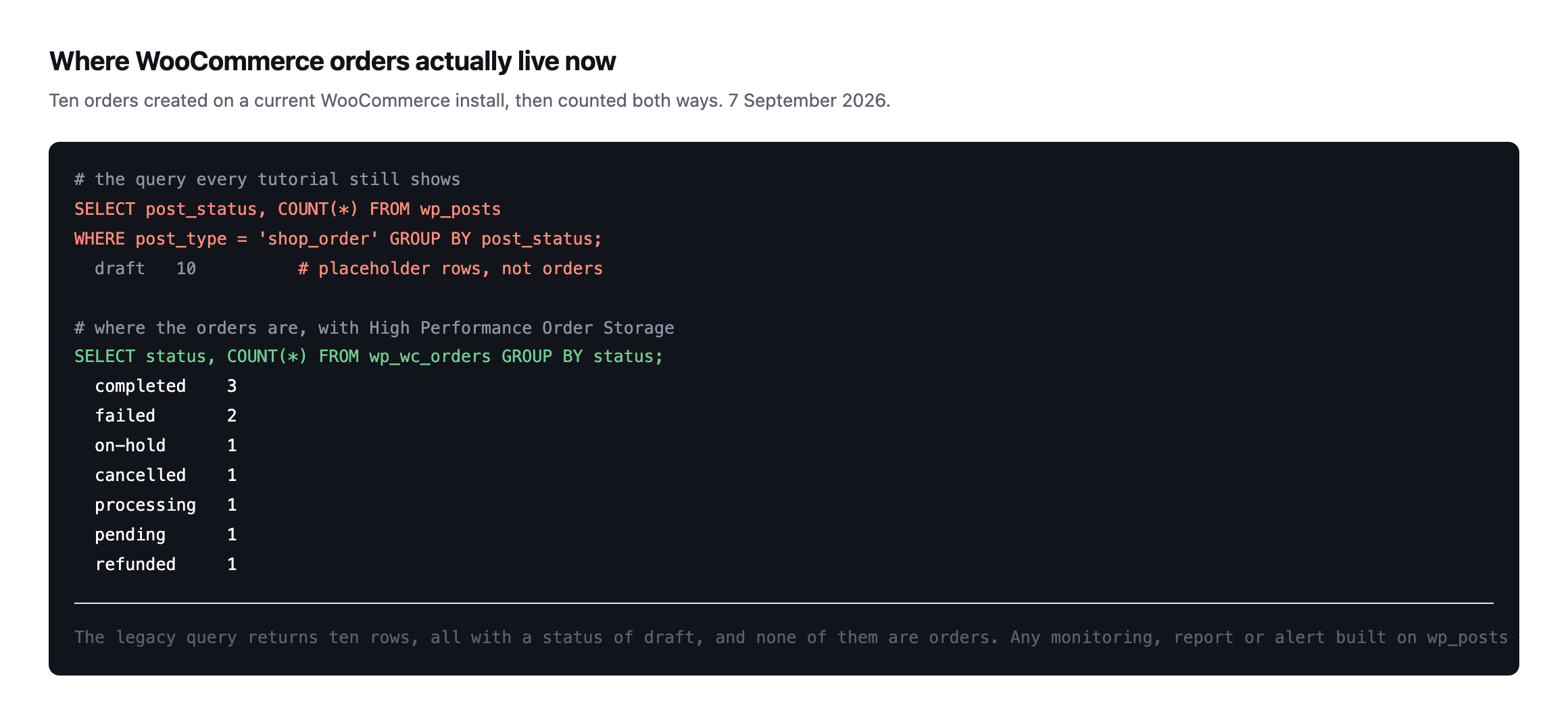
draft, and none of them are orders. Anymonitoring built on wp_posts reports a store with no sales while it trades normally.*
That single option check is the whole difference. This is the same shape as the autoload column that no longer contains the value every tutorial queries for: the query still runs, still returns rows, and describes nothing.
If you have a dashboard, a report or an alert that reads orders from wp_posts, check what it is actually returning. A silent zero is indistinguishable from a healthy quiet period.
Checking whether HPOS is even on before you write the query
The wp_wc_orders query above assumes the new order storage, HPOS, is active. I checked a fresh WooCommerce 11.1.0 install to find out whether that is now the default, since assuming it is the wrong direction to get this backwards.
wp option get woocommerce_custom_orders_table_enablednoNot enabled, on a current WooCommerce version, installed clean with no history to migrate. HPOS is opt-in, toggled from Settings → Advanced → Features, not something a store arrives with switched on by default. That matters for this post’s own premise: the trap is not “your store has moved and your query has not caught up.” It is narrower and depends entirely on which of two states a specific store is actually in, and the only way to know is to check, not assume either direction.
I created two real test orders on this legacy-storage install and queried both tables to see exactly what each one returns:
wp db query "SELECT post_status, COUNT(*) FROM wp_posts WHERE post_type='shop_order' GROUP BY post_status;"
wp db query "SELECT status, COUNT(*) FROM wp_wc_orders GROUP BY status;"
post_status COUNT(*)
wc-completed 2
wc-failed 1
ERROR 1146 (42S02): Table 'wp.wp_wc_orders' doesn't existOn a legacy-storage store, wp_posts returns the real, correct order statuses, exactly as it always has, and the wp_wc_orders query from earlier in this post does not return an empty or misleading result. It fails outright with a table-not-found error. That is actually the safer of the two possible mistakes: a hard SQL error gets noticed immediately, unlike the reverse case this post opened with, where a legacy query against a migrated store returns real rows that quietly mean nothing. Check woocommerce_custom_orders_table_enabled before writing either query, and let that answer decide which table you query, rather than assuming one direction based on how recent the WooCommerce version is.
Which statuses matter, and where WooCommerce failed orders sit
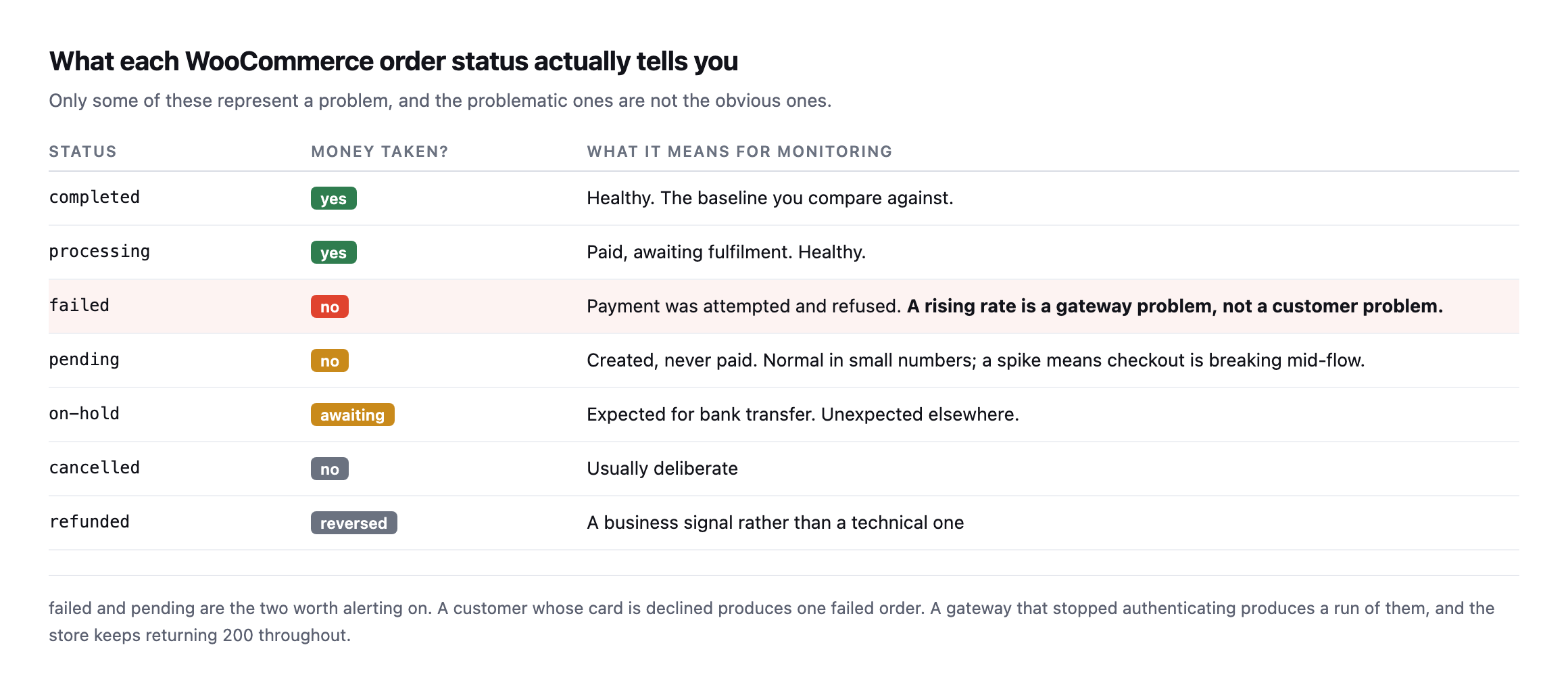
failed and pending are the two worth alerting on. A declined card produces one failedorder. A gateway that stopped authenticating produces a run of them.*
| Status | Money taken? | What it means for monitoring |
|---|---|---|
| completed | yes | healthy, the baseline you compare against |
| processing | yes | paid, awaiting fulfilment, healthy |
| failed | no | payment attempted and refused; rising rate is a gateway problem |
| pending | no | created, never paid; a spike means checkout is breaking mid-flow |
| on-hold | awaiting | expected for bank transfer, unexpected elsewhere |
| cancelled | no | usually deliberate |
| refunded | reversed | a business signal rather than a technical one |
The distinction matters because failed is not a customer problem. A customer with an expired card produces one failed order and then usually pays with another. A store producing a run of failed orders with no successes between them has an infrastructure problem, and nobody is being told.
pending deserves attention too. An order created and never paid means the customer reached the final step and something stopped them, which is the most expensive point at which to lose somebody.
Alerting without crying wolf
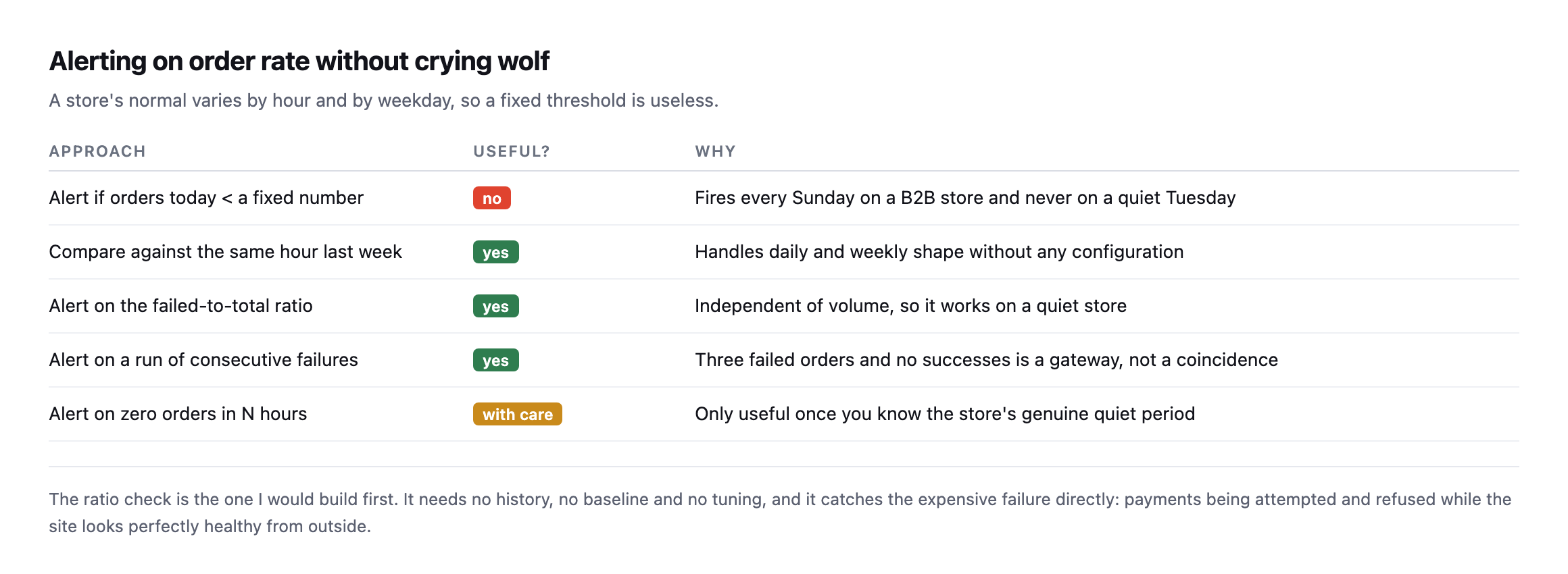
tuning.*
| Approach | Useful? | Why |
|---|---|---|
| alert if orders today < a fixed number | no | fires every Sunday on a B2B store, never on a quiet Tuesday |
| compare against the same hour last week | yes | handles daily and weekly shape with no configuration |
| alert on the failed-to-total ratio | yes | independent of volume, works on a quiet store |
| alert on a run of consecutive failures | yes | three failed and no successes is a gateway, not coincidence |
| alert on zero orders in N hours | with care | only useful once you know the genuine quiet period |
A fixed threshold fails immediately, because a store’s normal varies by hour and weekday. On a B2B store, Sunday is quiet by design and an alert that fires every Sunday gets muted within a fortnight.
The failed-to-total ratio sidesteps all of that. It is independent of volume, so it works on a store taking three orders a day and one taking three hundred.
WooCommerce itself refuses to make this worse
While testing the HPOS toggle on the lab install, I tried flipping the storage setting directly to see how a mid-migration store behaves, and WooCommerce stopped me:
wp option update woocommerce_custom_orders_table_enabled yesFatal error: Uncaught Exception: The authoritative table for orders storage can't be
changed while there are orders out of syncThat is a real guard, not a bug I stumbled into. WooCommerce checks whether every order is already synchronised between wp_posts and wp_wc_orders before it will let a site switch which table is authoritative, and refuses the switch outright if any are not. The exact trap this post opens with, a store where the two tables disagree about what an order’s status is, is one WooCommerce’s own core code actively tries to prevent from being the operating state for very long. Reads and writes through WooCommerce’s own APIs, the order object, the REST endpoints, the admin screens, stay correct throughout a migration because WooCommerce itself enforces synchronisation before it will call the switch complete.
The actual danger this post is about lives specifically in code that bypasses those APIs: a direct SQL query against wp_posts, written when that was the only table that existed and never revisited, run against a store that has since finished a migration WooCommerce itself guarded carefully. WooCommerce protects its own consistency. It cannot protect a dashboard query, a custom report, or an old cron job that never got told the table changed underneath it, which is exactly why the check this post recommends, confirm which table is authoritative before trusting either query, is doing work WooCommerce’s own safeguards cannot do for you.
The query
SELECT status, COUNT(*) AS n
FROM wp_wc_orders
WHERE date_created_gmt > DATE_SUB(UTC_TIMESTAMP(), INTERVAL 24 HOUR)
GROUP BY status;
Compare failed against completed plus processing. On most stores the failed share sits in low single digits. A jump to a third, or any period with failures and no successes at all, is worth a phone call.
Two caveats worth knowing. Sites that have not migrated to the new order storage still use wp_posts, so check which applies before writing anything. And a store with no orders in the window returns no rows rather than zeros, which is easy to misread as healthy.
Why this is the check worth having
Order-rate monitoring is the only store check that measures the outcome rather than a proxy.
Uptime tells you the server answered. A checkout probe tells you the page rendered. Neither tells you whether money moved. A gateway can accept the page load, present the payment form, and refuse every transaction, and every technical check will pass.
That is the same category of silent failure as a contact form that reports success and delivers nothing, with a price attached.
Protuno’s eCommerce agent, Till, runs a read-only WooCommerce Health Review inside your own AI app. See the playbooks page for what it covers.
Run the query on your busiest client’s store. If it returns nothing because you were querying wp_posts, that is today’s finding.
Building the ratio check so it survives a future migration
The safest version of the monitoring query this post recommends is one that does not assume which table is authoritative, because that answer can change under a store you are watching without anyone telling you first. A migration a client runs themselves, a hosting provider that bundles a WooCommerce update with HPOS enabled by default in some future release, or an agency switching it on deliberately during a maintenance window, all change which table holds the truth without necessarily changing anything else about how the site behaves day to day.
A monitoring script that hardcodes wp_wc_orders will fail loudly, the same table-not-found error this post’s test produced, the day it runs against a store that has not migrated. One that hardcodes wp_posts will fail quietly, returning real-looking rows describing nothing, against a store that has. Neither failure mode is acceptable in something meant to run unattended on a schedule, so the check worth writing first is not the order-status query. It is the one-line lookup that decides which query to run:
wp option get woocommerce_custom_orders_table_enabledyes routes to wp_wc_orders. no, or the option missing entirely on an older WooCommerce install that predates the setting, routes to wp_posts. That single check, run before the actual monitoring query on every execution rather than assumed once and hardcoded, is what keeps a failed-order alert working correctly through a migration it was never told was happening, which is exactly the kind of silent underlying change this entire post is about.
What this means for a query written before HPOS existed
The practical audit worth running today, on every client store with WooCommerce-based monitoring already in place: find every place a report, a dashboard widget, a cron job or a custom SQL query reads order data, and check whether any of them hardcode a table name rather than checking the authoritative-storage option first.
Most of that code was written before HPOS existed, because HPOS is a relatively recent addition to WooCommerce and wp_posts was the only option for years before it. None of that code is wrong for the store it was written against. It becomes wrong silently, the moment that specific store’s storage setting changes, and nothing about the code itself will tell you that happened. The option lookup this post recommends costs one extra query and turns a silent, indefinite failure into a check that keeps working correctly regardless of which side of a migration the store you are monitoring happens to be on today, or moves to next quarter without telling anyone who built the dashboard.
Comments