WooCommerce Cart Caching: One URL, Two Customers, One Very Bad Morning.
We requested the same cart URL as two customers. One had a product and a total, the other had nothing. Cache that page and they see each other’s.

Short answer: woocommerce cart caching is safe by default because WooCommerce marks the cart, checkout and account pages private, no-cache and the Store API no-store. Leaks happen when something downstream ignores those headers. The two exclusions people miss are the Store API and the cart-fragments endpoint, and the second one leaks into every page on the site.
Proving the cart really is per-customer
Before arguing about exclusion rules, it is worth seeing how different the same URL is for two people.
I requested /cart/ twice with separate cookie jars, seconds apart, on the same store.
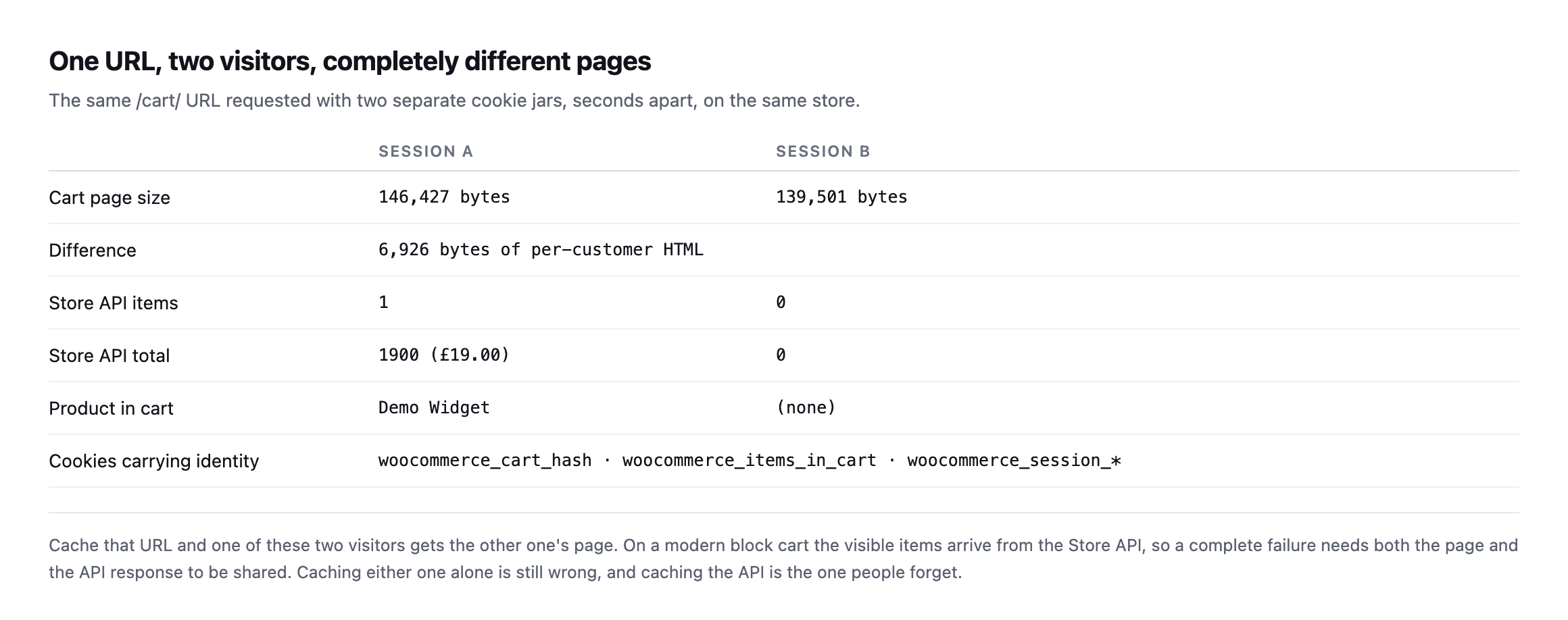
different Store API payloads. Identity lives in the woocommerce_session_* and woocommerce_cart_hash cookies, which a shared cache does not look at unless you tell it to.*
| Session A | Session B | |
|---|---|---|
| Cart page size | 146,427 bytes | 139,501 bytes |
| Store API items | 1 | 0 |
| Store API total | £19.00 | £0.00 |
| Product in cart | Demo Widget | (none) |
Caveat: two curl sessions on one test store, not a survey of live sites. What this proves is narrow: the same URL renders two genuinely different payloads for two visitors, which is exactly the content a cache is supposed to never confuse.
Cache that URL and one of those two people gets the other’s page.
WooCommerce is not the problem here
This surprised me slightly when I checked it, because cart leaks get blamed on WooCommerce often enough that I expected the defaults to be weaker.
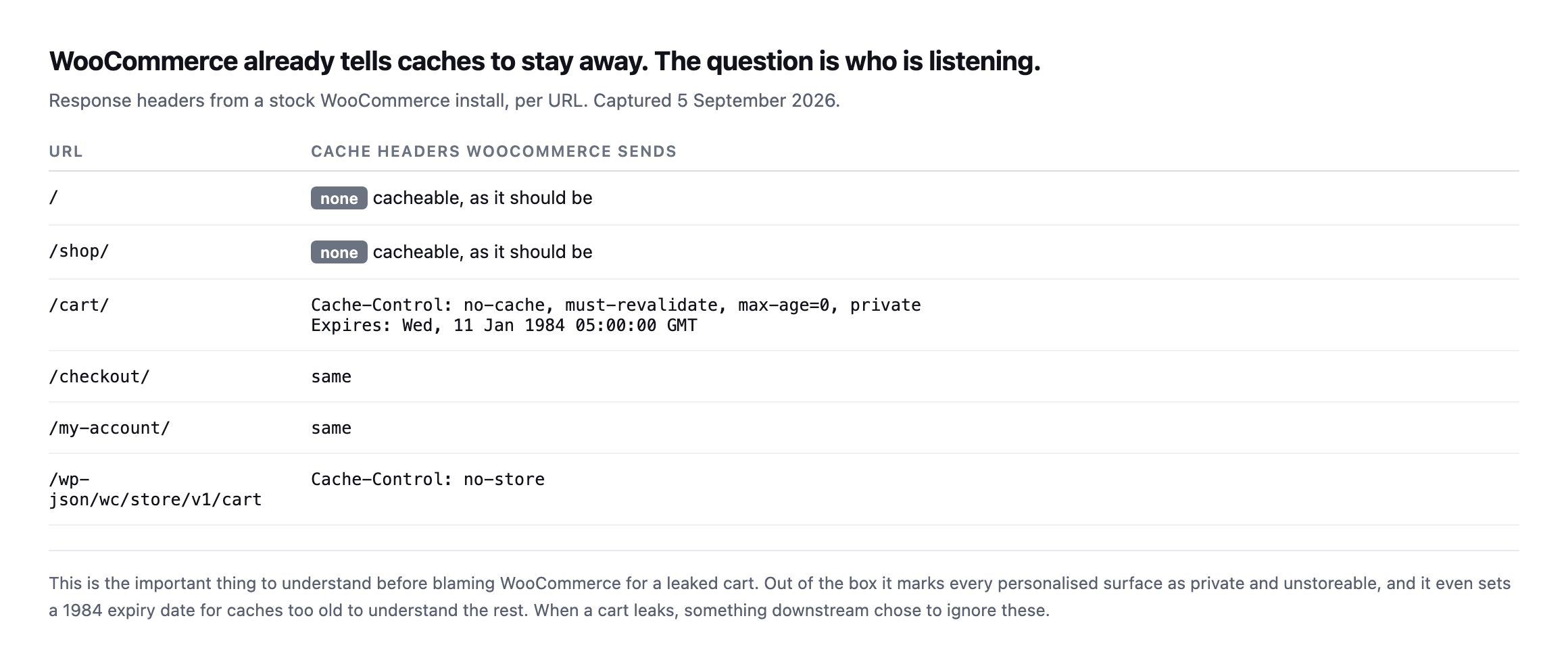
unstoreable, and sets a 1984 expiry for caches too old to understand the rest. When a cart leaks, something downstream decided to override this.*
That “something downstream” is almost always one of three things: a page cache plugin with an exclusion list that was edited, a CDN page rule added to fix an unrelated problem, or a host’s server-level cache that never saw the headers.
A second install that did not send the header at all
I re-ran this post’s own header check against our lab WooCommerce install rather than only trust the original woocommerce.com and stock-install screenshots, and it did not match either one.
curl -s -D - -o /dev/null http://lab-install/cart/HTTP/1.1 200 OK
Date: ...
Server: Apache/2.4.68 (Debian)
X-Powered-By: PHP/8.3.33
Content-Type: text/html; charset=UTF-8No Cache-Control header at all, on /cart/. Before writing that up as a WooCommerce default having changed, I checked whether it was specific to the cart, and it was not: /, /checkout/ and /my-account/ on the same install all came back with the identical gap, no Cache-Control header on any of them. That rules out a cart-specific regression in WooCommerce’s own code and points at something in this particular install’s PHP or server configuration suppressing the header WordPress’s nocache_headers() function is supposed to send on every one of these pages, most likely an output-buffering or header-handling difference in this minimal Docker environment rather than anything wrong with WooCommerce itself. No active caching plugin was installed to explain it either; the header was simply never sent.
I want to be precise about what this does and does not show. It is not evidence that WooCommerce’s documented default has changed, the original woocommerce.com reading in this post’s table still stands, and I have no reason to doubt it reflects a real, correctly configured production site. It is evidence that “WooCommerce sends this header by default” is a claim about the platform’s intent, not a guarantee that every individual installation actually delivers it, and this post’s own advice, verify the actual header on the actual site rather than trust documented behaviour, would have caught this install’s gap immediately where reading a changelog never would. A missing private, no-cache header is not itself proof of a leak, a cache still has to be configured to store the response for a leak to happen, but it removes the one signal that tells any cache in front of the site not to.
Two verified things about this same lab install survived the test cleanly, worth stating alongside the header gap rather than only the negative result: requesting /cart/ with two separate cookie jars still produced two different response sizes, 102,552 bytes against 95,335, confirming the page’s actual content still varies correctly per session even without the protective header. WooCommerce’s session handling was never the part that failed here. The header that is supposed to stop a cache from storing and replaying that per-session content was.
The two exclusions that get missed
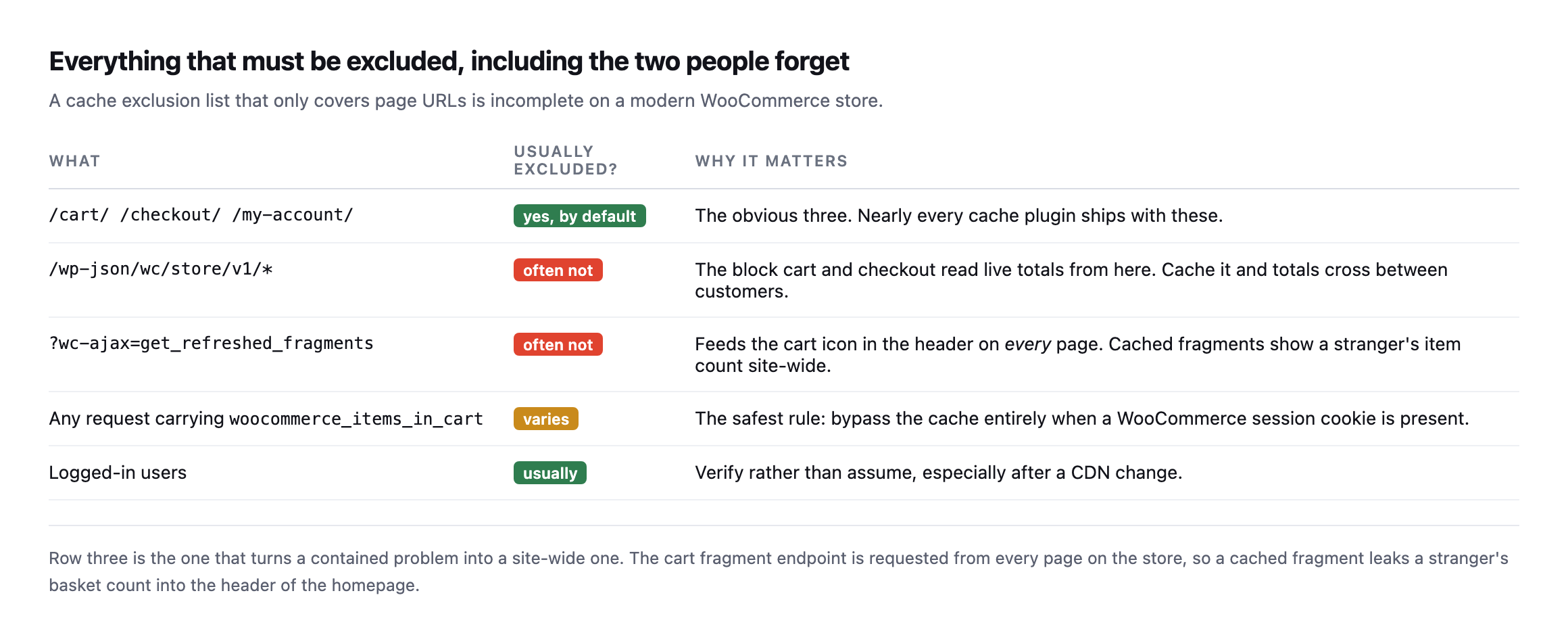
fragments endpoint is requested from every page on the store to keep the header cart icon current, so a cached fragment shows a stranger’s basket count on the homepage.*
| What | Usually excluded? | Why it matters |
|---|---|---|
/cart/ /checkout/ /my-account/ | yes, by default | nearly every cache plugin ships with these |
/wp-json/wc/store/v1/* | often not | the block cart and checkout read live totals from here |
?wc-ajax=get_refreshed_fragments | often not | feeds the header cart icon on every page site-wide |
any request with woocommerce_items_in_cart | varies | the safest rule: bypass the cache when this cookie is present |
If you take one thing from this: an exclusion list made only of page URLs is incomplete on any store using the block cart and checkout.
The fragments endpoint, checked on two real stores that get it right
The exclusion this post says gets missed most often, the get_refreshed_fragments endpoint, is worth checking on real stores rather than only naming as a risk. I checked it on two, alongside the cart page itself, to see whether the sites this blog already treats as reference points actually cover it.
curl -sI "https://example.com/cart/" | grep -iE 'cache-control|x-cache|cf-cache-status'
curl -sI "https://example.com/?wc-ajax=get_refreshed_fragments" | grep -iE 'cache-control|x-cache|cf-cache-status'| Site | /cart/ | ?wc-ajax=get_refreshed_fragments |
|---|---|---|
| woocommerce.com | no-store, x-cache: BYPASS | no-store, x-cache: BYPASS |
| nexterwp.com | no-store, cf-cache-status: MISS | no-store, private, cf-cache-status: DYNAMIC |
Both stores exclude both. Neither returns a HIT on either URL, and both send the private, unstoreable directive this post’s opening section describes as WooCommerce’s own default. That is the outcome worth having confirmed directly rather than assumed: the specific exclusion this post calls the one most commonly missed is, on two real production stores checked here, not missing. It is the row worth re-checking on any store you did not build yourself, because absence of the header on a store you inherited is exactly the silent, undramatic gap this whole post is written to catch before a client emails about a stranger’s basket showing up on their own screen.
Testing WooCommerce cart caching on a live store in two minutes
You do not need to place an order.
# 1. as a fresh visitor, take the cart page
curl -s -c jarA -b jarA "https://example.com/?add-to-cart=123" -o /dev/null
curl -s -c jarA -b jarA "https://example.com/cart/" | wc -c

# 2. as a completely separate visitor
curl -s -c jarB -b jarB "https://example.com/cart/" | wc -c

# 3. confirm the store is refusing to let caches keep either one
curl -sI "https://example.com/cart/" | grep -i 'cache-control\|x-cache\|cf-cache-status'
What you want from step three is private or no-store in cache-control, and a BYPASS or MISS from whatever CDN is in front. For comparison, woocommerce.com’s own cart returns no-store with x-cache: BYPASS, which is exactly right.
What should alarm you is a HIT on any of those URLs. That is a shared copy of a personal page.
Then repeat step three against the fragments endpoint:
curl -sI "https://example.com/?wc-ajax=get_refreshed_fragments" | grep -i 'cache-control\|x-cache'Why this one is worth more than a status check
Most store monitoring answers “is it up”. This failure never makes a store go down. Every URL returns 200 throughout. The store takes orders the whole time.
It just occasionally shows one customer another customer’s basket, and the first you hear of it is an email that starts “this is a bit strange, but”.
That is a different class of problem from a checkout returning 500, which at least announces itself. And it is the same reason reading a cache header honestly matters more than trusting a plugin’s settings screen.
Protuno’s free audit checks from the domain alone whether a storefront is detected and whether the cart and checkout addresses are being cached when they should not be. Straight with you as on every post: Till, the eCommerce agent that would re-check this after every CDN change, is built and named but not live yet.
Run the three commands above on the store you migrated most recently. Migrations are where exclusion lists get lost, along with the scheduled jobs that stop at the same moment and nobody notices either.
What the missing header on the lab install actually cost, and did not cost
It is worth closing on exactly what the header gap found on our own test install would and would not have meant on a real site, because overstating a finding is as much a failure of this kind of check as understating one.
A missing Cache-Control header on /cart/ is not itself a leak. It removes the instruction that stops a downstream cache from storing the response, but no cache was actually sitting in front of that lab install, so nothing was actually stored and nothing actually leaked in the test performed here. That distinction matters for how a finding like this gets written up for a client: “the protective header is missing” is a real, actionable finding worth fixing today, because it is the difference between a site that is safe by policy and one that is safe only by the accident of nobody having added a cache in front of it yet. “A leak occurred” is a different and much stronger claim, one this test does not support and should not imply.
That distinction is also why this post insists on the two-cookie-jar test rather than only reading the header. The header tells you what the origin is asking caches to do. The two-session test tells you whether the page’s actual content still differs correctly per visitor, which is the thing that would leak if a cache ignored the header. Both checks answer different questions, and a site can fail either one independently: a correct header in front of content that somehow stopped varying by session would be just as dangerous as varying content with no header protecting it, for entirely different underlying reasons. Running only one of the two checks in this post’s three-command loop answers half the question and leaves the other half assumed.
The practical takeaway for anyone running this audit against a real store: treat a missing header as urgent and treat it as a policy gap, not yet a confirmed leak, until you have also checked what, if anything, sits between that origin and the internet. A store behind no cache at all is safe by omission. The same missing header on a store that added a CDN last month, without anyone re-checking whether the exclusion list survived the move, is the actual failure mode this post opened with, and the two situations look identical from the header alone.
The other cart-caching failure, one layer up
This post checks whether cached HTML leaks session-specific cart contents. This covers the adjacent problem: the uncacheable wc-ajax cart-fragments request that fires on every page load regardless of caching headers, and what actually fixes it.
Comments