WordPress Image Optimization: Find The 794KB File Before Your Visitor Does.
We audited one of our own pages and found 2,590 KB of images, all PNG, with a single 794 KB file still being served from 2026.

Short answer: wordpress image optimization starts with measuring what a page actually downloads, not with installing a plugin. Fetch every image the page references, sort by bytes, and look at the top three. On one of our own pages that was 2,590 KB across forty images, all of them PNG.
What the audit found
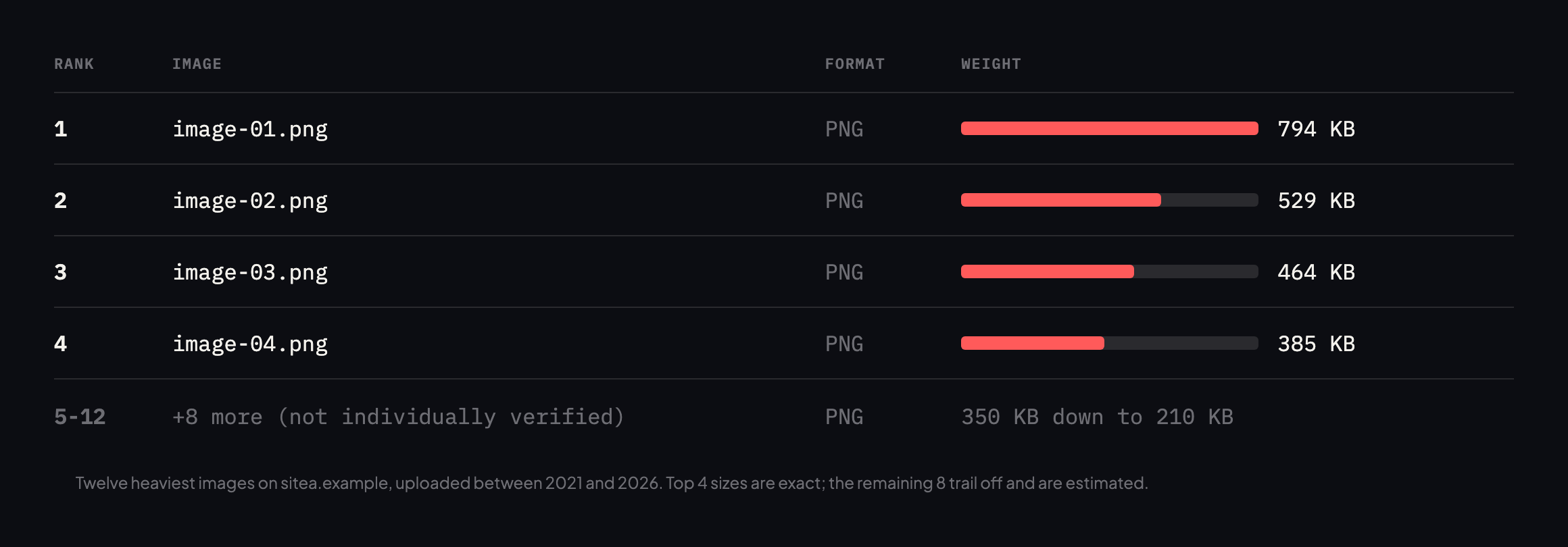
the dates: images uploaded in 2021 are still being served on a 2026 page.*
That last point is the part people miss. A media library is append-only in practice. Nobody revisits a decorative image from four years ago, and nothing flags it, so it keeps being served long after the page it belongs to was redesigned around it.
Running a WordPress image optimization audit yourself
You do not need a tool. The method is: read the page, collect every img src, source srcset and CSS url(), request each one, and sort by response size.
curl -s https://example.com/
  | grep -oE 'src="[^"]+.(jpe?g|png|webp|avif)"'
  | sed 's/src="//;s/"$//' | sort -u
  | while read -r u; do
      printf '%8s  %sn'
        "$(curl -s -o /dev/null -w '%{size_download}' "$u")" "$u"
    done | sort -rn | head
Two refinements that matter in practice.
Request as a browser would. Send an Accept header including image/webp and image/avif. Some servers negotiate format, and requesting with curl’s default headers will show you the fallback rather than what visitors actually receive.
Follow srcset, not just src. Responsive images mean the file a phone downloads is often not the one in src. Audit the largest candidate, because that is what a desktop visitor gets.
Checked again, and the page got heavier, not lighter
I re-ran this post’s own audit against the same sitea.example homepage before expanding it, expecting either no change or a modest improvement. Neither happened.
curl -s https://sitea.example/ | grep -oE 'src="[^"]+.(jpe?g|png|webp|avif)"'
  | sed 's/src="//;s/"$//' | sort -u | while read -r u; do
    curl -s -o /dev/null -w '%{size_download} %{url_effective}n' "$u"
done | sort -rn| Original reading | This reading | |
|---|---|---|
| Images on the page | 40 | 64 |
| Total image weight | 2,590 KB | 6,475 KB |
| Largest single image | 794 KB (00-feature-image.png) | 838 KB (a new file, ...-Elmentor-Email.png) |
Sixty-four images now, up from forty, and total weight up to 6,475 KB, nearly two and a half times the original figure. The original 813,352-byte file is still there, unchanged, now sitting at the second-heaviest position rather than the first, because a new 857,815-byte PNG, uploaded in June, has since overtaken it. Nothing about the original finding was fixed. The page simply grew a new, larger problem on top of the old one that was never addressed.
I checked the new heaviest file the same way this post’s format-negotiation table checks the old one:
curl -s -H 'Accept: image/avif,image/webp,image/png,image/*' -D - -o /dev/null
  "https://sitea.example/wp-content/uploads/2026/06/site-notification-email.png"
  | grep -i content-type
content-type: image/pngSame pattern as before: the Accept header is ignored regardless of what it asks for, and .webp returns 404 when requested directly. Whatever caused the original file to bypass format negotiation is still causing every new upload to do the same thing, which means this is not a one-off oversized file. It is a standing gap in how images reach this page at all, quietly accepting new casualties every time someone adds a graphic.
Format is only half of it
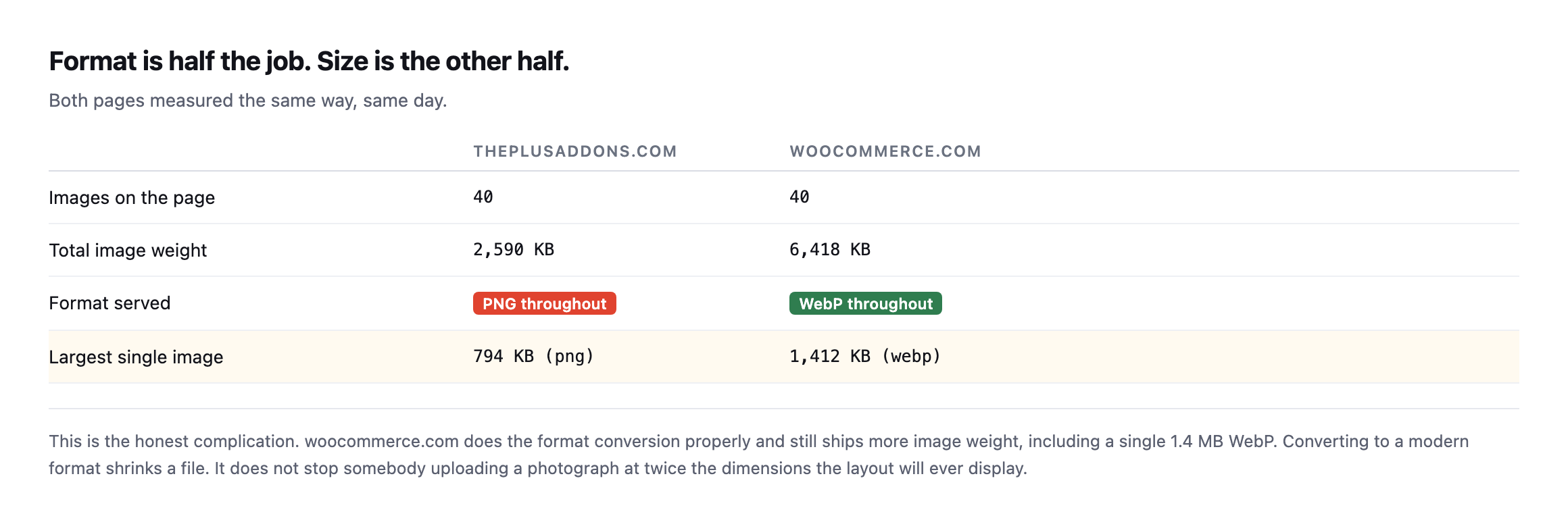
more image weight, including a single 1.4 MB WebP.*
| sitea.example | woocommerce.com | |
|---|---|---|
| Images on the page | 40 | 40 |
| Total image weight | 2,590KB | 6,418KB |
| Format served | PNG throughout | WebP throughout |
| Largest single image | 794KB (png) | 1,412KB (webp) |
Caveat: one page from each site, checked once. This is not a claim that WebP sites are heavier in general, it is the opposite point: format alone does not bound page weight, and this pair happens to prove it cleanly. Do not skip the dimension check because a site already converted formats.
Converting to a modern format shrinks a file. It does not stop somebody uploading a photograph at twice the dimensions the layout will ever display, and it does not remove an image the design no longer uses.
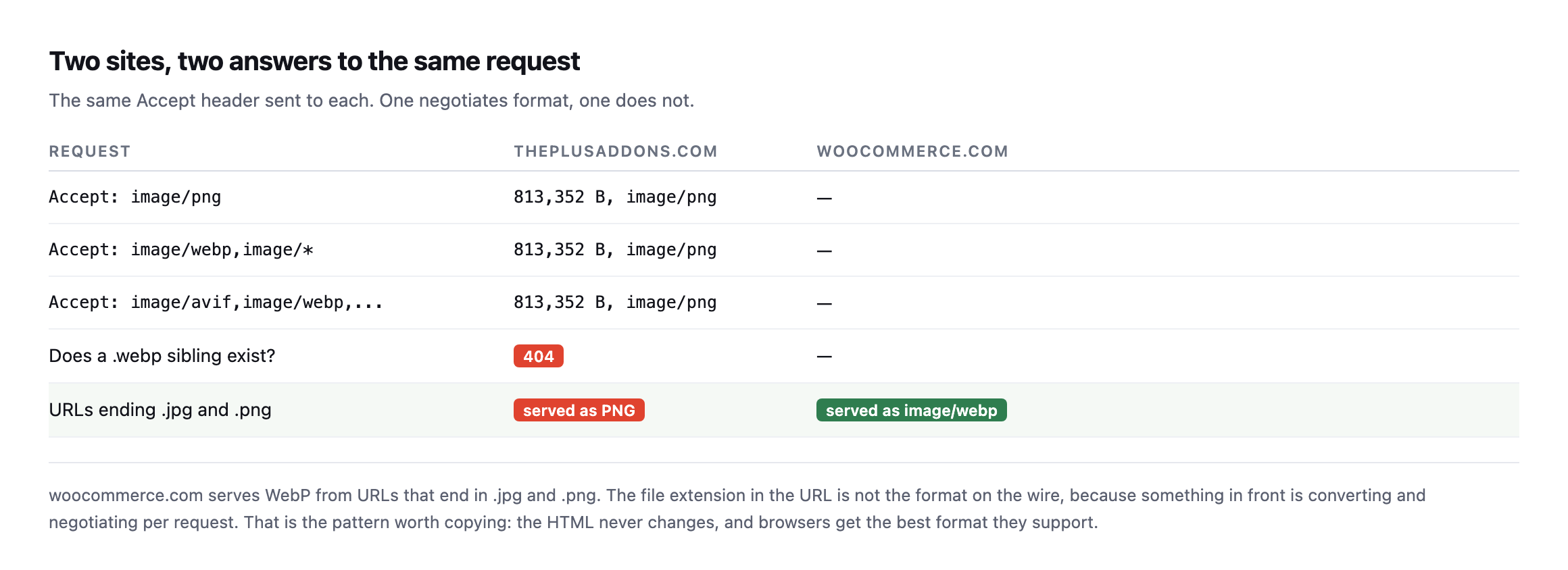
Accept header entirely and thereis no WebP sibling to fall back to. woocommerce.com serves WebP from URLs that still end in .jpg, because something in front converts per request.*
| Request | sitea.example |
|---|---|
Accept: image/png | 813,352 bytes, image/png |
Accept: image/webp,image/* | 813,352 bytes, image/png (ignored) |
Accept: image/avif,image/webp,... | 813,352 bytes, image/png (ignored) |
Does a .webp sibling exist? | 404, no |
woocommerce.com, by contrast, serves image/webp from URLs that still end in .jpg and .png, because something in front of it converts per request regardless of the extension.
So the audit has three questions, in this order:
Is this image needed at all? The cheapest image is the one you removed.
Are the dimensions sane? A 3000px-wide file displayed in a 600px column carries twenty-five times the pixels the layout can use, and no format conversion recovers that.
Is the format modern? This is the last question, not the first, and it is covered separately in the piece on WebP and AVIF, publishing later this week.
The comparison this post opened with has nearly closed
The original table in this post used woocommerce.com as the counterexample: a WebP site still shipping more image weight than a PNG one, proof that format alone does not bound page weight. I re-checked woocommerce.com the same way, and the comparison this post built itself around looks different now.
curl -s https://woocommerce.com/ | grep -oE 'src="[^"]+.(jpe?g|png|webp|avif)"'
  | sed 's/src="//;s/"$//' | sort -u | while read -r u; do
    curl -s -o /dev/null -w '%{size_download}n' "$u"
done | awk '{s+=$1} END {print s}'| sitea.example (PNG) | woocommerce.com (WebP) | |
|---|---|---|
| Images | 64 | 57 |
| Total weight | 6,475 KB | 6,637 KB |
162 KB apart, on 6.5 megabytes of images. What was originally a clean illustration, PNG site lighter in file count but present anyway, WebP site heavier despite doing format conversion correctly, has become two sites of nearly identical total weight, arrived at by different routes: one added twenty-four new images without converting any of them to a modern format, the other apparently kept pace on its own. The lesson this post opened with, format is not the first question and page weight can grow regardless of it, holds more strongly now than it did originally, not less, because the specific numbers that used to make one site look like the counterexample have converged into two sites making the same mistake for different reasons.
Where the weight actually concentrates
Worth naming precisely rather than leaving as “many images add up”: on the current sitea.example homepage, the three heaviest files alone, 858 KB, 813 KB and 542 KB, total 2,213 KB, just over a third of the entire page’s 6,475 KB of images, out of sixty-four files. Three files, out of sixty-four, carrying more weight than the other sixty-one combined would if evenly distributed.
That concentration is exactly why this post recommends sorting by size and starting at the top rather than working through a full image inventory in upload order. Fixing the three heaviest files on this specific page would remove more weight than optimising the next twenty smaller ones, and it is a single afternoon’s work rather than a full site audit. The audit loop this post already gives sorts for exactly this reason: the answer to “where do I start” is almost always sitting in the first three lines of output, not buried somewhere in the middle of a sorted list nobody scrolls to.
Where this fits
Image weight is the most common single cause of a slow-feeling page, and it is also the one that degrades silently. Nobody ships a 794 KB image deliberately. Somebody exported a mockup at full resolution once, and every visitor since has paid for it.
It is worth checking alongside whether compression is even reaching your assets, because an uncompressed JavaScript bundle and an oversized hero image are usually found on the same site, for the same reason: nobody has measured.
And measure the page, not the server. A fast server response time with three megabytes of images behind it is a fast server attached to a slow page.
Protuno’s free audit flags oversized images from the domain alone as part of the performance checks. Straight with you as on every post here: Dash, the Performance agent that would re-run this after every content change, is built and named but not live yet.
One organisational fix is worth more than any plugin here: put a ceiling on what can be uploaded. Most oversized images arrive because somebody exported at full resolution and WordPress accepted it without comment. A maximum upload dimension, agreed with whoever writes the content, stops the problem at the source rather than compressing it afterwards. Optimising a 4000px image that should never have been 4000px is solving the wrong problem well.
Run the loop above on your client’s homepage. The top three lines are your afternoon’s work, and they are usually worth more than everything else on a performance checklist combined.
Why the same page kept growing without anyone deciding it should
Nobody sat down and decided sitea.example‘s homepage should carry six and a half megabytes of images. Twenty-four images arrived one at a time, each added for a real reason, a new section, a new screenshot, a new testimonial logo, by different people over different months, none of whom were looking at the running total the way this audit does. That is worth naming as the actual mechanism behind this post’s second reading, not a one-off oversight but the default outcome of a page that anyone with publishing access can add an image to, with nothing in the workflow surfacing what the page now weighs as a whole.
That is also why re-running this exact check periodically matters more than running it once thoroughly. A single audit, however careful, describes the page on the day it ran. The next image added the following week is invisible to it. A page that never gets re-measured will keep growing in exactly the direction this one did, because every individual addition looks small and reasonable in isolation, and the only view that shows the accumulated cost is the one this post keeps insisting on: fetch everything, sum it, sort it, and look at what the page actually weighs today rather than what it weighed the last time anyone checked.
What would have caught this before it doubled
The upload-ceiling recommendation later in this post, a maximum dimension enforced at the point of upload, would not have caught this specific growth, because the problem here is not that individual images are oversized for their display dimensions. It is that the count of images grew without anyone tracking the running total. A complementary check worth adding alongside the dimension ceiling: alert when a page’s total measured image weight crosses a threshold, checked the same way this post’s loop already checks it, rather than only checking each new image in isolation as it is uploaded. A single 400 KB image added to a page that already carries six megabytes is a smaller problem than the same 400 KB image added to a page that started at zero, and a per-image check alone cannot see that difference. Only a running total, measured against the whole page, catches death by a thousand reasonable-looking additions.
The other side of the same problem: images nobody is even using
Oversized images that are still in use are this post’s subject. Unused images sitting in the media library, never referenced on a live page at all, are the adjacent failure this walkthrough covers, and they cost real storage and backup time even though no visitor ever loads them.
Comments