WordPress Security Audit: The Playbook, Step By Step.
A security grade is only worth trusting if it tells you what it did not check. Here is how a graded WordPress audit works, run on a real site.

A security grade is only useful if it tells you what it did not check.
That sounds like a small detail. It decides whether an “A” means your site is safe, or only that the scan never reached the parts that would have lowered it.
Short answer: a good WordPress security audit reads the site in passes, checks the site directly, tries to verify what it finds, and then gives one grade with the gaps written beside it. A grade with no gaps listed is a guess dressed as a result.
What this post is, and is not: it is a practical look at how a graded audit is built, and what one real run on a test site produced. It is not a claim that every finding below is exploitable, or that a grade replaces a human review.
Why A Single Grade Misleads
Most people meet security as a number. A plugin shows a green badge. A report says 92 out of 100.
The number is easy to read. What it hides is the question underneath it: what was actually looked at?
A site can score well because it passed every check that ran, while the checks that matter most never ran at all. A timeout, a missing permission or a blocked feed can quietly remove half the evidence. The score still arrives.
That is why a useful audit shows two things together: the grade, and the coverage behind it.
Four Passes, Not One Scan
A WordPress site can be exposed in different ways, and each way needs different evidence.
| Pass | What it looks at | What it cannot tell you on its own |
|---|---|---|
| Configuration and exposure | Settings and files a visitor can reach from outside, such as logs, headers, version details and usernames | Whether any installed software has a known flaw |
| Vulnerable components | Installed core, plugins and themes, matched against public advisory data | Whether a plugin that is not on wordpress.org has a problem |
| Access control | Code paths that should check who is asking before they act | Whether a flagged path can really be abused |
| Injection and execution | Code that handles input, uploads, requests and dynamic execution | Anything, if the scan did not finish |
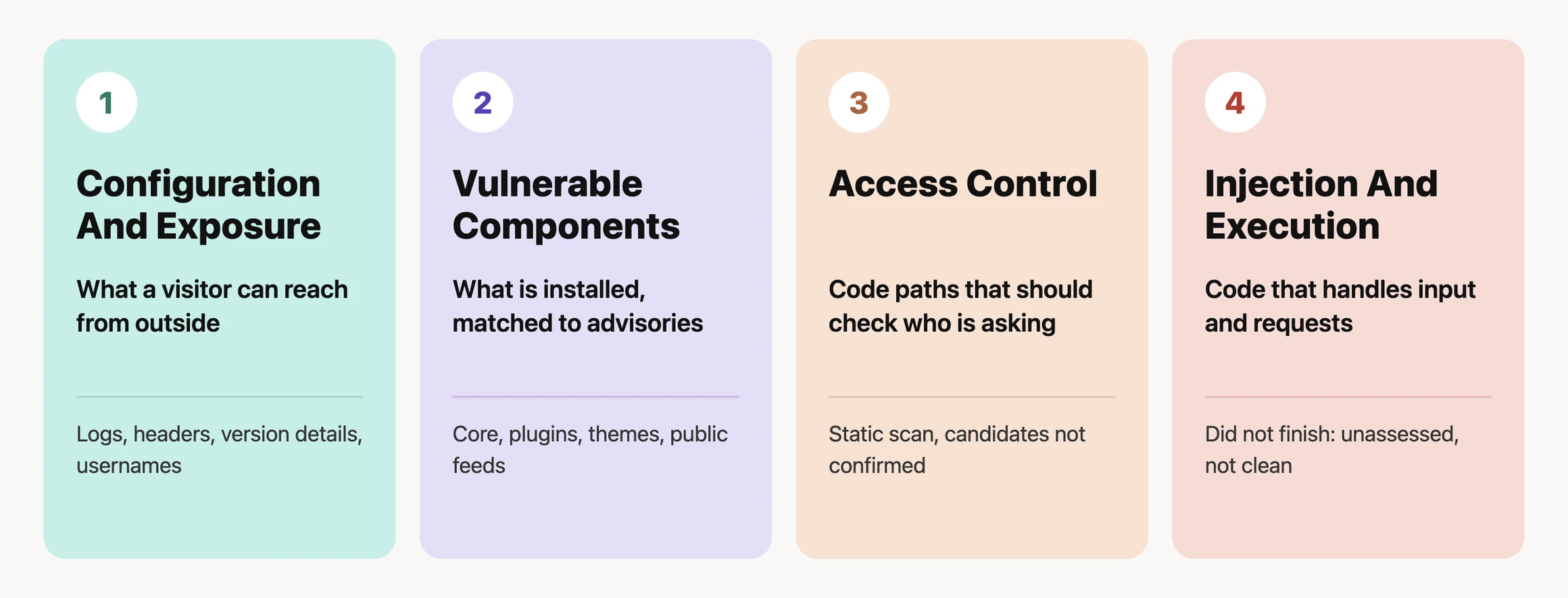
The audit is the work of putting these four side by side, so one pass can cover the blind spot of another. If you want the monitoring side of the same question, WordPress Security Monitoring covers how to keep checking after the first audit.
A Small Test You Can Run Today
Pick one staging site, or a site you are authorised to manage. Open these in a private window and write down what each one returns:
/debug.log
/?author=1
/readme.html
/wp-json/wp/v2/users
Then look at the response headers for the home page and note which of these are present: Strict-Transport-Security, X-Content-Type-Options, X-Frame-Options, Referrer-Policy and Content-Security-Policy.
A response is not automatically a vulnerability. It is evidence to review. The useful question is whether the exposure is needed, and who it helps.
The Playbook, Step By Step
WP Security Audit is a Protuno security playbook: a fixed sequence written down before it runs, so it asks the same questions every time. It only reads the site and changes nothing. There are eight steps, as they appear in the Protuno dashboard. It is not on the public playbooks page yet, so treat it as a new playbook that is still being rolled out.
| # | Step | What it does |
|---|---|---|
| 1 | Recon And Facts | Reads the live site: WordPress and PHP versions, theme, plugins, admin count and whether registration is open |
| 2 | Config And Exposure Audit | Checks what an unauthenticated visitor can reach: debug log, headers, version disclosure, usernames, directory listing |
| 3 | Vulnerable Components Audit | Matches installed core, plugins and themes against public vulnerability data |
| 4 | Security Scan, Access Control | Sweeps plugin and theme code for routes that may skip an access check |
| 5 | Security Scan, Injection, Execution And Supply Chain | Looks for injection, upload, request-forgery and dynamic-execution patterns |
| 6 | Verify And Triage Findings | Checks each finding against the real code before it is reported, and ranks it |
| 7 | Posture Score, A To F | Turns the evidence into a grade, and marks any area it could not grade |
| 8 | Report | Writes the plain-language report with a fix for each finding |
Step six is the one that matters most, because an unverified finding is an accusation and a verified one is a task. It is also the step that errored in the real run below, so the findings in this post come from the direct checks in steps one to four, not from step six.
What It Found On A Real Site
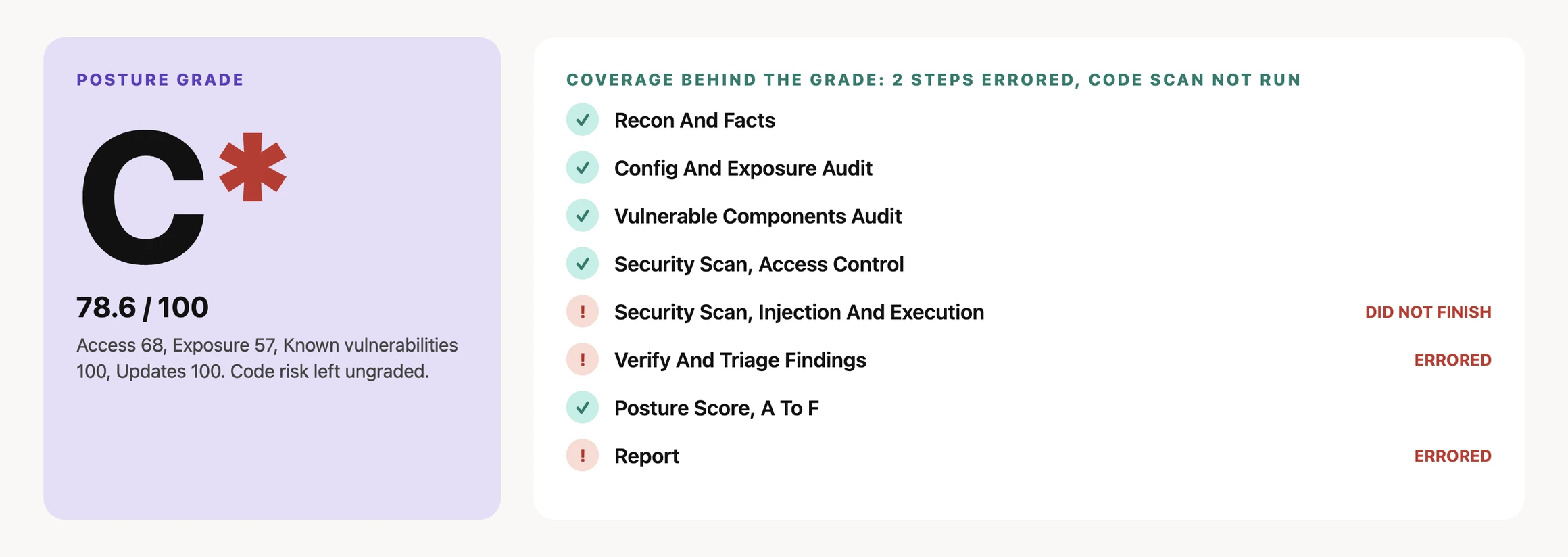
The video below walks through the result of one real audit run on a WordPress test site, on 24 September 2026. Steps one to four and step seven completed. Step five did not finish, because its code scan timed out three times. Steps six and eight errored. That is part of the result, so it is shown rather than hidden.
- Grade: C* with a score of 78.6 out of 100. The asterisk marks that one area was left ungraded.
- Two critical findings: the debug log was publicly readable at about 1.4 MB, and the only admin account had no two-factor authentication.
- Warnings: the admin username was revealed through the author archive, three security headers were missing, the WordPress version was disclosed in several places, plain HTTP was still served, there was no login lockout, and PHP errors were printed to visitors.
- Low priority: in-dashboard plugin and theme installs were still allowed.
- Passed: the checked components had no known vulnerabilities, and the core configuration checks passed, including file permissions, security salts, the file-edit lock and closed registration.
- Not finished: step five (injection and execution) timed out three times, and steps six (verify and triage) and eight (report) errored. The report page still showed the findings from steps one to four and the score from step seven, and it states that the unfinished checks were unassessed, not clean.
- Candidates, not confirmed: the access-control sweep flagged 65 candidates and one request-forgery candidate across 4,557 files. None was confirmed exploitable, and the report says so.
The honest part is the useful part. A scan that times out and still prints “no issues” is worse than a scan that says “this part did not run”. The grade here is lower than it might have been, and it is also more believable.
What An Audit Does Not Solve
An audit is one moment in time, and security monitoring covers what changes after it. Neither is a full security programme.
It cannot, by itself, tell you whether:
- the site is being attacked right now;
- a plugin that is not on wordpress.org has a known flaw;
- a flagged code path can really be abused by a real visitor;
- a file changed after the scan finished; or
- the site has already been compromised.
Those are different questions that need different checks. This is also why the vulnerability monitoring question and the audit question are kept apart.
Reading The Findings
These are the main findings from that run, ordered by what to fix first. The smaller ones are listed in the run summary above.
| Priority | Finding | Why it matters |
|---|---|---|
| Critical | Public debug log | It can reveal paths, plugin names and errors to anyone. See WordPress Debug Log Exposed |
| Critical | No two-factor authentication on the admin | One stolen password is then enough |
| Warning | Username shown by the author archive | It hands an attacker half of a login. See WordPress REST User Enumeration |
| Warning | Missing security headers | They are cheap to add and easy to verify. See WordPress Security Headers |
| Warning | Version disclosed in several places | Removing one tag does not remove the others |
| Warning | Plain HTTP still served | Visitors and bots can still reach the site without encryption |
| Warning | No login lockout | Repeated password guesses are not slowed down |
| Warning | PHP errors visible to visitors | Debug output belongs in a private log |
| Low | In-dashboard plugin installs still allowed | Low priority if you use the dashboard for updates |
Two practical rules keep this safe. Take a restore point before changing anything that can affect the site. And re-check the finding after the change: “the setting was changed” is not the same as “the exposure is gone and the site still works.” The hardening checklist lists the fixes in a suggested order.
When The Audit Cannot See A Plugin
One line in the report deserves its own section. Three plugins on the test site were private or off-repository, so public vulnerability feeds had nothing to say about them. The report listed them as “verify with the vendor” rather than counting them as clean.
That distinction matters for any agency running custom or premium code. “No known vulnerabilities” can mean nothing was found, or it can mean nothing was checked. A good report tells you which. For a related risk, see WordPress Removed Plugin Risk.
A Five-Site Audit You Can Do This Week
Pick five sites you are responsible for. For each one, record:
- WordPress and PHP versions
- Whether a public debug log exists
- Whether the author archive reveals a username
- Which security headers are present
- Whether the admin accounts use two-factor authentication
- Whether failed logins are limited
- Which plugins are private or off-repository
- The owner, the next action and the date it was last checked
You will learn two things quickly: which site has the biggest gap, and which of your checks would have been silently skipped. For each site, write the decision beside the finding: fix now, test first, accept with an owner and a date, or investigate. A finding without a decision is just a better-organised inbox.
Where Protuno Fits
In the Protuno dashboard, WP Security Audit sits under the Security agent, Rook. It is a read-only playbook with eight steps that reports a grade with its coverage beside it, and it does not change the site. Fixes stay a human decision, made with the evidence in front of you. It is new and not on the public playbooks page yet; the current public security playbooks are listed on the playbooks page.
The Point
A security grade should make you ask better questions, not stop asking them.
A C that tells you what it could not check is worth more than an A that does not.
So before asking “what is our score?”, ask the question underneath it: what did this audit actually look at, and what did it skip?
Comments