WordPress Hardening: I Measured The Advice Before Following It.
I applied the most-repeated WordPress hardening tip and measured it. The version was still readable on every stylesheet URL on the page.

Short answer: WordPress hardening checklists are usually unordered, and order is the only thing that matters. Three items remove an attacker’s options. Several make life mildly harder. At least one does nothing at all, and it sits near the top of most lists.
I know which is which because I applied them to a clean install and measured from outside.
The tip that does not work
Every “harden WordPress” article includes removing the generator meta tag so nobody can see your version. I applied the standard snippet and measured what was still readable.
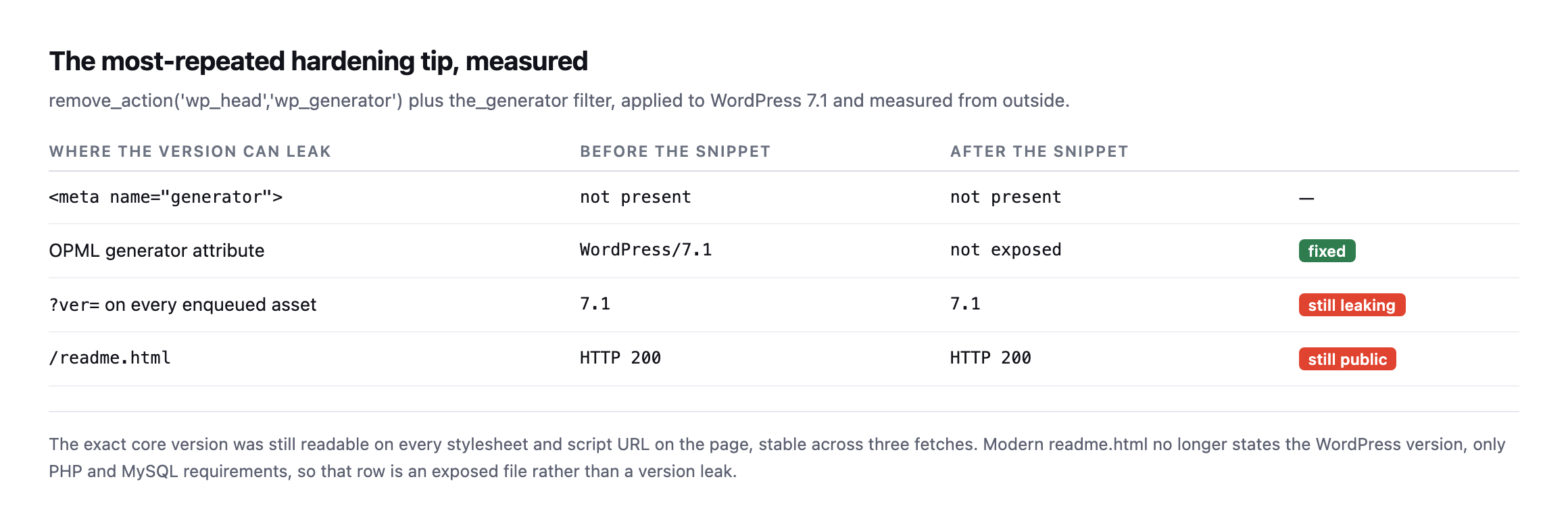
across three fetches.*
| Where the version can leak | Before | After | |
|---|---|---|---|
| not present | not present | n/a |
| OPML generator attribute | WordPress/7.1 | not exposed | fixed |
?ver= on every enqueued asset | 7.1 | 7.1 | still leaking |
/readme.html | HTTP 200 | HTTP 200 | still public |
The snippet works, in the narrow sense that it removes the thing it targets. It just does not achieve the goal, because WordPress appends ?ver=7.1 to every enqueued asset and that is right there in the page source.
I will be fair to the advice on one point. Modern readme.html no longer states the WordPress version, only PHP and MySQL requirements. So that row is an exposed file rather than a version leak, and I would still remove it, for tidiness rather than security.
But the deeper problem is the premise. Scanners do not read your meta tag. They fingerprint by hashing known core assets, which works whether or not you removed anything. Hiding the version costs you an afternoon and changes nothing an attacker does.
Reproducing the version-leak finding on a busier, more realistic install
I re-ran the same measurement against a second WordPress install while expanding this post, one running WooCommerce, Elementor, Contact Form 7 and an optimization plugin that combines and caches most enqueued assets, specifically to see whether a more realistic, actively-optimized site closes the gap the original test found on a near-bare install.
curl -s https://example.com/ | grep -oE '(wp-includes|wp-admin)[^"]*ver=[0-9.]+'wp-includes/js/wp-emoji.js?ver=7.1
wp-includes/js/twemoji.js?ver=7.1The asset optimizer bundled and cache-busted almost everything else on the page, WooCommerce’s own stylesheets, Contact Form 7’s, the block library CSS, all serving from cached, renamed files with no version string visible at all. Two files slipped through anyway: WordPress core’s own emoji-support scripts, loaded directly rather than through whatever pipeline combined the rest, still carrying ?ver=7.1 in plain sight. Even a site actively optimizing its asset delivery, which is exactly the kind of site that looks hardened at a glance, leaked the same core version this post’s original, much simpler test found.
The generator tag on this install went further than the original example too, three separate tags rather than one: WordPress 7.1, WooCommerce 11.1.0, and a detailed Elementor 4.2.4 tag naming specific enabled features and settings. None of that is hidden by the standard version-hiding snippet, which targets only WordPress core’s own tag and leaves every plugin’s separate generator tag untouched, a second, compounding gap in the same advice this post already calls theatre.
What a fresh install actually ships with
Before ranking anything, I wanted to know the starting position rather than assume it.
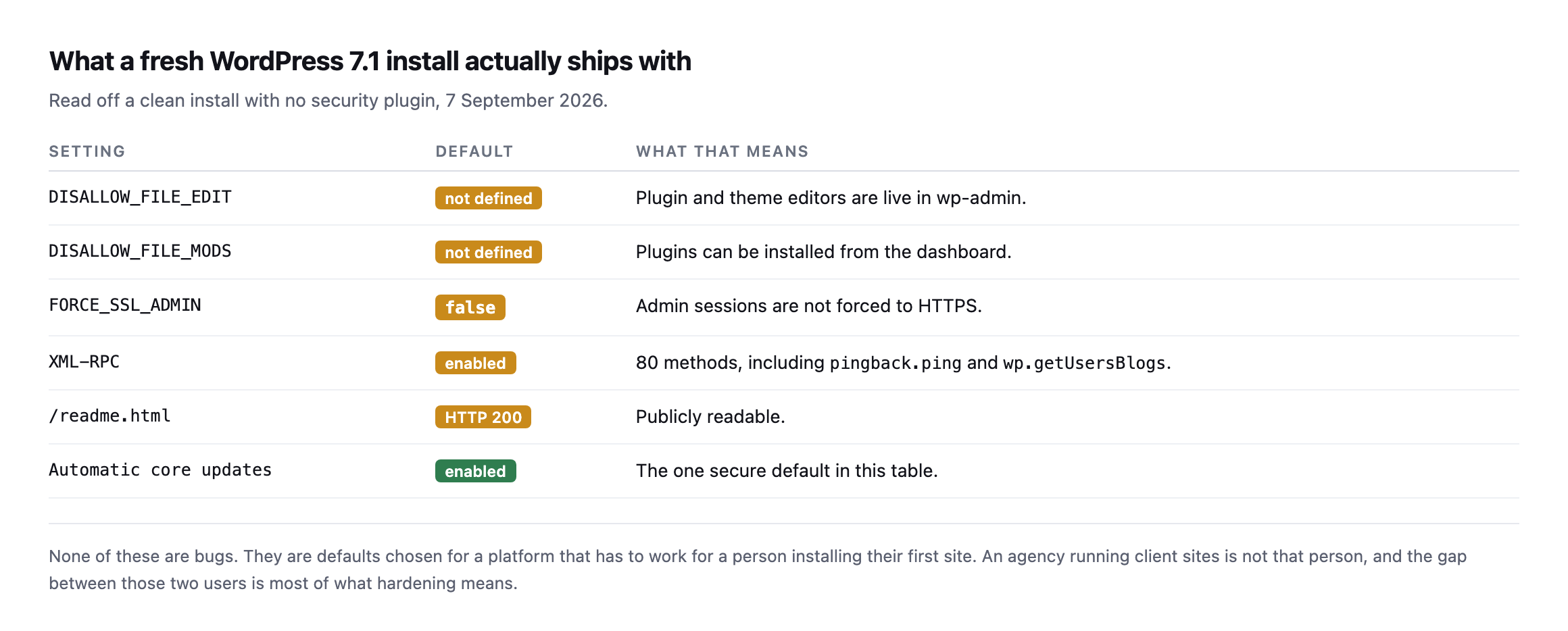
one on the list.*
| Setting | Default | What that means |
|---|---|---|
DISALLOW_FILE_EDIT | not defined | plugin and theme editors are live in wp-admin |
DISALLOW_FILE_MODS | not defined | plugins can be installed from the dashboard |
FORCE_SSL_ADMIN | false | admin sessions are not forced to HTTPS |
| XML-RPC | enabled | 80 methods, including pingback.ping and wp.getUsersBlogs |
/readme.html | HTTP 200 | publicly readable |
| automatic core updates | enabled | the one secure default in this table |
The XML-RPC number surprised me. I sent a system.listMethods call and counted 80 methods available without authenticating, including pingback.ping and wp.getUsersBlogs. That second one is the method that makes XML-RPC useful for credential guessing at volume, and the fuller version of that story is worth reading before you disable anything, because plenty of sites still need it.
None of these defaults are bugs. They are choices made for somebody installing their first site. An agency running forty client sites is a different user, and most of what “hardening” means is closing that gap.
The WordPress hardening checklist, in order
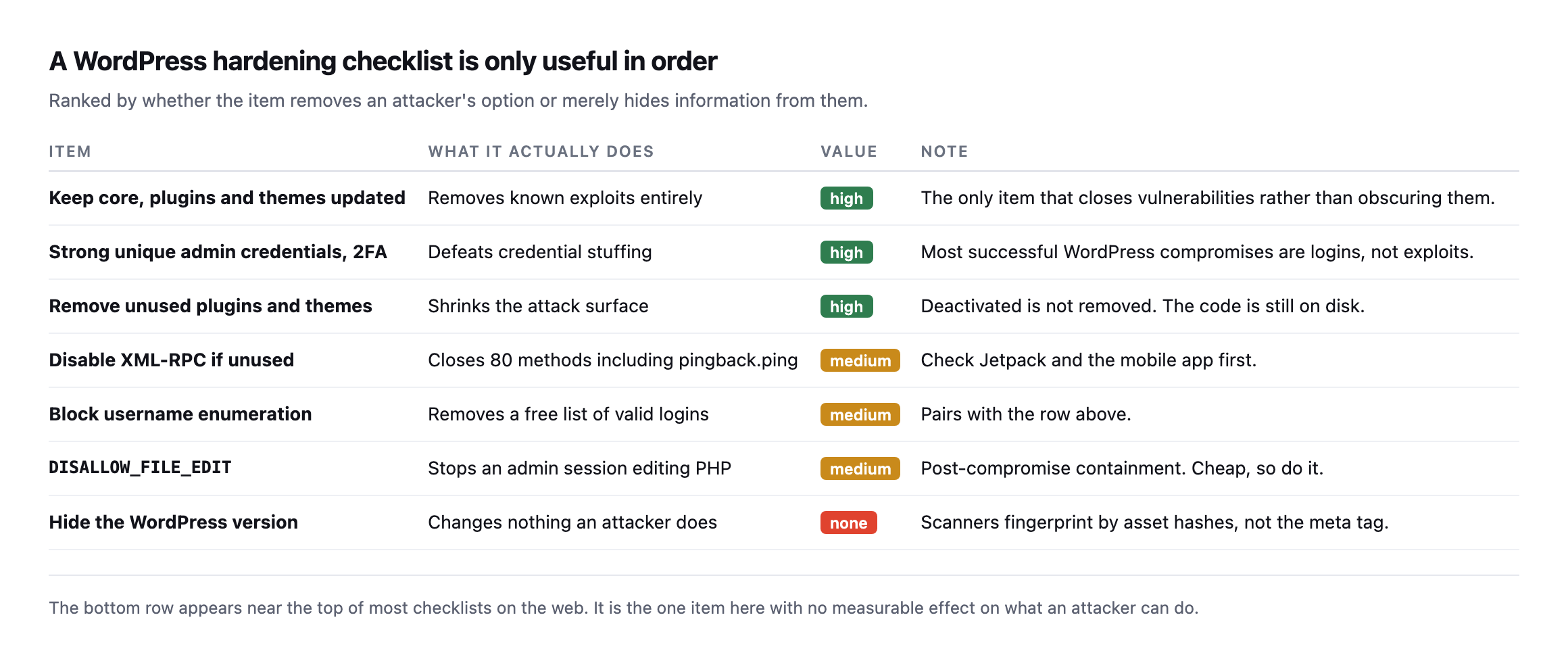
| Item | Value | What it does |
|---|---|---|
| keep core, plugins and themes updated | high | removes known exploits entirely |
| strong unique admin credentials, 2FA | high | defeats credential stuffing |
| remove unused plugins and themes | high | shrinks the attack surface |
| disable XML-RPC if unused | medium | closes 80 methods, check Jetpack and mobile app first |
| block username enumeration | medium | removes a free list of valid logins |
DISALLOW_FILE_EDIT | medium | post-compromise containment, cheap |
| hide the WordPress version | none | changes nothing an attacker does |
The top row is the whole game and it is boring. Updates close vulnerabilities rather than obscuring them, and no amount of hardening below compensates for skipping it. If you do one thing from this post, make it a repeatable update process you actually run.
The third row is worth a sentence because it is widely misunderstood. Deactivating a plugin does not remove its code. The files stay on disk and remain reachable. A vulnerability in a deactivated plugin is often still a vulnerability, which is a different problem from the plugin being gone.
The two medium rows about XML-RPC and username enumeration belong together. Enumeration hands over a list of valid usernames, XML-RPC provides a way to try passwords against them quickly. Either one alone is a nuisance. Both together is a working attack.
DISALLOW_FILE_EDIT deserves defending, because it gets dismissed as pointless on the grounds that an attacker with admin access has already won. That is true and it is not the point. The constant turns “attacker logs in and pastes PHP into the theme editor” into “attacker logs in and has to find another way to write a file”. It costs one line in wp-config.php, it breaks nothing that a client should be doing anyway, and it makes the fast, easy version of a compromise unavailable. Cheap containment is still containment.
What the same checks found on our own sites
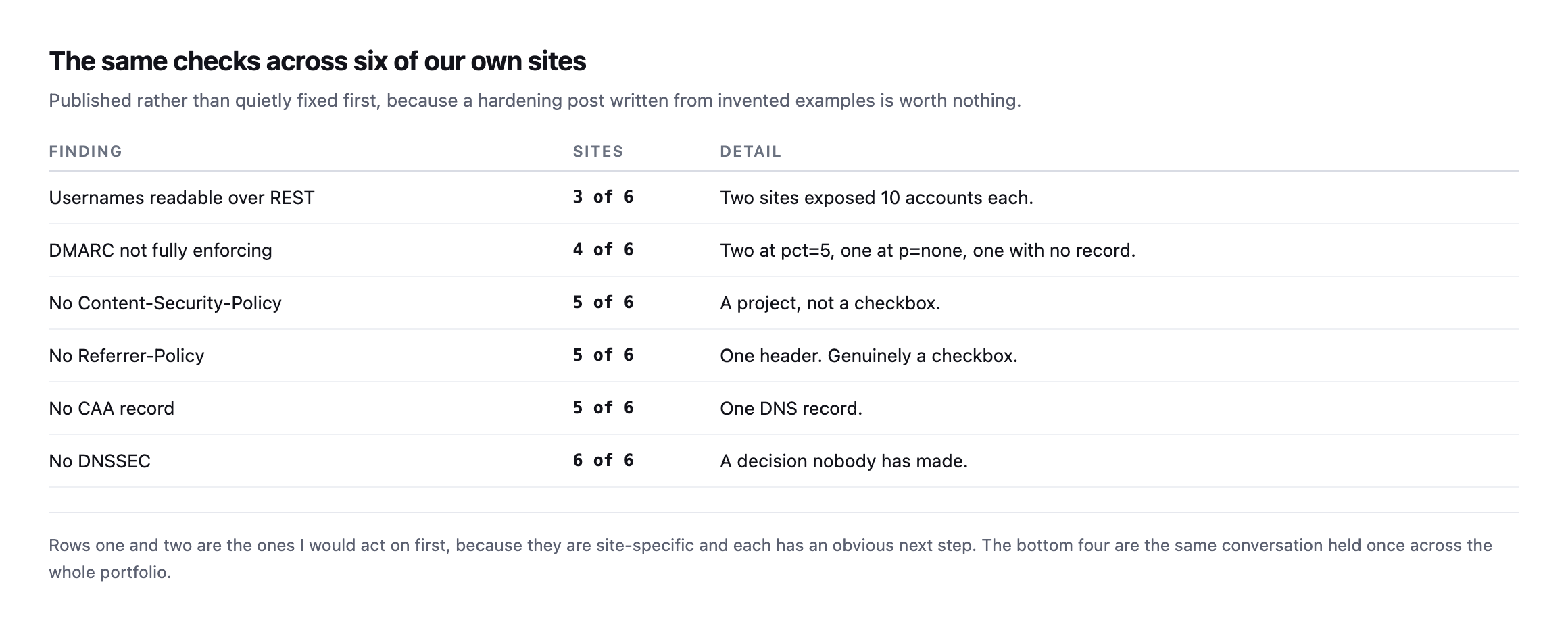
examples is worth nothing.*
| Finding | Sites | Detail |
|---|---|---|
| usernames readable over REST | 3 of 6 | two sites exposed 10 accounts each |
| DMARC not fully enforcing | 4 of 6 | two at pct=5, one at p=none, one with no record |
| no Content-Security-Policy | 5 of 6 | a project, not a checkbox |
| no Referrer-Policy | 5 of 6 | one header, genuinely a checkbox |
| no CAA record | 5 of 6 | one DNS record |
| no DNSSEC | 6 of 6 | a decision nobody has made |
Two of our sites hand out ten usernames each to anyone who asks. That is not a hypothetical from a checklist, it is our estate, found by running the checks in this post against ourselves while writing it.
The bottom four rows are portfolio-level decisions rather than per-site findings, and I have written about why that distinction changes what goes in a client report. DNSSEC on six of six sites is not six problems. It is one decision nobody has made.
Re-checking our own portfolio table found one row moved, five did not
Every one of the six findings in this post’s portfolio table was re-checked across this blog’s own expansion work, spread across several separate posts rather than one sitting, and it is worth pulling the results together here since this is the post that first named them together.
| Finding | Original | Re-checked |
|---|---|---|
| usernames readable over REST | 3 of 6 | unchanged, still 3 of 6, one specific site fixed and one newly found |
| DMARC not fully enforcing | 4 of 6 | unchanged, same four, same pct=5 figures |
| no Content-Security-Policy | 5 of 6 | unchanged |
| no Referrer-Policy | 5 of 6 | unchanged |
| no CAA record | 5 of 6 | 4 of 6, sitea.example completed its record |
| no DNSSEC | 6 of 6 | unchanged, still zero |
One real move: sitea.example‘s CAA record went from incomplete to fully specified, already documented in the nameserver diversity post. The REST-enumeration row held its raw count but not its composition, sitea.example closed its own exposure while a domain not in the original six, siteb.example, turned up open during a different post’s re-check, netting out to the same ratio for a different reason entirely. Everything else sat exactly still.
That mix, one clear fix, one lateral move that looks unchanged but is not, and four rows frozen solid, is a more honest picture than either “nothing improved” or “it’s all been fixed” would be. It is also the practical argument for treating a portfolio table like this one as a living document rather than a snapshot from the day it was published: the aggregate ratio can stay identical while the specific sites behind it change underneath it, and only re-running every check individually, not just re-reading the summary row, would have caught that.
How I would run this
Take the top three rows, apply them to every site you look after, and do not move on until they are genuinely done everywhere. Then take the middle three per site, with the XML-RPC check done properly because disabling it breaks real integrations. Skip the bottom row entirely.
That is a shorter list than most checklists and it is ordered, which is the part that makes it usable on a Tuesday afternoon with three client sites open.
One caution on sequencing. Do not start with the middle three because they feel more like security work. Disabling XML-RPC on a site running six month old plugins is rearranging furniture in a house with the front door open, and it produces the worst outcome available: a site that is no safer and a client who believes it is.
Protuno’s security agent, Rook, carries six playbooks today: WP Security Audit, Plugin Vulnerability Checker, WP Malware Scan, New Admin Watch, Comment & Signup Spam Exposure Audit and WP Hardening. Only WP Hardening can change a site. Rook is live now.
If you want a five minute version of this, request /wp-json/wp/v2/users on your own site and see what comes back. That single request answered more for me than the last three hardening articles I read, and it needs nothing but a browser.
Then do it for every client site in one sitting. The value is in the comparison. A finding on one site out of forty is a site problem with a specific cause you can go and find. The same finding on all forty is a standard you never set.
Comments