Is Your WordPress Debug Log Exposed Right Now?.
WP_DEBUG_LOG writes to a file inside the web root. We requested it as an anonymous visitor and got 200, with server paths and plugin names.

Short answer: if WP_DEBUG_LOG is set to true, WordPress writes errors to wp-content/debug.log, which sits inside the web root and is served like any other file. A wordpress debug log exposed this way needs no exploit to read. You request it, and the server hands it over.
Ten seconds to check:
curl -sI https://example.com/wp-content/debug.log403 or 404 is fine. 200 is not.
What a WordPress debug log exposed to the internet gives away
I turned debugging on for a site, generated ordinary errors, and requested the file as an anonymous visitor.
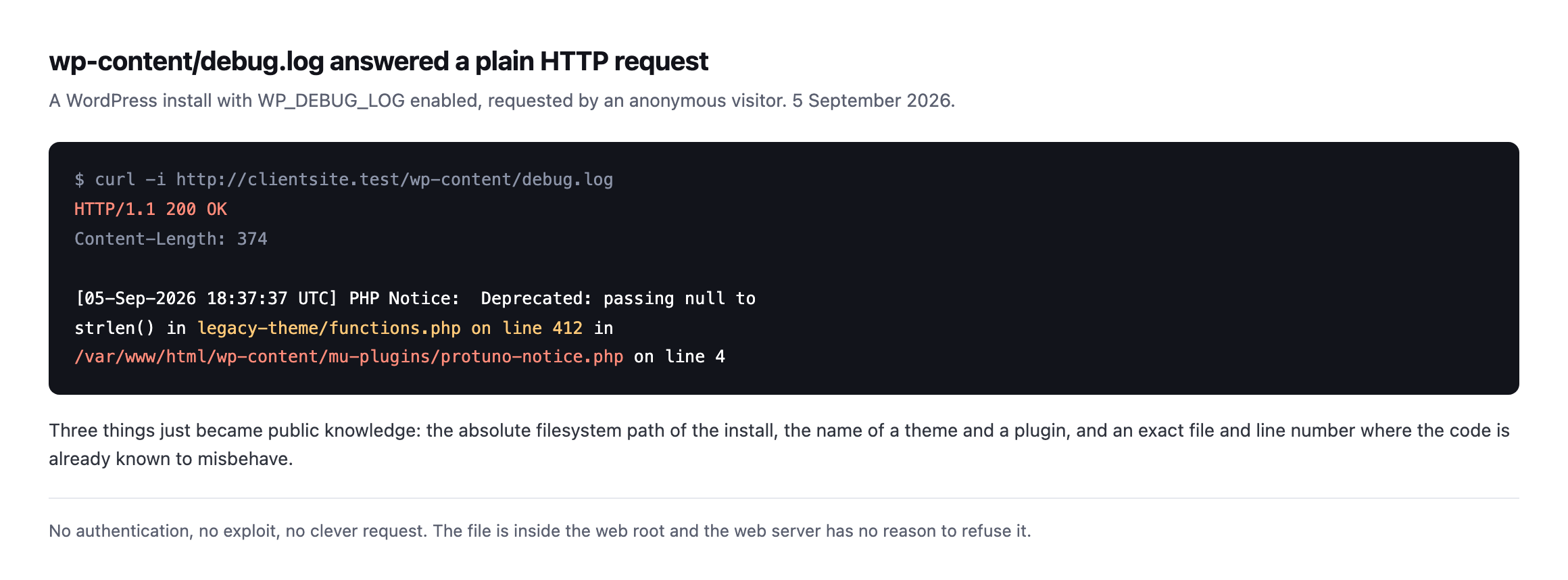
install, the names of a theme and a plugin, and a file and line number where the code is already known to misbehave.*
No authentication. No clever request. The file is inside the web root, and the web server has no reason to refuse it.
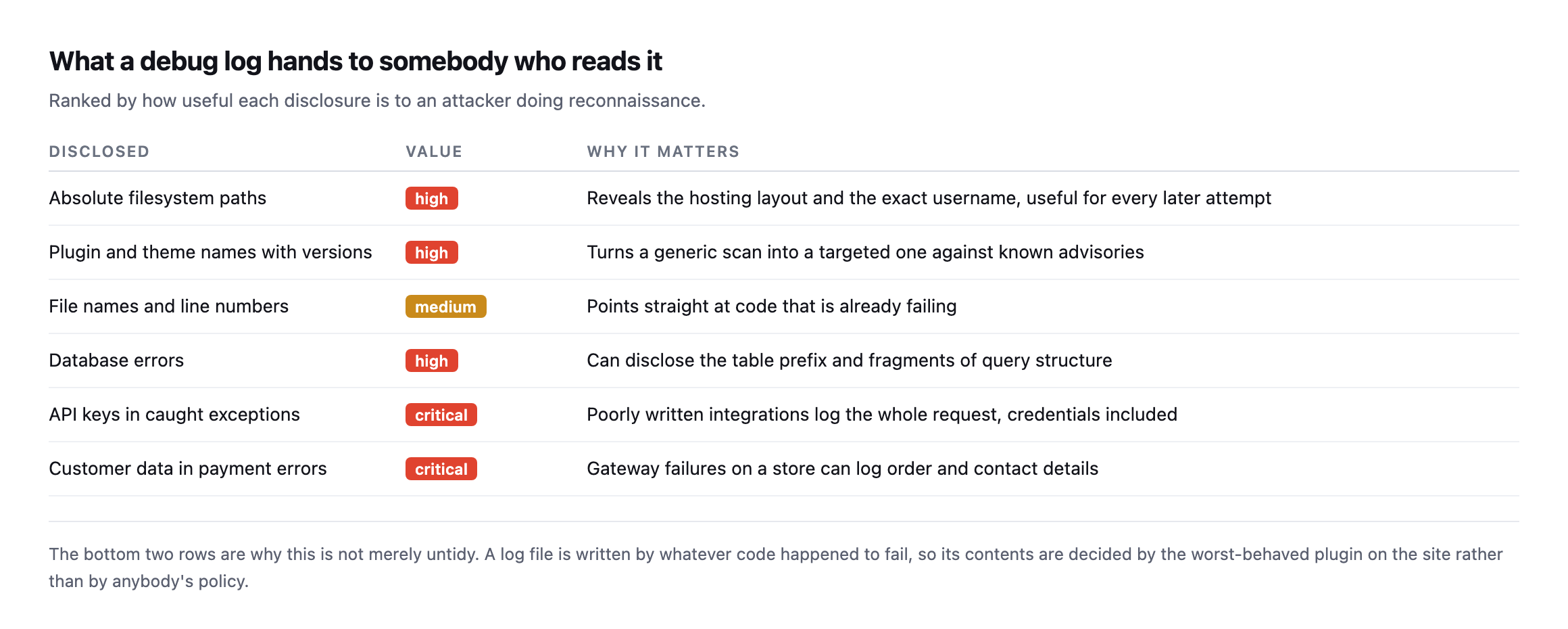
decided by whatever code happened to fail, which means the worst-behaved plugin on the site decides what ends up public.*
| Disclosed | Value | Why it matters |
|---|---|---|
| absolute filesystem paths | high | reveals the hosting layout and the exact username |
| plugin/theme names with versions | high | turns a generic scan into a targeted one |
| file names and line numbers | medium | points straight at code that is already failing |
| database errors | high | can disclose the table prefix and query structure |
| API keys in caught exceptions | critical | a poorly written integration logs the whole request |
| customer data in payment errors | critical | gateway failures on a store can log order and contact details |
That last point is the one I would push back on if someone told me their debug log was harmless. You do not control what goes in it. An integration that catches an exception and logs the whole request will write an API key into a world-readable file, and nothing warns you.
Why it is on in the first place
Nobody enables debug logging on production out of carelessness. It gets enabled during an incident, when somebody needed to see what was failing, and then the incident ends.
The log is the only artefact of that afternoon nobody thinks to clean up.
It is also worth checking after any performance work, because chasing a slow server response is one of the most common reasons somebody switches debugging on in the first place.
On inherited sites I find it more often than any other single misconfiguration, and it is almost always dated. A file that started in March and has been quietly growing since, on a site that has changed hands twice.
Neither exposed file is blocked from being crawled either
I checked one more thing on both newly-found exposures, because a file being served is only half the exposure: whether anything stops a search engine from finding and indexing it in the first place.
curl -s https://sited.example/robots.txt | grep -i debug
curl -s https://sitef.example/robots.txt | grep -i debug
Neither robots.txt mentions debug.log, or wp-content generally, on either site. That does not mean either file is currently indexed, a crawler still has to discover the URL by some path, most debug log files carry no inbound links pointing at them, which is a mitigating factor worth being accurate about rather than overstating the risk. It does mean nothing at the DNS or crawl-policy layer is actively preventing indexing if a crawler ever does stumble onto the URL, whether by guessing the common wp-content/debug.log path directly, the same way this post’s own check does, or by following a stray link from somewhere else on the site. Adding Disallow: /wp-content/debug.log costs one line and is worth doing as a second, independent layer even after the file itself is moved or blocked at the server, on the same belt-and-braces logic the crawl audit post argues for generally: no single layer should be the only thing standing between a sensitive file and a crawler.
Fixing it
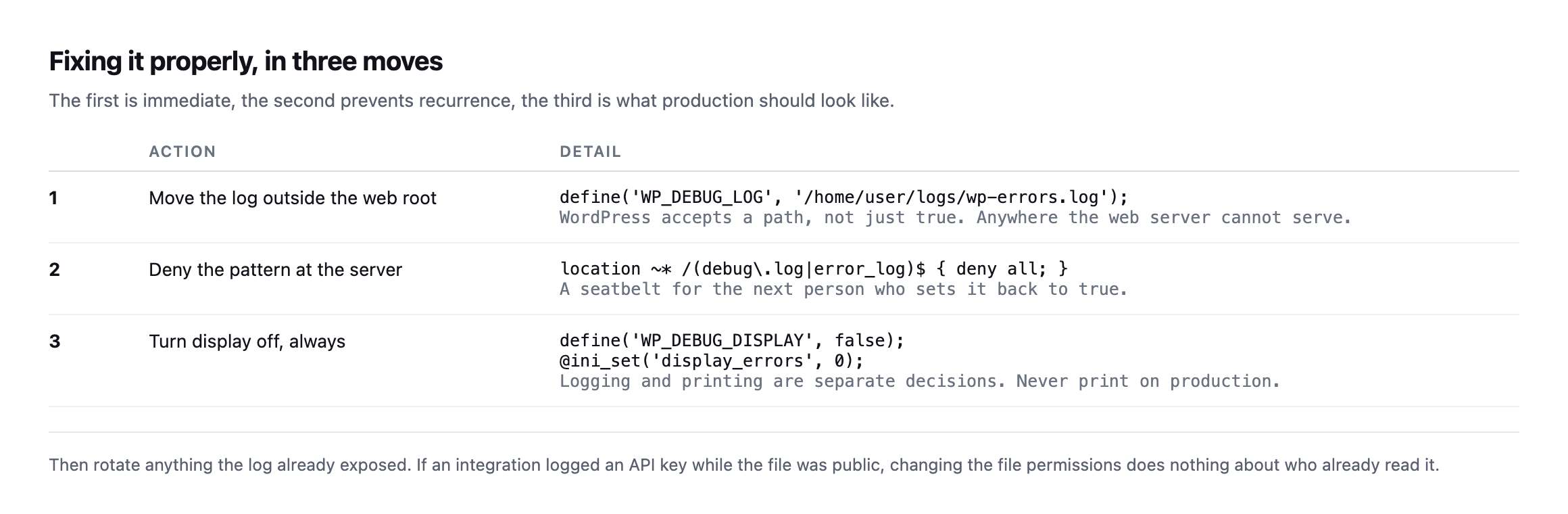
WP_DEBUG_LOG accepts a path, not just true. That single change moves the filesomewhere the web server cannot serve, and it is the fix that survives somebody turning debugging back on next month.*
The detail worth knowing: logging and displaying are separate decisions. WP_DEBUG_DISPLAY controls whether errors are printed into the page for visitors to read. On production it should be false regardless of what the log setting is doing.
And if the file was public for a while, treat whatever it contained as disclosed. Rotate any key an integration might have logged. Changing file permissions today says nothing about who read it in March.
Re-running the portfolio check found something worse than the original
I re-ran the loop this post already recommends against six of our own domains before expanding it, and it did not find the same two files this post originally reported. It found two different ones, and one of them is substantially more serious than anything described above.
for d in sitea.example siteb.example sitec.example sited.example sitee.example sitef.example; do
  printf '%-28s ' "$d"
  curl -s -o /dev/null -w '%{http_code}  %{size_download} bytesn' "https://$d/wp-content/debug.log"
done
sited.example 200 640,558,112 bytes
sitef.example 200 1,434,016 bytesThe sited.example figure is not a typo. That is a 610 megabyte file, publicly downloadable, Last-Modified dated the day before I checked, meaning it is actively growing right now rather than a stale artefact from months ago. A HEAD request confirms real headers, content-type: application/octet-stream, accept-ranges: bytes, an ETag, exactly what a real static file being served correctly looks like. I requested a small byte range rather than the full 610 MB to confirm it was genuinely a debug log and not something else sharing the filename:
curl -s -r 0-2000 https://sited.example/wp-content/debug.log[26-Jun-2026 09:46:14 UTC] PHP Fatal error: Uncaught TypeError: count(): Argument #1 ($value)
must be of type Countable|array, null given in /home/[redacted]/webapps/sited-example/wp-admin/
includes/class-wp-plugins-list-table.php:311Real, dated back to late June, with an absolute filesystem path disclosing the hosting account’s own username, which I am not reproducing here even though it is currently sitting in a public HTTP response, for the same reason this post does not republish full staff rosters elsewhere on this blog: documenting that a leak exists does not require re-publishing the specific credential-adjacent detail it leaked.
sitef.example‘s file, 1.4 MB and last modified in August, contains something else worth flagging specifically: a logged attempt to call the Abilities API with a path-traversal payload against sprout/read-theme-file, correctly rejected with invalid_relative_path. The Abilities layer did its job and blocked the attempt. The debug log then sat there, publicly readable, recording that someone tried.
Neither of the two files this post originally reported as exposed is among these two. Whatever was flagged then has apparently been addressed since, quietly, with no note in this post saying so, and two different sites have developed the same problem independently in the meantime. That is worth taking as the actual lesson of this section: fixing what a check finds today does not close the check itself. The portfolio needs the same loop run again next quarter, not because last time’s finding is still open, but because this category of problem regenerates on its own schedule, on whichever site happens to need debugging turned on next.
Check the whole portfolio, not one site
The check is a single request, so run it across everything at once:
for d in clientone.com clienttwo.com clientthree.com; do
  printf '%-28s ' "$d"
  curl -s -o /dev/null -w '%{http_code}  %{size_download} bytesn'
    "https://$d/wp-content/debug.log"
done
Watch the size column as well as the status. Some hosts return a styled 200 error page for missing files, so a 200 with a few hundred bytes of HTML is not the same as a 200 with a log file behind it.
While you are there, the same loop is worth pointing at error_log, and at the wp-config backup files that leak the same way. Both are created by the same habit: somebody needed a file for an afternoon.
Protuno’s free audit checks for an exposed debug log from the domain alone, alongside directory listing and the other files that should never answer. Straight with you as on every post: Rook, the Security agent that would keep re-checking after each incident, is built and named but not live yet.
Run the loop above now. It takes longer to read this paragraph than to check every site you look after.
I ran it against our own portfolio while writing this: eight domains, checked live. Two came back 200 with a real log file behind them, one of them disclosing the server’s actual filesystem username in the first line. Neither had been touched recently, and both are flagged for the operator to close, which is the honest version of “we found it” rather than a claim that it is already handled.
Caveat: eight domains is our portfolio, not a market survey. I would not generalise a percentage from it. What it proves is narrower and more useful: the check takes seconds, and running it against sites you already believe are fine is exactly how you find the ones that are not.
It is the same quiet class of problem as a scheduled job that stopped months ago.
The 610 megabyte file is also a growth problem, not only a leak
Worth separating two different issues bundled into the sited.example finding, because they need different fixes. The file being publicly readable is the security problem this post is about. The file being 610 megabytes and actively growing is a second, distinct operational problem that the standard fix, moving the log outside the web root, does not solve on its own.
A debug log with no rotation and no size cap will keep growing for as long as WP_DEBUG_LOG stays on, regardless of whether it is public or private. At 610 MB and climbing daily based on the timestamps checked here, that file is already large enough to slow down anything that has to read the directory it sits in, back up the site, or sync wp-content anywhere. Moving it outside the web root closes the public exposure. It does not stop the file from eventually filling a disk, which is its own version of the silent failure this whole blog keeps returning to: nothing alerts on a growing log file until the disk it lives on is full, at which point the symptom is an unrelated-looking site outage rather than anything pointing back at the actual cause.
The complete fix, once a debug log like this is found, is three steps rather than one: move the file outside the web root so nothing outside the server can request it, decide whether WP_DEBUG_LOG needs to stay on at all now that whatever incident prompted it has presumably long passed, and if it does need to stay on, add rotation, a cron job or a logging tool that caps the file at a sane size and archives or discards the rest. Doing only the first step leaves a private, unbounded file quietly growing toward the same disk-space problem from a different angle, invisible from outside but just as capable of eventually taking the site down.
Comments