WordPress Vulnerability Scanner Design: Start From The Site.
Reading advisories and checking whether they apply is backwards. Read the installed inventory first, then match. Only one direction scales.

Short answer: a useful wordpress vulnerability scanner reads what is actually installed on a site and matches it against advisory data. Starting from the advisory feed and asking whether each entry applies is the same job done backwards, and it produces volume rather than relevance.
The direction matters more than the specific data source used to check it
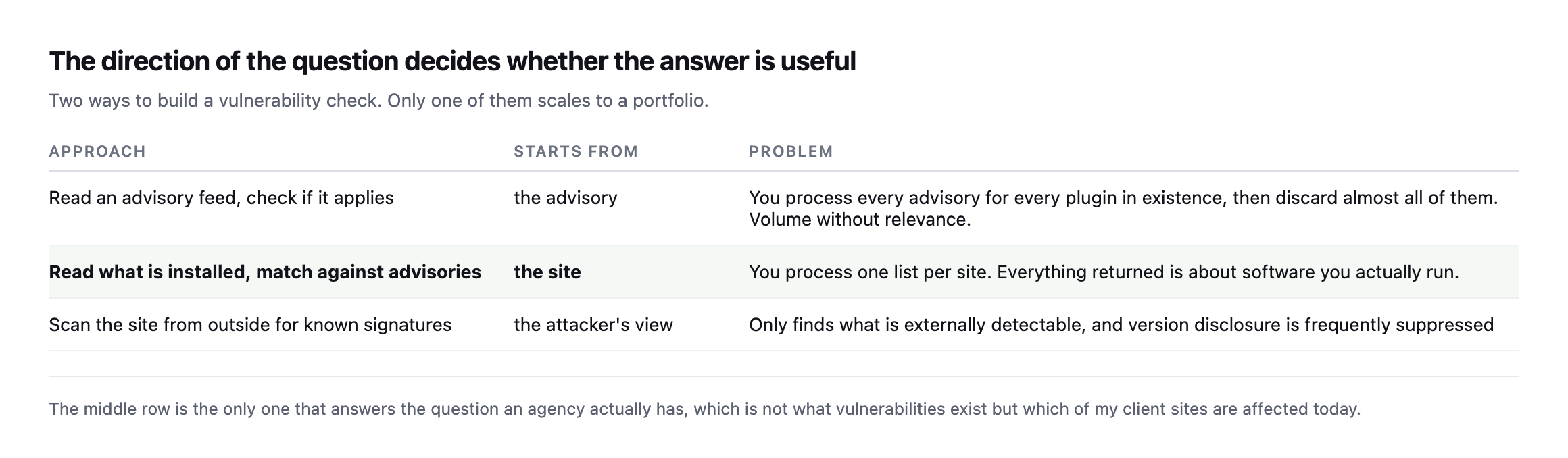
not what vulnerabilities exist but which of my client sites are affected today.*
| Approach | Starts from | Problem |
|---|---|---|
| read an advisory feed, check applicability | the advisory | processes every advisory for every plugin, discards almost all |
| read what is installed, match against advisories | the site | one list per site, everything returned is software you run |
| scan from outside for known signatures | the attacker’s view | only finds what is externally detectable |
That question can only be answered from inside the install, which has a consequence worth being explicit about.
Why it cannot run from the domain alone
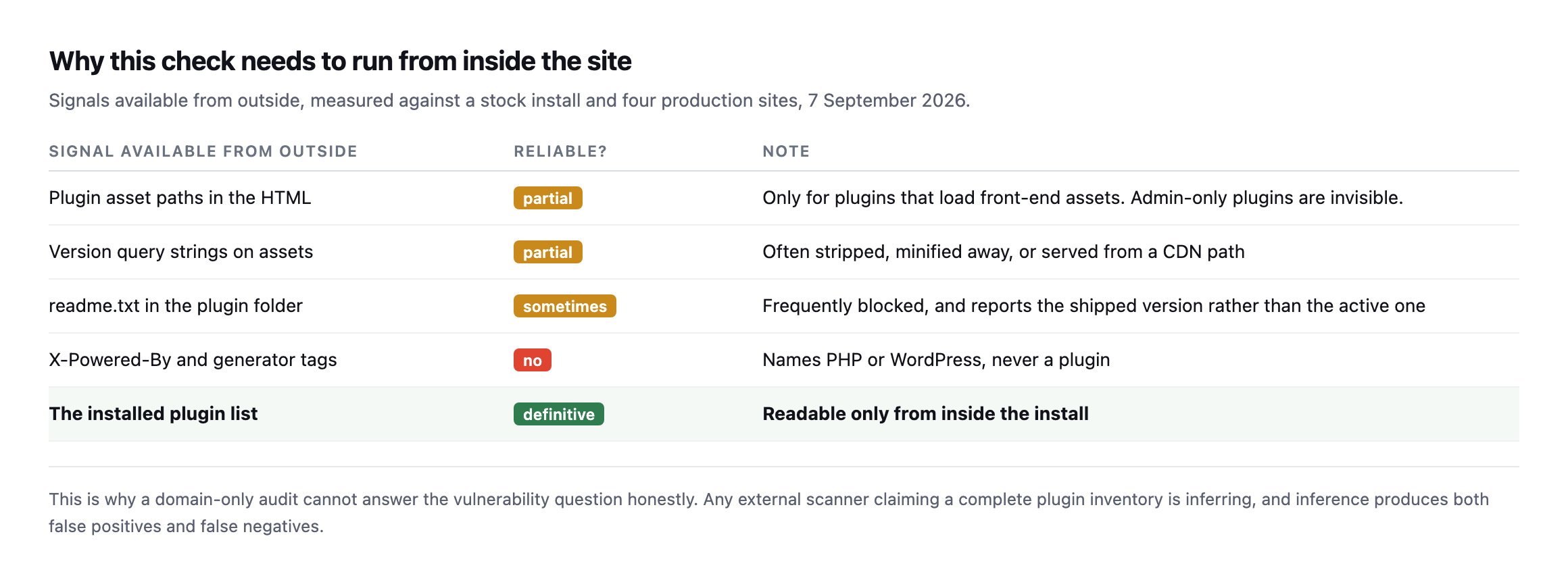
produces both false positives and false negatives.*
| Signal from outside | Reliable? | Note |
|---|---|---|
| plugin asset paths in the HTML | partial | admin-only plugins are invisible |
| version query strings on assets | partial | often stripped, minified, or CDN-served |
readme.txt in the plugin folder | sometimes | reports the shipped version, not the active one |
X-Powered-By / generator tags | no | names PHP or WordPress, never a plugin |
| the installed plugin list | definitive | readable only from inside |
This is why Protuno’s free audit does not attempt it. The audit reads a great deal from a domain alone, and the installed plugin list is not among the things a domain can tell you honestly.
Admin-only plugins load no front-end assets and are entirely invisible from outside. A plugin serving minified, CDN-hosted assets discloses no version. Both are ordinary configurations.
What a WordPress vulnerability scanner needs to match on
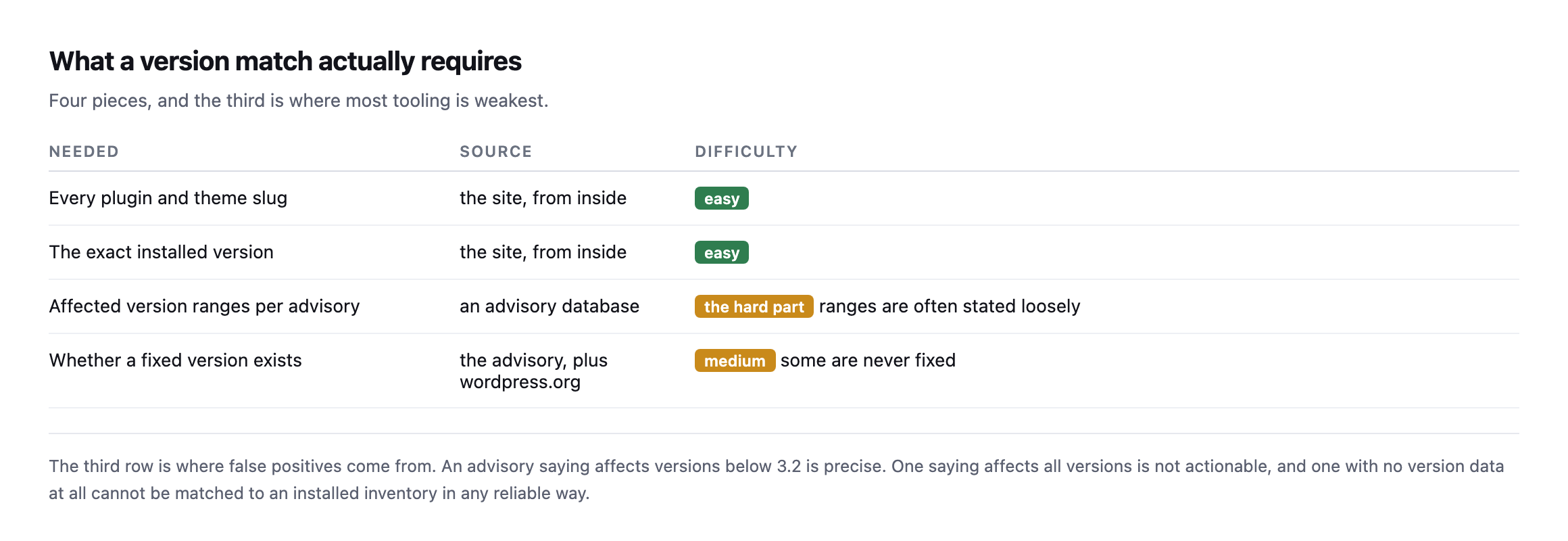
below 3.2″ is precise. One saying “affects all versions” is not actionable.*
Version-range quality is the unglamorous, easy-to-overlook constraint that decides whether any of this actually works. Matching an installed 2.8.1 against “below 3.2” is arithmetic. Matching it against “all versions” tells you nothing you can act on.
There is a related case worth checking separately: a plugin removed from the directory entirely. Those often have no advisory at all, because there is no fixed version to point at, and they will never appear in a version-match report.
Where the inventory comes from
Reading the installed list is the easy half, and there are three ways to do it, with different trade-offs.
WP-CLI, if you have shell access. wp plugin list --fields=name,version,status returns exactly what you need, and it reports the active version rather than whatever a readme claims. It requires server access per site, which is the constraint.
The REST API or an ability, with a credential. This is how remote tooling does it, including ours. It needs an application password and a connector on each site, and the credential decides what else that connection could do, which is a decision worth making deliberately.
A management plugin’s own reporting. Convenient, and it means the inventory is only as current as the plugin’s last check-in. A site that stopped reporting three weeks ago looks identical to one with nothing to report, which is the same silent-failure pattern as everything else on this blog.
Whichever you actually use, the freshness of the inventory is always part of the check. An advisory match against a plugin list from August is a match against a site that may no longer exist in that form.
Running the actual match on a real install
I read the full plugin inventory off our own lab WordPress install and matched it against a real external source, rather than describe the two-step process abstractly.
wp plugin list --fields=name,version,statusForty plugins came back, most inactive, a handful active: WooCommerce, Elementor, Advanced Custom Fields, Autoptimize, Contact Form 7, Yoast SEO, among others, each with its exact installed version. That list alone is the entire hard part this post argues matters most, one query, one machine, no guessing about what is actually running.
The match step, against the free WordPress.org plugin API rather than a paid vulnerability feed, for the active plugins:
curl -s "https://api.wordpress.org/plugins/info/1.0/contact-form-7.json" \
| python3 -c "import json,sys; print(json.load(sys.stdin)['version'])"| Plugin | Installed | Latest published | Match |
|---|---|---|---|
| contact-form-7 | 6.1.7 | 6.1.7 | current |
| elementor | 4.2.4 | 4.2.4 | current |
| woocommerce | 11.1.0 | 11.1.0 | current |
| wordpress-seo | 28.4 | 28.4 | current |
| advanced-custom-fields | 6.8.9 | 6.8.10 | one patch behind |
| autoptimize | 3.1.15.1 | 3.1.15.1 | current |
| akismet | 5.7.2 | 5.7.2 | current |
| polylang | 3.8.8 | 3.8.9 | one patch behind |
Eight active plugins checked, six current, two one patch version behind. That is the actual shape this post’s argument produces in practice: not forty findings to sift through, not a vague “check your plugins” reminder, but a two-line answer naming exactly which plugins on exactly this site are worth a closer look, derived by starting from what the site actually runs and asking one specific question about each entry, rather than starting from an advisory feed and asking whether any of its thousands of entries happen to apply here.
Version currency is not the same claim as a confirmed vulnerability, and it is worth being precise about the difference: a plugin one patch behind may be missing a security fix, a bug fix, or nothing consequential at all, and the WordPress.org API used here reports the latest published version, not whether any specific advisory names the installed one. The free source demonstrates the direction this post argues for, site inventory first, external match second, using data anyone can query without an account. A paid vulnerability feed, matched the same way against the same inventory, adds severity and CVE-level detail on top of the same underlying process, not a different process.
The one matching mistake the same inventory nearly produced
Running that match surfaced a live example of a trap worth naming specifically, because it is easy to build a version-matching script that gets it wrong silently. wp plugin list reports the folder name WordPress reads from disk, hello, for the plugin bundled with core. Querying that name against the WordPress.org API is where a naive matcher breaks:
curl -s "https://api.wordpress.org/plugins/info/1.0/hello.json"{"error":"Plugin not found."}The real directory slug is hello-dolly, not hello, and querying that one correctly returns 1.7.2, exactly matching the version installed here. A matching script that trusts the folder name as the lookup key would report Hello Dolly as an unlisted, possibly-removed plugin, the exact false alarm covered in an earlier post on this blog about plugins pulled from the directory. The fix there is the same fix worth repeating here: resolve the real slug from the plugin’s own update-check data before trusting a 404 as meaning anything, because the folder name on disk and the identifier the directory actually indexes by are not guaranteed to match, and Hello Dolly is the single most common real-world case where they do not.
Responding without crying wolf
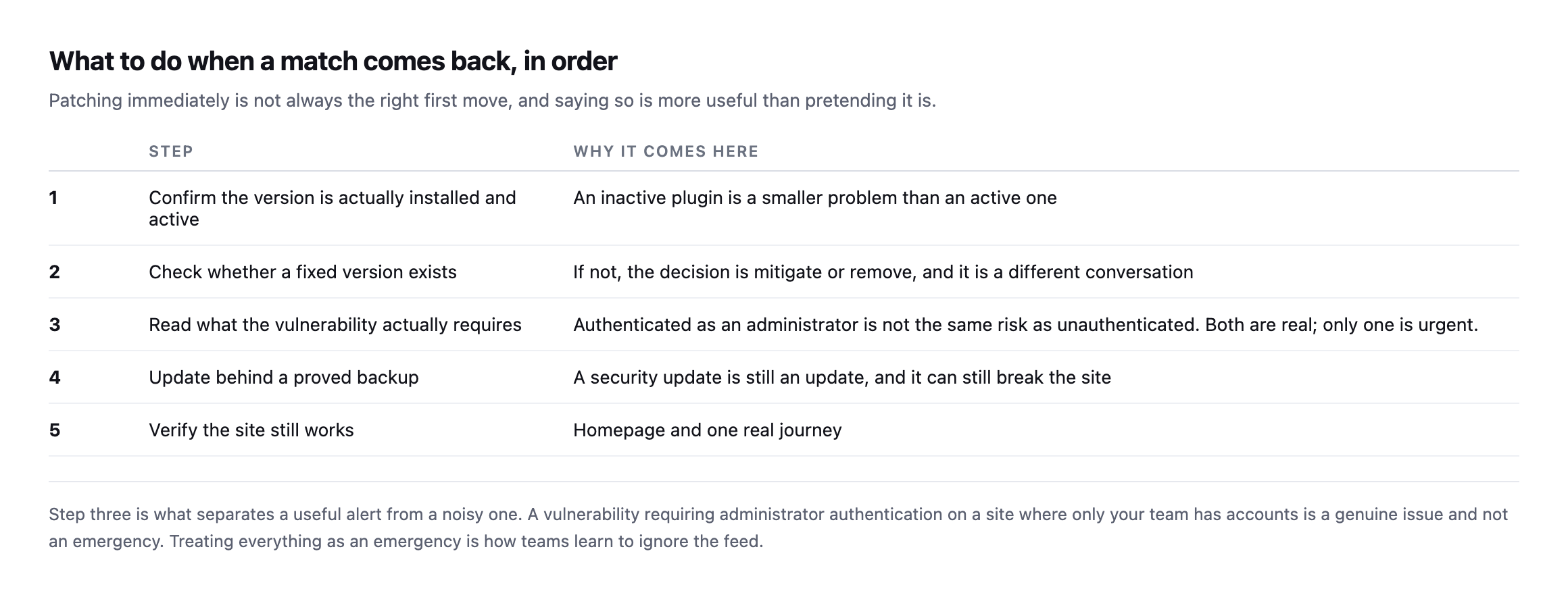
administrator authentication, on a site where only your team has accounts, is a genuine issue and not an emergency.*
Treating every single finding as critical is how a security feed gets muted, and a muted feed is worse than no feed because everybody believes it is being watched.
Step four is not optional either. A security update is still an update, and it can still break the site, which is why it belongs behind the same proved backup as any other write.
The two things a version match will never tell you
Worth stating plainly, because tooling in this space tends to imply completeness it does not have.
Whether the vulnerability is reachable on this site. An advisory describes a code path. Whether that path is exercised depends on configuration, on which features are enabled, and sometimes on which theme is active. A match is a strong signal to act; it is not proof of exposure.
Whether the site is already compromised. Version matching is entirely forward-looking. A site running a vulnerable version for eight months may be fine or may have been breached in March, and nothing in the inventory distinguishes those. That is a different discipline with different tools, and conflating them gives false comfort.
Both of those limits argue for the same habit: fix the matches promptly rather than perfectly, and keep the window short enough that the second question rarely becomes interesting.
What this looks like as a daily habit
The useful version is a morning report per portfolio, not an alert per advisory.
One list, sorted by severity, for all client sites at once. An agency does not want forty notifications; it wants one document that says these three sites need attention today.
Named per site and per plugin, with the installed version and the fixed version. Enough to decide without opening anything.
Silence when there is nothing. A report that arrives every morning saying nothing changed is training people to skim, and skimming is how the one that mattered gets missed.
This is what Rook, Protuno’s Security agent, does with its Plugin Vulnerability Checker playbook, inside your own AI app: it reads what a connected site has installed and checks it against known vulnerabilities. Run it as a daily routine (Pro and Agency) and you hear the day something you run becomes a problem.
Until then, the manual version is worth doing quarterly rather than never. Export the plugin list and versions from each client site, and check the ones you have not updated in six months against whichever advisory source you already trust.
Pair it with the checks that need no inventory at all, since those run from the domain and cover the exposure an attacker sees first: whether a debug log is readable, whether the security headers are in place, whether anything is answering that should not be.
The value is not in having a scanner. It is in the direction: start from what your clients actually run, and let that decide what you read.
Running the real inventory-and-match pass on even one lab install, as this post now does end to end, is worth an hour precisely because it turns every abstract warning above into a concrete line of output: two plugins one patch behind, one folder-name mismatch that would have produced a false alarm, and a clean bill of health on the rest. That is what the direction this post argues for actually looks like once somebody runs it, rather than describes it.
What the inventory is actually defending against
Patchstack, whose whitepaper this blog cites elsewhere, hosting a threat researcher on how these attacks actually happen in practice, the other half of the plugin-inventory argument above.
Comments