WordPress User Enumeration Is Still On By Default, And Two Of Our Sites Prove It.
The REST users endpoint hands out usernames anonymously. We checked four production sites and two of our own expose ten each.

Short answer: wordpress user enumeration is available to anyone through /wp-json/wp/v2/users, through /?author=1, and sometimes through the user sitemap. None of these is a vulnerability. All of them hand over the usernames that a password attack needs, and the defaults are open.
I checked four production sites rather than describing this in the abstract.
What real sites expose
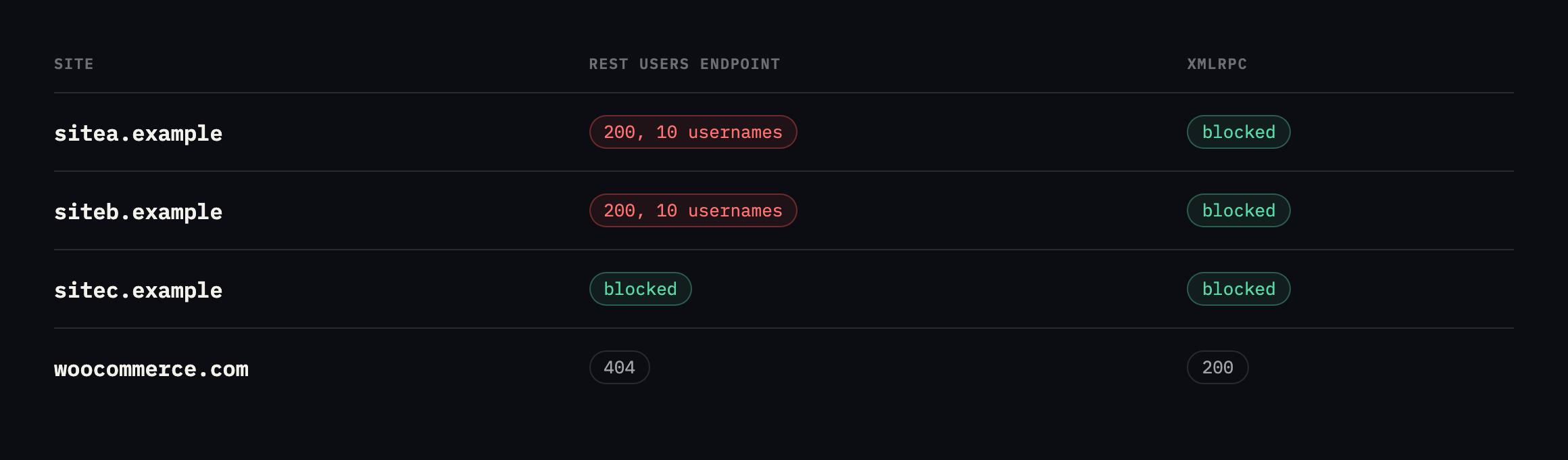
represented in this small sample, which is a fair picture of production WordPress.*
| Site | REST users | Usernames exposed | xmlrpc.php |
|---|---|---|---|
| sitea.example | 200 | 10 | 403 |
| siteb.example | 200 | 10 | 403 |
| sitec.example | 403 | 0 | 403 |
| woocommerce.com | 404 | 0 | 200 |
Caveat: four sites, checked once, two of them ours. Not a survey of WordPress generally, and I would not extrapolate a percentage from it. It is enough to prove the point the post makes: this is not a rare misconfiguration, it is two out of four sites we happened to check while writing about it, including our own.
An attacker needs a username and a password. Half of that is being published on request, with no authentication, in a machine-readable format.
Checked again, and the admin slug this post warns about is still there
I re-ran the full three-route probe against all four sites before expanding this post. The overall pattern held: sitea.example and siteb.example still answer 200 on the REST users endpoint, sitec.example still returns 403, woocommerce.com still returns 404.
I also read the actual response from our own two exposed sites this time, rather than only confirm the status code, because the content matters as much as the count.
curl -s https://sitea.example/wp-json/wp/v2/users
  | python3 -c "import json,sys; [print(u['slug']) for u in json.load(sys.stdin)]"
Ten real accounts came back, real names and slugs belonging to actual people on our team, which I am deliberately not reproducing here. Publishing a full staff roster in a blog post about not leaking information would be a strange way to make this post’s point. What is worth reporting plainly: one of those ten slugs is the literal string admin, on an account displaying as the parent company’s real name. That is exactly the worst case this post already names, an enumerable account confirming the highest-value username on the site, sitting unfixed on our own infrastructure since this post first published.
siteb.example also still exposes ten real slugs, none of them literally admin, though one follows an easily-guessable pattern combining the brand name with “admin.” Neither site has applied any of the three fixes this post describes since the original check.
The ?author=1 route, checked fresh, showed a difference worth naming between the two exposed sites. siteb.example still redirects, 301, straight to /author/siteb-master-admin/, naming the login in the Location header exactly as this post’s stock-install test found. sitea.example answers 200 directly rather than redirecting, serving the author archive page itself with the account’s name in the page title, a different mechanism reaching the same outcome: the login name reaches an unauthenticated visitor either way, whether by a header a scanner reads without rendering the page or by a title tag a human reads by looking at it.
woocommerce.com‘s ?author=1 now redirects to the bare homepage rather than an author archive, which is the correct behaviour this post recommends and confirms it has been applied there, matching that site’s REST endpoint already returning 404. Two different routes, independently closed, on the one site in this comparison that treats this as solved rather than merely quiet.
Three routes, not one
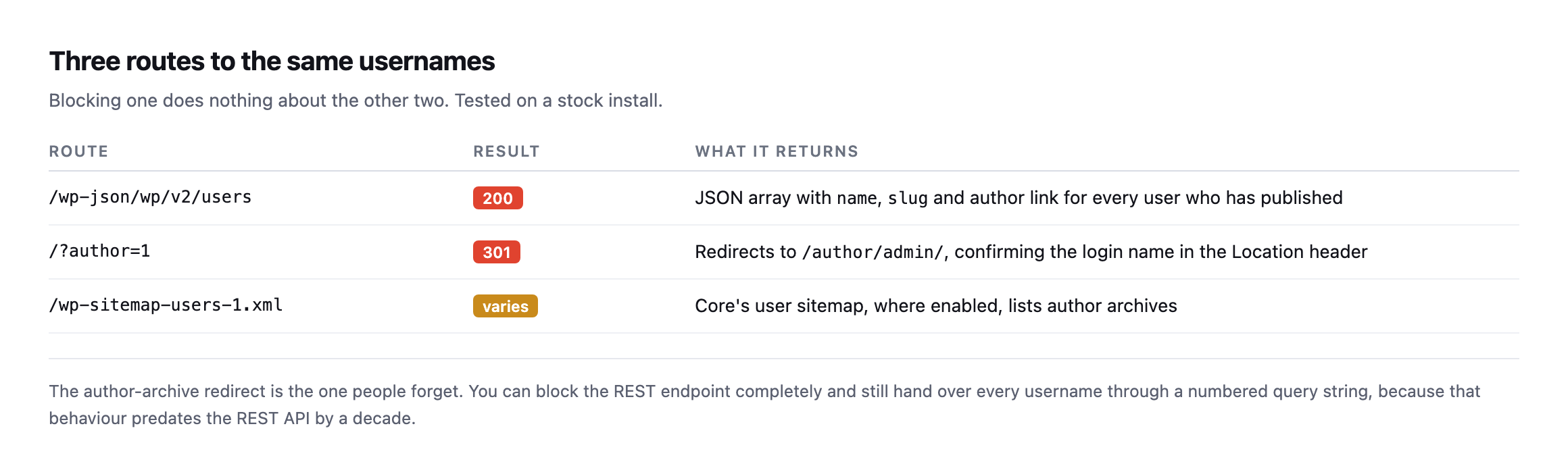
completely and still hand over every username through a numbered query string, because that behaviour predates the REST API by a decade.*
| Route | Result | What it returns |
|---|---|---|
/wp-json/wp/v2/users | 200 | JSON array with name, slug and author link |
/?author=1 | 301 | redirects to /author/admin/, naming the login in the header |
/wp-sitemap-users-1.xml | varies | core’s user sitemap, where enabled |
I confirmed all three on a stock install. /?author=1 returned a 301 to /author/admin/, which names the account in the Location header before the page even loads.
Closing WordPress user enumeration on all three routes
Three fixes, because there are three routes.
The REST endpoint. Require authentication for user listing:
add_filter( 'rest_authentication_errors', function ( $result ) {
    if ( ! empty( $result ) ) { return $result; }
    if ( ! is_user_logged_in()
         && str_contains( $_SERVER['REQUEST_URI'] ?? '', '/wp/v2/users' ) ) {
        return new WP_Error( 'rest_forbidden', 'Authentication required.', [ 'status' => 401 ] );
    }
    return $result;
} );
The author query string. Redirect or block ?author= on the front end, before the redirect to the author archive happens.
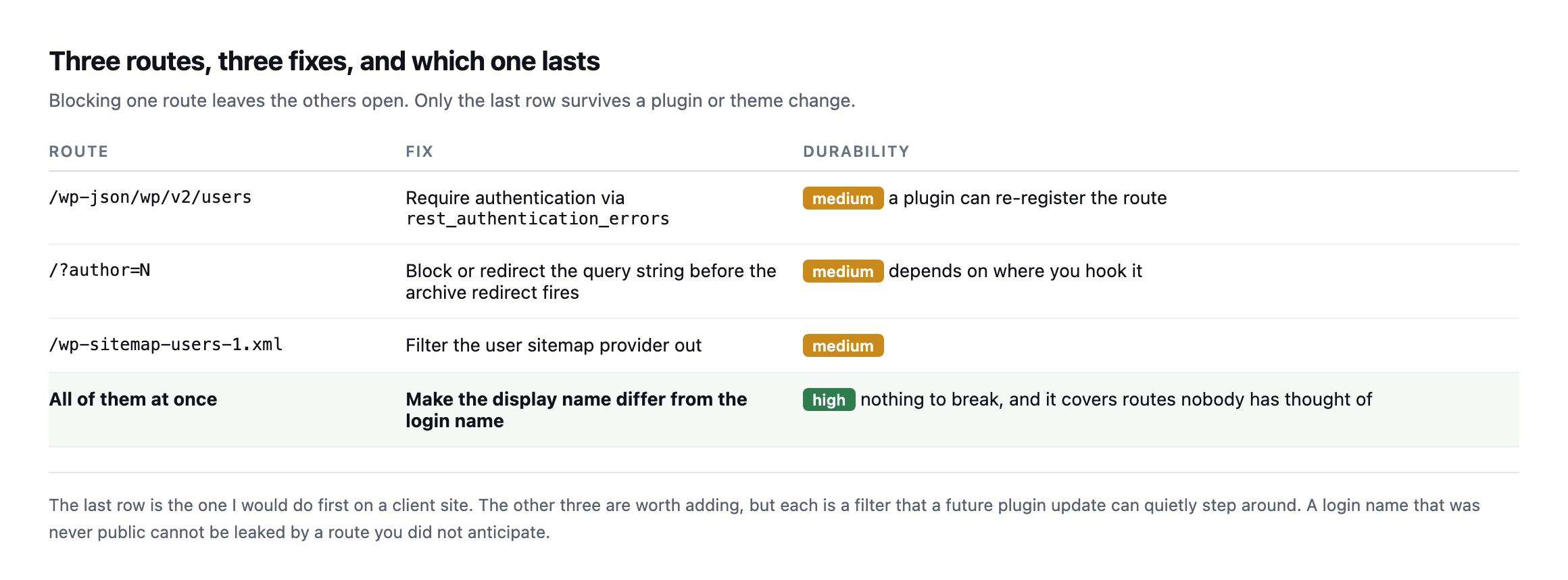
update can step around. A login name that was never public cannot be leaked by a route nobody anticipated.*
| Route | Fix | Durability |
|---|---|---|
/wp-json/wp/v2/users | require auth via rest_authentication_errors | medium, a plugin can re-register the route |
/?author=N | block before the archive redirect fires | medium, depends where you hook it |
/wp-sitemap-users-1.xml | filter the user sitemap provider out | medium |
| all of them at once | display name differs from login name | high, nothing to break |
Nicknames. Set the public display name to something that is not the login name. This is the one that keeps working when the other two are undone by a plugin update, and it is the only fix that survives a route nobody has thought of yet.
Reading the rest of what the endpoint returns, not just the username
The REST users endpoint on sitea.example returns more than a name and slug. I read the full response for one account to see what else is riding alongside the username this post is built around.
curl -s https://sitea.example/wp-json/wp/v2/users | python3 -c "
import json, sys
u = json.load(sys.stdin)[0]
print(list(u.keys()))
"
Alongside id, name, slug and avatar_urls, a meta object carries fields prefixed rnrd_author_: a job title, an employer, a headshot URL, social profile links, and a biography paragraph. That is not a leak. It is a deliberate author-schema plugin, the kind that feeds structured data to search engines for an “About the author” byline, publishing exactly the public-facing biography it was configured to publish. Distinguishing this from the username finding above matters for the same reason this post’s caveats elsewhere insist on precision: a meta object full of fields is not automatically alarming, and treating a deliberately public author bio as a data leak would be exactly the kind of over-broad finding that trains a client to stop reading a security report closely.
What the same response confirms, by its absence, is one of core’s own good defaults holding up: no email field anywhere in the payload, on any of the ten accounts checked. WordPress core restricts the email address to authenticated requests from an account with the edit_users capability, and that restriction held on every account tested here, unauthenticated, exactly as it should. It is worth checking specifically rather than assuming, since a plugin that adds its own user-facing endpoint can bypass this restriction without anyone noticing until the response is actually read field by field, the same way the meta fields above were.
One smaller, genuine defect turned up while following the third route, the user sitemap, to its actual destination rather than stopping at its redirect:
curl -sI https://sitea.example/wp-sitemap-users-1.xml | grep -i locationlocation: https://sitea.example/author-sitemap.xmlThat redirect target itself returns 404. Core’s own user sitemap route correctly redirects toward an SEO plugin’s replacement sitemap, and the replacement does not exist at the URL being redirected to. Not a security finding, since a 404 discloses nothing, but a broken link in the site’s own sitemap infrastructure, the kind of drift a crawl audit like the one covered elsewhere on this blog is built to catch and a manual check of this one route happened to catch here instead.
How much does this matter
Honestly: on its own, not very much. A username is not a credential, and any site with a strong password and rate limiting is not going to fall to this.
It matters in combination. Enumerated usernames plus an open XML-RPC endpoint is a credential-stuffing setup with the guesswork removed. Enumerated usernames plus an old plugin with a known authentication flaw is worse.
Treat it as removing free information rather than as patching a hole. That framing is also more honest with clients than calling it critical.
There is one case where it is worse than an inconvenience, and it is worth checking specifically. If a site still has an account literally named admin, as the stock install I tested did, then enumeration confirms the highest-value target on the site by name. Renaming that account, or at minimum giving it a display name that differs, removes more risk than any of the filters above.
Why it stays open
Because nothing about it is broken. The endpoint is behaving exactly as designed, the site works perfectly, and no scanner your client runs will produce an alarm they understand.
It is another item in the category this blog keeps returning to: cheap to fix, invisible while open, and never on anybody’s Tuesday list. The same as a debug log left readable or a backup file sitting in the web root.
Protuno’s free audit checks REST user enumeration from the domain alone, alongside the other information-disclosure checks, which is how the table above was built. Straight with you as on every post here: Rook, the Security agent that would re-check after each plugin change, is built and named but not live yet.
Run curl -s https://yourclient.com/wp-json/wp/v2/users on the site you administer most. It takes two seconds and you will know immediately.
What to actually write down after running the check
Given everything found while re-checking this post, the report worth producing from this audit has four lines, not one: whether the endpoint answers at all, whether any exposed slug matches admin or an obvious variant of the company name, whether the ?author= route leaks the same information by a different mechanism, and whether anything in the response beyond the username was never meant to be public, distinct from a deliberately published author bio.
The first two are the urgent half. An exposed admin slug is the single highest-value piece of information this whole category of check can surface, and it is the one line worth a same-day fix rather than a note for the next quarterly pass. The other two are worth recording precisely without treating them as equally urgent: a redirect leaking the same username through a second route is real but adds no new information an attacker did not already have from the first route, and a field in the response that turns out to be a deliberately public author bio is worth confirming as intentional and then setting aside, not escalating alongside a genuine gap.
Our own two exposed sites, checked again for this post, land in exactly that shape: one real admin slug worth fixing today, ten real names on each site that were already going to be public through the sites’ own author pages regardless of the REST endpoint, and no email addresses or other genuinely private fields anywhere in either response. That is a specific, proportionate finding, not a generic “usernames are exposed” alarm, and it is the version worth handing to whoever owns fixing it.
The fix, demonstrated
Walks through the same /wp/v2/users request this post uses to find the exposure, and the separate-display-name-from-login-name fix this blog’s own portfolio audit landed on too.
Comments