Your wp-config.php Is Fine. The Exposed File Next To It Is Not..
wp-config.php is safe because PHP executes it. Rename it .bak and the same secrets are served as plain text. Here is the probe, and the fix.

Short answer: a wp-config exposed to the internet is almost never wp-config.php itself. PHP executes that file and sends nothing. The problem is wp-config.php.bak, wp-config.php~, wp-config.txt and their relatives, which the web server does not recognise as code and therefore hands over as plain text, database password included.
I have been on the POSIMYTH side of enough support tickets to know how these files get there.
Nobody is careless.
Somebody was about to do something risky, took a copy first, fixed the thing, and moved on. That is good instinct. The copy is what stays behind.
Why one file is safe and its twin is not
WordPress does not protect wp-config.php by hiding it. It is protected by being executed.
The server sees .php, hands it to PHP, PHP runs it, and the constants become variables in memory. Nothing is printed. The response body is empty.
Change the extension and that entire chain stops.
.bak is not mapped to a handler, so the server falls back to what it does with any unknown file. It reads it and sends it.
Here is the same install answering both requests:
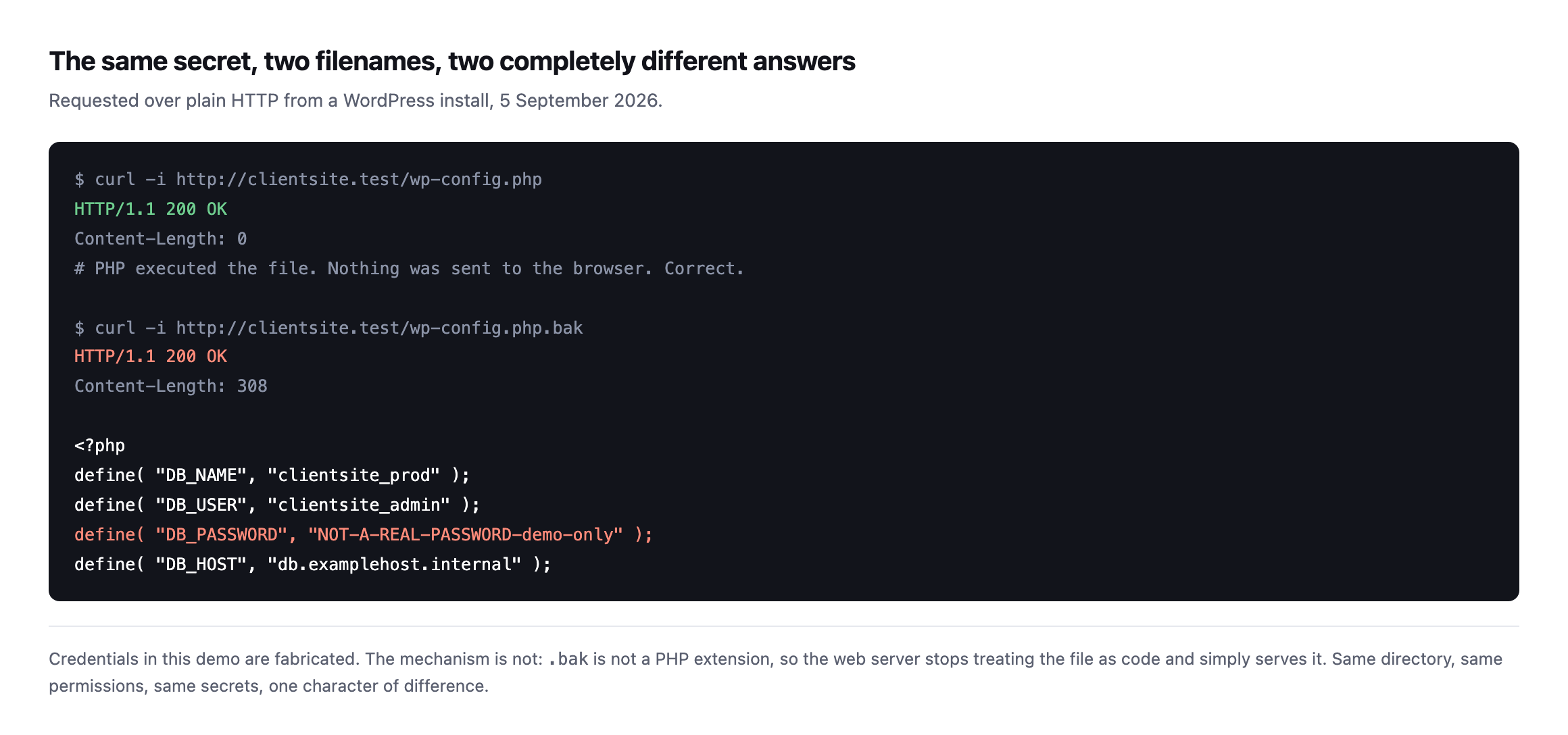
mechanism is real even though the password is not. One character of difference between the two filenames, and the second one prints the database credentials to anybody who asks.*
No exploit. No vulnerability in WordPress. Just a file being served, exactly as designed.
The filenames actually worth checking
When I look at a site I have inherited, I do not check one name. I check the family, because each one is created by a different ordinary habit.
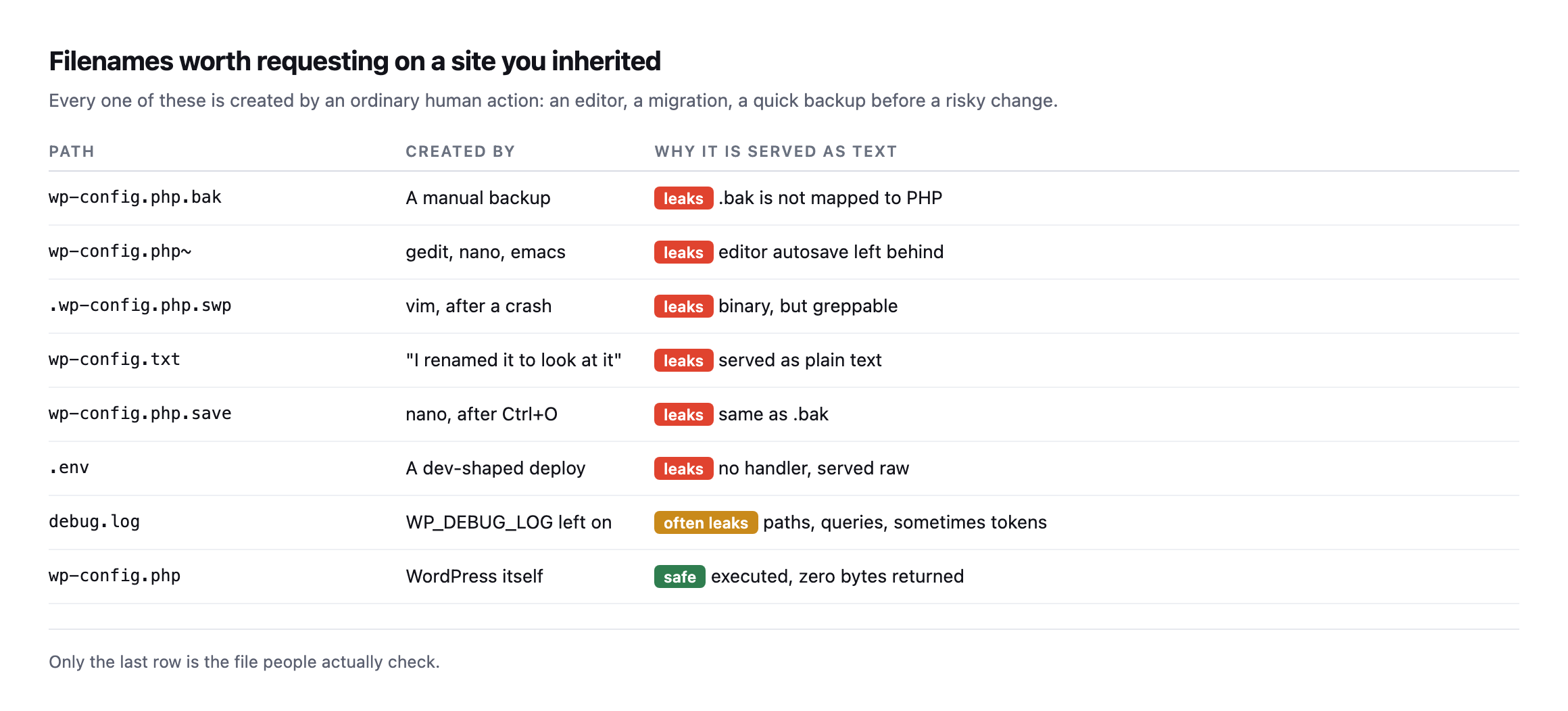
They are what an editor leaves behind after a crash, or what a person creates thirty seconds before a migration they are nervous about.*
.swp is the one people dismiss. It is a binary vim swap file, so it looks like noise.
Run strings over it and the password is right there.
The same data, as a table rather than a screenshot, so it is easy to search or paste into a runbook:
| Path | Created by | Why it leaks |
|---|---|---|
wp-config.php.bak | a manual backup | .bak is not mapped to PHP |
wp-config.php~ | gedit, nano, emacs | editor autosave left behind |
.wp-config.php.swp | vim, after a crash | binary, but strings reads it fine |
wp-config.txt | “I renamed it to look at it” | served as plain text |
wp-config.php.save | nano, after Ctrl+O | same mechanism as .bak |
.env | a dev-shaped deploy | no handler, served raw |
debug.log | WP_DEBUG_LOG left on | often leaks paths, queries, sometimes tokens |
wp-config.php | WordPress itself | safe: executed, zero bytes returned |
Caveat: this list is the eight filenames I actually see on real sites, not an exhaustive scan. A determined attacker tries hundreds of variants; this list is the fifteen-second check that catches the ones an ordinary workflow creates, which is most of them in practice.
Check a site for an exposed wp-config in about fifteen seconds
The method is three steps: request every filename above against the live domain, read the status code, and read the byte count too, because a 200 can still mean nothing leaked. Point this at any domain you look after:
for f in wp-config.php.bak wp-config.php~ wp-config.txt wp-config.php.save \
         wp-config.php.old .env debug.log; do
  printf '%-24s ' "$f"
  curl -s -o /dev/null -w '%{http_code}  %{size_download} bytes\n' "https://example.com/$f"
done
What you want is 403 or 404 on every line.
What should worry you is 200 with a non-zero byte count. That is the file being served.
A 200 with 0 bytes is fine, which is why the size column is in there. Status code alone will tell you the wrong thing about wp-config.php itself.
Closing it
Two moves, and the second is the one that lasts.
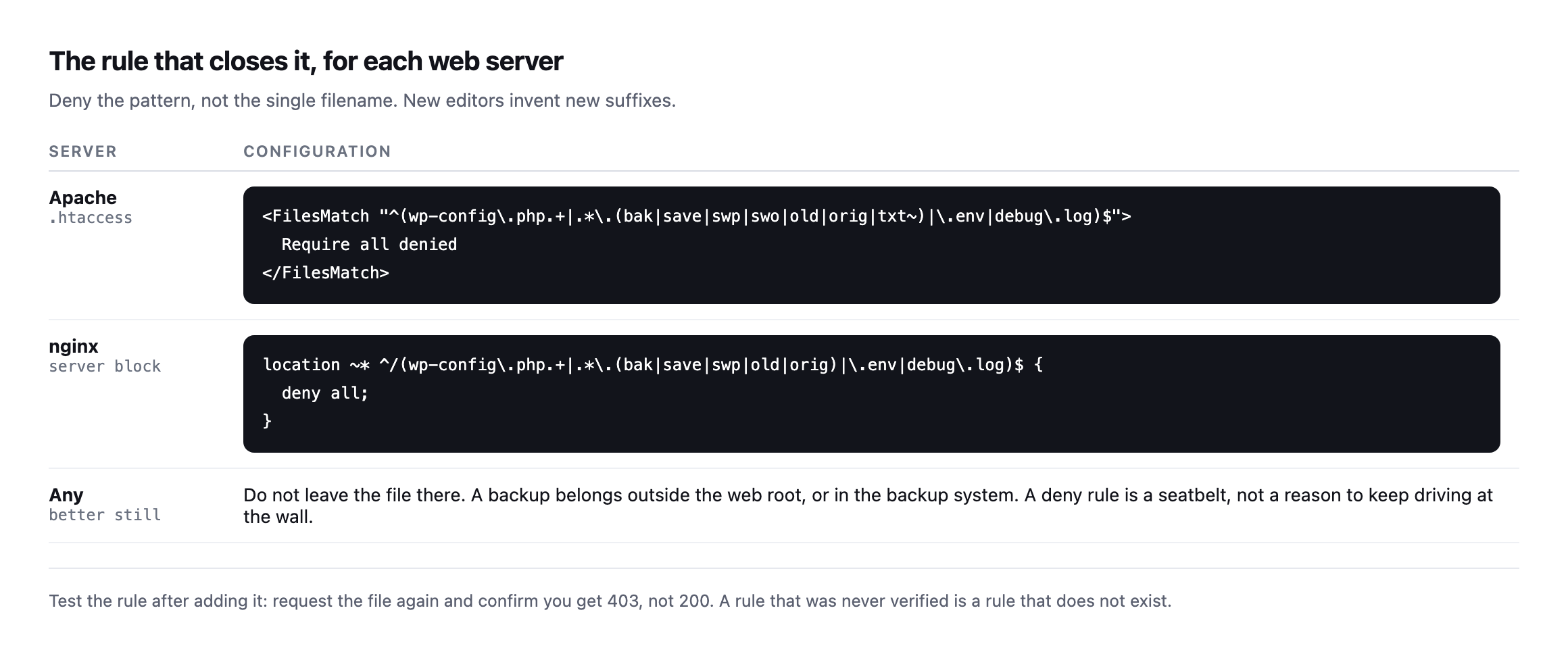
inventing new suffixes, and a rule listing only .bak will not catch the .save that nano writes next month.*
Then verify it. Request the file again and confirm you now get 403 rather than 200.
An unverified rule is not a fix. It is a note to yourself. I mean that literally rather than as a rhetorical flourish, so I put a leaked backup file on a real Apache install, requested it, applied the rule, and requested it again.
| Step | Request | Response |
|---|---|---|
| before | GET /wp-config.php.bak | 200, file served |
| rule applied, Apache reloaded | ||
| after | GET /wp-config.php.bak | 403, 316 bytes, Apache’s own error page |
| control | GET / (homepage) | 200, unaffected |
The rule that produced that result, tested exactly as written, not adapted from memory:
<FilesMatch "\.(bak|save|old|swp|txt)$">
  <If "%{REQUEST_URI} =~ m#^/wp-config#">
    Require all denied
  </If>
</FilesMatch>
Caveat: tested at server scope on a single-site Apache install, which is the simplest case there is. On a real host running multiple virtual hosts, place the equivalent block inside the specific
or in the site’s own.htaccess, and re-run the same before-and-after test rather than assume a rule that worked on one vhost applies to another. The control row above, confirming the homepage still answers normally, is the check that catches a rule written too broadly, and it is worth keeping in your own runbook.
The control row is not decoration. A FilesMatch pattern written slightly wrong can block more than intended, and the only way to know is to request something that should still work and confirm it does. A fix that also takes down the homepage is not a fix anybody will thank you for.
The rule I just verified turned out to be incomplete
I did not stop at the one filename. Before calling this finished, I went back to the full list of variants from earlier in this post and tested the same rule against all of them.
| Filename | Caught by the rule above? |
|---|---|
wp-config.php.bak | yes |
wp-config.php~ | no |
wp-config.txt | yes |
wp-config.php.save | yes |
.wp-config.php.swp | no |
.env | no |
debug.log | no |
Four of the seven leaked straight through the rule I had just proved worked. That is the exact mistake this whole post warns against, made by me, while writing the section telling you not to make it. Worth being honest about why.
The tilde variant and the leading-dot swap file both failed for the same reason: my /wp-config, and ~ and a leading . both sit before that prefix ever gets evaluated in some editor-generated names, or the check itself was written against the wrong anchor. .env and debug.log failed for a simpler reason: their extensions were never in the pattern at all, because the rule was written to protect one file family and I generalised the claim past what I had actually tested.
Fixing four rows meant rewriting the rule rather than patching it, because the failures came from two different causes and one patch would not have addressed both. The corrected version, re-tested against all seven names plus the homepage as a control:
<FilesMatch "^\.?wp-config\.php(~|\.(bak|save|old|swp|txt))?$">
  Require all denied
</FilesMatch>
<FilesMatch "^wp-config\.(bak|save|old|txt)$">
  Require all denied
</FilesMatch>
<FilesMatch "^\.env$">
  Require all denied
</FilesMatch>
<FilesMatch "^debug\.log$">
  Require all denied
</FilesMatch>
All seven filenames now return 403, every single one. The homepage still returns 200, exactly as before.
Caveat: this rule is now verified against the specific filenames listed in this post, not against every possible variant an editor or backup tool could generate. The lesson is not “use this exact rule,” it is “test your rule against your own list of variants before you trust it,” because the gap between a rule that looks complete and one that is complete is exactly the four rows in the table above.
And if a file was exposed, treat the credentials as burned. Rotate the database password and the salts in wp-config.php. A deny rule added today does nothing about who read the file last March.
Why this one is worth automating
The check is trivial. That is exactly the problem.
It takes fifteen seconds, it needs doing on every site you look after, it needs doing again after every migration and every hosting move, and it produces nothing to show a client when it passes. So it gets done once, thoroughly, during onboarding, and then never again. It is the same unbilled half hour that swallows every other check on the list.
Meanwhile the file that leaks is created later, by the migration, by the crash, by the careful person taking a backup before a risky change.
The rule-testing mistake earlier in this post is worth carrying into how you think about the fix, not only the check. A deny rule copied from a blog post, including this one, is exactly as untested as the check it is meant to close, until you run the same before-and-after against your own site’s actual filenames. Copy the corrected rule if it helps, but do not skip the step where you request each of the seven names yourself and read back 403. The whole argument of this post is that assuming is how the leak happened in the first place, and a deny rule you assumed works is the same category of mistake with better intentions.
It is also the reason I have not tried to write you a rule that covers every editor and every backup tool that will ever exist. That list grows the moment somebody adopts a new tool, and a rule frozen at today’s list is a rule with an expiry date nobody marked on the calendar. The seven-name test is not a one-time fix. It is the check you re-run whenever the tooling in your workflow changes, which is more often than most agencies think to look.
Run it after you change hosts. Run it after somebody on the team switches editors. Run it after a new backup plugin gets installed. None of those feel like security events, and every one of them is exactly when this list of filenames grows by one, quietly, with nobody thinking to check whether the deny rule from last year still covers what the team does today.
This is one of the checks Protuno’s free audit runs from the domain alone, because it needs nothing but HTTP requests. Straight with you about the rest: the Super Agents that would keep re-checking it on a schedule are built but not live yet.
Until then, the loop above is yours. Run it across your portfolio once this week.
If you find one, I would rather you found it than someone else did. The same logic applies to the plugins that quietly left the directory, and to the scheduled jobs that stopped without telling anyone: silent, cheap to fix, and invisible until they are not.
You can run the free audit on a domain without installing anything.
Comments