WordPress Two-Factor Authentication: What It Enforces.
WordPress two factor authentication guards the login form, not every way in. Here is how to test which sign-in routes still skip the second factor.

“Two-factor authentication: enabled.”
That is the line a security report gives you, and it is the line that reassures a client. It describes one screen, the WordPress login form, where a code prompt appears after the password.
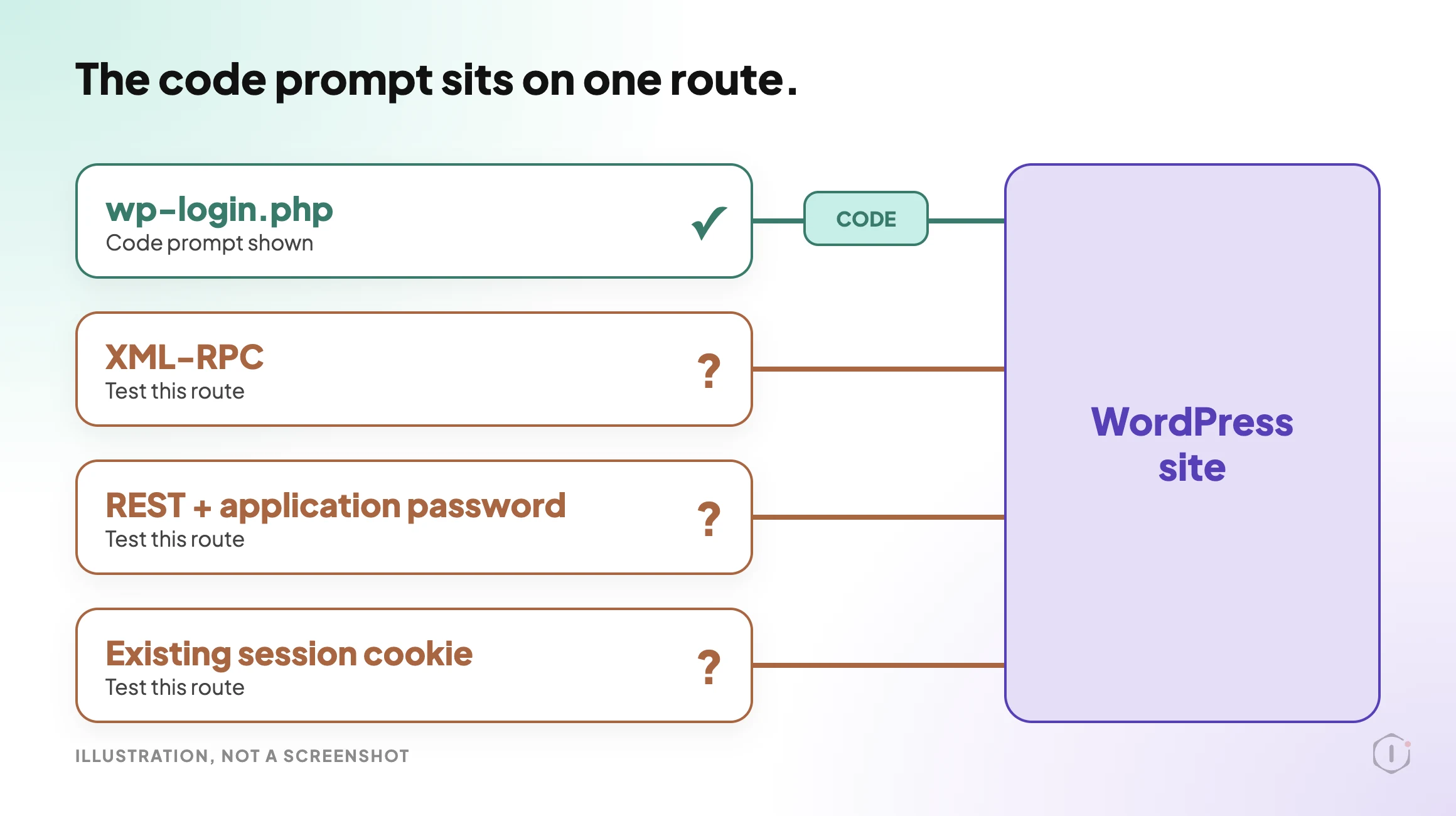
A WordPress site can be signed in to in more than one way. A script can present a username and an application password to the REST API. An XML-RPC call can send credentials in the request body. A browser can already hold a session cookie from before the setting changed. Whether each of those passes through the code prompt depends on the plugin and its version.
Short answer: WordPress two factor authentication comes from plugins, and what each one enforces depends on which sign-in routes it covers and whether the second factor is required or optional per user. The prompt after the password at wp-login.php is the part everyone checks. Whether the same plugin also covers XML-RPC, the REST API, application passwords and sessions that already exist is the part you confirm on your own site, with a request, not a feature list.
What this post is, and is not: this is a way to find out what 2FA enforces on a site you are allowed to test. It is not a plugin ranking, and it does not say what any plugin does beyond what its own wordpress.org page says, quoted with the date it was read. Plugin behaviour changes between versions, so the only answer you can rely on is the one you measure.
What The Official Plugin Says About Itself
On the wordpress.org plugin directory, the community-maintained Two Factor plugin is one widely installed option. Read on 19 October 2026, its page showed version 0.17.0, 100,000+ active installations and “tested up to” WordPress 7.1.3, the current release (6 October 2026, seven security fixes, none of them described as a sign-in or two-factor change).
The page is direct about what it does and does not enforce. In its own words and settings:
- Setup is per user. Each user configures their own methods from their profile. An administrator can also configure another user by editing that profile.
- Methods listed: an authenticator app (TOTP), email codes and backup codes. A dummy method exists for testing and needs
WP_DEBUG. - No built-in enforcement. The FAQ asks whether you can require 2FA for all users or specific roles. The answer is not through the plugin’s interface, there are no built-in enforcement settings, and native enforcement is a tracked feature request (GitHub issue #255). On multisite, there are no network-wide settings either.
- A locked-out user is a profile edit away. An administrator can untick every method in that user’s profile, and the user then signs in with the password alone.
- Passkeys and hardware keys come from a separate plugin, Two-Factor Provider: WebAuthn, not from the Two Factor plugin itself.
- API sign-in, by version. The changelog on the same page says version 0.14.0 (3 July 2025) turned on application passwords for REST API and XML-RPC authentication by default, while XML-RPC login stays disabled for regular user passwords. Version 0.17.0 (25 September 2026) lists a security fix to ensure that regular passwords cannot bypass the two-factor requirement for REST API and XML-RPC requests.
- A filter for API sign-in. The page lists
two_factor_user_api_login_enable, which it describes as restricting authentication for the REST API and XML-RPC to application passwords only.
Read that as a list of questions for your own install, not a verdict. “Enabled” on this plugin means the options are available. Who has set one up, whether it is required and which routes it covers are separate facts. This is one plugin’s documentation on one date, and other plugins make other choices.
What Each Method Proves
Before asking where a factor is enforced, be precise about what each method proves. They are not interchangeable.
| Method | What it proves | Known weakness |
|---|---|---|
| Authenticator app (TOTP) | Possession of a device holding a shared secret | The secret can be phished at set-up, and the code can be relayed |
| Email code | Control of the mailbox | Only as safe as the mailbox, and only works while the site can send email |
| SMS code | Control of a phone number | SIM swap, interception, recycled numbers |
| Push approval | Possession of an enrolled device | Approval fatigue: people tap yes to make it stop |
| Hardware key or passkey | Possession of a key bound to the site’s domain | Lost keys, and a weak recovery path |
| Backup codes | Possession of a stored list | A complete bypass of the main method, by design |
The domain binding in the fifth row is the real difference, not the hardware. A key will not sign for a look-alike domain, so a phished login cannot be completed, while any code you type can be relayed by someone in the middle. And if backup codes sit in a shared password note, the enforced method is effectively the note.
Enforcement Is A Separate Question From Method
A strong method says nothing about who has to use it. Four questions decide whether 2FA is a control or a suggestion:
- Required, or optional per user? If it is opt-in, coverage is whatever share of people opted in.
- Can an administrator skip it? Administrators are the accounts worth protecting. If the highest role can remove its own requirement, or anyone else’s, that is the largest hole in the model.
- What happens to an unenrolled user? Blocked at sign-in until they enrol, or let through with a reminder. Those two answers describe different sites.
- What happens to sessions that already exist? If current cookies stay valid, someone already holding a session is unaffected by the change you just made.
The fourth question turns a tidy change into a false sense of security. “2FA is now on” and “every live session is now backed by 2FA” are different statements, and the second usually needs sessions to be ended on purpose.
The Routes That Do Not Use The Login Form
This is the gap in the opening, and the reason for the whole exercise.
| Route | How authentication happens | What to check |
|---|---|---|
wp-login.php | Interactive form, username and password | Almost certainly covered. Confirm anyway |
| XML-RPC | Credentials in the request body, no form | Whether the endpoint answers at all, and whether it accepts a password without a code |
| REST API, cookie session | Existing browser session plus a nonce | It inherits whatever the session was granted when it began |
| REST API, application password | Username plus a generated password over basic auth | Built for sign-in without a form. That is its purpose |
| WP-CLI | A system process, not an HTTP sign-in | No second factor is involved, by design |
| Host or panel single sign-on | The hosting panel drops you into the admin | Check whether it passes through the same second-factor step |
Two rows need more than a table cell.
XML-RPC takes credentials directly, which is why it has long been a target for credential stuffing: one request can try many pairs without touching the login form. Whether a given 2FA plugin blocks it, ignores it or turns it off is something to check, not assume. Whether to turn the endpoint off at all depends on what still uses it, and that argument is in WordPress XMLRPC In 2026: Block It Or Leave It Alone.
Application passwords are the harder case, because they are not a flaw. Core introduced them in WordPress 5.6 as a way to make authenticated requests without a form. The core integration guide says the credentials go to the REST API over HTTPS with Basic Auth, and that for the legacy XML-RPC API you use the application password in place of the account’s real password. A second factor cannot sensibly apply to a background script, so the useful questions are different: who can create them, how many exist right now, what is each one for, and does any belong to someone who has left?
Attackers also need a valid username before a password is worth guessing, and WordPress is still generous with those. That half of the problem is in WordPress User Enumeration: Three Routes, One Fix Each, and it is why 2FA reduces risk rather than removing it.
A Test You Can Run This Afternoon
Run this on a staging copy, or a site you are explicitly allowed to test. Record what happened at each step, not the impression you came away with.
- Turn on 2FA with your chosen method. Enrol one administrator and leave one editor unenrolled.
- Sign out completely. Sign in as the administrator. Note whether the code prompt appears.
- Sign in as the unenrolled editor. Note whether you are blocked, prompted or let straight in.
- From the administrator’s profile, try to remove the requirement for yourself, then for another user. Note what the screen allows.
- Create an application password and use it for an authenticated REST request. Note the status and the body:
curl --user "USERNAME:APP-PASSWORD" \
"https://example.com/wp-json/wp/v2/users/me?context=edit"- Make an XML-RPC call with the same credentials. Note the status and the body:
curl -s -d '<?xml version="1.0"?><methodCall><methodName>wp.getProfile</methodName><params><param><value>1</value></param><param><value>USERNAME</value></param><param><value>APP-PASSWORD</value></param></params></methodCall>' https://example.com/xmlrpc.php- Repeat steps 5 and 6 with the account’s regular password in place of the application password. Note the status and the body. A plugin that covers these routes should refuse it, but the result you record is the one that counts.
- Open a session in a second browser first, then change the enforcement setting and reload that session. Note whether it survives.
- Use one backup code. Confirm it works once and not twice.
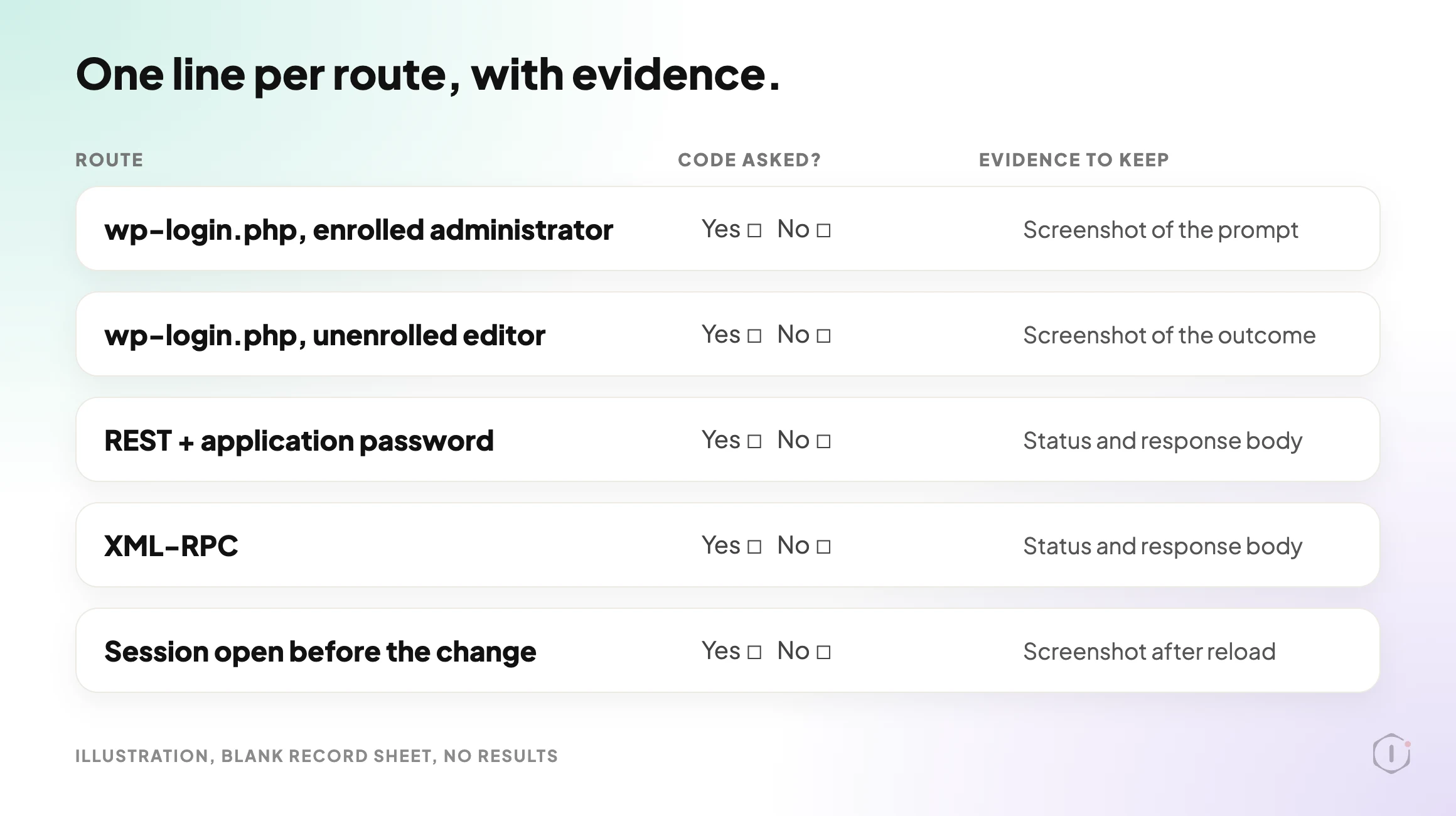
- List every route that let you in without a second factor.
Step ten is the output. The rest is instrumentation.
A short silent video walks through the same ideas.
The output of that run is a short table you can show a client, one line per route, with the evidence next to it. Compare that with “Two-factor authentication: enabled”. One is a finding. The other is a checkbox. The same difference runs through WordPress Hardening Checklist, Ranked By What It Changes, which ranks hardening steps by what they actually change.
Two Outside Views
A video from someone who tried a plugin. WPTuts walks through FluentAuth 3.0, a free plugin from the WPManageNinja team, from its set-up wizard to its login-protection options. The video description lists what it covers:
“two-factor authentication, email verification codes, failed login lockouts, XML-RPC blocking, username protection”
WPTuts, 100% FREE WordPress 2FA, Passkeys, Magic Login & More Plugin, video description, 18 September 2026
It is a review of one plugin, so treat it as one person’s setup, not a comparison. It does show that XML-RPC blocking is listed as its own feature, apart from the two-factor codes.
A thread from people living with it. In an r/Wordpress thread titled “I need to disable API logins. How do I do this and how can I verify that the blocking is working?”, the poster is seeing many failed logins even though /wp-admin/ is limited by IP. One reply explains why a login limiter might not see them:
“limit login attempts won’t catch REST failures because they’re not going through wp-login.php”
A reply in the same thread, r/Wordpress, 6 August 2026
Another reply suggests checking the access logs to see whether attempts are hitting the login page, the XML-RPC file or the REST path, because those are three different paths. That is the same instinct as the test above: stop treating “login” as one door.
Where 2FA Sits Among The Other Controls
2FA defends one thing well: an attacker who has a valid password and nothing else. That is a large and common case, so the control earns its place.
It does nothing about a stolen session cookie, because the factor was satisfied when that session began. The flags that limit how a cookie can be read are in WordPress Cookie Security: Secure, HttpOnly And SameSite. It also does nothing about a vulnerable plugin that allows privilege escalation without signing in, or when an attacker is using a browser that is already signed in.
So it belongs inside a wider pass, not on its own. The surrounding sequence is in WordPress Security Audit: The Playbook, Step By Step, and the question of which accounts exist and what each can do is in WordPress User Roles: Who Really Has The Keys. If an account is already compromised, WordPress Hacked: The First Hour, In Order covers what to do next.
What This Does Not Solve
Turning on 2FA and testing it leaves these untouched:
- Session theft. A valid cookie skips the prompt entirely. Session lifetime and the ability to end sessions matter more here than the factor does.
- Real-time phishing. Any code you type can be relayed within its validity window. Only domain-bound keys resist that.
- Recovery. The reset path, the support process and the backup codes are now the weakest way into the account, and attackers go there.
- Non-interactive credentials. Application passwords, integration keys and host-level access sit outside the model by design.
- The one unenrolled account. Coverage is a percentage, and the percentage is the control.
- Whether the factor still works. An email-code method stops working the day the site stops sending email, and the failure can look like a login problem rather than a security one.
That last point is quieter than it sounds. An email-code method depends on everything in WordPress Email Deliverability: Alignment, Not SPF, and a site that cannot deliver a code can end up with the requirement switched off in a hurry.
The Point
Comparing 2FA plugins by feature list compares marketing. Comparing them by sign-in route compares security.
The test is dull and takes an afternoon: list every way a credential can be presented to the site, try each one with 2FA turned on, and write down which ones asked for a factor. On most sites, that table has at least one row that surprises somebody.
So for the sites you look after: you know 2FA is enabled. Do you know, with evidence, every route that still signs in without it?
Sources And Further Reading
- WordPress 7.1.3 Maintenance and Security Release, WordPress.org News, 6 October 2026.
- Two Factor, WordPress.org plugin directory, page read 19 October 2026 (version 0.17.0).
- Application Passwords: Integration Guide, Make WordPress Core, 5 November 2020.
- Application Passwords REST API reference, WordPress Developer Resources.
- Two Step Authentication, Advanced Administration Handbook, WordPress Developer Resources.
- 100% FREE WordPress 2FA, Passkeys, Magic Login & More Plugin, WPTuts, YouTube, 18 September 2026.
- I need to disable API logins. How do I do this and how can I verify that the blocking is working?, r/Wordpress, 6 August 2026.
Comments