WordPress 403 Forbidden Error: What Causes It and How to Fix It.
A WordPress 403 Forbidden error means the server refuses the request. Tell in a minute whether it blocks everyone or only some people, then fix the right layer.

A 403 Forbidden error means the server understood the request and refuses to serve it. Unlike a 404, the page usually exists. Something between the visitor and WordPress is saying no: file permissions, a server rule, a security plugin, or a firewall. The fastest way to find which is to check whether it blocks everyone, or only some people.
The short version
- Blocked for everyone, on every page? Check file permissions, then .htaccess.
- Only on wp-admin or the login page? A security plugin or a login rule is the usual cause.
- Only some visitors, countries or tools? Look at your firewall or CDN, not WordPress.
- Never set anything to 777. It does not fix a 403 safely, and WordPress’s own guidance says no folder should ever have it.
How we built this guide
We did not fake a 403 on a test site for a screenshot. The guide follows WordPress’s documentation on file permissions and common errors, read on 25 November 2026, and starts with the one question most guides skip: who is being blocked.
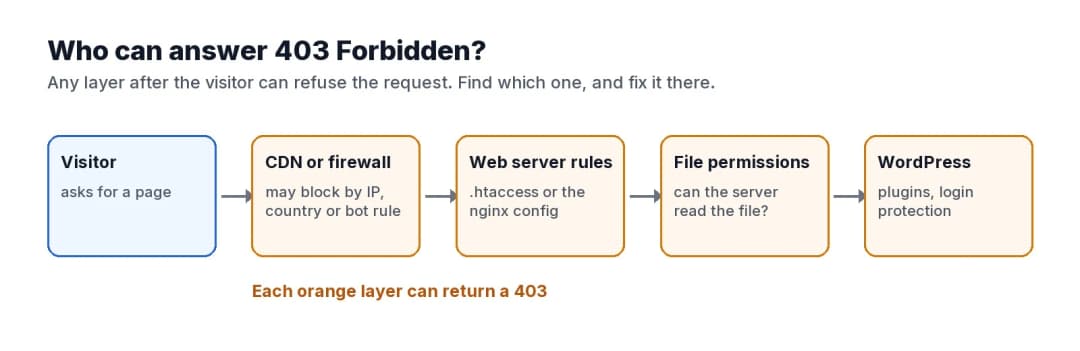
What Does 403 Forbidden Mean In WordPress?
Your browser asked for a page, the server understood the request, and it refused. That refusal can come from four places: a firewall or CDN in front of the site, the web server’s own rules, the file system, or WordPress and its plugins. The message often looks the same whichever one sent it, so the text of the error tells you little. Who sees it tells you a lot.
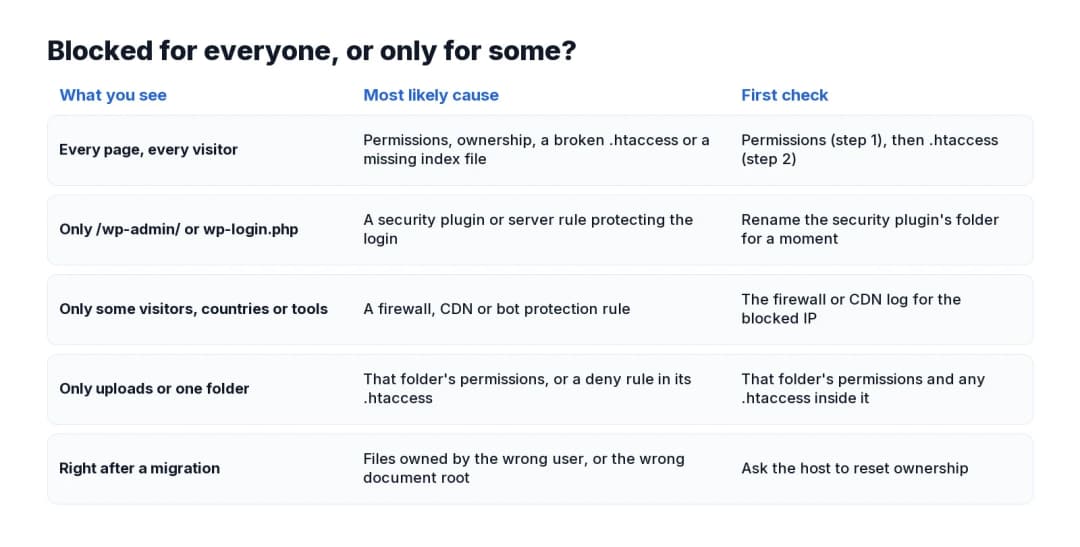
Blocked For Everyone, Or Only For Some?
Open the page in a private window, then on your phone using mobile data, and ask someone in another place to try. Then match what you see:
How To Fix A 403 Forbidden Error In WordPress
1. Check File And Folder Permissions
If every visitor gets a 403 everywhere, start with permissions. WordPress’s own guidance is clear:
“All directories should be 755 or 750. All files should be 644 or 640. Exception: wp-config.php should be 440 or 400 to prevent other users on the server from reading it. No directories should ever be given 777, even upload directories.”
Your host’s file manager can show and change permissions. With SSH access, these commands set the recommended values from the WordPress folder:
find . -type d -exec chmod 755 {} \;
find . -type f -exec chmod 644 {} \;
chmod 440 wp-config.php
If your host runs PHP as a different user from the file owner, 440 on wp-config.php can stop WordPress reading it. Check with your host first, or use 640.
2. Reset The .htaccess File
On Apache servers, a broken or overly strict .htaccess file is a common cause. Rename it to .htaccess_old over SFTP or in the file manager, then load the site. If it works, log in and go to Settings, Permalinks and press Save Changes. WordPress writes a fresh .htaccess with its standard rules. Then add back any custom rules you need, one at a time.
On nginx there is no .htaccess. The rules live in the server configuration, which only your host or server admin can change.
3. Check Your Security Plugin
If only /wp-admin/ or wp-login.php returns 403, a security plugin or a login protection rule is the usual cause. It may have blocked your own IP after failed logins, or limited the login page to certain countries. Rename the security plugin’s folder in wp-content/plugins/ for a moment. If the login comes back, the plugin was the cause: rename it back, log in, and check its blocked IP list and login rules. Our hardening checklist covers which login rules are worth keeping.
4. Check The Firewall Or CDN
If only some visitors, some countries or some tools get a 403, the block is almost certainly in front of WordPress. Open your firewall or CDN dashboard, find the event log, and search for the blocked visitor’s IP. Look for a country block, a rate limit or a bot rule that matched. Allow the visitor or relax the rule there. Nothing inside WordPress will change it.
5. Check One Folder At A Time
If only images in uploads, or one folder, return 403, check that folder’s permissions and look for an .htaccess file inside it. Some security setups add a “deny” rule to wp-content/uploads/ to stop PHP running there. That is good, but a rule that is too broad can block images as well.
6. After A Migration, Check Ownership
If the 403 started right after a move, the files may be owned by the wrong server user, or the domain may point to the wrong folder. Ask your host to reset file ownership for your account and to confirm the document root. Our clone and move guide covers what to check after any move.
When It Is Not A 403 Problem
- 404 Not Found means the page is not there. See our 404 guide.
- 500 or a “critical error” means the site broke while building the page. Start with our site-down guide.
- “Error establishing a database connection” is a database problem, not an access one. See our database error guide.
Where A Super Agent Fits
Protuno is Super Agents for WordPress: six AI agents you use from Claude, Claude Code, Codex or Cursor, each working from written playbooks and a Brain for each site. To be plain: Protuno cannot change server permissions or firewall rules. Those fixes happen in your hosting panel and your firewall. Where it helps:
- Wren’s Uptime Checker checks your site from an outside monitor and from your own server. A block from bot protection is reported as needing an allowlist rather than as the site being down, which tells “blocked for the checker” apart from “down for everyone”. It only reads.
- Rook’s WP Security Audit reviews your access settings and grades the site. On our test site it graded B (80.9), with most of its 8 fixes about login and access. It shows which rules exist, not why a 403 happened.
What a job may change depends on the agent’s mode on that site. Read only: no changes run. Approval mode: a run starts only when you press Approve in Protuno. Auto mode: runs start on their own, with no approval. More about all six AI agents for WordPress.
Common Questions
What does 403 Forbidden mean on WordPress?
The server understood the request and refused it. The cause is usually file permissions, an .htaccess rule, a security plugin or a firewall, not WordPress itself.
Why do I get 403 on wp-admin only?
Usually a security plugin or a server rule that protects the login, for example after several failed logins from your IP. Rename the plugin’s folder for a moment to check, then review its blocked IPs.
Can a plugin cause a 403?
Yes. Security and firewall plugins return 403 on purpose when they block a request. A plugin can also write strict rules into .htaccess that block more than intended.
Is a 403 bad for SEO?
If search engines get a 403, they cannot crawl the page, and a lasting 403 can drop it from results. Check that bot protection does not block search engines. See why a site is not showing on Google.
What is the difference between 403, 404 and 500?
403 means refused, 404 means not found, and 500 means the server failed while building the page. Each points to a different layer, so the fix is different.
Related Reading
- A WordPress hardening checklist
- WordPress security headers
- XML-RPC in WordPress
- Error establishing a database connection
Comments