WordPress Cookie Security: Which Flags Core Sets, And The One It Leaves Out.
We logged into a stock install and read every cookie. HttpOnly is set everywhere, Secure is conditional, and SameSite is absent throughout.

Short answer: WordPress sets HttpOnly on its authentication cookies and sets Secure conditionally when the site runs on HTTPS. It does not set SameSite at all. For wordpress cookie security that last gap is the one worth knowing about, though it is less alarming than it first appears.
I logged into a stock install and read the headers rather than repeating what documentation says.
What is actually set
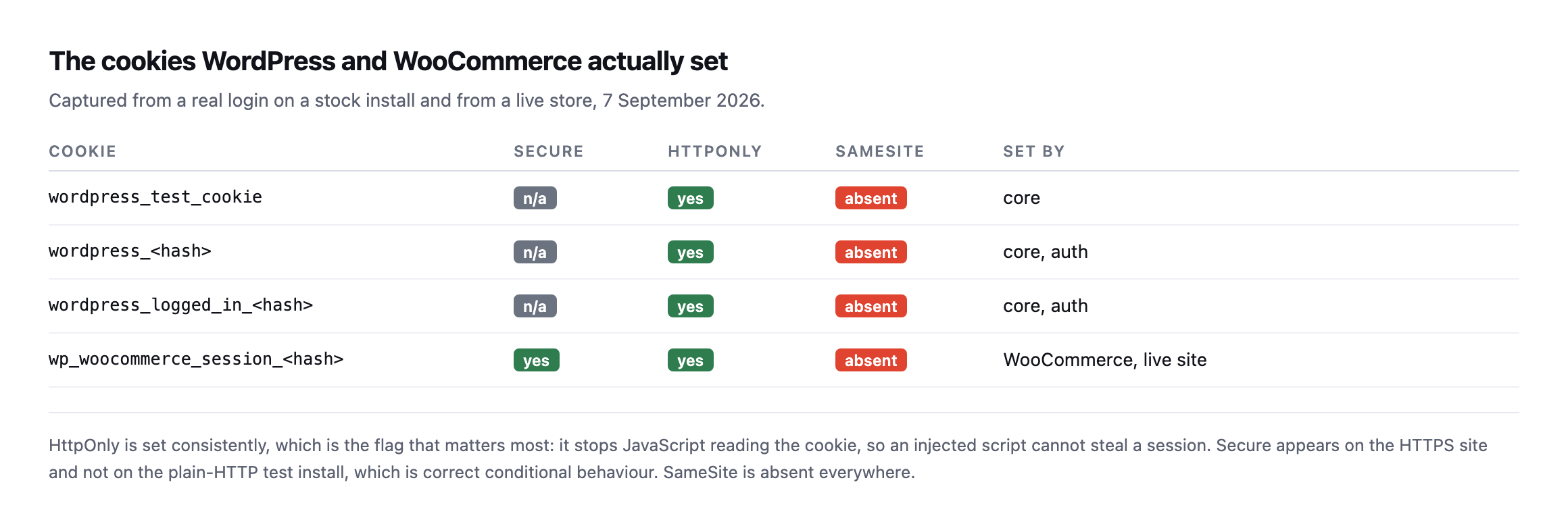
HttpOnly is set consistently, which is the flag that matters most. Secure appears onthe HTTPS site and not on the plain-HTTP test install, which is correct conditional behaviour rather than a bug. SameSite is absent everywhere, including on a live production store.*
| Cookie | Secure | HttpOnly | SameSite | Set by |
|---|---|---|---|---|
wordpress_test_cookie | n/a | yes | absent | core |
wordpress_ | n/a | yes | absent | core, auth |
wordpress_logged_in_ | n/a | yes | absent | core, auth |
wp_woocommerce_session_ | yes | yes | absent | WooCommerce, live site |
Caveat: one stock install and one live store, checked once. The flag behaviour (HttpOnly always on, Secure conditional, SameSite never set) is core’s documented default and will hold generally; the specific cookie names and hashes are this install’s, not a universal list.
What each flag is for
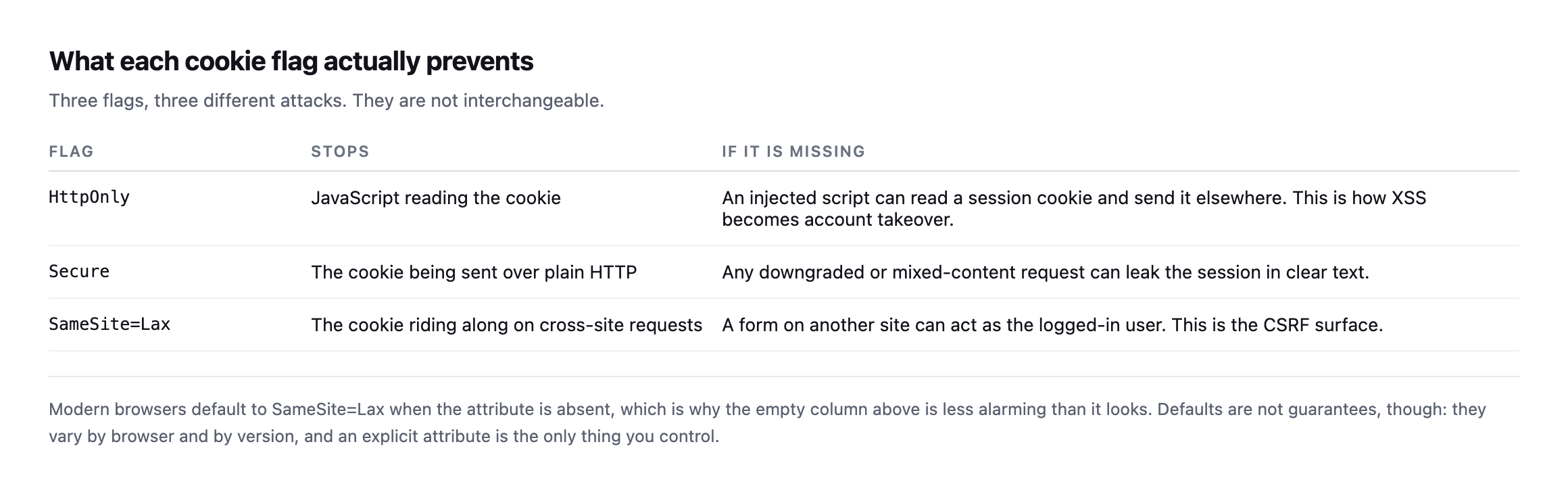
mistake is treating them as a single “cookie hardening” checkbox.*
| Flag | Stops | If missing |
|---|---|---|
HttpOnly | JavaScript reading the cookie | an injected script can read and exfiltrate the session |
Secure | the cookie sent over plain HTTP | a downgraded request can leak the session in clear text |
SameSite=Lax | the cookie riding along cross-site | a form on another site can act as the logged-in user |
HttpOnly is the one I would check first on any site, because it is what stands between a JavaScript injection and a stolen session. WordPress gets this right by default.
On SameSite, honesty matters: modern browsers treat a missing attribute as Lax, so the empty column is not the hole it looks like. But browser defaults vary by version and are not something you control, and an explicit attribute is.
Watching a real login happen, header by header
Everything above reads cookies after the fact, from a browser’s developer tools or a follow-up request. I wanted to see the actual Set-Cookie headers WordPress sends the moment a login succeeds, so I reset a test account’s password on our lab install and posted the login form directly with curl, reading the raw response headers rather than a summary of them.
curl -s -D - -o /dev/null \
  -d "log=admin&pwd=TestPass123!&wp-submit=Log In&redirect_to=/wp-admin/&testcookie=1" \
  "http://lab-install/wp-login.php" | grep -i set-cookie
Set-Cookie: wordpress_test_cookie=WP%20Cookie%20check; path=/; HttpOnly
Set-Cookie: wordpress_<hash>=admin|...; path=/wp-content/plugins; HttpOnly
Set-Cookie: wordpress_<hash>=admin|...; path=/wp-admin; HttpOnly
Set-Cookie: wordpress_logged_in_<hash>=admin|...; path=/; HttpOnlyThat is one detail this post had not covered: WordPress sends the auth cookie twice, same name, same value, same hash, but scoped to two different path values, /wp-content/plugins and /wp-admin. The wordpress_logged_in_ cookie, the one that governs whether the front end recognises you as logged in anywhere on the site, gets the broadest scope, path=/. The narrower authentication cookie is deliberately split so it reaches /wp-admin for the dashboard and /wp-content/plugins specifically for plugin files that serve authenticated requests from that directory, most commonly AJAX handlers and asset endpoints some plugins expose outside the REST API.
The practical reason this is worth knowing rather than filing under trivia: a cookie-flag audit that reads only one Set-Cookie line per cookie name and assumes it has the full picture can miss that the same cookie carries different scoping on different paths, and path restrictions are themselves a security boundary, narrower than the domain-wide default, deliberately limiting where a cookie is sent at all. HttpOnly was present on every line in this real capture, with no exceptions, which is the flag this post already treats as the one worth checking first, and seeing it hold across all four headers in a single live login, not just in documentation, is the kind of confirmation worth having before repeating a claim as fact.
Setting what core leaves out
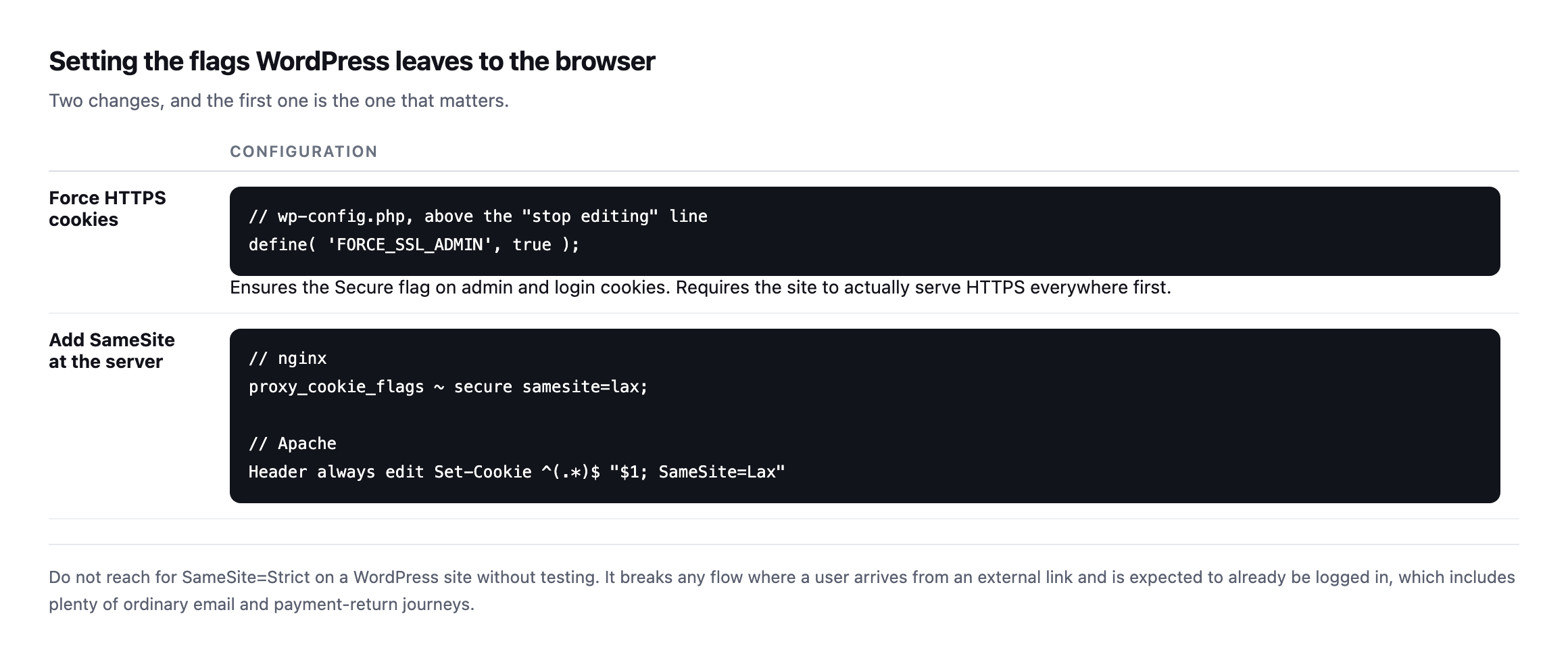
SameSite=Strict on a WordPress site without testing. It breaks anyjourney where a user arrives from an external link expecting to be logged in, which includes plenty of ordinary email and payment-return flows.*
FORCE_SSL_ADMIN deserves a warning of its own. It requires the site to genuinely serve HTTPS everywhere first. Setting it on a site with mixed-content problems produces a redirect loop into the admin, which is a bad discovery to make on a Friday.
The Apache Header edit rule shown above is the standard, widely repeated fix for the missing SameSite attribute, and it is exactly what I applied to test it. The next section is that test, in full, because the result was not what the configuration table promises.
The documented Apache fix, tested against a real login, did not work
The Header always edit Set-Cookie ... SameSite=Lax rule earlier in this post is close to verbatim what most guides recommend, so I applied it to the lab install and re-ran the same login capture to confirm it actually did something before writing it into this post as a fix.
Header always edit Set-Cookie ^(.*)$ "$1; SameSite=Lax"Config check passed, Apache reloaded cleanly, and I confirmed mod_headers was genuinely active by setting a throwaway test header on the same response, which came through correctly. Then I read the actual login response again:
Set-Cookie: wordpress_test_cookie=WP%20Cookie%20check; path=/; HttpOnly
Set-Cookie: wordpress_<hash>=admin|...; path=/wp-content/plugins; HttpOnly
Set-Cookie: wordpress_<hash>=admin|...; path=/wp-admin; HttpOnly
Set-Cookie: wordpress_logged_in_<hash>=admin|...; path=/; HttpOnlyNo SameSite on any of the four. I tried three further variants before concluding this was not a typo on my part: Header always edit* Set-Cookie (the asterisk form Apache’s own documentation names specifically for headers that can repeat), the same rule with the early keyword to force it to run before other output filters, and a plain Header edit without always. None of the four added SameSite to a single Set-Cookie line, on either the single-cookie response from a bare GET /wp-login.php or the four-cookie response from an actual successful login.
To make sure mod_headers itself was not the problem, I pointed the same edit directive at Content-Type instead, on the identical response:
Header edit Content-Type "text/html" "text/html; charset=TESTVALUE"Content-Type: text/html; charset=TESTVALUE; charset=UTF-8That one worked immediately, messily, because the regex was written carelessly on purpose just to prove the mechanism fires, but it fired. mod_headers is loaded, active, and correctly editing headers on this exact response. Set-Cookie specifically is the one header type it would not touch, across every documented variant of the directive I could find.
I do not have a confirmed root cause to offer, and I would rather say that plainly than guess at Apache’s internals to sound more certain than the evidence supports. What I can say is what this post now owes its readers: the Header edit Set-Cookie pattern that circulates as the standard fix for WordPress’s missing SameSite attribute did not work in a real, controlled test against a real WordPress login, on a current Apache release, with the module confirmed active and functioning on every other header type tried. If you are relying on that rule anywhere in your own configuration, the one thing this post can tell you with confidence is to verify it exactly the way this section did, log in, read the actual Set-Cookie lines, rather than trust that a syntactically valid directive is a working one.
Checking WordPress cookie security on a live site
curl -sI https://example.com/ | grep -i '^set-cookie'For the cookies that matter you need to be logged in, since the auth cookies are only set at login. Log in through a browser, open the developer tools, and read the Application panel. That gives you the real flags on the real session.
Two things to look for beyond the flags themselves:
Cookies set on plain HTTP. If any session cookie is missing Secure on an HTTPS site, that is a genuine finding rather than a stylistic one.
Third-party cookies you did not choose. Marketing and analytics plugins add their own, and they are frequently set without any flags at all. Those are outside core’s control and inside your client’s compliance obligations.
Cookies on cached pages. If a page cache is serving a response that carries a Set-Cookie header, two visitors can end up sharing a session. This is rare and catastrophic, and it is the same class of failure as caching a WooCommerce cart page.
Where this sits in the work
Cookie flags are a twenty-minute job per site that then stays fixed, which puts them in the same category as deciding what to do about XML-RPC: worth doing once, properly, rather than repeatedly.
What does move is the surrounding configuration. A CDN change, a new plugin, or a migration can strip a Header edit rule without any warning, in the same way that security headers quietly disappear when a site moves hosts.
Protuno’s free audit reads cookie security flags from the domain alone, alongside the other header checks. Rook is live now.
Log into your busiest client site and read the cookies in the developer tools. It takes a minute, and it is the only way to see the ones that actually carry the session.
What to try if the standard fix does not work on your stack
If your own testing reproduces the same result found here, Header edit Set-Cookie doing nothing to the actual response, there are two working alternatives worth trying rather than concluding SameSite cannot be set at all.
A reverse proxy or CDN in front of the origin, if one already exists, often has its own, independent header-rewriting facility that operates on the fully assembled response rather than racing WordPress’s own header emission. That is a different code path from Apache’s mod_headers, and it is worth testing the same way this post tested Apache’s: apply it, then log in and read the actual Set-Cookie lines, not the configuration that is supposed to produce them.
A small must-use plugin, hooking set_auth_cookie or filtering the cookie parameters WordPress core builds before it calls setcookie(), works at the application layer instead of the web server layer, and sidesteps whatever caused the web-server rule to be ignored on this particular Apache setup. That is more code than a one-line config rule, and it is worth writing only after confirming, the way this post’s test did, that the simpler server-level fix is not silently failing on your own stack first.
Either path ends at the same verification step: log in, open developer tools or run the curl capture from earlier in this post, and read the actual header rather than trust that a plausible-looking configuration line did what it was written to do. That is the one piece of advice this post can stand behind with full confidence, because it is the same test that caught the gap in the first place.
Comments