Payment Gateway Monitoring: Nothing Breaks, The Money Just Stops.
Five gateway failures that leave every URL returning 200. The signal that catches all of them, and the tempting approach you should not take.

Short answer: payment gateway monitoring cannot be done with status codes, because a broken gateway leaves the store returning 200 on every URL. The signal that catches it is the ratio of failed to successful orders, measured against the store’s own baseline. Everything else is a proxy.
Five failures, none of which take the site down
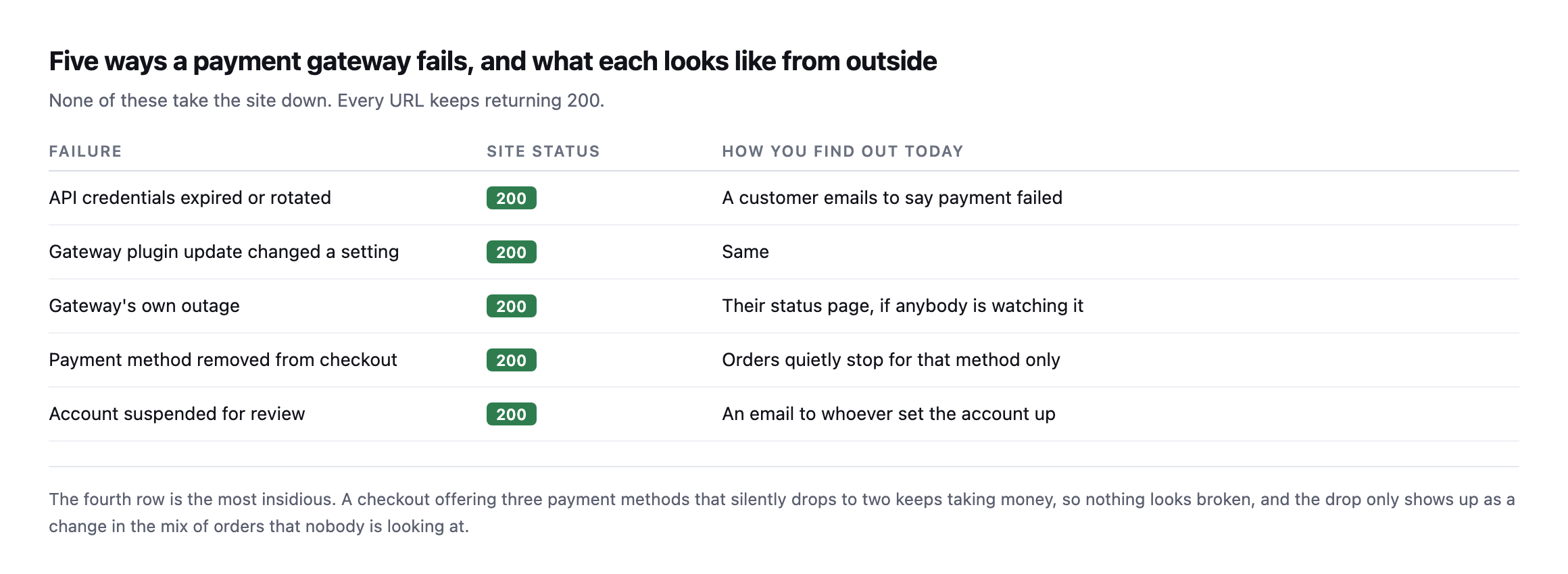
silently drops to two keeps taking money, so nothing looks broken.*
| Failure | Site status | How you find out today |
|---|---|---|
| API credentials expired or rotated | 200 | a customer emails to say payment failed |
| gateway plugin update changed a setting | 200 | same |
| gateway’s own outage | 200 | their status page, if anybody is watching it |
| payment method removed from checkout | 200 | orders quietly stop for that method only |
| account suspended for review | 200 | an email to whoever set the account up |
That specific category of partial, quiet failure is worth dwelling on carefully. A total gateway outage is loud, because orders stop entirely and somebody notices within hours. A single method disappearing is quiet: the store keeps trading, revenue dips by whatever share that method carried, and the dip reads as a slow week.
What actually signals it
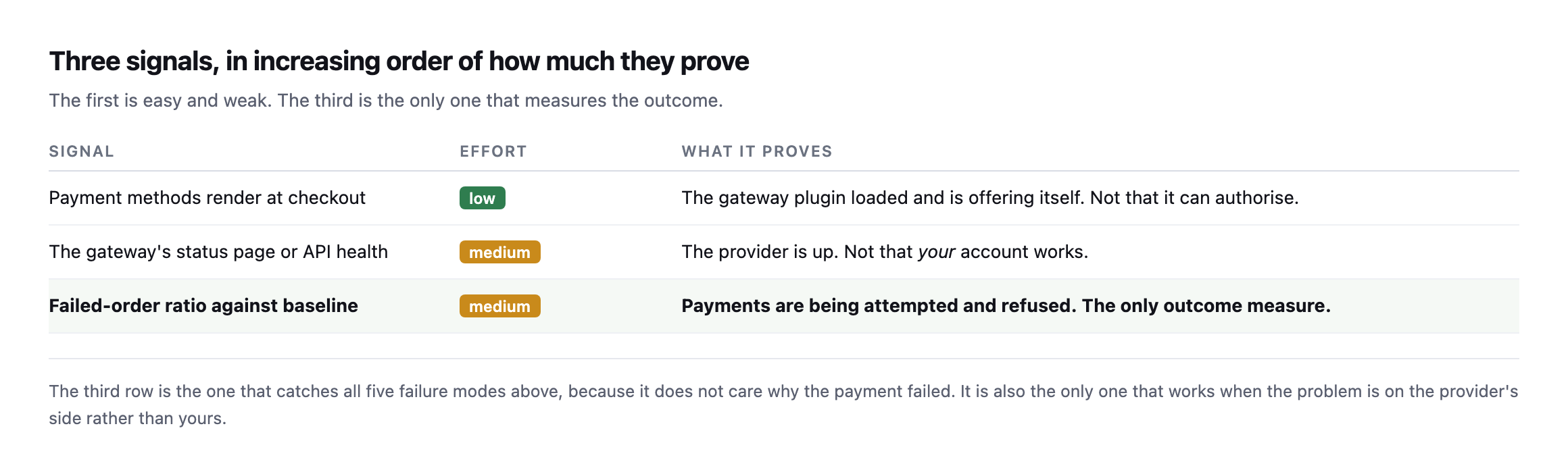
failed. It is also the only one that works when the problem is on the provider’s side.*
| Signal | Effort | What it proves |
|---|---|---|
| payment methods render at checkout | low | the gateway plugin loaded and is offering itself |
| the gateway’s status page or API health | medium | the provider is up, not that your account works |
| failed-order ratio against baseline | medium | payments being attempted and refused, the only outcome measure |
The first signal is nearly free once you are already walking a product to the payment step. I had written it here as “assert that a payment method appears in the checkout HTML”, and then I went and measured it, and that advice is wrong on any store using the block checkout. More on that below, because it changes the check.
The third is the one that measures the outcome, and it is the failed-order ratio rather than a raw count, because a ratio works on a store taking three orders a day and one taking three hundred.
The payment gateway monitoring check that takes one request
I built a store to break on purpose: WordPress 7.1, WooCommerce 11.1.0, the block checkout, one virtual product, three payment methods enabled. Then I turned the gateways off one at a time and measured the store from outside, as a logged-out visitor with a product in the cart.
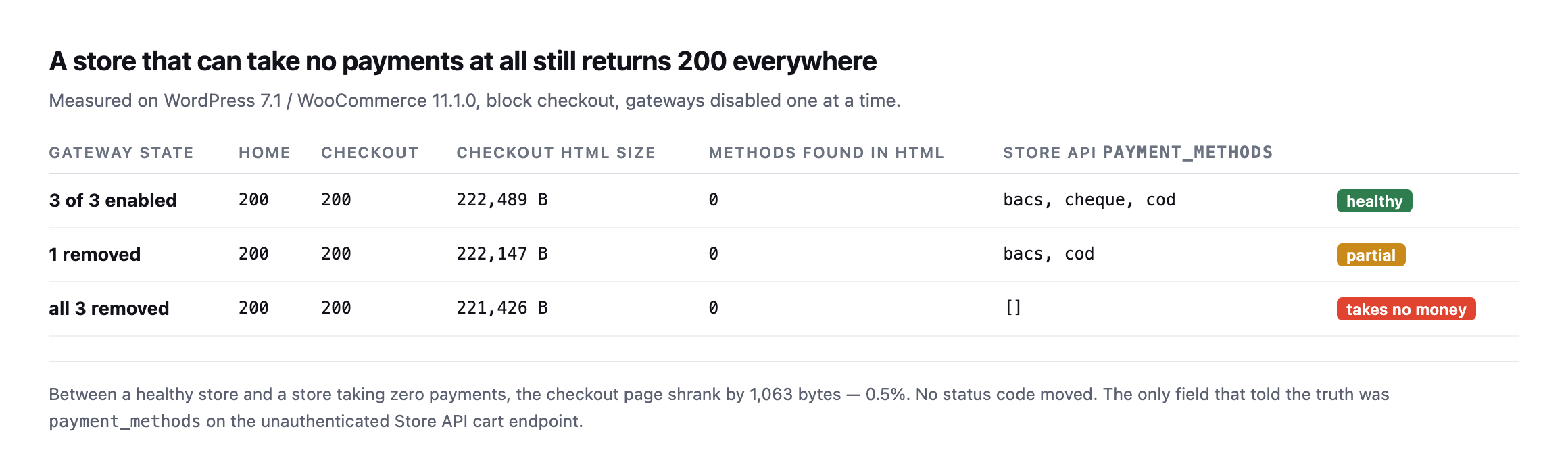
and the checkout page is 0.5% smaller. Nothing a status monitor watches moved at all.*
| Gateway state | Home | Checkout | Methods in HTML | Store API payment_methods |
|---|---|---|---|---|
| 3 of 3 enabled | 200 | 200 | 0 | bacs, cheque, cod (healthy) |
| 1 removed | 200 | 200 | 0 | bacs, cod (partial) |
| all 3 removed | 200 | 200 | 0 | [] (takes no money) |
Two things fell out of that, and one of them corrected my own draft.
The checkout HTML contains no payment methods. Not fewer, none. The block checkout renders the payment step in JavaScript from data fetched after page load, so the gateway IDs never appear in the server response. My column for “methods found in HTML” reads 0 in all three rows, including the healthy one. Any check that greps the checkout page for bacs or stripe will report a healthy store as broken, or a broken store as healthy, depending on which way you wrote the assertion.
The Store API tells you the truth, unauthenticated. WooCommerce exposes the cart at /wp-json/wc/store/v1/cart, and the response carries a payment_methods array. It is populated from get_available_payment_gateways(), the same call the checkout itself uses, so it reflects availability rather than configuration. A gateway that is enabled in settings but failing its own availability check does not appear. That is exactly the distinction that matters.
So the check is: add a product to the cart, read that one endpoint, and compare the array to the one you saw yesterday. No admin credentials, no test order, no headless browser.
GET /wp-json/wc/store/v1/cart
  -> "payment_methods": ["bacs","cod"]     # yesterday: ["bacs","cheque","cod"]
One method vanished and every status code in the building stayed green.
Caveat I owe you, because it nearly caught me while writing this. My first run of this probe returned an empty array on a healthy store, and it was convincing enough that I started drafting a paragraph about the Store API being unreliable. It was not. I was pointing the probe at the wrong container. Two WordPress installs, two ports, one transposed digit. If a monitoring result surprises you, confirm what you are actually talking to before you write it down, and definitely before you tell a client their store is broken.
Reproducing the whole experiment on a second, separate install
I rebuilt this exact test on a different WordPress install while expanding this post, rather than trust the original numbers alone, and hit a third gotcha before getting the same result.
The Store API request returned the site’s own homepage HTML instead of cart JSON, on both the plain and trailing-slash forms of the URL. The cause was not a wrong container this time. It was plain permalinks: this install had no pretty-permalink structure set, so /wp-json/... never reached the REST router at all and fell through to whatever the default front-end handler serves. The fix is the same fallback WordPress documents for exactly this situation:
curl "http://example.com/index.php?rest_route=/wc/store/v1/cart"That form bypasses the rewrite rules entirely and reaches the Store API regardless of permalink structure, which is worth keeping in a monitoring script’s back pocket specifically because a site’s permalink setting is exactly the kind of quiet configuration detail nobody checks before assuming a REST endpoint will simply respond.
With that fixed, the reproduction matched the original result exactly:
3 gateways enabled:  payment_methods: ["bacs", "cheque", "cod"]
1 disabled (cheque):  payment_methods: ["bacs", "cod"]
all 3 disabled:       payment_methods: []
At every step, curl -o /dev/null -w '%{http_code}' against the homepage and the checkout page both returned 200. A store that had just been reduced from three working payment methods to zero looked, by every status-code check running anywhere on it, completely healthy throughout. That is not a subtler version of the original finding. It is the identical mechanism, reproduced from nothing on a separate install, which is the strongest form of confirmation this kind of claim can get: not “it happened once,” but “it happens whenever the conditions are the same,” regardless of which specific WordPress instance is asked.
The approach not to take
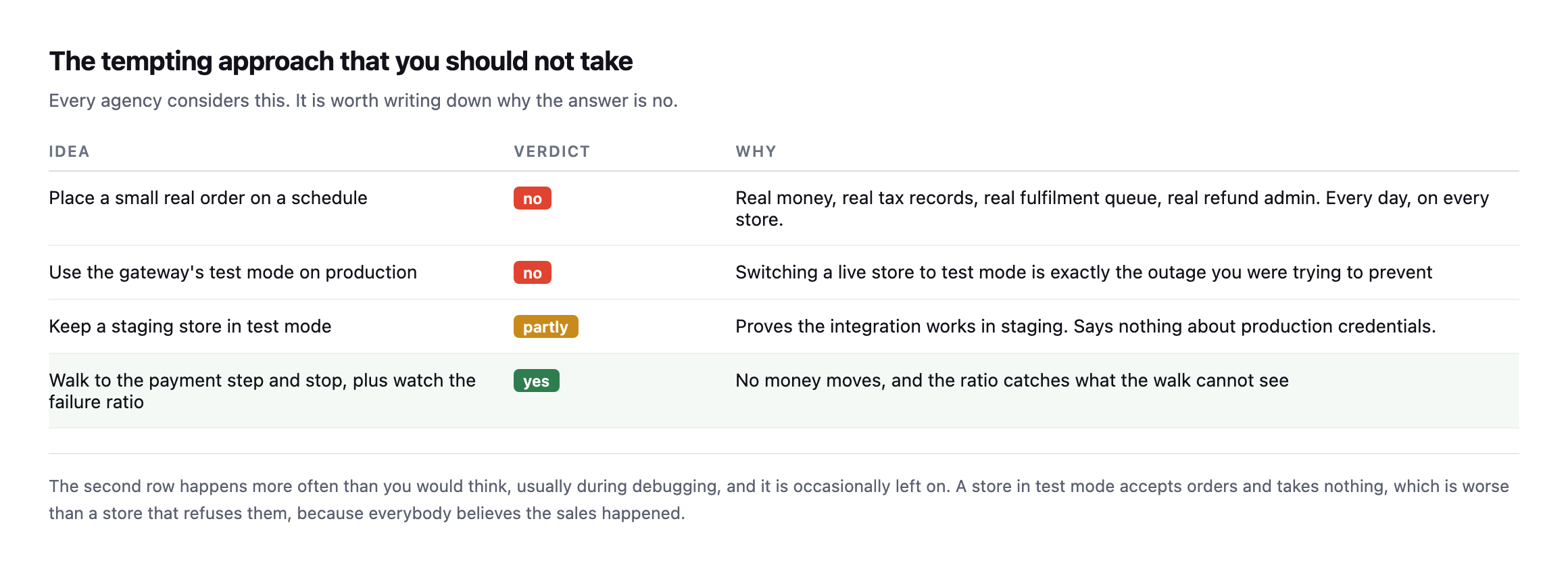
occasionally left on. A store in test mode accepts orders and takes nothing.*
Every single agency considers the first row eventually, and it is worth writing down plainly why the correct answer is no. A real order every day means real money, real tax records, a real fulfilment queue with a person attached, and real refund admin. Multiply all of that by every single store you actually look after.
The synthetic walk combined with the ratio check gets you exactly the same real coverage with none of that downside.
The nonce mechanics a monitoring script actually needs
Building the reproduction above end to end, not just reading the response, surfaced a requirement this post’s original walkthrough does not spell out: adding an item to the cart through the Store API needs a fresh nonce, read from the cart response itself, not a static value a script can hardcode once and reuse.
# 1. read the cart first, to obtain a nonce
curl -s -c jar -b jar ".../wc/store/v1/cart" -D - -o /dev/null | grep -i '^Nonce:'

# 2. use that exact value on the write request
curl -s -c jar -b jar -X POST ".../wc/store/v1/cart/add-item" \
  -H "Nonce: <value from step 1>" \
  -H "Content-Type: application/json" -d '{"id":122,"quantity":1}'
Skipping step one and guessing at a nonce, or reusing one from an earlier session, produces woocommerce_rest_invalid_nonce and a 403, which is a real, specific failure this monitoring approach can hit long before it ever reaches the payment-methods check it exists to run. A script built against this endpoint needs to read-then-write in that order every single time, using the same cookie jar throughout so the session the nonce was issued for matches the session making the follow-up request. That is a small implementation detail and it is exactly the kind of thing that turns a monitoring script that worked once in testing into one that silently fails every run in production, reporting nothing rather than reporting a problem, which is the worst possible failure mode for a monitor.
When the ratio moves
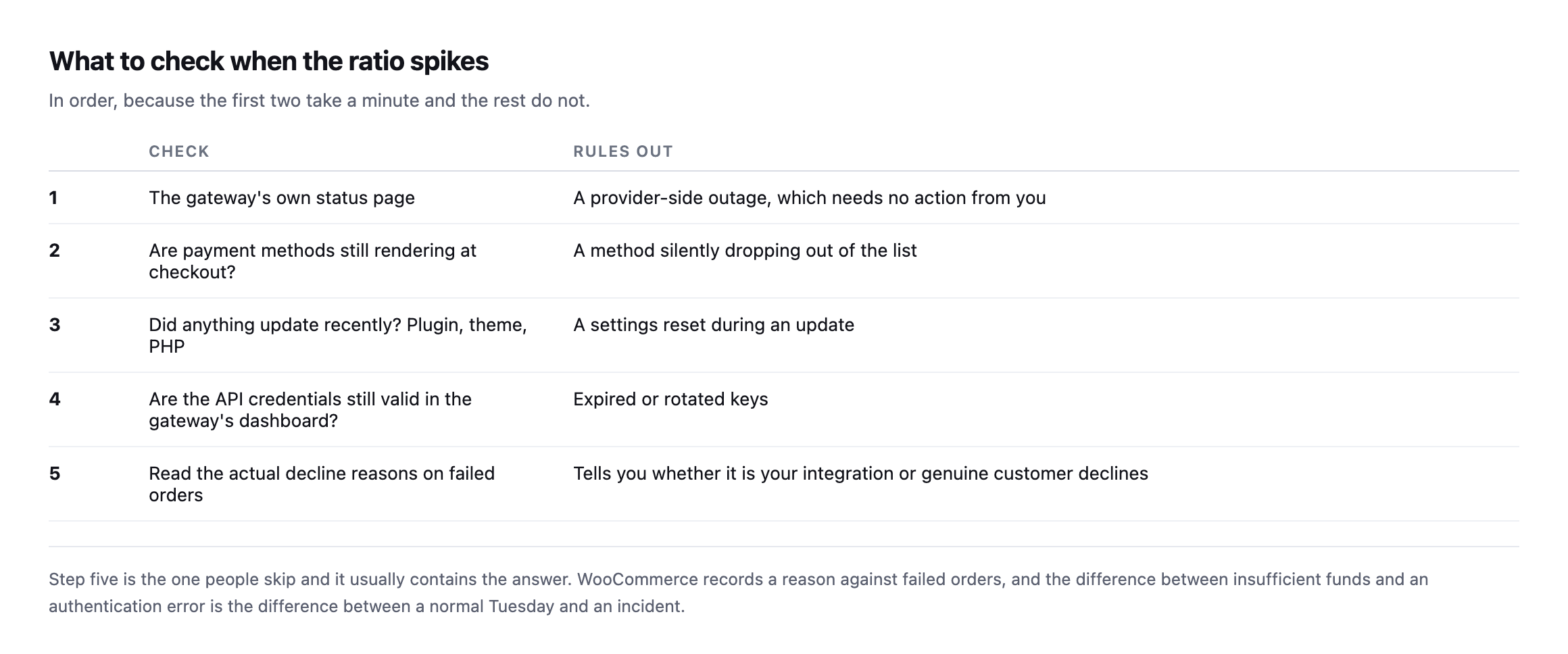
That last step deserves emphasis. WooCommerce records a reason against failed orders, and reading them separates the two cases that matter: genuine customer declines, which are a normal cost of trading, and integration errors, which are yours.
A run of “insufficient funds” is an ordinary Tuesday, nothing to escalate. A run of authentication or configuration errors is a real incident, and the difference between the two readings is one single column in the order list, checked or ignored.
Where this sits in the wider picture
Gateway health is the last of three checks that together cover a store, and they answer different questions.
Is the store even reachable at all? Uptime monitoring. Necessary, and the weakest of the three.
Can a customer reach the payment step? The synthetic walk, which catches a checkout returning 500 while the homepage stays green.
Does the money actually really move? The failed-order ratio. The only one that measures the outcome the client cares about.
Most stores have the first and neither of the others, which is why the common experience of a payment outage is a customer email rather than an alert.
Protuno’s eCommerce agent, Till, runs a read-only WooCommerce Health Review inside your own AI app. See the playbooks page for what it covers.
If you look after a store, do the manual version this week: open the checkout, count the payment methods, and write the number down. That number changing is the whole check, and nothing currently tells you when it does.
Having built and rebuilt this probe twice now, on two separate installs, the honest summary is that the concept is simple and the implementation has three small, specific traps: point it at the right install, handle plain permalinks with the rest_route fallback, and read a fresh nonce before every write. None of the three is difficult once known. All three are exactly the kind of thing that only surfaces by actually building the thing and running it against a real store, rather than reading the mechanism described and assuming it will simply work.
Comments