WordPress Contact Form Not Sending? The Worse Case Is When It Says It Did.
We built a site where mail is accepted and discarded. wp_mail returned TRUE, the visitor was thanked, and the enquiry reached nobody.

Short answer: a wordpress contact form not sending is usually easy to spot, because the visitor gets an error. The dangerous version is the opposite. wp_mail() returns TRUE, the visitor is thanked, and the message reaches nobody. Nothing is logged, nothing bounces, and the first sign is a client asking why enquiries dried up.
I reproduced it deliberately this week, and the part that stayed with me is that nobody in the chain lies.
The reproduction
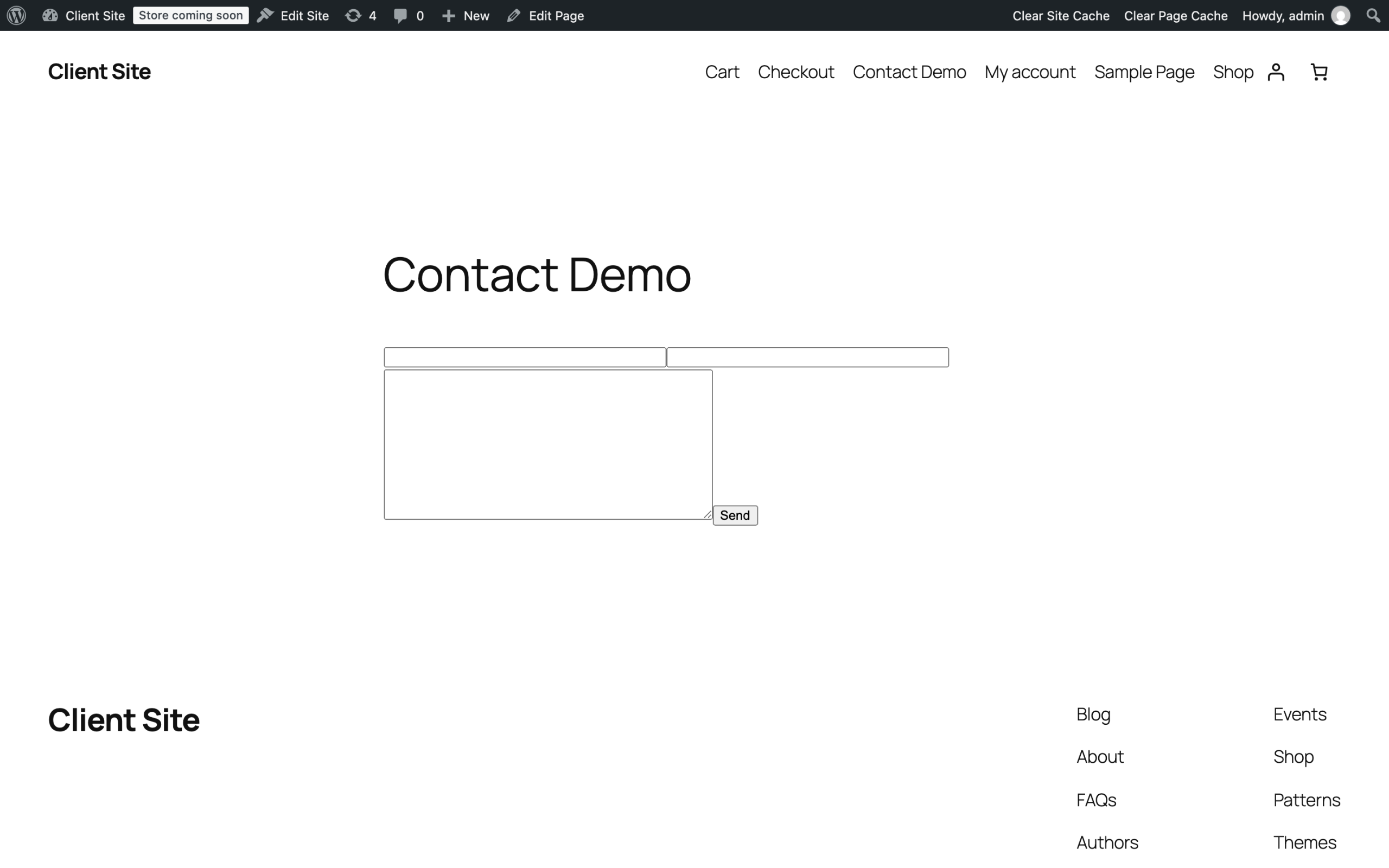
I built a WordPress site with a working contact form, then gave the server a mail transport that accepts every message and writes it nowhere. That is not a contrived setup. It is what a suspended SMTP account, an over-quota mailbox or a misconfigured relay looks like to PHP.
which is the point.*
Then I submitted it as a visitor would.
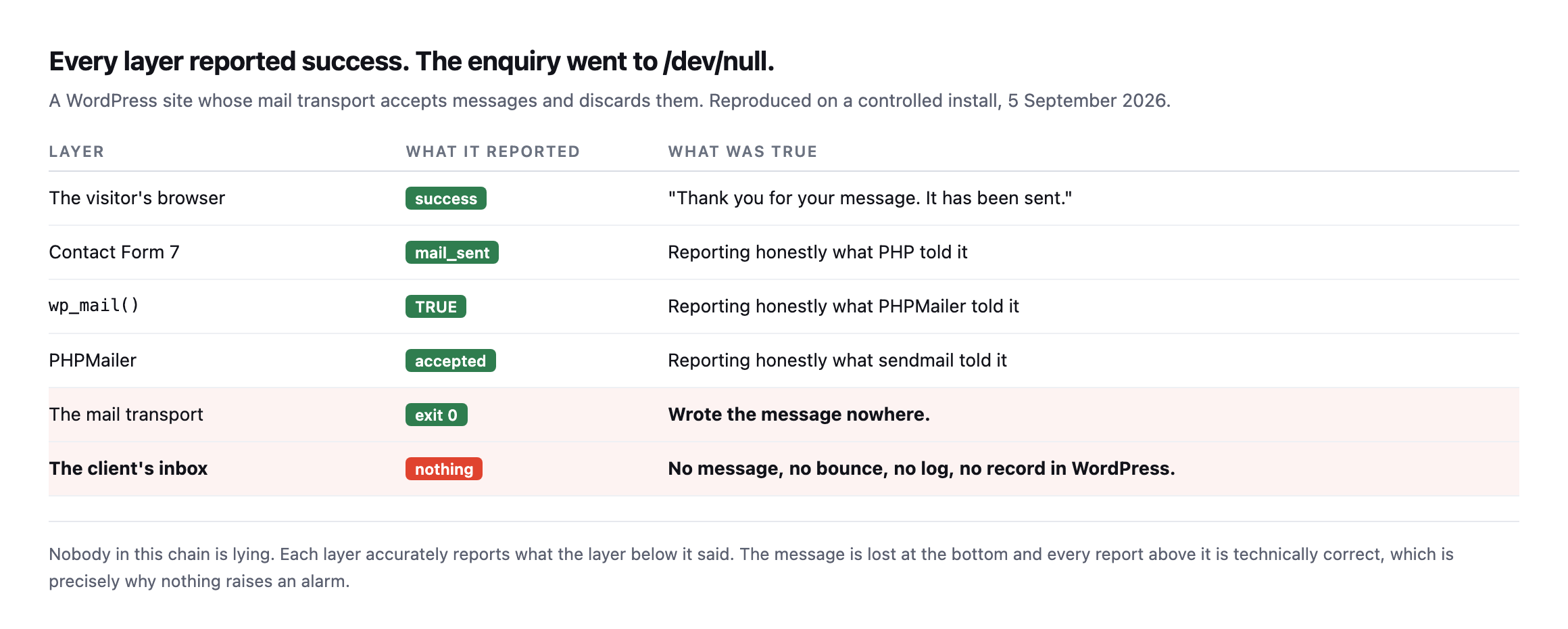
the bottom, and every report above it is technically correct. That is exactly why nothing raises an alarm.*
| Layer | What it reported | What was true |
|---|---|---|
| The visitor’s browser | success | “Thank you for your message. It has been sent.” |
| Contact Form 7 | mail_sent | reporting honestly what PHP told it |
wp_mail() | TRUE | reporting honestly what PHPMailer told it |
| PHPMailer | accepted | reporting honestly what sendmail told it |
| The mail transport | exit 0 | wrote the message nowhere |
| The client’s inbox | nothing | no message, no bounce, no log, no record |
Caveat: one deliberate reproduction on one test site, chosen to show the mechanism cleanly. It is not a claim about what fraction of contact forms fail this way. The demonstration is narrow: every layer can report truthfully and the message still vanish.
The visitor saw: “Thank you for your message. It has been sent.”
The enquiry went to /dev/null.
Reproducing both failure shapes fresh, on a second install
I rebuilt this reproduction on a different WordPress install while expanding this post, and it started by demonstrating the safe failure entirely by accident. This install’s mail transport was never configured at all, so the very first test run before I changed anything returned:
wp eval '$ok = wp_mail("[email protected]","test","body"); echo $ok ? "TRUE" : "FALSE";'FALSEReading the actual error via the wp_mail_failed hook explained why:
Invalid address: (From): wordpress@localhostPHPMailer correctly refused to send from a localhost address, exactly the honest, visible failure this post’s comparison table already names as the safe case: the visitor would see an error, and somebody would know to pick up the phone instead of assuming the message went through.
Reproducing the dangerous case took a little more work than the original post’s transport swap, because sendmail_path tricks depend on exactly which PHP process handles the request, and wp-cli’s own PHP is not always the one serving real visitor traffic. The cleaner, more portable method: WordPress core’s own pre_wp_mail filter, added specifically to let something short-circuit mail sending entirely.
wp eval '
add_filter("wp_mail_from", function($e) { return "[email protected]"; });
add_filter("pre_wp_mail", function($null, $atts) { return true; }, 10, 2);
$ok = wp_mail("[email protected]","test","body");
echo $ok ? "TRUE" : "FALSE";
'TRUEA valid-looking From address plus a filter that answers “handled” before anything actually attempts delivery reproduces the exact silent failure this post is about: wp_mail() reports success, nothing was sent, and nothing anywhere logs a discrepancy. Whether the real cause on a live site is a suspended SMTP account, a discarding relay, or a plugin’s own mail-interception filter, the mechanism a visitor and a client experience is identical, TRUE returned, a thank- you page shown, silence downstream.
Contact Form 7 is not the problem
I want to be fair here, because this failure gets blamed on form plugins constantly.
With a genuinely broken transport, the same form behaved perfectly honestly.
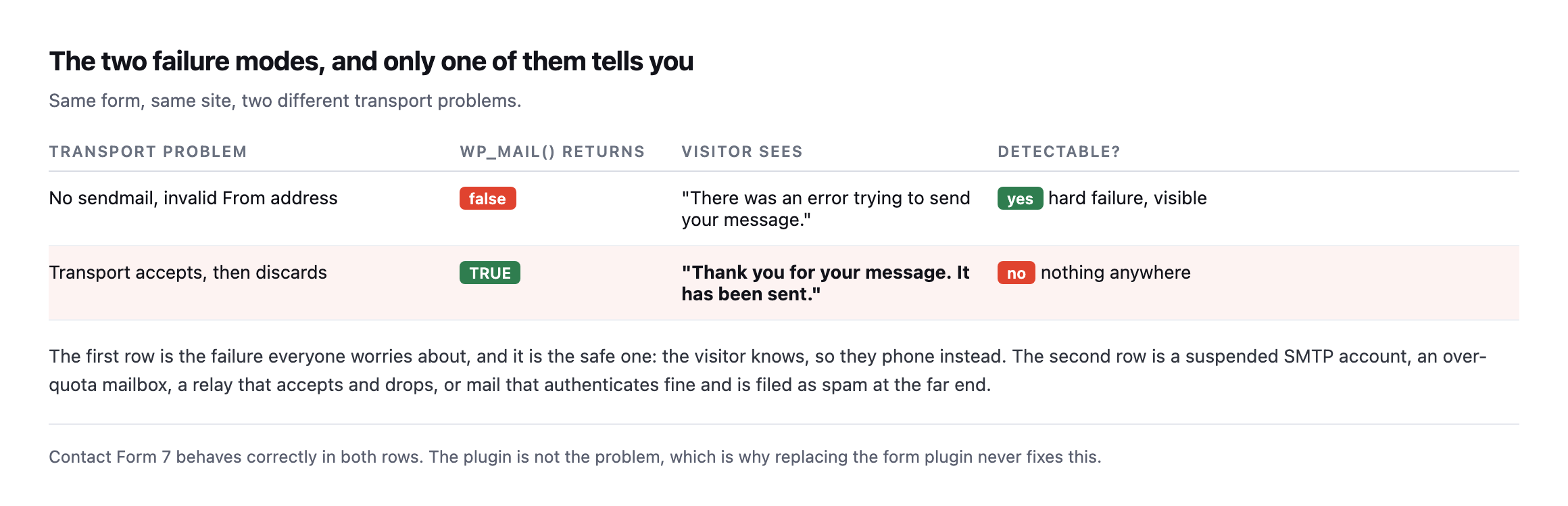
visitor knows and picks up the phone instead. Row two is the expensive one. Contact Form 7 behaves correctly in both, which is why swapping form plugins never fixes this.*
In the first case the form told the truth because PHP told it the truth. In the second case it told the truth too. The lie starts one layer below anything WordPress can see.
The filter that made the reproduction clean is also a real, sixth cause
pre_wp_mail deserves its own line in this post’s list of causes, not only credit for making the reproduction easier to build. It exists precisely so a plugin can intercept mail sending before WordPress attempts it, which is legitimate and common, a marketing plugin routing mail through its own API, a queueing system deferring sends, a testing tool blocking outbound mail on a staging copy. Every one of those is a real, intended use of the filter.
The failure mode is the same filter used carelessly, or left behind. A staging-site safeguard that blocks all outbound mail and returns true so nothing looks broken, accidentally shipped to production during a migration, produces exactly the reproduction above: every form submits successfully, every visitor is thanked, and nothing is ever sent, indefinitely, until somebody notices enquiries have stopped arriving. Unlike a suspended SMTP account or an over-quota mailbox, this cause leaves no trace in any mail provider’s logs at all, because the message never reaches a mail provider. It is intercepted and discarded entirely inside WordPress, one line of PHP, active or not, with no setting screen anywhere that shows whether it is currently doing so.
Checking for it is a one-line query rather than a guess:
wp eval 'global $wp_filter; echo isset($wp_filter["pre_wp_mail"]) ? "something is hooked" : "clear";'A result of “something is hooked” on a production site is worth investigating specifically, because it means at least one plugin or one line of custom code has the ability to intercept every outbound message before it ever reaches a transport, silently, and finding out what is hooked there and why takes minutes, considerably less time than diagnosing the same symptom by working backward through SMTP logs that were never going to show anything in the first place.
Four reasons a WordPress contact form is not sending while reporting success
Four transport states produce a TRUE from wp_mail() and no delivery:
- The relay accepts and drops. Exactly what I simulated. Common with a local sendmail that
was never wired to a real mail service.
- The SMTP account is suspended or over quota. The plugin authenticates, the provider
accepts, then the message is refused downstream and the bounce goes to an address nobody reads.
- Authentication passes and the message is filed as spam. Delivery succeeded. Nobody sees
it. This is where SPF and DMARC come in, and where an SPF record that quietly went over its lookup limit will cause exactly this pattern.
- The mail is queued to a scheduler that is not running. Plenty of plugins send
asynchronously, so a stopped WP-Cron means the message is never dispatched at all while every screen reports success.
That last one is worth checking first, because it is the cheapest to rule out.
There is a fifth, and it is the one I have seen bite agencies hardest after a migration. The site sends from a From address on a domain it is not authorised to send for. Everything succeeds locally. The receiving server checks SPF, finds the sending host is not listed, and files the message as spam or drops it outright. The site reports success because, from its own point of view, it did succeed. Nothing on the WordPress side can see the decision, because the decision is made by a machine you do not control, after the handoff.
This is why form debugging that stays inside WordPress so often ends in a shrug. The evidence you need is in the receiving server’s logs, and you have no access to those. The only thing you can genuinely control is whether the submission survives the attempt.
How to actually prove forms work
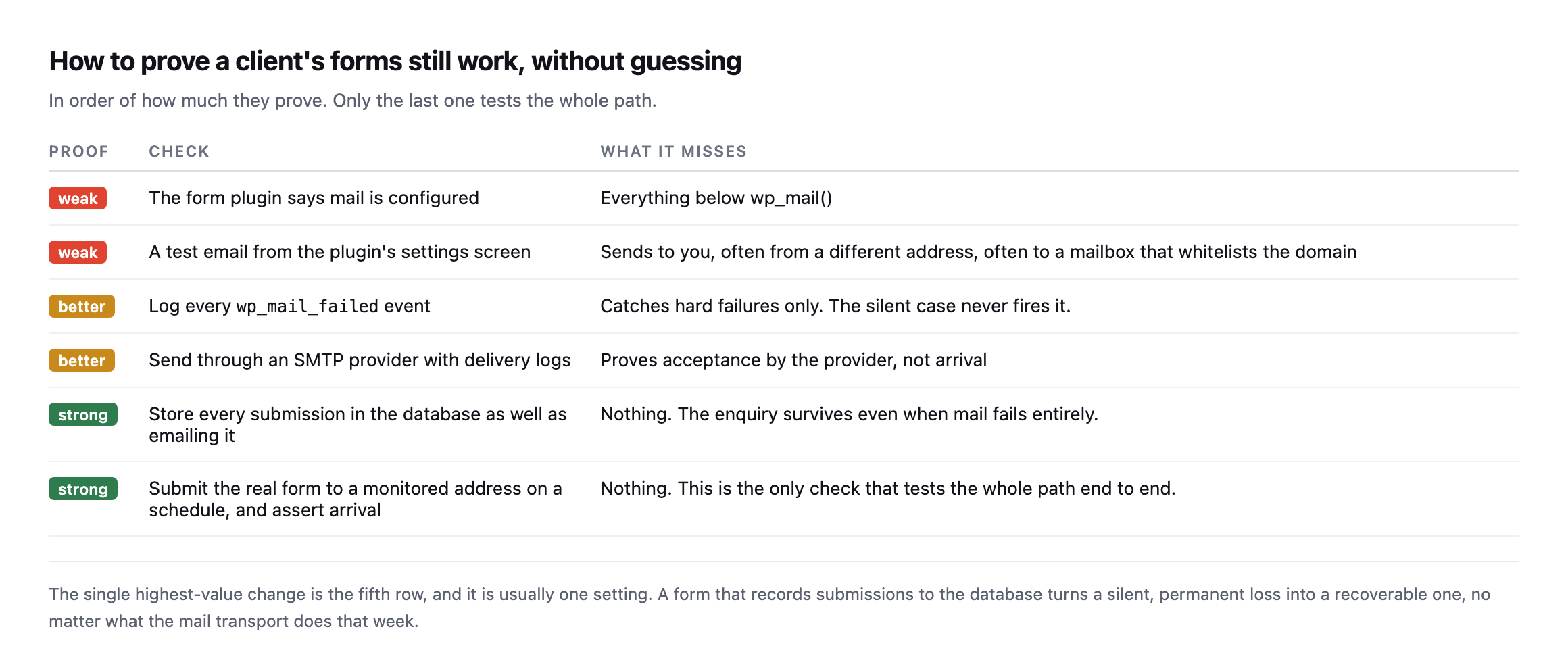
form that records submissions to the database turns a silent, permanent loss into a recoverable one, whatever the mail transport does that week.*
| Proof | Check | What it misses |
|---|---|---|
| weak | plugin says mail is configured | everything below wp_mail() |
| weak | test email from the settings screen | sends to you, often to a mailbox that already trusts the domain |
| better | log every wp_mail_failed event | catches hard failures only, never the silent case |
| better | SMTP provider with delivery logs | proves acceptance by the provider, not arrival |
| strong | store every submission in the database too | the enquiry survives even when mail fails entirely |
| strong | submit the real form on a schedule, assert arrival | the only check that tests the whole path end to end |
Three commands that tell you where you stand, in the order I run them:
# 1. does wp_mail even claim success on this site
wp eval '$ok = wp_mail("[email protected]","protuno test","body");
         echo $ok ? "TRUE" : "FALSE";'

# 2. if it returns FALSE, get the actual reason
wp eval 'add_action("wp_mail_failed", function($e){ echo $e->get_error_message(); });
         wp_mail("[email protected]","protuno test","body");'

# 3. what address is the site sending as, and is it authorised to
wp eval 'echo apply_filters("wp_mail_from", "wordpress@" . parse_url(home_url(), PHP_URL_HOST));'
Command three is the one that most often produces the surprise. If it prints something like [email protected] and the client’s mail is on Google Workspace, the site is sending as a domain whose SPF record does not list the web server. That message will authenticate as nothing and be treated accordingly.
TRUE from command one is not good news on its own. It only means the message left. Whether it arrived is a question WordPress cannot answer, which is the whole argument of this post.
Two practical notes from doing this.
A test email from the plugin’s settings screen proves almost nothing. It usually goes to you, often from a different sender address, and lands in a mailbox that already trusts the domain. The failure you are hunting affects a stranger’s message to a client’s inbox.
Turn on database storage today, before anything else. Whatever form plugin the site uses, there is a setting that keeps submissions. It costs nothing and it means the next silent outage is an inconvenience rather than a quarter of lost leads.
Why this is worth automating
The check is conceptually simple and genuinely annoying to do by hand: submit the real form, wait, confirm arrival at a monitored address, and do it on every site, repeatedly, because the thing that breaks it is usually a change somewhere else.
So it gets tested once at launch and trusted forever. That is the unbilled half hour again, and this time the cost is measured in enquiries the client never knew existed.
Echo, Protuno’s Marketing agent, is built to submit forms on a schedule and confirm they still post. Straight with you as on every post here: Echo is built and named but not live yet. The free audit checks the mail posture from the domain today, which catches the SPF and DMARC causes above but cannot see whether a form arrives.
Go and check the database-storage setting on your busiest client’s contact form. If it is off, that is the ten minutes with the highest return in this entire post.
Comments