WooCommerce Detection From The Outside: One Signal Is Never Enough.
One of our own sites returns 200 on the Store API with ten products and 404 on cart and checkout. Single-signal detection gets it wrong.

Short answer: reliable woocommerce detection needs at least two signals. The Store API proves the plugin is active. The cart and checkout pages prove somebody can actually buy something. Those two disagree more often than you would expect, including on one of our own sites.
Four sites, four different answers
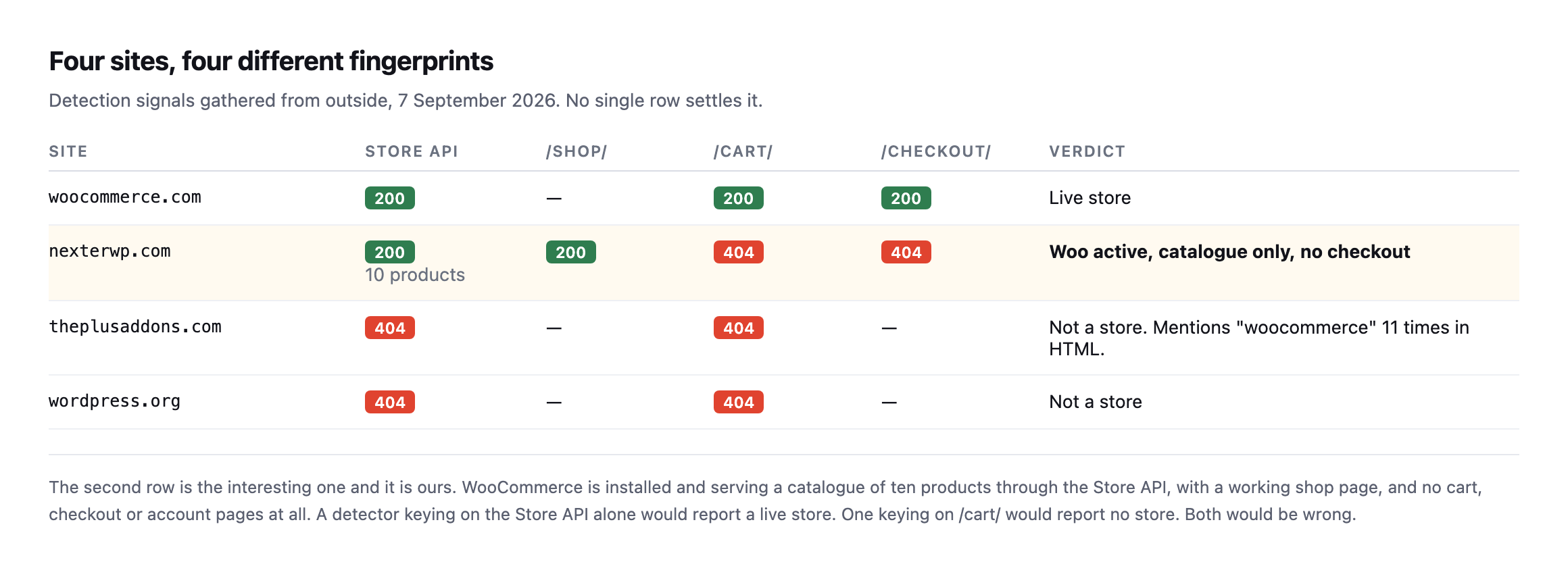
catalogue of ten products, with a working shop page and no cart, checkout or account pages at all.*
| Site | Store API | /shop/ | /cart/ | /checkout/ | Verdict |
|---|---|---|---|---|---|
| woocommerce.com | 200 | n/a | 200 | 200 | live store |
| siteb.example | 200, 10 products | 200 | 404 | 404 | Woo active, catalogue only |
| sitec.example | 404 | n/a | 404 | n/a | not a store, mentions “woocommerce” 11 times |
| wordpress.org | 404 | n/a | 404 | n/a | not a store |
A detector keying on the Store API alone would report siteb.example as a live store. One keying on /cart/ would report no store. Both would be wrong, and the real answer is more specific than either: WooCommerce is installed and being used as a product catalogue, with the actual selling happening somewhere else.
That is a completely legitimate configuration, and it is exactly the case that breaks simple detection.
I went one layer deeper on siteb.example while re-checking this table, because the Store API response carries more than a product count. It also states, per product, whether the item is purchasable:
curl -s "https://siteb.example/wp-json/wc/store/v1/products?per_page=3" | python3 -c "
import json,sys
for p in json.load(sys.stdin):
    print(p['name'], p['prices']['price'], p['is_purchasable'])
"
Performance Leggings 3999 True
Casual Striped Tee 4499 True
Denim Dream Jacket 1999 TrueEvery sampled product reports is_purchasable: True, with a real price attached, on a site whose /cart/ and /checkout/ both return 404. WooCommerce’s own API considers these items buyable in principle, and no path on the site currently lets a visitor act on that. That is not a contradiction inside WooCommerce, is_purchasable describes the product’s own configuration, in stock, priced, not restricted, independent of whether a checkout flow is wired up to let anyone act on it. It is the clearest evidence yet for why this post’s opening claim holds: the plugin’s own data model can describe a fully sellable catalogue while the site itself provides no way to buy anything from it, and only a check that spans both, the API’s opinion of the product and the actual page that would complete a sale, catches the gap between them.
Which WooCommerce detection signals to trust
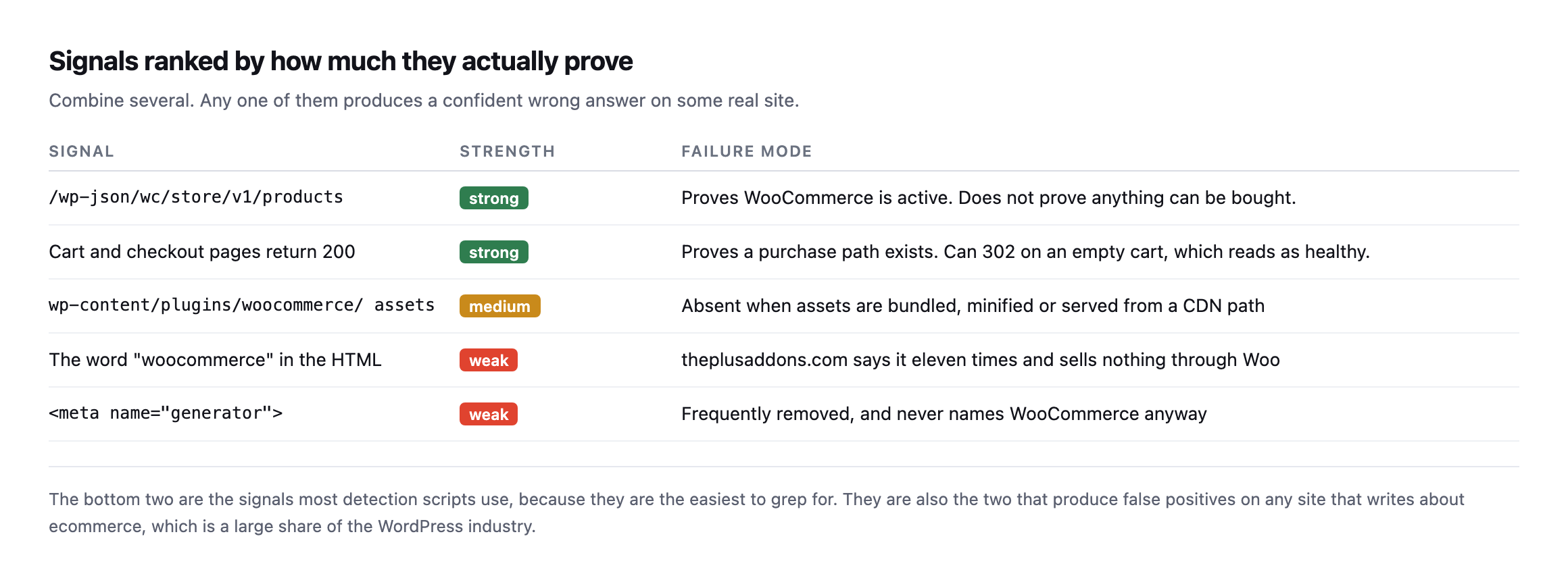
to grep for. They are also the two that produce false positives on any site that writes about ecommerce.*
| Signal | Strength | Failure mode |
|---|---|---|
/wp-json/wc/store/v1/products | strong | proves Woo is active, not that anything can be bought |
| cart and checkout return 200 | strong | can 302 on an empty cart, which reads as healthy |
wp-content/plugins/woocommerce/ assets | medium | absent when bundled, minified, or CDN-served |
| the word “woocommerce” in the HTML | weak | eleven mentions here, sells nothing through Woo |
| weak | frequently removed, never names WooCommerce anyway |
sitec.example mentions “woocommerce” eleven times in its homepage HTML and sells nothing through it. A word-match detector calls that a store.
The checkout signal has its own trap, which I found while testing checkout monitoring: a /checkout/ URL requested with an empty cart returns a 302 rather than a 200, because WooCommerce redirects away. A detector following redirects records a success and learns nothing.
The row in my own table that turned out to be wrong
I re-ran the exact loop from this post while expanding it, rather than assume the original table still held, and one result had changed enough to be worth investigating rather than just updating a number.
=== sitec.example ===
store api: 404
/shop/         404
/cart/         404
/checkout/     200
/my-account/   404
/checkout/ now returns 200, not 404. That contradicts this post’s own earlier verdict of “not a store.” I checked what was actually there instead of trusting the status code alone:
curl -s https://sitec.example/checkout/ | grep -oE "<title>[^<]*</title>"<title>Checkout | Site C</title>A real checkout page, live, serving a title that says exactly what it is. And searching that same page for platform markers found WooCommerce and woocommerce in the HTML, not a generic word mention this time but class names and script paths, the kind that indicate the plugin is actually rendering the page rather than the word simply appearing in prose somewhere on the site.
So sitec.example is a WooCommerce store, selling the plugin itself, and this post’s own detection table called it “not a store” because the one signal it trusted most, the Store API, returned 404. I checked why:
curl -s https://sitec.example/wp-json/ | python3 -c "
import json,sys
d=json.load(sys.stdin)
print([n for n in d['namespaces'] if 'wc' in n.lower()])
"[]No wc/ namespace is registered in the REST API discovery document at all. Not blocked, not firewalled, simply never activated, most likely because the site runs WooCommerce’s older shortcode-based checkout rather than the block-based checkout the Store API exists to serve, so nothing on the site has ever called it and WordPress never registered the routes.
That is the actual failure mode this post has been arguing against from the first paragraph, found in its own reference table rather than a hypothetical: the single strongest signal in the ranked list, the Store API, produces a false negative on a real, live, selling WooCommerce installation, because the signal’s presence depends on which checkout architecture the store happens to use, not on whether WooCommerce is active and taking orders. A detector trusting the Store API alone, exactly the “strong” signal this post recommended leaning on hardest, would have filed a real customer-facing store as a brochure site.
The corrected verdict, and the reason a fourth check earns its place: a direct request to the page path itself, checked for a store-specific page title rather than only a status code, catches what an API-only check misses. /checkout/ returning 200 with a title naming itself “Checkout” is a signal in its own right, worth treating as equally strong to the Store API rather than subordinate to it, precisely because the two can disagree, as they do here.
Following the redirect, not just reading its status code
The same re-run turned up something worth adding to how the loop is read, on a site already confirmed as a real, functioning store. woocommerce.com itself now redirects three of the four paths this post checks:
| Path requested | Status | Redirects to |
|---|---|---|
/shop/ | 302 | /products/ |
/checkout/ | 302 | /cart/ |
/my-account/ | 302 | a WordPress.com OAuth login screen |
None of those are failures. /shop/ moved to a renamed URL, /checkout/ redirects to the cart when nothing is in it, which this post already names as expected, and /my-account/ bounces to a centralised login system woocommerce.com uses instead of WordPress’s own. A loop that stops at the status code and treats every non-200 as “not present” would read all three as absence, on a site that is unambiguously a live, selling store. Add -L to follow redirects, or check the location header explicitly with curl -sI, and read where a redirect lands before deciding what it means, the same discipline the checkout monitoring post already applies to the empty-cart case specifically.
Running the same loop against a site that definitely is not a store
For a clean control, I ran the loop against protuno.com itself, which is not WooCommerce, not even WordPress on the visitor-facing side, since the frontend is a separate Next.js application entirely.
=== protuno.com ===
store api: 404
/shop/         308
/cart/         308
/checkout/     308
/my-account/   308
Every path redirects, 308, rather than returning a clean 404 outright, because the frontend strips trailing slashes and issues a permanent redirect to the slash-free version of whatever URL was requested, a routing detail with nothing to do with commerce. Following one of those redirects settles the question properly:
curl -s -L https://protuno.com/cart | grep -oE "<title>[^<]*</title>"<title>Page Not Found · Protuno</title>A 404 page, titled as one, reached after the redirect. That is the correct verdict for a site that sells nothing, and it took following the redirect chain to confirm it rather than stopping at the first 308 and guessing what it meant. The general rule this and the sitec.example correction above both point at: a raw status code from any single request in this loop is a clue, not a verdict, and the verdict only becomes trustworthy once you have either read the page title behind a 200, or followed a redirect to see what it actually resolves to.
The loop
D=example.com
printf 'store api: ' ; curl -s -o /dev/null -w '%{http_code}n' "https://$D/wp-json/wc/store/v1/products"
for p in /shop/ /cart/ /checkout/ /my-account/; do
  printf '%-14s ' "$p"
  curl -s -o /dev/null -w '%{http_code}n' "https://$D$p"
done
Read the combination rather than any single line. Store API 200 with cart and checkout 404 means a catalogue. All four 200 means a live selling path. Store API 404 with the word appearing in the HTML means somebody writes about ecommerce.
Why bother
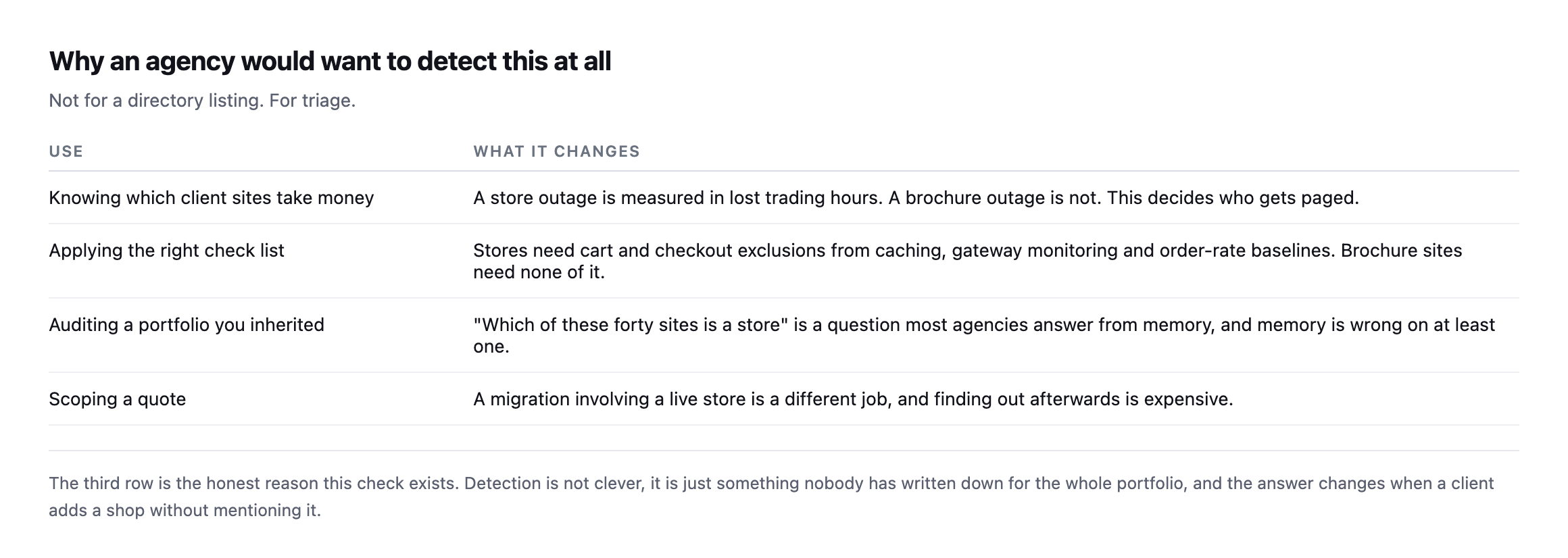
written down for the whole portfolio, and the answer changes when a client adds a shop without telling anybody.*
The practical value is triage. A store outage costs trading hours; a brochure outage costs goodwill. Knowing which is which decides who gets phoned at the weekend, and getting that classification wrong in either direction, as this post’s own first table did, means either under-reacting to a real outage or paging someone for a site that was never taking orders.
It also matters for the mail side. A store sends transactional email that a brochure site does not, so its SPF and DMARC posture carries a different weight and a deliverability problem there costs orders rather than enquiries.
It also decides which checks apply. Stores need cart and checkout excluded from caching, gateway monitoring and order-rate baselines. Brochure sites need none of that, and running store checks against them generates noise that trains people to ignore the reports.
Protuno’s free audit detects a storefront from the domain alone and reports whether the cart and checkout addresses answer, which is how the table above was built and, just as importantly, how it kept getting re-checked and corrected while this post itself was being expanded. Straight with you as on every post here: Till, the eCommerce agent, is live now, since 27 October 2026, and runs a WooCommerce Health Review inside your own AI app. The loop and the follow-up questions above are still the way to check a store from the outside, and neither takes long to run.
Run the loop across your portfolio once. On ours, siteb.example came back exactly that way: a catalogue nobody had flagged as anything other than a marketing site, and sitec.example came back the other way, a real store this post’s own first pass had wrongly written off.
Both mistakes cost something different. Missing a catalogue-only site means treating it like a brochure when it is one migration away from taking orders. Missing a live store, the actual error this post’s original table made, means a site is generating revenue with nobody monitoring the checkout for the outages the gateway health post describes. Neither failure announces itself. Both are visible in under a minute to whoever runs the four-line loop and reads what each result actually says, rather than trusting the first signal that answers.
Comments