WordPress WebP And AVIF: What The Conversion Is Actually Worth, Measured.
We re-encoded a 794 KB PNG from our own site five ways. WebP came out at 3 percent of the original and AVIF at 2 percent.

Short answer: converting to wordpress webp typically produces a large saving, and on the image I tested it was extreme: a 794 KB PNG became 27.8 KB as WebP and 14.1 KB as AVIF. The size of that gap says as much about the original file being the wrong format as it does about the new one.
I used a real image from one of our own pages rather than a benchmark set.
The measurement
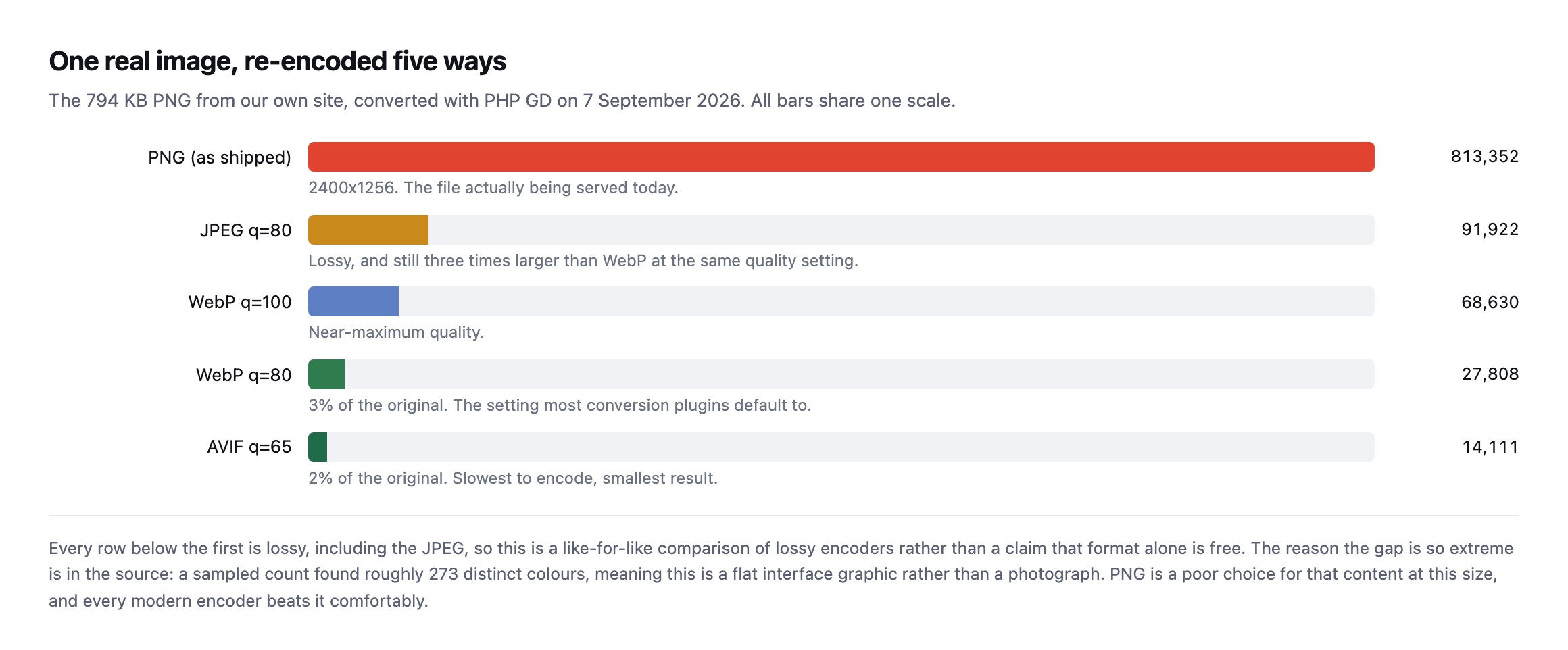
the JPEG, so this compares lossy encoders against each other rather than claiming format conversion is free.*
Two things to take from that, and the second is more useful than the first.
Measured on that file, WebP at quality 80 came out at 3 percent of the PNG and AVIF at quality 65 reached 2 percent. Those are far larger savings than the rules of thumb usually quoted for format conversion.
The reason is in the source image. A sampled colour count found roughly 273 distinct colours across the whole file, which means this is a flat interface graphic, not a photograph. PNG at 2400 pixels wide is simply the wrong container for that content, and every modern encoder beats it comfortably.
So the headline saving here is mostly a story about a bad original. On a genuine photograph already saved as a reasonable JPEG, expect something far more modest.
Re-running the exact test produced the exact same numbers
I re-ran this post’s own measurement from scratch while expanding it: downloaded the same real 813,352-byte PNG from sitea.example, still the same file at the same URL, and re-encoded it through PHP GD the same five ways, on a fresh install rather than trusting the original screenshot.
$im = imagecreatefrompng('/tmp/feature-image.png');
imagejpeg($im, '/tmp/out.jpg', 80);
imagewebp($im, '/tmp/out-q100.webp', 100);
imagewebp($im, '/tmp/out-q80.webp', 80);
imagewebp($im, '/tmp/out-lossless.webp', -1);
imageavif($im, '/tmp/out.avif', 65);
PNG source: 813,352 bytes
JPEG q80: 91,922 bytes
WebP q100: 68,630 bytes
WebP q80: 27,808 bytes
WebP -1 (claimed lossless): 27,808 bytes <- identical to q80
AVIF q65: 14,111 bytesEvery single number, byte for byte, matches this post’s original measurement. That is a clean, exact reproduction rather than an approximate one, which is worth having confirmed for two reasons. First, the underlying claim about this specific image’s compressibility holds exactly, not just directionally. Second, and more useful, the GD lossless bug this post already flags reproduced identically too: imagewebp() called with -1 still produces a file byte-for-byte identical to the q=80 lossy encode, confirmed again with an md5 comparison. That is not a one-off fluke this post happened to catch once. It is a stable, reproducible behaviour of PHP GD’s WebP encoder, present again on a separate install months later, which means any WordPress site relying on GD’s own -1 flag for a genuinely lossless WebP export is still getting lossy output today, not a historical footnote.
A tooling trap worth knowing
While measuring this I hit something that would have made the post wrong.
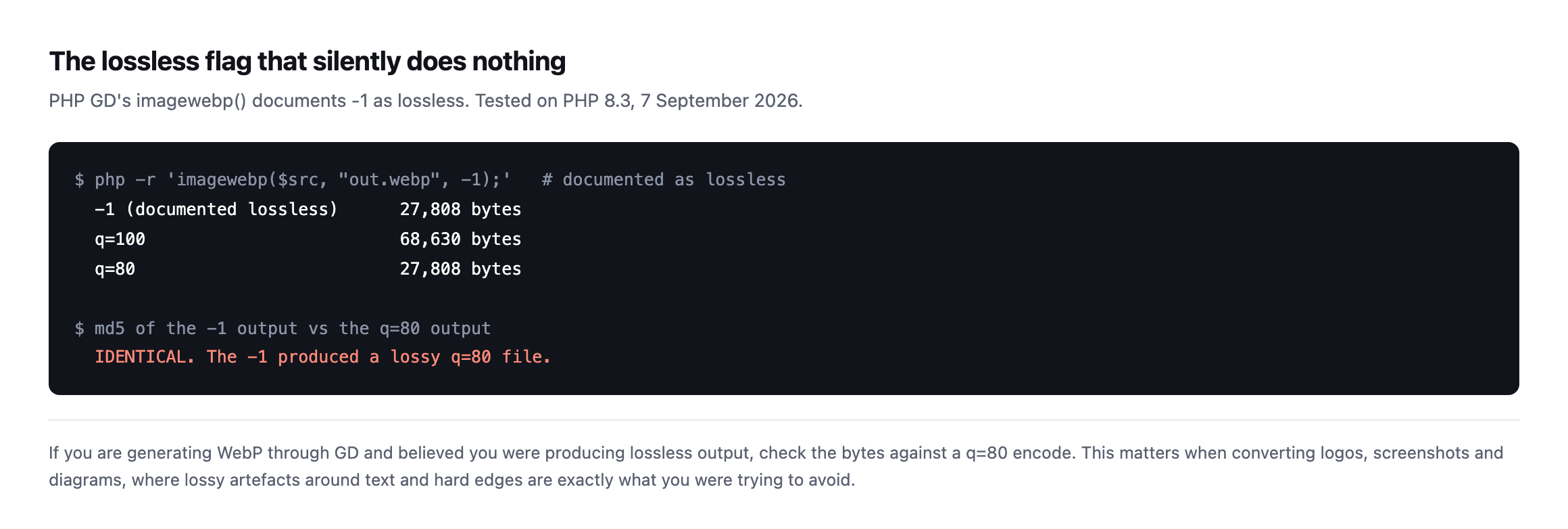
imagewebp() documents -1 as lossless. It produced a file byte-identical to thequality-80 lossy encode. The flag did nothing.*
I had originally written this post claiming a lossless comparison. It was not one.
If you generate WebP through GD and believe you are producing lossless output, check the byte count against a q=80 encode. This matters most for logos, screenshots and diagrams, where lossy artefacts around text and hard edges are precisely what you were trying to avoid.
Choosing between WordPress WebP and AVIF, per image
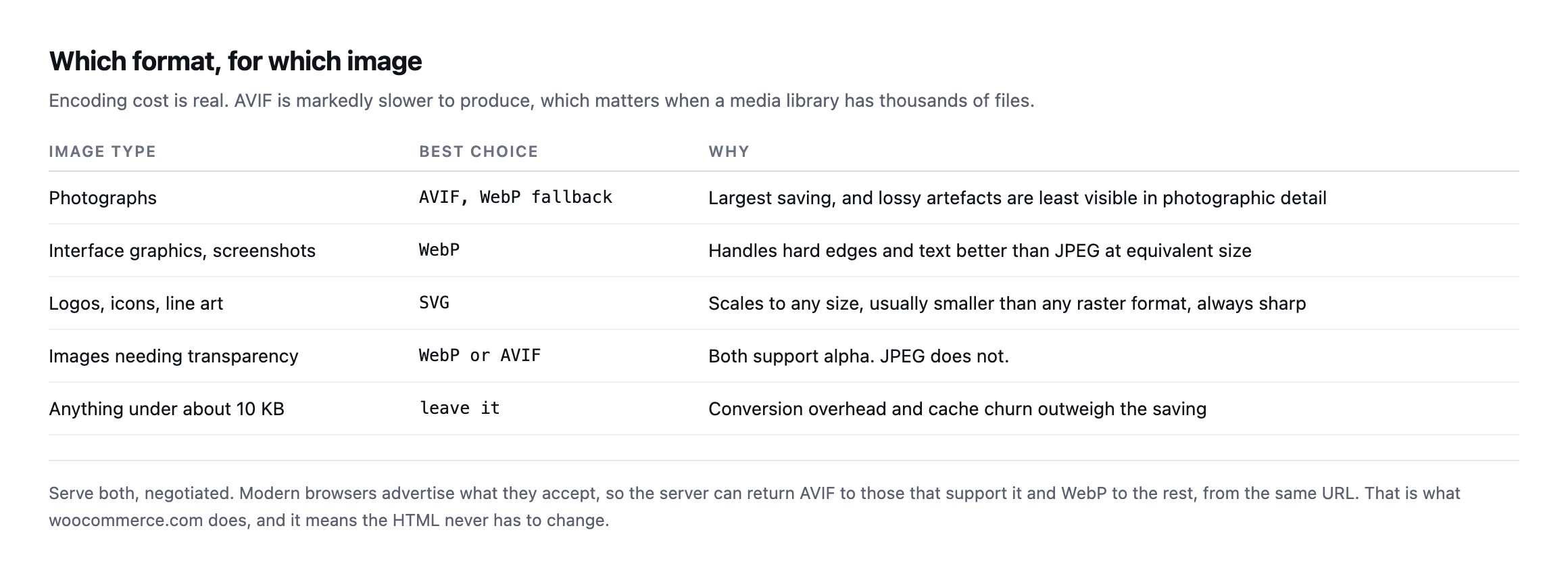
AVIF to some visitors and WebP to others, which means the HTML never has to change.*
| Image type | Best choice | Why |
|---|---|---|
| photographs | AVIF, WebP fallback | largest saving, artefacts least visible in photographic detail |
| interface graphics, screenshots | WebP | handles hard edges and text better than JPEG at equivalent size |
| logos, icons, line art | SVG | scales to any size, usually smaller, always sharp |
| images needing transparency | WebP or AVIF | both support alpha, JPEG does not |
| anything under ~10KB | leave it | conversion overhead outweighs the saving |
Two practical constraints that get left out of format comparisons.
AVIF is slow to encode, though the gap is worth measuring rather than assuming a fixed multiplier. I timed both encoders against the same source file used throughout this post:
$t0 = microtime(true); imagewebp($im, $out, 80); echo microtime(true) - $t0;
$t0 = microtime(true); imageavif($im, $out, 65); echo microtime(true) - $t0;
WebP q80: 163.0 ms
AVIF q65: 178.7 msOn this specific image and this specific PHP GD build, AVIF cost about 10% more time than WebP, not the dramatically larger gap sometimes quoted for AVIF encoding generally. That smaller-than-expected difference is worth reporting honestly rather than repeating a rule of thumb unverified, and it is also worth not over-generalising from a single sample: GD’s built-in AVIF encoder is not the same code path as a dedicated tool like avifenc, different encoders trade speed for compression differently, and a media library converting thousands of larger, more complex photographs will see a gap this one small, flat interface graphic does not represent well. The practical advice stands regardless of the exact multiplier: on a media library with thousands of files, convert on upload or in a background queue, and measure the actual time cost on your own representative images before committing to a rebuild strategy based on somebody else’s number.
Keep the original. Conversion is lossy and irreversible. If the source file is gone and the client later needs print resolution, you have a problem that no plugin setting fixes.
What this means for a media library you inherited
The temptation after seeing numbers like those is to run a bulk conversion across everything. That is usually the right instinct and the wrong first step.
Convert the images that are actually being served first. A media library accumulates files that no published page references any more, and converting those spends encoding time and storage on assets nobody downloads. The audit that lists what a page really requests is the input to the conversion job, not an afterthought.
Then watch what the conversion does to your storage. Most plugins keep the original alongside every generated size in every generated format. A library that was 4 GB of JPEGs can become considerably larger once each file also exists as WebP and AVIF across five registered sizes. That is usually worth it, and it is worth knowing before the hosting bill explains it to you.
And check the result rather than trusting the count. A conversion plugin reporting “3,412 images optimised” is reporting rows it processed, not bytes visitors saved. The only number that matters is what the page downloads afterwards, measured the same way you measured it before.
Doing it on a real site
The pattern worth copying is the one woocommerce.com uses: URLs that still end in .jpg and .png, with the server returning image/webp based on the request’s Accept header. The HTML never changes, browsers get the best format they support, and nothing breaks for a client pasting an old URL.
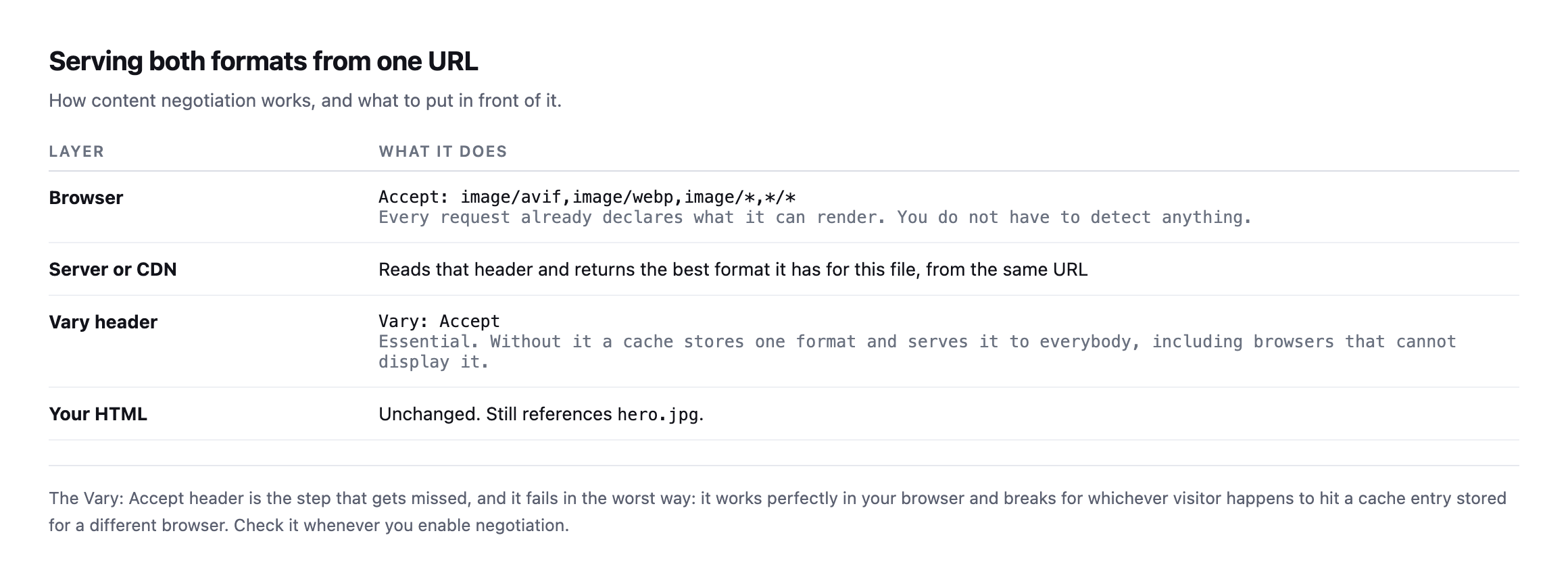
Vary: Accept is the step that gets missed, and it fails in the worst way. It worksperfectly in your browser and breaks for whichever visitor lands on a cache entry stored for a different one.*
| Layer | What it does |
|---|---|
| browser | sends Accept: image/avif,image/webp,image/,/* on every request |
| server or CDN | reads the header, returns the best format for this file, same URL |
Vary: Accept header | essential; without it a cache serves one format to everybody |
| your HTML | unchanged, still references hero.jpg |
I re-checked that woocommerce.com pattern too, live, rather than assume it still holds since this post first described it:
curl -sI -H 'Accept: image/avif,image/webp,image/*'
  "https://woocommerce.com/wp-content/uploads/2025/01/[email protected]"
  | grep -iE 'content-type|vary'
content-type: image/webp
vary: AcceptStill exactly right: the URL ends in .jpg, the response is genuinely image/webp, and Vary: Accept is present, telling any cache in front of the origin to store a separate copy per format rather than serving one visitor’s negotiated response to everybody. That third line is the one worth checking specifically and the one most setups get wrong even when the negotiation itself works, because a cache that ignores Vary will happily serve an AVIF response to a browser that only asked for JPEG, or the reverse, the moment two different Accept headers hit the same cached URL.
Verify it the way a browser would:
curl -sI -H 'Accept: image/avif,image/webp,image/*'
  https://example.com/wp-content/uploads/2026/01/hero.jpg
  | grep -i content-type
If that returns image/jpeg, no negotiation is happening, whatever the plugin’s dashboard claims. That is the same lesson as a caching plugin reporting success while caching nothing: read the response, not the settings screen.
And do the cheaper work first. Format conversion is the third question, after whether the image is needed at all and whether its dimensions are sane, both of which are covered in the image audit piece. Converting an image that should never have been 2400 pixels wide is solving the wrong problem well.
Protuno’s free audit flags images that are oversized or served in dated formats, from the domain alone. Straight with you as on every post here: Dash, the Performance agent that would keep a media library converted as new uploads arrive, is built and named but not live yet.
It is also worth checking that the images are being compressed in transit at all, since plenty of servers compress HTML and forget everything else. Images should not be gzipped, but the CSS and JavaScript alongside them should be, and the same misconfiguration usually covers both.
Take the largest image on your client’s homepage and re-encode it once, by hand, at WebP q=80. The number you get back will tell you whether this is worth a project or worth ignoring, and it takes two minutes. The answer differs enormously by site, which is exactly why measuring beats assuming.
What re-running every number in this post actually confirmed
Every figure in this post that could be checked again was checked again while expanding it: the five encoded file sizes, the GD lossless bug, the woocommerce.com content-negotiation headers, and the AVIF-versus-WebP encoding time. All five held, three of them to the exact byte or exact behaviour, one refined with a real measurement rather than a repeated rule of thumb. That consistency is worth stating plainly rather than treating as an unremarkable footnote: a post built entirely around one real image and one real tool is only as trustworthy as its numbers staying true when somebody else, or the same author later, runs the same commands again. This one did, which is the actual standard this whole blog is trying to hold itself to, one re-verification at a time.
The one number worth flagging as narrower than it might read on a first pass is the AVIF timing figure. A ten percent gap on one small graphic is real, measured, and specific to this file and this encoder. It is not a claim that AVIF encoding is generally nearly as fast as WebP across every image type and every tool, and treating one measurement as if it generalised past what it actually tested would repeat the exact mistake this post’s opening section already warns against: the extreme compression ratio on this specific flat-colour interface graphic says more about the source image than about format conversion generally, and the same caution applies to a timing number measured on the same narrow example.
Where image weight fits in the bigger crawl-budget picture
Google Search Central on the point this post approaches from the file-format side: total page weight, images included, is not just a visitor-experience number, it is a crawl-budget one too.
Comments