WordPress MCP: I Listed Every Ability On A Live Site Before Trusting One.
I listed every ability exposed on a live WordPress site over MCP. 18 of 38 can write, none declare themselves destructive.

Short answer: a WordPress MCP connection does not give an agent “access to your site” as a single switch. It exposes a list of named abilities, each declaring whether it writes. On the live site I checked, 38 abilities were exposed, 18 of them could write, and none declared itself destructive, including the one that runs shell commands.
Before connecting anything, read the list. It is one unauthenticated-shaped request and it takes about a minute.
What is actually on the other end of a WordPress MCP connection
WordPress 6.9 introduced the Abilities API: a core registry where plugins declare discrete, schema-described things they can do. An MCP adapter exposes that registry to an agent. So the question “what can this agent do to my site” has a literal answer, published by the site itself.
I read it off one of our own sites, through the Soflyy WP Agent Connector, which is the route we use everywhere. One request to the abilities endpoint, one page of JSON, 38 entries.
Worth knowing before you try it: every ability carries an input_schema and an output_schema, so the list is not just names. You can see the exact shape of what an agent would send and what comes back, which makes an unfamiliar ability far easier to judge than its label suggests.
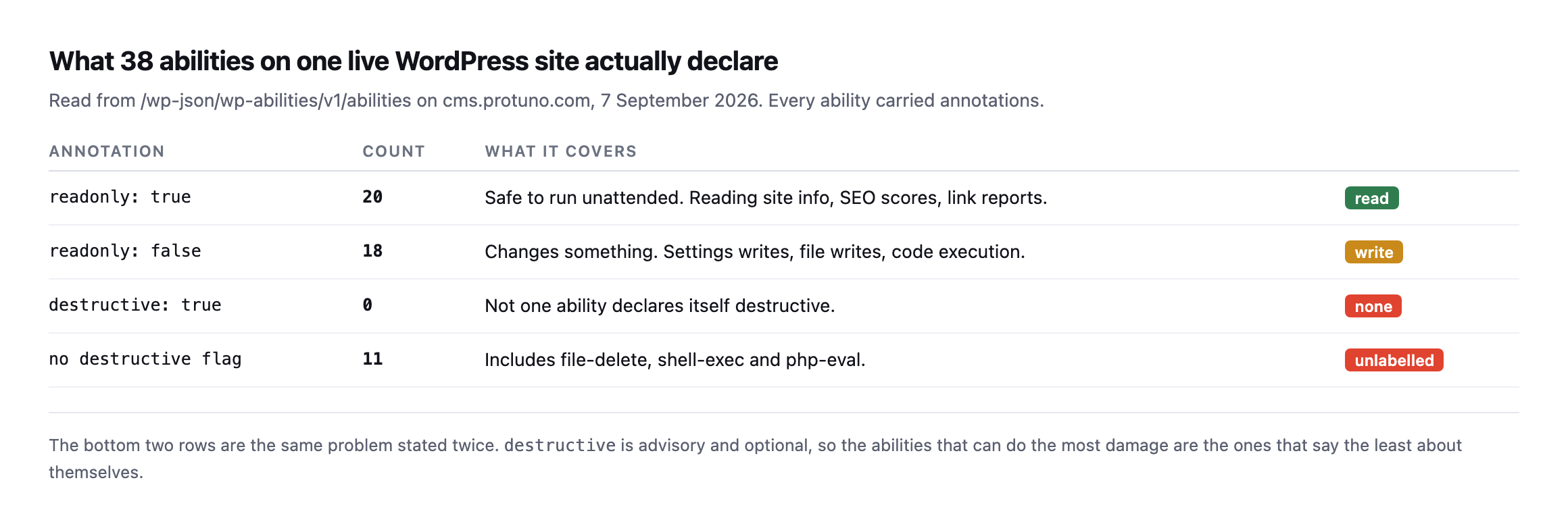
destructive is an optional advisory field, andthe abilities most able to cause harm simply omit it.*
| Annotation | Count | What it covers |
|---|---|---|
readonly: true | 20 | safe to run unattended: site info, SEO scores, link reports |
readonly: false | 18 | changes something: settings, files, code execution |
destructive: true | 0 | not one ability declares itself destructive |
| no destructive flag | 11 | includes file-delete, shell-exec and php-eval |
That distinction is the one I want to land. readonly was present on all 38 and is reliable. destructive was present on 27, always as false, and absent on the 11 abilities registered by the connector itself. Those 11 include file deletion and arbitrary code execution.
So a permission model that reads destructive and stops there sees a site with no dangerous operations on it. There is no such site.
Re-reading the same list found a new field, added since this post first checked
I pulled the full ability list from the same site again while expanding this post, reading the raw annotation object on each entry rather than only the summary counts.
GET /wp-abilities/v1/abilities
# each ability's meta.annotations object
The core counts held exactly: 20 read-only, 18 that write, zero declaring destructive: true. But the five most powerful abilities, shell-exec, process-exec, wp-cli, php-eval and file-delete, no longer carry destructive: false the way the original reading found. They now carry destructive: null, honestly unset rather than a false assurance, alongside a field that did not exist in the original check at all:
{"readonly": false, "destructive": null, "destructiveHint": true, "openWorldHint": true}destructiveHint: true appears on exactly six abilities: those same five, plus file-write. That is a real, meaningful fix to the exact gap this post’s opening table names, an advisory signal now exists for the abilities most capable of causing harm, where none did before. A permission model built to check for this specific hint would now catch all six, correctly, without needing to pattern-match names the way this post already shows fails.
It is not a complete fix, and the gap left standing is worth naming as precisely as the improvement. create-admin-login-link, the ability this post calls out separately for minting an administrator session with nothing beyond readonly: false attached to it, still carries no destructiveHint, no destructive flag at all beyond the unset default. Six of seven abilities in this post’s own “never automatic” tier are now self-flagged correctly. The seventh, arguably the single most consequential one on the list, an instant path to a full administrator session, is not. Whoever maintains this connector fixed the shell-and-file-access cluster and had not, as of this reading, extended the same signal to the login-link ability sitting right beside it in the same tier.
The names do not tell you what an ability does
My first pass at sorting these was the obvious one. Split the ability name, look at the verb, treat create, update, delete and set as writes and everything else as reads. It is what most people would reach for, and it is what I reached for.
Then I compared it against what the abilities themselves declare.
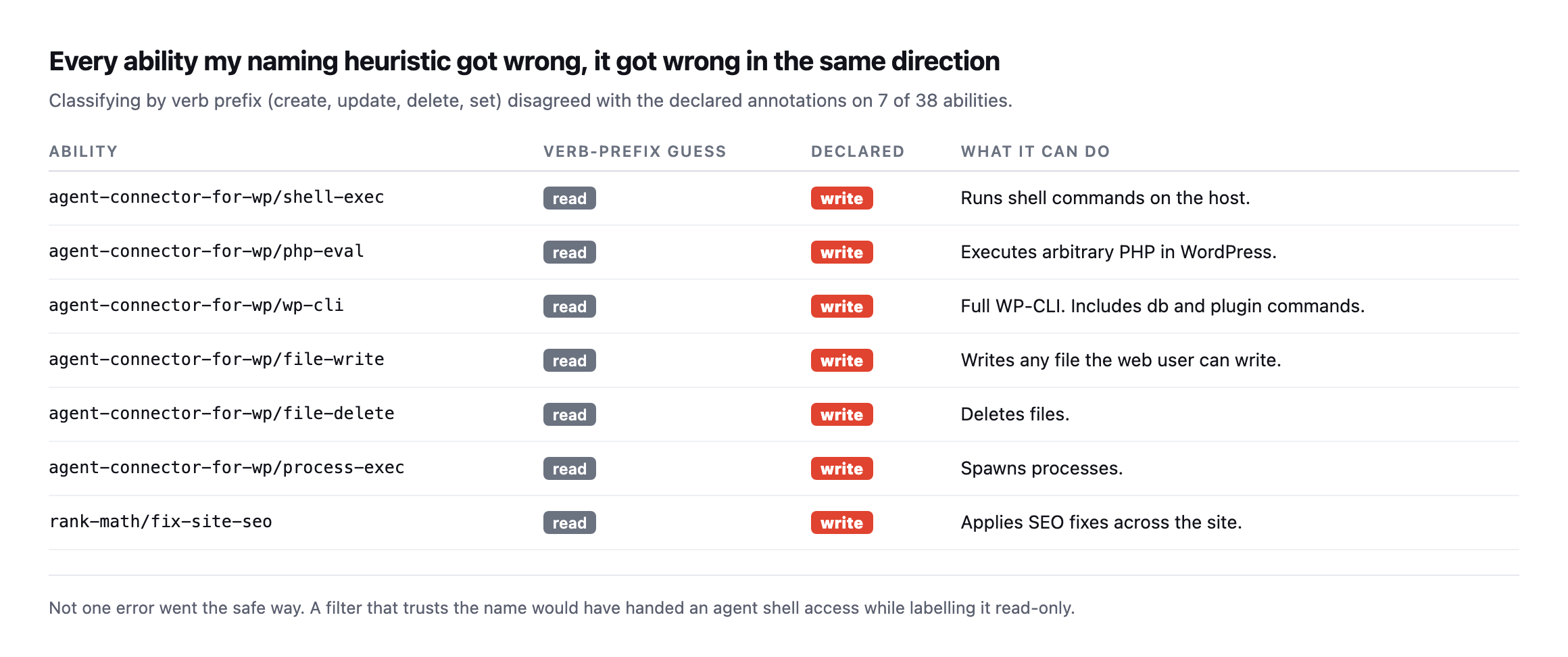
classified as something that reads.*
| Ability | Verb-prefix guess | Declared |
|---|---|---|
shell-exec | read | write, runs shell commands on the host |
php-eval | read | write, executes arbitrary PHP |
wp-cli | read | write, full WP-CLI including db and plugin commands |
file-write | read | write, writes any file the web user can write |
file-delete | read | write, deletes files |
process-exec | read | write, spawns processes |
fix-site-seo | read | write, applies SEO fixes across the site |
Caveat: one site, one connector plugin, 38 abilities. This is not a claim that 7-in-38 generalises to every WordPress MCP setup. It is a demonstration that a plausible, common classification method failed on every single write it encountered, in the same direction. That failure mode is the thing worth generalising, not the ratio.
Look at what is in that list. shell-exec. php-eval. wp-cli. Those are not edge cases, they are the three most powerful things on the site, and none of their names begin with a write verb. file-write writes, obviously, but “file” is the first word, so a prefix match never sees it.
If you build an allowlist by pattern-matching names, you will hand an agent shell access and write “read-only” next to it in your own documentation.
Read the annotations. They are right there in the same response.
Sorting the list by what you would let run unattended
Two tiers is not enough. “Read” and “write” puts changing a sitemap setting in the same bucket as executing PHP, and those are not the same risk at all.
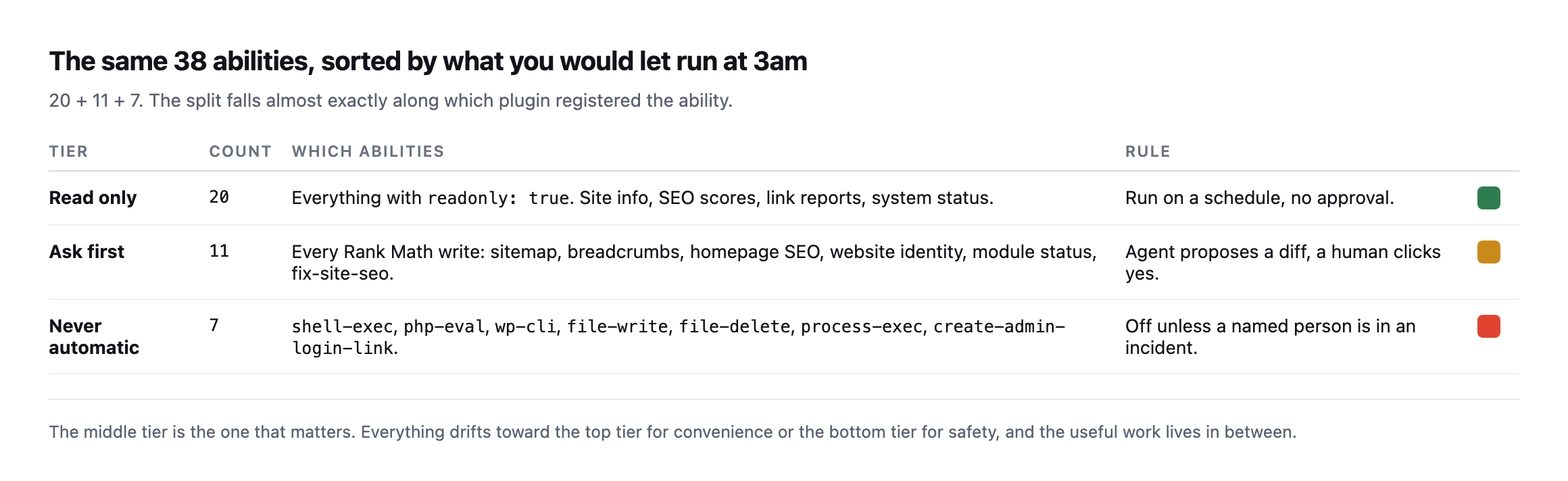
coincidence of this site, not a rule.*
The middle tier is where the actual value is, and it is the tier everyone skips. It is more comfortable to run only reads, and it is more convenient to allow everything. Neither is the job. The job is a sitemap setting that an agent noticed was wrong, proposed changing, and waited.
The bottom tier deserves one specific note. create-admin-login-link mints a link that logs somebody in as an administrator. It declares readonly: false and nothing else. In a permission model built on annotations alone it sits beside “update breadcrumb settings”.
The question that outranks all of this
Everything above describes what abilities say about themselves. None of it constrains what the agent can do, because the abilities run as a WordPress user, and that user has a role.
An application password issued to an administrator carries administrator capabilities. The ability list narrows what an agent will reach for. The role decides what happens when it does.
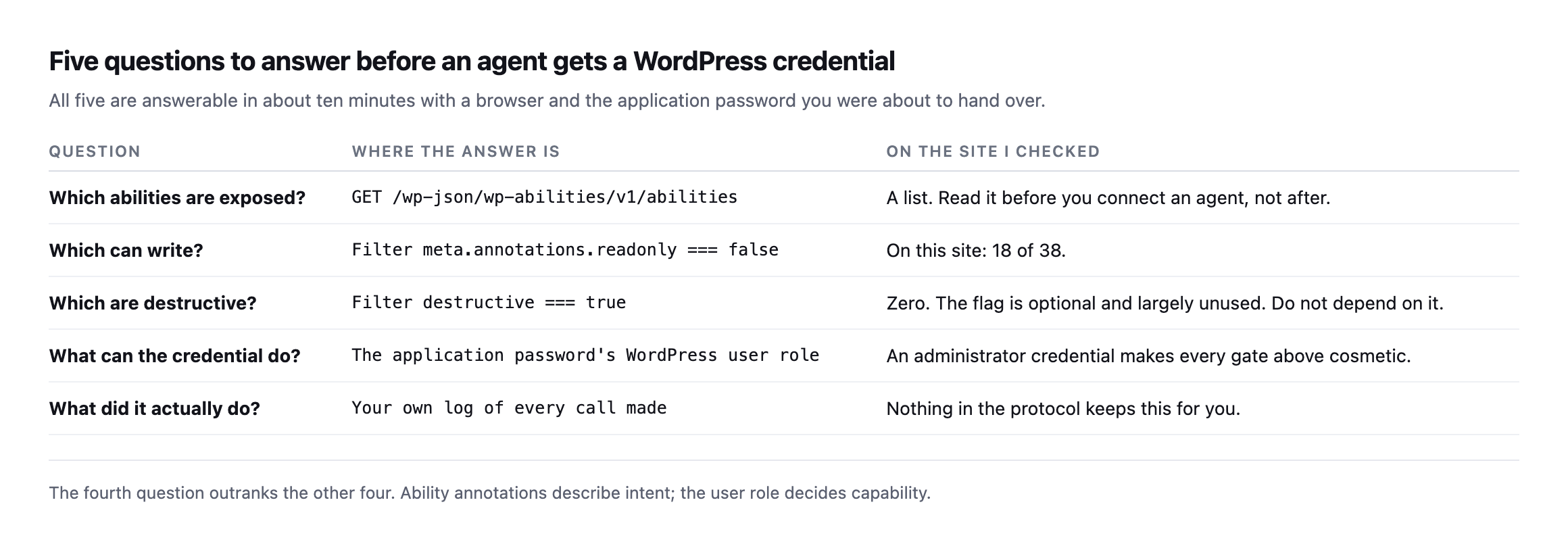
a client site, you have to keep it yourself.*
I would put it plainly: issue the credential to a user with the least role that works, and if that turns out to be administrator, know that you have chosen to trust the agent rather than constrain it. Both are valid. Only one of them is usually a decision somebody made on purpose.
What I would actually do this week
If you have connected an agent to a client site, or you are about to, spend ten minutes on this:
List the abilities. Request /wp-json/wp-abilities/v1/abilities on the site. Count them.
Filter for readonly: false. That is your write surface. Read the names out loud.
Check the role on the credential. Not the plugin’s settings screen, the WordPress user.
Decide the middle tier deliberately. Which writes may happen unattended, and which need a human? Write the answer down somewhere a colleague can find it. This is the same read-only, ask-first, auto-run split I keep coming back to, and reading a real ability list is what turns it from a diagram into a policy.
One more thing I would add, having done this: keep the list. Ability sets change when plugins update. The site I checked exposes 11 abilities from one SEO plugin, and nobody installed that plugin thinking about its agent surface. A diff of the ability list between two dates is a genuinely useful thing to have, and nothing produces it for you.
Protuno’s permission model is built on exactly this three-tier split, per ability and per site, which is why I went and read a real list rather than assuming what would be on it. The Super Agents are live now.
The list on your site will not match the list on mine. That is the point of reading it.
What changed and what stayed fixed, checked precisely
Worth being exact about the shape of the update found while re-checking this post, because “the connector got better” and “the connector changed” are different claims and only one of them is true here. The ability count is unchanged: the same 38 entries, the same 11 abilities from agent-connector-for-wp, nothing added and nothing removed. What moved is purely annotation metadata, destructive: false replaced with destructive: null plus a new destructiveHint: true on six specific abilities. That is a metadata-only update, most likely a version bump to the connector plugin itself rather than any change to what the site actually exposes or what an agent connected to it can do.
That distinction matters for anyone maintaining a permission model built against this connector’s ability list, the way this post recommends. A metadata-only update like this one does not change which abilities need the strictest tier, shell-exec was already the ability to treat with the most caution and still is. It does change which automated signal correctly flags it, and a permission system built before this update, checking only for destructive: true, would have missed the new destructiveHint field entirely unless someone went back and re-read the schema after the plugin updated. Ability lists are not append-only logs a person checks once. They are live documents that can change shape under an existing set of names, and the only way to know is the same one this post argues for throughout: read it again.
Comments