The WordPress Abilities API: What It Lets Software Do To A Client Site.
Core shipped a registry that lets a site declare what it can do. We read one live and found 38 abilities, three of them equivalent to SSH.

Short answer: the wordpress abilities api is a registry, introduced in WordPress 6.9, where plugins and core declare what they can do in a machine-readable schema. It is not a chatbot and it is not an AI feature. It is the list an agent reads to find out what a particular site permits, and that list is decided entirely by what is installed.
I read one on a live production site this week. Here is what is actually in there.
What it is, in the words of core
The WordPress AI team describes the Abilities API as “a core WordPress API (introduced in 6.9) that creates a central registry of capabilities, making WordPress functions discoverable and accessible to AI agents, automation tools, and developers”.
An ability itself is defined as “a registered, self-documenting unit of WordPress functionality that can be discovered and invoked through multiple contexts (REST API, Command Palette, MCP). Includes authorization and input/output specifications”.
The phrase doing the work there is self-documenting. The site tells you what it can do, what each operation accepts, and what it returns, without anybody writing an integration guide.
That definition also names the piece most WordPress-specific explainers skip: MCP, the Model Context Protocol, is one of the three contexts an ability can be invoked through, not the Abilities API itself. MCP is the transport an AI client speaks over. The Abilities API is the WordPress-side registry that gets exposed through it, through the REST API directly, or through the editor’s own Command Palette. They are frequently described as one thing, and mixing them up is where a lot of the confusion in this space comes from. If you have never seen MCP explained outside of a WordPress context, this covers the protocol itself in about nine minutes:
A real WordPress Abilities API registry, read live
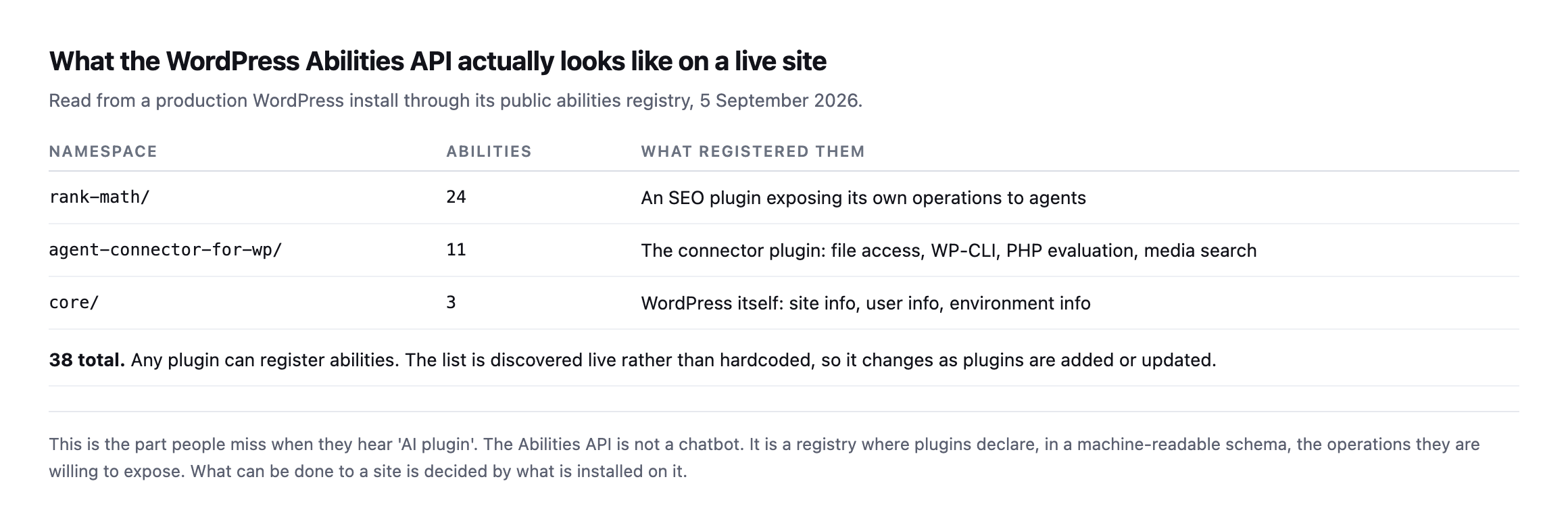
Everything else was registered by a plugin somebody chose to install.*
That distribution is the thing to internalise. What an agent can do to a WordPress site is not a property of WordPress. It is a property of that site’s plugin list.
Here is a single ability as the site publishes it:
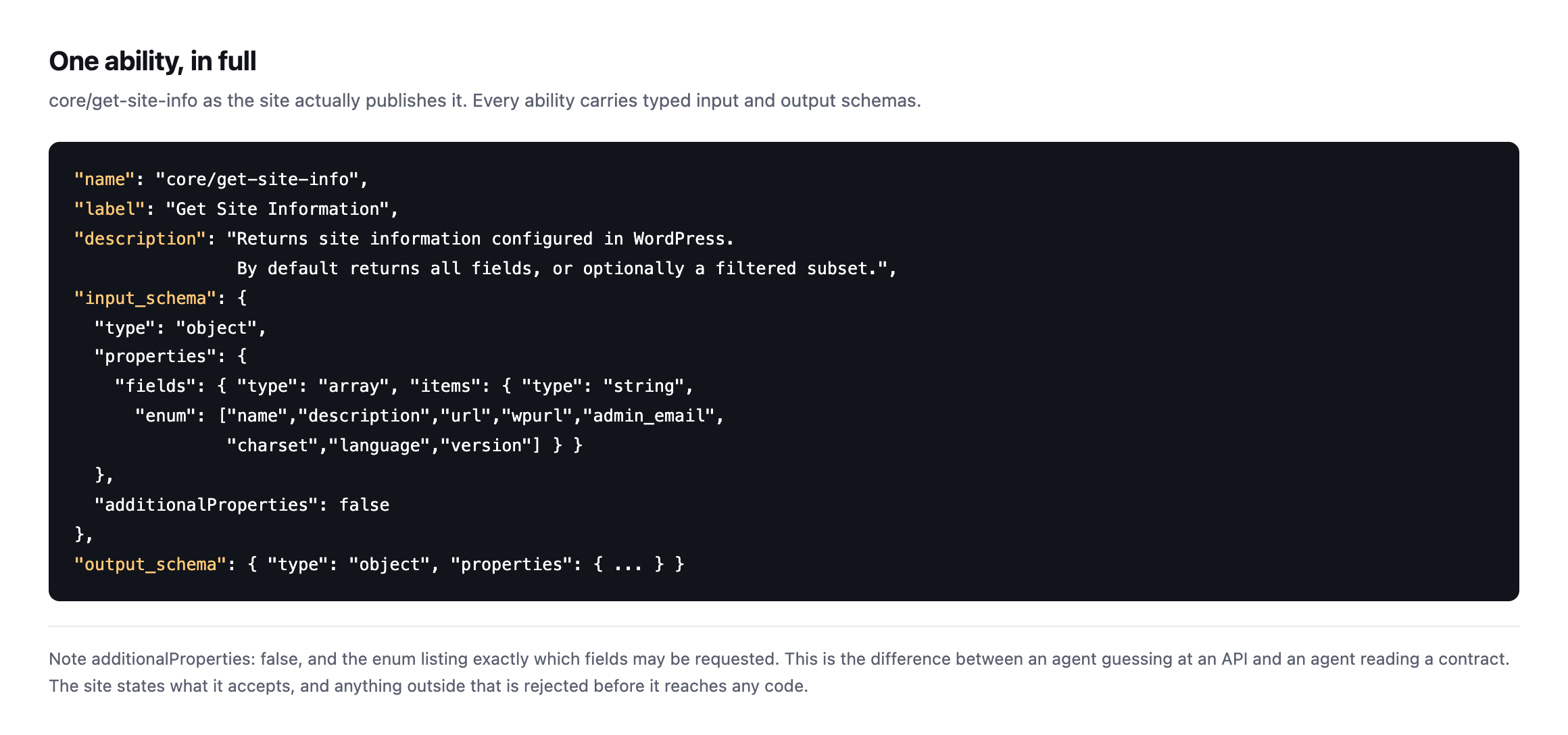
additionalProperties: false and the enum listing exactly which fields may berequested. This is the difference between an agent guessing at an API and an agent reading a contract. Anything outside the schema is rejected before it reaches any code.*
The line core drew, and the line your plugins did not
Core is being deliberately careful here, and it is worth knowing why.
The AI team is implementing read-only abilities first, with management operations planned afterwards, on the reasoning that write operations “require more careful design and governance than retrieval capabilities.”
That caution does not extend to plugins, because it cannot. Any plugin may register any ability it likes.
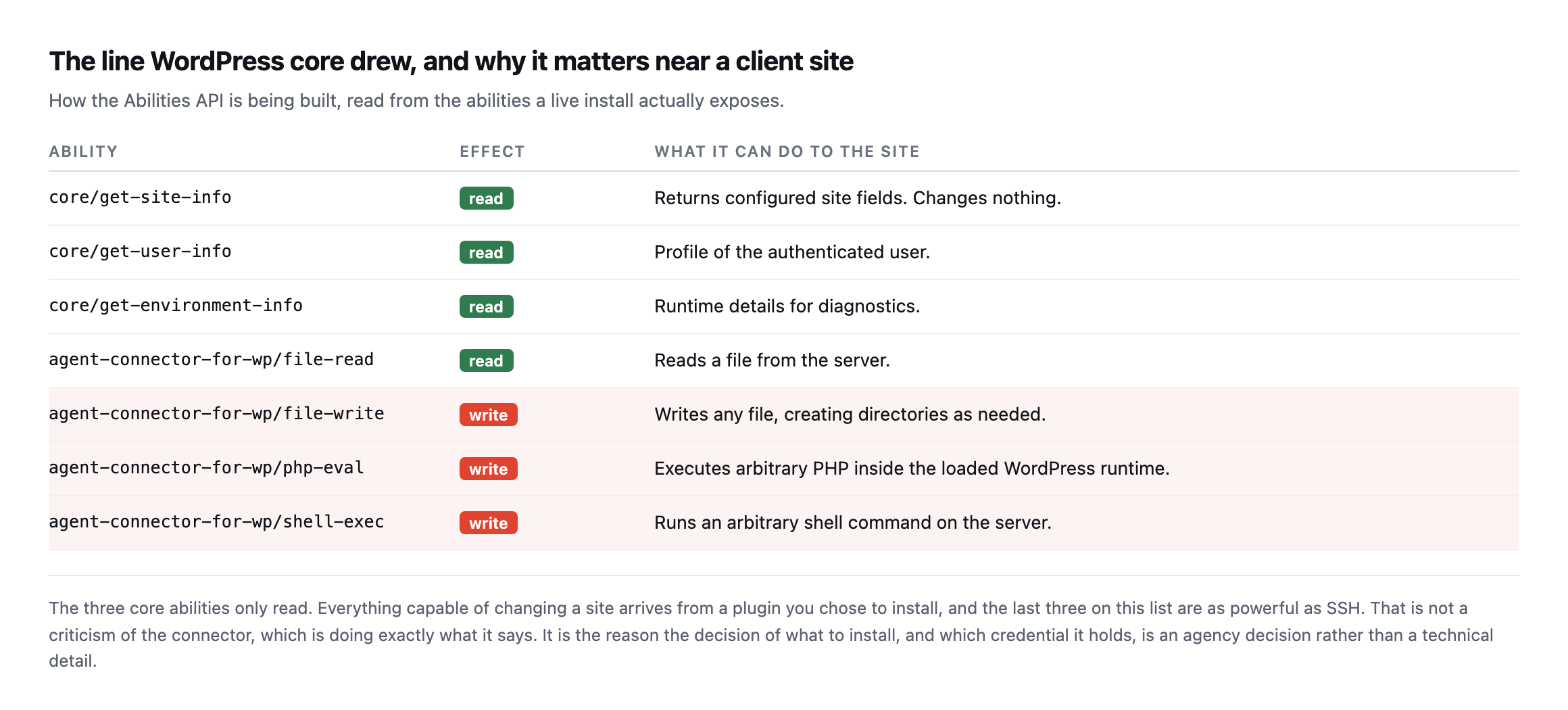
plugin, are as powerful as SSH. That is not a criticism of the connector, which documents exactly what it does. It is the reason installing one is an agency decision rather than a technical detail.*
| Ability | Effect | What it can do |
|---|---|---|
core/get-site-info | read | returns configured site fields, changes nothing |
core/get-user-info | read | profile of the authenticated user |
core/get-environment-info | read | runtime details for diagnostics |
agent-connector-for-wp/file-read | read | reads a file from the server |
agent-connector-for-wp/file-write | write | writes any file, creating directories as needed |
agent-connector-for-wp/php-eval | write | executes arbitrary PHP in the loaded runtime |
agent-connector-for-wp/shell-exec | write | runs an arbitrary shell command on the server |
Caveat: one site, one connector plugin. The point is not that this specific connector is unsafe, it documents itself honestly. The point is that the Abilities API has no opinion on what a plugin registers, so “an agent is connected” tells you nothing until you have read the actual list on the actual site.
An agent connected to that site is not limited by the Abilities API. It is limited by whichever plugin registered the most dangerous ability, and by the capabilities of the user whose credential it holds.
What this changes for an agency
The genuinely useful shift is that you can now inspect this rather than trust a vendor’s description of it.
Before the Abilities API, “our tool integrates with WordPress” was a claim you either believed or did not. Now the site itself will tell you, in a schema, exactly what has been exposed on it.
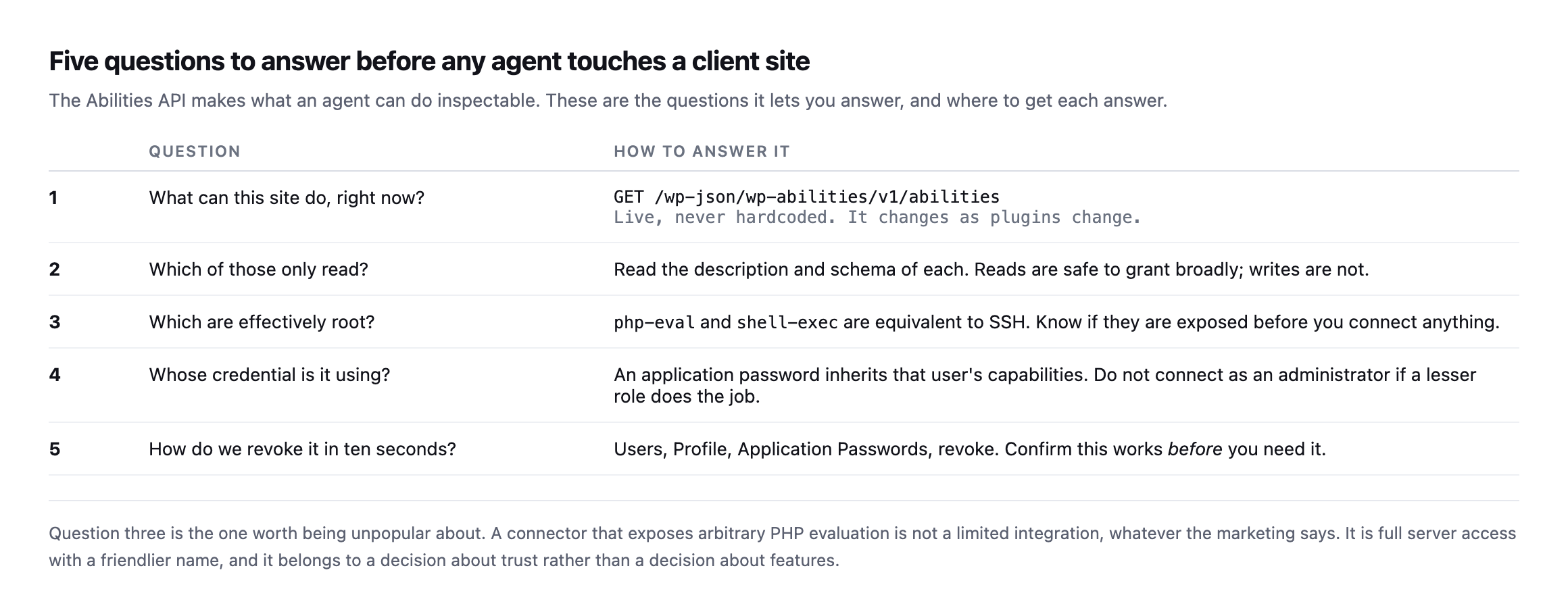
PHP evaluation is not a limited integration, whatever the marketing says. It is full server access with a friendlier name.*
| # | Question | How to answer it |
|---|---|---|
| 1 | What can this site do, right now? | GET /wp-json/wp-abilities/v1/abilities, live, never hardcoded |
| 2 | Which of those only read? | read each schema; reads are safe to grant broadly, writes are not |
| 3 | Which are effectively root? | php-eval and shell-exec are equivalent to SSH |
| 4 | Whose credential is it using? | an application password inherits that user’s capabilities |
| 5 | How do we revoke it in ten seconds? | Users → Profile → Application Passwords → revoke; confirm it works before you need it |
One practical habit: never hardcode an ability list. Ask the site every time. Plugins get added, updated and removed, and a list you cached in March describes a site that no longer exists.
There is a second habit worth building, and it comes from the same place as every other check on this blog: verify the revocation path before you rely on it. An application password is revoked from the user’s own profile screen, and the connection dies immediately. Test that once, on a site you control, so you know what it looks like. A safety mechanism nobody has ever exercised is a backup nobody has ever restored: a hope with a filename.
It is also worth being clear about what the registry does not tell you. It lists what a site can do. It says nothing about whether the code behind each ability is well written, or whether the plugin that registered it is still maintained. An ability exposed by a plugin that quietly left the directory is still discoverable, still invokable, and no longer receiving fixes.
Is the schema actually enforced, or just documentation?
A schema that nobody checks is a comment. I wanted to know whether core/get-site-info‘s declared input schema, the one with the enum of permitted fields shown earlier, is actually validated by WordPress before the ability runs, or whether it is descriptive text an agent is trusted to follow. I called the live endpoint four ways to find out.
| Call | What I sent | Result |
|---|---|---|
| valid | fields: ["name","url"] | 200, returns exactly those two fields |
| enum violation | fields: ["not_a_real_field"] | rejected, ability_invalid_input, names the offending index |
| wrong type | fields: "name" (string, not array) | accepted, WordPress’s own query parsing coerced it into a one-item array before validation ran |
| unexpected property | an extra top-level key not in the schema | rejected, additionalProperties enforced |
| no input at all | nothing sent | 200, every field returned, confirming the schema’s default: {} |
Caveat: one ability on one site,
core/get-site-info, chosen because it is core rather than a plugin and its schema is simple enough to test exhaustively. It is not a claim that every ability on every site validates this strictly. It is proof that the mechanism is real on at least one ability, which is the question this section set out to answer.
Two things worth taking from that. The enum and additionalProperties rejections are the genuinely reassuring result: an agent cannot silently send something outside the documented shape and have WordPress guess at what was meant. The wrong-type row is the more interesting one, because it shows the boundary is softer than “strict JSON Schema validation” implies. WordPress’s own REST query-string parsing turns a bare string into a single-item array before the schema validator ever sees it, so a client that gets the type wrong in a forgiving way is quietly corrected rather than rejected. That is ordinary REST API behaviour, not a flaw in the Abilities API specifically, but it means “the schema is enforced” is true for shape and true for the values your client actually sends, not a guarantee that every deviation is caught.
One operational note from running this test, unrelated to the abilities mechanism itself but worth flagging because it is the kind of thing that ends up in a support ticket: the unfiltered core/get-site-info call with no fields argument returned the account’s own admin email address in plain text, because that field is included by default when nothing is specified. That is documented core behaviour, not a bug, and it is exactly why scoping which fields an integration is allowed to request matters even on abilities marked read-only. Read-only does not mean the response is safe to log verbatim or forward to a third party without a second look at what came back.
Reading a registry yourself
The endpoint is public in the sense that it exists at a known path, though it requires authentication to read:
curl -s -u "USER:APPLICATION_PASSWORD" \
  https://example.com/wp-json/wp-abilities/v1/abilities \
  | python3 -c 'import json,sys
d=json.load(sys.stdin)
items = d if isinstance(d,list) else d.get("abilities",[])
print(len(items),"abilities")
for a in items: print(" ", a["name"])'
Two things to look for in the output. Group the names by their namespace prefix, because that tells you which plugin contributed what. Then read the description of anything whose name contains write, exec, eval, delete or update, because those are the ones that can change the site.
If the list surprises you, that is the point of reading it.
Where I think this goes
The interesting part is not that agents can now change WordPress sites. Software has been able to do that for twenty years through the REST API and WP-CLI.
The interesting part is that the site can now declare what it permits, in a form software can read, and that declaration can be audited by the person responsible for the site.
That is the piece agencies have never had. Not a promise that a tool behaves, but a list you can read before you connect it, and revoke afterwards without asking anybody.
Protuno connects to sites this way, and the same reasoning is why permission is set per site and why a playbook that changes a site takes a backup and checks it first. Straight with you as on every post here: the Super Agents are built and named but not live yet. The free audit needs no connection at all and runs from a domain.
If you want to see this for yourself, the fastest route is a site you already control. Install a connector, request the abilities list, and read it. It is more informative than any integration page, and it is the same list an agent would read.
It also pairs well with knowing what PHP branch that site is on, because an agent is only ever as safe as the runtime underneath it.
Comments