Duplicate Google Analytics Tags: You Cannot Find Them In The Page Source.
One site’s HTML declared a single tag manager. At runtime it loaded 22 analytics requests across 8 vendors, including LinkedIn twice.

Short answer: a duplicate google analytics tag inflates sessions, halves your bounce rate and double-counts conversions, and you will not find it by reading the HTML. A tag manager is one line in the source that loads an unknown number of tags at runtime. The only reliable audit is observing what the browser actually requests.
The gap between source and runtime
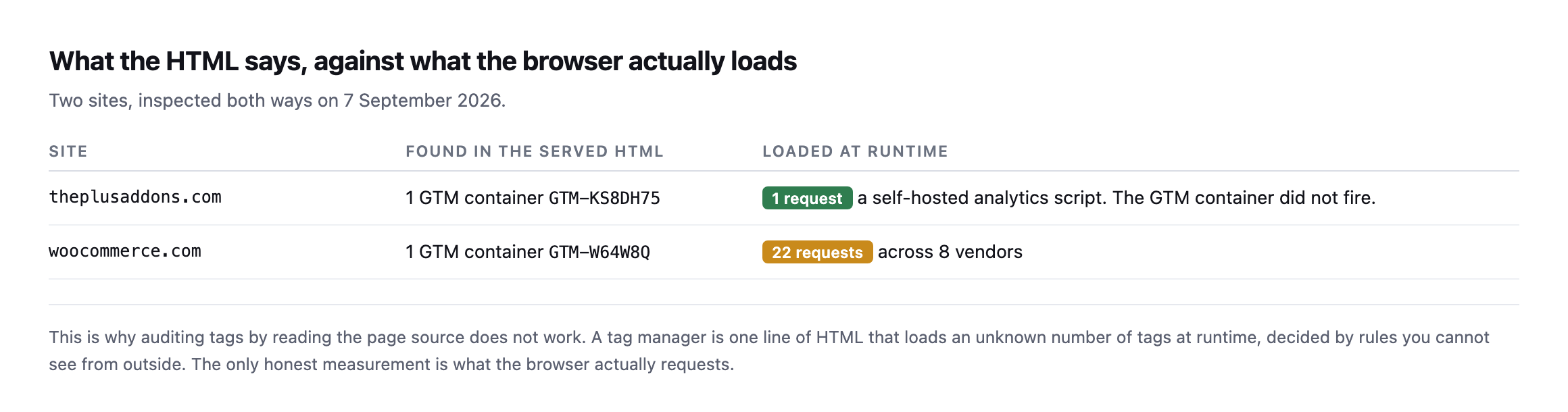
request; the other loads twenty-two.*
| Site | Found in the served HTML | Loaded at runtime |
|---|---|---|
| sitea.example | 1 GTM container (GTM-KS8DH75) | 1 request: a self-hosted script; the GTM container did not fire |
| woocommerce.com | 1 GTM container (GTM-W64W8Q) | 22 requests across 8 vendors |
That first row is worth noting too. The GTM container is present in the markup and did not fire during my page load. Whether that is consent gating or something else, it is the mirror image of the same problem: what is in the source tells you nothing about what runs.
What twenty-two requests looks like
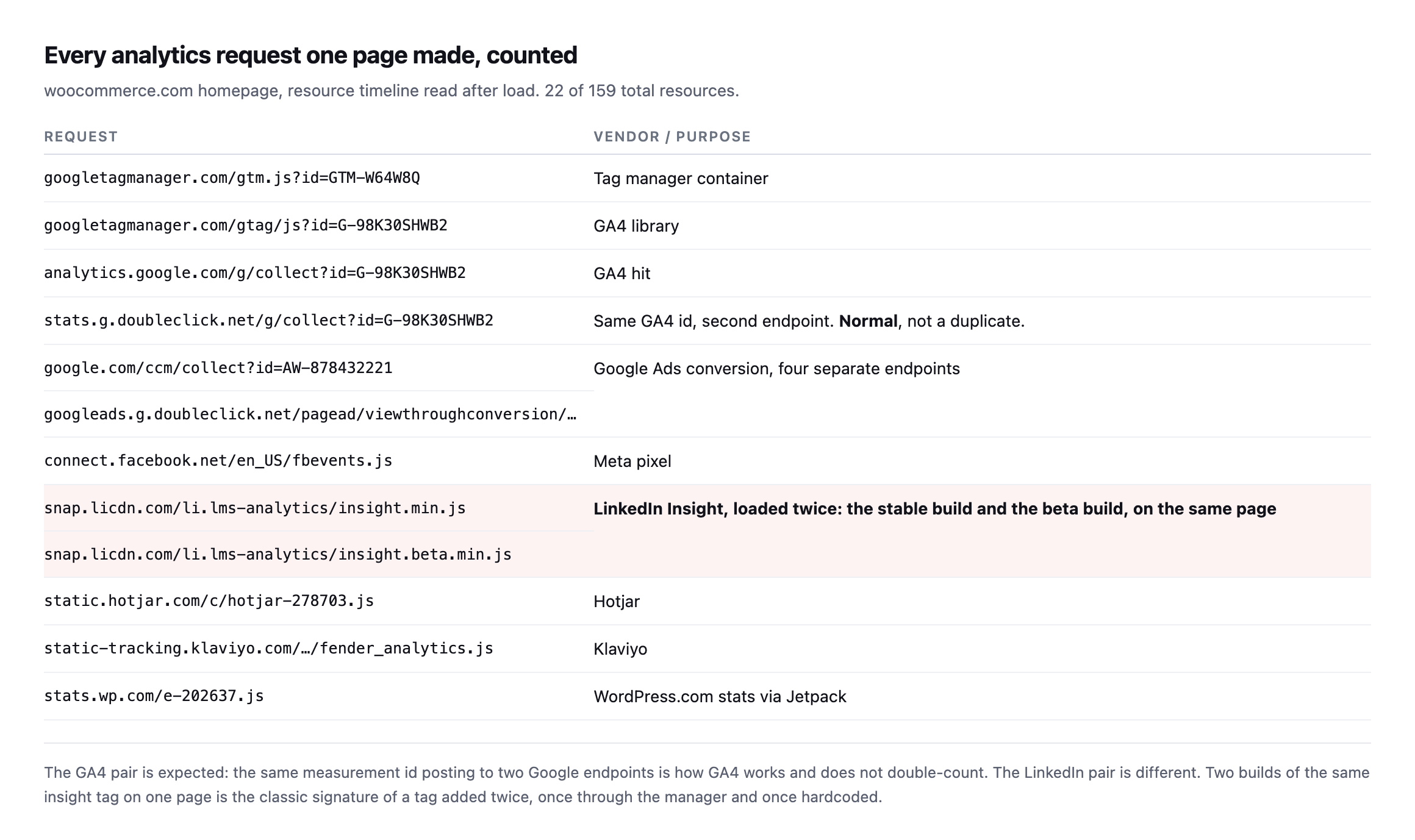
of the same insight tag, the stable one and the beta one, on the same page load.*
| Request | Vendor / purpose |
|---|---|
gtm.js?id=GTM-W64W8Q | tag manager container |
gtag/js?id=G-98K30SHWB2 | GA4 library |
analytics.google.com/g/collect | GA4 hit |
stats.g.doubleclick.net/g/collect | same GA4 id, second endpoint, normal |
google.com/ccm/collect + 3 more | Google Ads conversion, four endpoints, one account |
connect.facebook.net/.../fbevents.js | Meta pixel |
insight.min.js and insight.beta.min.js | LinkedIn Insight, loaded twice, this is the duplicate |
static.hotjar.com/... | Hotjar |
static-tracking.klaviyo.com/... | Klaviyo |
stats.wp.com/... | WordPress.com stats via Jetpack |
Caveat: one page load on one site. The exact vendor list will differ everywhere; the pattern worth taking from it is general: a genuine duplicate looks like two builds of the same script, not two different vendors doing similar things.
I want to be careful about what counts as a duplicate here, because it is easy to raise a false alarm.
Not a duplicate: one GA4 measurement id posting to both analytics.google.com/g/collect and stats.g.doubleclick.net/g/collect. That is how GA4 works.
Not a duplicate: several Google Ads endpoints for one conversion id. Different mechanisms, one account.
A genuine duplicate: insight.min.js and insight.beta.min.js from LinkedIn on the same page. That is the classic signature of a tag added twice, once through the tag manager and once hardcoded into the theme, which is exactly how it happens on WordPress sites during a handover.
Re-checking both findings, using the browser this time rather than a proxy
I went back and re-ran this post’s own audit through an actual browser, rather than only re-reading the original screenshots, using the Performance Resource Timing API this post already recommends as the reliable method:
performance.getEntriesByType('resource')
  .filter(e => hosts.some(h => e.name.includes(h)))
  .map(e => e.name)
woocommerce.com still loads both insight.min.js and insight.beta.min.js from snap.licdn.com, the exact duplicate this post’s original audit found. That finding has not been fixed. I want to be as straightforward about that as this blog is about everything else: a real, findable duplicate, confirmed live again, sitting unresolved on the same page since the first check.
sitea.example still shows the mirror-image problem too. window.google_tag_manager is undefined, dataLayer is empty, and zero requests to any analytics host fired on page load, while the GTM-KS8DH75 container tag is still present in the page’s own HTML. Whatever gates that container, most likely a consent-management layer waiting for a decision that never arrives in an automated check, is still gating it.
Re-running both checks turned up one additional detail the original pass did not capture: the full resource list from woocommerce.com shows the same Google Ads remarketing pixel firing to two different domains, google.com and google.co.in, within the same page load.
https://www.google.com/pagead/1p-user-list/878432221/...
https://www.google.co.in/pagead/1p-user-list/878432221/...
Same account ID, 878432221, same parameters, two country-specific endpoints. This is worth naming as a third category alongside the “not a duplicate” and “genuine duplicate” rows earlier in this post: a geographic or infrastructure redundancy inside a single vendor’s own tag, firing what looks like a duplicate request but represents one logged event handled by two regional endpoints rather than two separate recordings of the same conversion. Distinguishing this from a genuine duplicate takes the same discipline as the GA4 dual-endpoint case already covered: read what each request is actually reporting, not just how many requests share a similar shape.
The audit
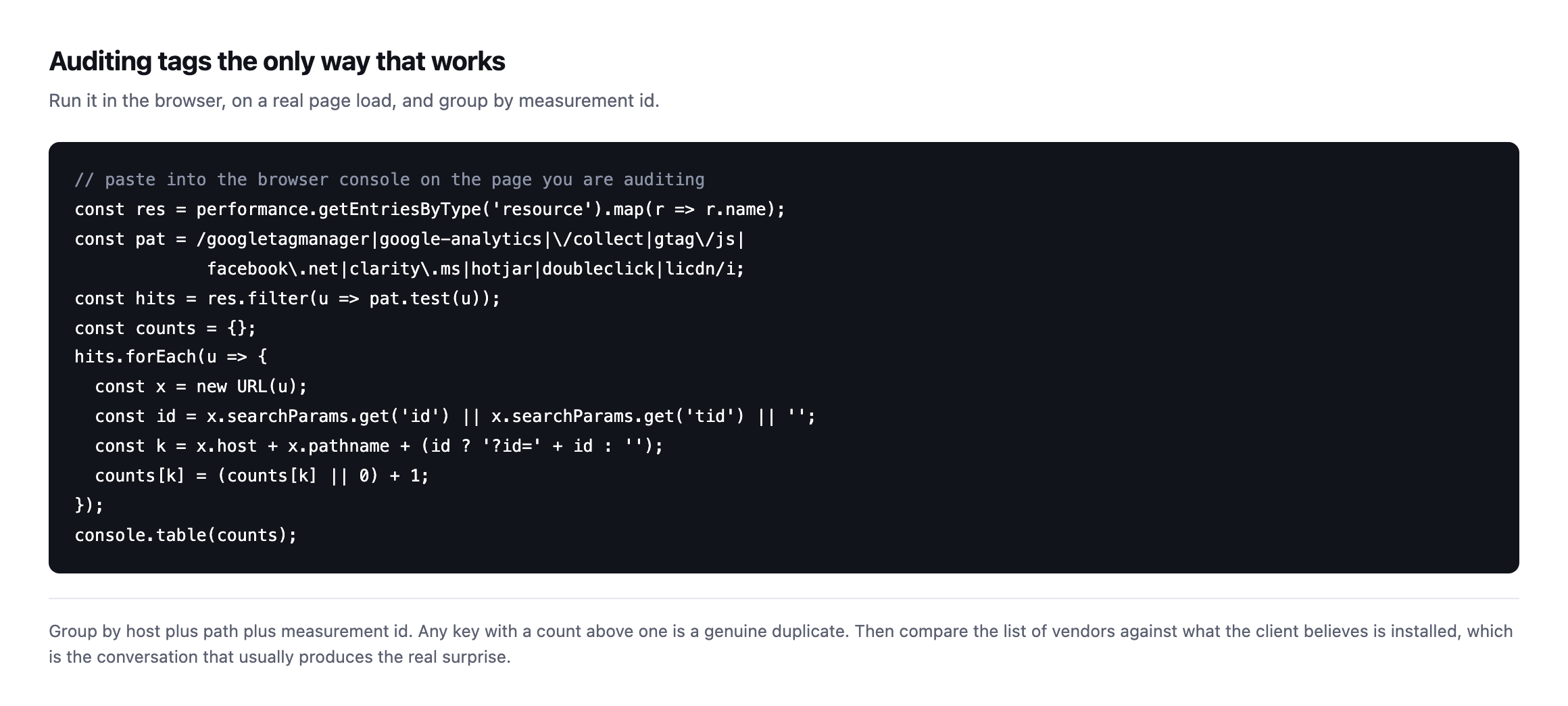
duplicate.*
Run it on the homepage, a blog post and a conversion page, because tags are often injected by rules that only fire on some templates. A duplicate that exists only on the checkout is the most expensive version and the least likely to be found by testing the homepage.
A vendor with a dozen requests is not automatically a dozen problems
The full resource list from the live re-check turned up something worth addressing directly, because it is exactly the kind of number that produces a false alarm if read naively: Klaviyo alone accounted for roughly twenty separate requests to static.klaviyo.com and static-tracking.klaviyo.com on a single page load.
Reading those filenames explains why immediately: runtime.js, sharedUtils.js, vendors~in_app_forms~signup_forms.js, event_adapter.js, telemetry.js, each one a separately hashed, separately cacheable chunk of one JavaScript application, split apart by a modern bundler rather than shipped as a single file. That is code-splitting, a performance technique, not twelve copies of a tracking tag each independently recording the same event. Counting Klaviyo’s request volume as “twelve tracking calls” would be exactly the kind of naive count this post already warns against for the GA4 dual-endpoint case, applied to a vendor whose architecture happens to produce a much larger number of individual files.
The practical rule this adds to the audit: group by what a request actually does, not by domain or by raw count. A vendor with one measurement ID posting to twenty different code-chunk URLs and one conversion event is doing less tracking than a vendor posting to two URLs that both record the same purchase. Counting domains, or counting requests, without reading what each one reports is the same mistake in a different shape.
Two different LinkedIn products, easy to conflate
The genuine duplicate in this post, insight.min.js next to insight.beta.min.js, sits alongside a separate LinkedIn request that is not part of that duplicate at all, and the two are worth telling apart precisely rather than lumping together as “LinkedIn stuff.”
snap.licdn.com/li.lms-analytics/insight.min.js         <- the Insight Tag (page-level tracking)
snap.licdn.com/li.lms-analytics/insight.beta.min.js    <- the same tag, a second build
px.ads.linkedin.com/collect                             <- a conversion event, fired by the tag above
The Insight Tag is the script; px.ads.linkedin.com/collect is one event that script sends once it has loaded. Finding two copies of the script is the duplicate worth fixing, because each copy independently initialises its own tracking session and can independently fire its own version of the same conversion event, doubling what LinkedIn’s ad platform believes happened. Finding one collect request downstream of it is not itself evidence of doubling; it would only become evidence of doubling if two separate collect calls for the same event appeared, which is a check worth running specifically rather than assuming from the presence of two script tags. On this page, only one collect request appeared despite the two scripts, which suggests the duplication has not yet produced a doubled conversion count on this specific page, though a different page, especially the actual checkout, is the one this post already argues is the one that matters most and the one least likely to have been checked.
What a duplicate Google Analytics tag does to the numbers
Two pageviews per visit, so sessions inflate. The second hit arrives moments after the first, so bounce rate collapses toward zero because every session looks like it had two interactions. And conversions double, which means the reported cost per acquisition halves.
That last one is the expensive part. A client making budget decisions on a halved cost per acquisition will spend more on a channel that is performing worse than the dashboard says.
It is the same class of quiet wrongness as a form that reports success and delivers nothing: the report is confident, internally consistent, and describing something that did not happen.
Where it comes from on WordPress
Almost always a handover. The previous developer hardcoded the tag into the theme. The new agency adds it through the tag manager, because that is the tidy way. Nobody removes the first one, because nobody knows it is there.
The other common source is a plugin. Several SEO and marketing plugins offer an analytics field, and filling it in adds a tag that coexists happily with whatever else is installed.
So the audit is worth running specifically after any site you inherit, alongside the crawl and the other onboarding checks. It is also worth re-running after a theme change, since a hardcoded tag disappears when the theme does, for the same reason cache and header rules need re-checking after a migration: configuration living in one layer vanishes when that layer is replaced.
Protuno’s free audit flags duplicate analytics tags detectable from the domain.
Paste the snippet into the console on your busiest client’s site. If any row has a count above one, their reporting has been wrong for as long as it has been there.
What re-running this check taught me about how long these things live
The LinkedIn duplicate on woocommerce.com was real when this post first published, and it is still there now, unfixed, on a site with a professional marketing team and a security posture good enough to make it into three other posts on this blog as a reference point. That is not a criticism of the people running that site. It is the clearest evidence available that this category of problem does not get found by accident, because nothing about it produces an error, a broken page, or a support ticket. The dashboard keeps reporting numbers. They are simply the wrong numbers, quietly, for as long as nobody runs the specific check this post describes.
The same applies to the gated GTM container on sitea.example. Whatever decision produced that state, a consent platform waiting for an interaction an automated check never provides, a misconfigured trigger, something else entirely, has held for months without anyone treating it as urgent enough to investigate. Both of these are small technical facts with a real cost attached, and both would take a working afternoon to properly diagnose and fix. Neither has been, which is the argument this whole post is making, restated as two live examples rather than a general claim: the audit is cheap, and the absence of anyone running it is the actual reason these problems last as long as they do.
The wider category this mistake belongs to
A duplicate tag is one entry on a longer list of quiet Analytics failures that produce numbers without producing an error, walked through by a dedicated Google Tag Manager and GA channel.
Comments