WooCommerce REST API Security: The Defaults Are Right, So Check What Changed Them.
Every WooCommerce admin endpoint returned 401 unauthenticated on both stores we tested. The risk comes from what gets added afterwards.

Short answer: woocommerce rest api security is sound out of the box. Every admin endpoint refuses an unauthenticated request. The Store API is public deliberately, because it powers the block storefront. What is worth auditing is everything added on top: API keys, plugin endpoints and custom routes.
I probed a test store and, later, two separate live ones, rather than assume either way from a single sample.
What answers, and what does not
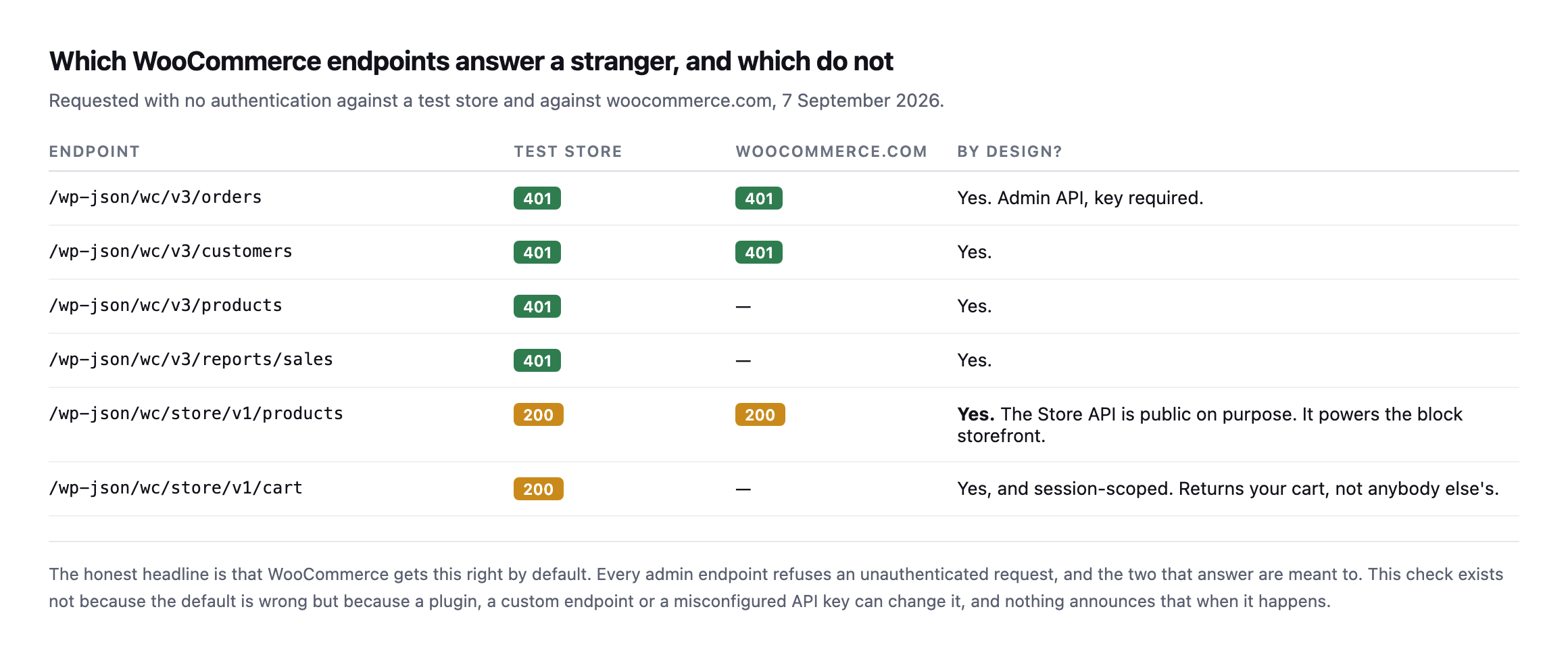
request, and the two that answer are meant to.*
| Endpoint | Test store | woocommerce.com | By design? |
|---|---|---|---|
/wc/v3/orders | 401 | 401 | yes, admin API, key required |
/wc/v3/customers | 401 | 401 | yes |
/wc/v3/products | 401 | not tested | yes |
/wc/v3/reports/sales | 401 | not tested | yes |
/wc/store/v1/products | 200 | 200 | yes, powers the block storefront |
/wc/store/v1/cart | 200 | not tested | yes, session-scoped, returns your cart only |
Caveat: two stores, one test and one live, checked once. This does not prove every WooCommerce install behaves the same; it proves the defaults are correct on the two I could verify directly, which is a reasonable basis for trusting the defaults and auditing what was added on top instead.
The Store API returning 200 is not a finding. It exists so a block-based storefront can fetch products and cart contents from the browser. The cart endpoint is session-scoped: it returns your cart, keyed to your cookie, not anybody else’s.
I checked that specifically while testing cart caching, and two separate sessions returned entirely different payloads, which is the correct behaviour.
What is actually worth checking for WooCommerce REST API security
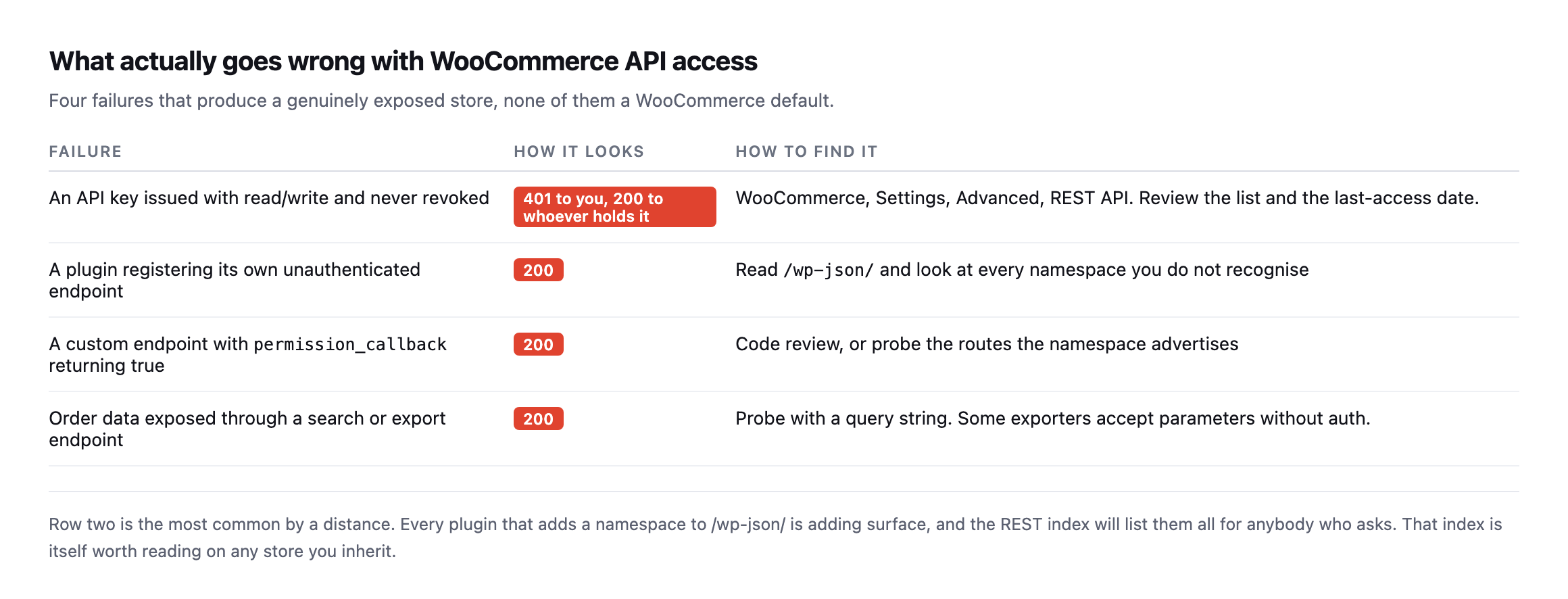
and none of them announce themselves.*
| Failure | How it looks | How to find it |
|---|---|---|
| API key issued read/write, never revoked | 401 to you, 200 to whoever holds it | Settings → Advanced → REST API, check last-access dates |
| plugin registers its own unauthenticated endpoint | 200 | read /wp-json/, look at every unfamiliar namespace |
custom permission_callback returning true | 200 | code review, or probe the routes it advertises |
| order data exposed via search or export endpoint | 200 | probe with a query string; some exporters skip auth on parameters |
The second row is the most common by a distance. Every plugin that registers a namespace under /wp-json/ adds surface, and the REST index lists them all for anybody who asks.
The first row is the one with the longest tail. An API key issued to a developer, an integration, or a migration tool three years ago is still valid until somebody revokes it. WooCommerce records a last-access date against each key, which makes the review quick: anything unused for months is a credential nobody is monitoring.
Reading the full namespace list on a real, high-traffic store
The advice to read /wp-json/ before probing anything is easy to state and more interesting once you actually do it against a site with a lot of integrations installed. I pulled woocommerce.com’s namespace list in full.
curl -s https://woocommerce.com/wp-json/ | python3 -c "
import json, sys
d = json.load(sys.stdin)
print(len(d['namespaces']))
for n in d['namespaces']: print(n)
"
89 distinct namespaces, on one production store. Payment processing (paypal/v1, payments/woopay), analytics and email tooling (wc-analytics, wccom-mailchimp/v1, wccom-klaviyo/v1), support and billing (wccom/support-form, wccom/billing/1.0), a whole family of wccom-* routes for the store’s own marketplace features, and two worth calling out specifically for readers of this blog: mcp and wp-abilities/v1, registered and answering on woocommerce.com’s live site right now. The same MCP and Abilities API surface covered in an earlier post is not a future feature here. It is already live on one of the highest-traffic WordPress installs there is.
Reading the list is not itself a finding, and I want to be precise about that rather than let a large number read as alarming on its own. Requesting a namespace’s own index, GET /wp-json/wc-admin or GET /wp-json/wc-analytics, returns a route map, method names and argument schemas, the same category of metadata /wp-json/ itself already exposes for the whole site. I checked what a few of the more interesting-sounding ones actually return:
curl -s -o /dev/null -w '%{http_code}n' https://woocommerce.com/wp-json/wc-analytics
curl -s -o /dev/null -w '%{http_code}n' https://woocommerce.com/wp-json/wc-analytics/reports/revenue/stats
200
401The namespace index answers 200 with a route map. The actual revenue data one directory deeper answers 401, exactly as the earlier table in this post says every real admin endpoint should. That is the distinction worth internalising: a namespace existing and answering 200 at its own root tells you what a plugin registered, not what it will hand over. The finding is never in the list. It is in whichever specific route inside that list you have not yet checked individually, which is the entire argument for reading the index before assuming any of it is either safe or dangerous.
Checking the MCP endpoint specifically, since it is the newest surface
The mcp namespace is worth a closer look than the others, because it is the newest addition to this list by a wide margin and the category this blog has been tracking as it rolls out across WordPress. Reading its route map:
curl -s https://woocommerce.com/wp-json/mcp | python3 -m json.toolturns up one functional route beneath the namespace index itself, /mcp/mcp-adapter-default-server, accepting POST, GET and DELETE. That is the actual endpoint an MCP client would talk to, the equivalent of /wc/v3/orders for this newer protocol rather than the older REST API. I requested it the same way I requested every admin endpoint earlier in this post:
curl -s https://woocommerce.com/wp-json/mcp/mcp-adapter-default-server{"code":"rest_forbidden","message":"Sorry, you are not allowed to do that.","data":{"status":401}}401, gated the same way as every WooCommerce admin endpoint this post has tested. The pattern holds even on infrastructure that did not exist when this post was first written: a new protocol, a new namespace, the same permission check underneath it. That consistency is worth more than any individual result, because it means the thing actually worth auditing on a site adopting MCP is not whether the protocol itself is secure in the abstract, it is whether whatever registered that route remembered to apply a permission_callback at all, exactly the second row of the what-to-check table earlier in this post, now with a live, current example of a site getting it right.
A third store, checked the same way
Two stores were enough to draw a conclusion when this post was first written. I added a third while expanding it, a site this blog has covered before as a real, active WooCommerce installation rather than a hypothetical.
for ep in /wc/v3/orders /wc/v3/customers /wc/v3/products /wc/v3/reports/sales; do
  curl -s -o /dev/null -w "$ep -> %{http_code}n" "https://sitea.example/wp-json$ep"
done
/wc/v3/orders -> 401
/wc/v3/customers -> 401
/wc/v3/products -> 401
/wc/v3/reports/sales -> 401Four for four, matching the other two stores exactly. Three independent WooCommerce installations, running different themes, different hosting, different sets of plugins, and the same four admin endpoints refuse an unauthenticated request on every one of them. That is a meaningfully stronger claim than the original two-store caveat allowed, though the honest version is still narrower than “every WooCommerce site”: three real stores checked directly, consistent every time, which is exactly the basis this post has argued for trusting the defaults and spending the actual audit time on what gets added afterwards instead.
Probing a store
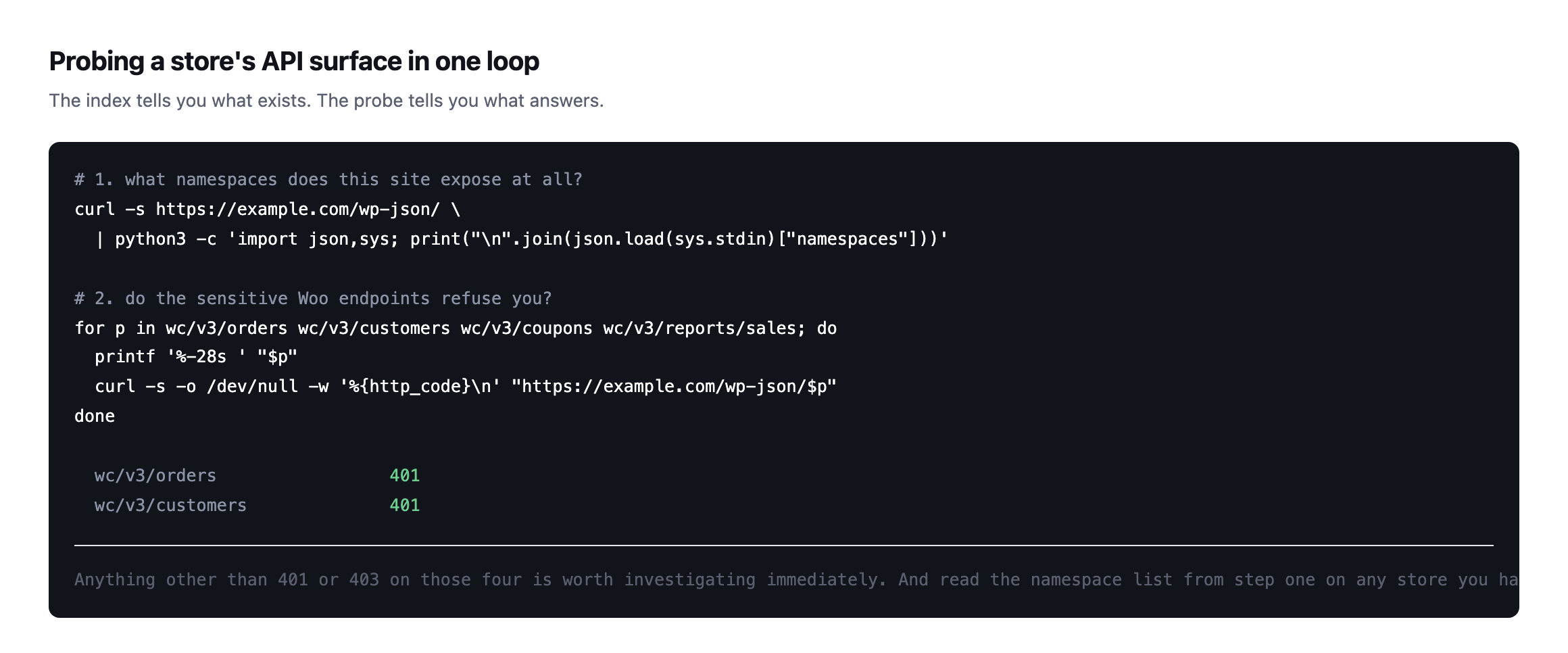
or 403 on those four is worth investigating immediately.*
Reading the namespace list is the step I would not skip on an inherited store. Unfamiliar namespaces are where custom code and abandoned integrations live, and they are frequently the work of somebody who is no longer available to explain them.
It is the same instinct as reading the abilities a site exposes before connecting anything to it: inventory first, opinions afterwards.
Keeping it that way
Three habits, none expensive.
Review API keys quarterly. Revoke anything with no recent access. A key is a credential, and credentials outlive the projects that needed them.
Re-probe after every plugin addition. A new namespace appearing is normal; a new namespace answering unauthenticated is not.
Watch the wider information-disclosure surface too. A store that also hands out its usernames through the REST API gives an attacker both halves of what a credential attack needs.
Never issue read/write when read will do. Most integrations that ask for full access need to list products, and the difference matters enormously on the day the key leaks.
Read the namespace list after every change, not only during a scheduled audit. The MCP route on woocommerce.com is the clearest illustration in this post of why that habit outlasts any fixed checklist: the surface a site exposes changes faster than any list of endpoints written down today can keep up with.
Protuno’s free audit checks whether a WooCommerce admin endpoint answers unauthenticated, from the domain alone, alongside storefront and checkout reachability. Straight with you as on every post here: Till, the eCommerce agent that would re-probe after each deploy, is built and named but not live yet.
Run the four-endpoint loop on every store you look after. It takes seconds per site, and the expected result is four 401s. Anything else is your afternoon.
The habit worth building alongside the checklist
Everything in this post is a list of endpoints to request and status codes to expect, which makes it easy to treat as a one-time script rather than a way of looking at a site. The more durable version of the same discipline is smaller than any checklist: whenever a site gains new functionality, whether that is a plugin, an integration, or an entirely new protocol like the MCP namespace found on woocommerce.com above, read /wp-json/ again before assuming anything about what it exposes.
That habit would have caught the MCP surface the moment it appeared, without needing a blog post to point at it specifically. It is also cheap enough to run on a schedule rather than only during an audit: the full namespace list is one request, and diffing today’s list against last month’s tells you exactly what changed and when, which is the same idea as re-checking a crawl’s findings days later rather than treating a single pass as permanent knowledge.
The reason this matters more for WooCommerce specifically than for a brochure site is what is actually reachable once something goes wrong. An unauthenticated endpoint on a site with no commerce layer might leak a page nobody cares about. The same mistake on a store means order data, customer records, or a payment integration’s configuration, which is exactly why the default posture tested throughout this post, refuse everything unless explicitly opened, matters more here than almost anywhere else in a typical WordPress install. Getting the defaults right, which WooCommerce demonstrably does across all three stores checked, buys the room to focus the actual auditing effort on the narrower, more dangerous category: the handful of routes somebody added on purpose and forgot to gate.
Comments